Top 6 Free Pinterest Image Downloader Extension & Online Tools - Catch Now!

5 mins read

Updated on 2026-10-10 10:08:48 to Photo Tips

Looking for a simple way to save beautiful pins? Pinterest makes it easy to collect visual ideas, but saving them in full quality is less straightforward. Thus, many people search for a reliable free Pinterest image downloader high-quality when the built-in option falls short.

In this guide, you'll learn the official methods to grab and save Pinterest images on desktop and mobile. We'll also cover the limits of Pinterest's own tools and point you toward free alternatives that enhance your images to clearer, 4K results.

Part 1. How to Download High-Quality Images from Pinterest

Before using a third-party Pinterest image downloader, it is worth trying Pinterest's own download feature. It is the simplest choice when you only need one or two images and do not need to choose a specific resolution.

1. Download Pinterest Images on Desktop

Pinterest allows some image Pins to be downloaded directly from its website. The process only takes a few clicks:

  • Open Pinterest in your desktop browser and select the image Pin you want to save.

  • Click the three-dot menu next to the image and select Download image.

    pinterest download images desktop
  • The image will normally be saved to your browser's default Downloads folder.

Tips:

You can also download straight from the home feed without opening the full pin. Hover over the image, click the three dots in the bottom-right corner, and choose Download image.

2. Save Pinterest Photos to Camera Roll on Mobile (iPhone & Android)

The process is almost the same on iPhone and Android.

  • Open the Pinterest app and tap on the pin you like.

  • Tap the three-dot menu underneath the Pin and choose Download image.

    pinterest download images mobile
  • Allow photo access if your phone asks for permission.

  • On Android, the image is generally saved to the Gallery. On iPhone, it is saved to Photos.

Pinterest also lets you access the download option from some Pins in the home feed without opening the full Pin first.

Limitations of the Official Download Option

The built-in download feature is convenient for quick saves, but it comes with several practical limits:

  • The Download image option does not appear on every pin (creators can disable it).
  • Image quality is often compressed and lower than the original high-resolution version.
  • Videos and multi-image/carousel pins are rarely supported.
  • You can only download one pin at a time, no bulk or board download option.
  • You cannot select JPG, PNG, or another output format before saving.
  • On some devices the downloaded file may not be the sharpest available version.

These restrictions are why many people look for a free Pinterest image downloader when they need higher quality or faster results.

Part 2. Top 6 Free Pinterest Image Downloader Extension & Online Tools

When the official download option falls short, free online tools and browser extensions step in. These options help you grab higher-quality files, support more media types, and sometimes handle multiple pins at once. Here are six reliable choices that work without forcing you to create an account.

Note:

Keep in mind that "original" means the largest file Pinterest makes available. Even a 4K Pinterest image downloader cannot turn a low-resolution original into a true 4K image without separate upscaling.

1. PinDown

PinDown is a free online Pinterest image downloader usually in HD that lets you save photos, videos, GIFs, and Idea Pins in the highest quality available. Just paste a pin link and download. It works on any device through your browser and needs no installation. Best for users who want quick, original-resolution saves on the go.

pindown pinterest image downloader
  • Pros
  • Cons
    • Delivers original or HD quality with no watermarks
    • Supports images, videos (up to 4K when available), and GIFs
    • Fast processing and unlimited free use
    • Works on mobile and desktop without sign-up
    • Supports JPG and PNG downloads.
    • Light ads appear on the site
    • Single-pin focus (not ideal for full boards)
    • Quality depends on what Pinterest provides, it does not guarantee 4K resolution.

Best for: Anyone needing a simple Pinterest high quality image downloader for individual pins across devices, without installing an extension.

How to Download High-Quality Images from Pinterest with PinDown

  • Open the pin on Pinterest and copy its link (use Share > Copy Link).

  • Go to pindown.io and paste the URL into the box.

  • Click Download and wait a moment for processing.

  • Choose the highest quality option shown (original, HD, or others).

    pindown save pins different resolution options
  • Save the file to your device.

2. ConvertICO

ConvertICO provides a focused high-quality Pinterest image downloader that displays the image sizes Pinterest makes available. When an Original version is exposed, users can select it instead of a smaller 736 px or thumbnail version. Also, You can download in JPG, PNG, or GIF with no watermark or registration. It suits people who want clean, high-resolution images without extra software.

convertico pinterest image downloader
  • Pros
  • Cons
    • Original full-size quality with multiple size options
    • No watermark, no sign-up, completely free
    • Supports static JPG, PNG images and animated GIFs
    • Clean interface and fast results
    • Does not add a watermark to downloaded images.
    • Limited to images (videos need a separate page)
    • Single download at a time
    • Occasional ads on the site
    • Private and secret Pins are not supported.

Best for: Users who mainly save still photos and want original resolution every time.

3. SavePin

SavePin is a popular free online pinterest photo downloader that handles images, photos, and GIFs in HD or original quality. Paste the pin link, process it, and download with no account required. Moreover, it supports original or Full HD downloads, JPG, PNG, and WebP files, and does not add its own watermark.

savepin pinterest image downloader
  • Pros
  • Cons
    • HD and original quality with no watermarks
    • Fast downloads and unlimited free use
    • Mobile-friendly interface
    • Supports JPG, PNG, WebP, GIF, and animated WebP.
    • Free to save Pinterest images without an account.
    • Primarily single-pin downloads
    • Ads may appear
    • Video support varies by pin
    • Does not download private boards or secret Pins.

Best for: Casual users who want a quick, no-fuss way to save individual Pinterest photos or GIFs to their device.

4. Klickpin

Klickpin is a free online tool (with optional Chrome extension) broader than a basic image saver. It works as a Pinterest video and image downloader for photos, videos, GIFs, Stories, Idea Pins, carousels, profiles, boards, and multiple Pin links in HD or higher quality. Its current version can collect up to 50 available Pins from supported profile or board URLs in one request without login.

klickpin pinterest image downloader
  • Pros
  • Cons
    • Supports images, videos, GIFs, carousels, Stories, and multi-image pins
    • HD / 2K / 4K options when available
    • No watermark and no account needed
    • Browser extension for one-click convenience
    • Supports up to 50 available Pins per board/profile request.
    • Ads on the website
    • Limited to about 50 pins from boards or profiles
    • Quality depends on the original upload
    • Private, restricted, login-only, and deleted content is unsupported.

Best for: People who download a mix of images and videos and prefer flexible online or extension options.

5. Pinpasta -- Pinterest Board Downloader Extension

Pinpasta is a browser extension (Chrome, Firefox, Edge, Brave) built mainly for designers and users who need a Pinterest bulk image downloader. It fetchs the highest-resolution version available, package images into a ZIP, or send them directly into Figma. The free version covers the first 20 pins per board.

pinpasta pinterest board downloader extract pinterest images
  • Pros
  • Cons
    • Original high-resolution images with proper file names
    • Batch selected Pins or board downloads and ZIP export
    • Direct Figma integration
    • No ads and privacy-focused (runs in browser)
    • Keeps native formats such as JPEG, PNG, WebP, GIF, or AVIF.
    • Free tier limited to 20 pins per ZIP
    • No video support
    • Free Figma transfer is limited to 30 Pins per paste
    • Desktop only; it does not support normal mobile browsers.

Best for: Designers and creatives who need a pinterest bulk image downloader for boards and mood boards.

How to Save Images from Pinterest with Pinpasta

  • Install the Pinpasta extension from the Chrome Web Store or Firefox Add-ons.

  • Open the Pinterest board or pin page you want.

  • Click the Pinpasta icon in your browser toolbar and select Extract this board.

  • Choose "Download to ZIP" or "Copy to Figma."

    pinasta download pinterest images in zip
  • Wait for the process to finish and save or paste the results.

6. Pinterest Image Downloader: Save High-Res Pins (Chrome Extension)

Pinterest Image Downloader: Save High-Res Pins is a Chrome extension for downloading individual images or entire Pinterest boards. Its Chrome Web Store listing also states that it supports Pinterest videos, making it useful as a lightweight Pinterest video and image downloader extension for people who prefer staying inside the browser.

pinterest image downloader chrome extension
  • Pros
  • Cons
    • High-res images and video support
    • Supports both single downloads and bulk board downloads
    • Free and fast with no watermark
    • Simple one-click or selection mode
    • Chrome-only
    • Limited user reviews and occasional compatibility issues
    • Basic features compared to more specialized tools

Best for: Chrome users who want a simple Pinterest multiple image downloader for both single and multiple high-quality saves.

⚡ Part 3. How to Enhance Downloaded Pinterest Images to 4K (Up to 8K)

Even the best free Pinterest image downloader tools sometimes deliver files that look a bit soft or low-resolution on a large screen. If you want sharper details for wallpapers, design work, or printing, an AI photo enhancer can make a big difference. One reliable option is 4DDiG Photo Enhancer. It uses smart AI to upscale images to 4K and even close to 8K while cleaning up noise and improving clarity.

Stunning Features of 4DDiG Photo Enhancer

Here are some of its useful features for Pinterest photos:

  • Automatically upscales low-resolution images to 4K (and higher) with natural-looking details
  • Removes noise and blur so the picture looks sharper
  • Restore old or faded photos and colorize B&W images with vivid hue
  • Offers specialized AI models (General, Face, Denoise, Colorize) for different photo types
  • Supports batch processing so you can enhance multiple images at once
  • Works with common formats like JPG, PNG, HEIC, and more
  • Easy one-click process with before-and-after preview
FREE DOWNLOAD

Secure Download

FREE DOWNLOAD

Secure Download

Steps to Upscale Downloaded Pinterest Images to 4K with 4DDiG

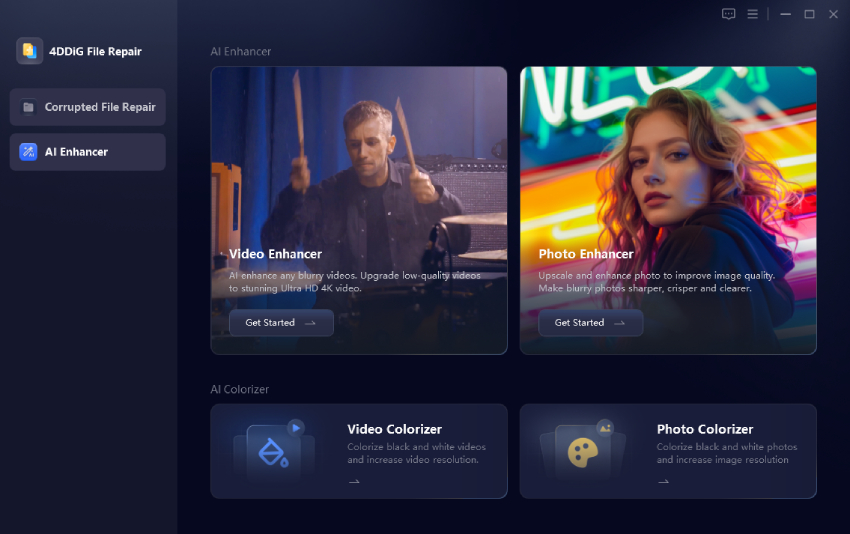
  • Download and launch 4DDiG File Repair. From the left sidebar, go to "AI Enhancer" > "Photo Enhancer".

    4ddig ai photo enhancer
  • Click "Add Photos" (or drag and drop) to import the Pinterest images you downloaded earlier.

    add blurry pinterest images to 4ddig
  • Select General Model, Denoise Model, or Face Model based on the image type. Then choose the desired output resolution (usually 2x or 4x for 4K results) and click Enhance:

    a) General for most images

    b) Face for portraits

    c) Denoise for grainy shots

    select ai model and reset resolution to enhance
  • Preview the improved image side by side with the original. Once you're happy with the result, click "Save" to export the high-quality file to your computer.

    preview and save enhanced images

FAQs about Pinterest Image Downloader

Q1: How to save wallpapers from Pinterest?

Open the pin you like, then use either the official download option or a free Pinterest image downloader tool such as PinDown or SavePin. After saving the high-resolution file to your device, set it as your wallpaper through your phone or computer's display settings. For the sharpest result on large screens, run the image through an enhancer like 4DDiG Photo Enhancer first.

Q2: Why is Pinterest not downloading images?

The most common reasons are that the creator has disabled downloads, the pin is private or restricted, or the official "Download image" button simply isn't available. In these cases a reliable online pinterest photo downloader or browser extension usually solves the problem by fetching the public file directly.

Conclusion

Pinterest's built-in download option is fine for single images, but it does not offer native bulk downloading or resolution controls. A reliable Pinterest image downloader can help you save HD images, multiple Pins, videos, or entire boards more efficiently.

If the downloaded image is still too small or blurry, 4DDiG Photo Enhancer can upscale it to 4K, reduce blur, and improve overall image quality with A. So they look great as wallpapers, design references, or prints.

FREE DOWNLOAD

Secure Download

FREE DOWNLOAD

Secure Download

William Bollson (senior editor)

William Bollson, the editor-in-chief of 4DDiG, devotes to providing the best solutions for Windows and Mac related issues, including data recovery, repair, error fixes.

(Click to rate this post)

You rated 4.5 ( participated)