[2026] Legal & Safe Getty Images Downloader in 4K/HD

5 mins read

Updated on 2026-07-31 16:53:39 to Photo Tips

Premium stock photos or video content from Getty images can make all the difference when you want to create eye-catching posts, social media conten, or others. However, finding a sharp, watermark-free Getty image can be frustrating, especially when preview files look perfect but the available downloads are small, compressed, or unclear.

That is why many users turn to a free Getty Images downloader that promises fast access to 4K photos and videos without watermark. This guide breaks down the top options in 2026, their limitations, smarter legal ways to get the crisp visuals you need, and also best way to enhance Getty images to 4K or higher.

Part 1. Can You Download Getty Images Without Watermark or for Free?

When you purchase a license and download from Getty Images, the files arrive clean and watermark-free, ready for professional use. The platform offers excellent quality, but these downloads come at a cost. That is, there’s no truly free pass for premium content.

That’s why so many people turn to third-party Getty images downloader without watermark tools promising quick, no-cost access in 4K. These tools can sometimes strip watermarks or bypass preview restrictions. However, they come with significant drawbacks.

Using them may work for strictly personal, non-commercial experiments, but it’s risky for anything else. For commercial projects, this approach often violates copyright laws and Getty’s terms of service. You could face legal consequences, content removal demands, or damages claims, since Getty actively tracks unauthorized use of their assets.

Part 2. 5 Popular Free Getty Images Downloaders in 4K Without Watermark (Caution Required)

Here’s a balanced look at 5 popular free Getty images downloader that provides 4K and watermark-free downloads in 2026, including Gettyimages Downloader by Beatsnoop, SteptoDown, Fetchpik Downloader, ImgHunt Bulk Image Downloader chrome extension, and Downloader.la. You will figure out what they really do and also their limitations.

5 Getty Images Downloader without Watermark Online Free

1. Gettyimages Downloader (Beatsnoop)

Gettyimages Downloader by Beatsnoop stands out for its straightforward speed and simplicity. You simply paste a Getty URL and often receive a high-resolution or 3K file quickly without visible watermark. Best for occasional personal use or testing visuals in mockups. However, it frequently shows ads and doesn't provide a Getty license.

beatsnoop gettyimages downloader
Image Output Quality

:3K/High resolution (watermark-free in many cases).

Video Support

:No.

Best Use Case

:Quick fast single-image downloads for personal reference, testing, or non-commercial projects.

Legal

:Generally not legal for commercial use without a proper Getty license. Purchase rights for publication.

✅ Also Read: Top 8 4K Image Converter Online/Free/AI✨

SteptoDown Getty Image Video Downloader supports downloading both photos and videos. Also, it outputs decent HD or 4K in many cases. Its wider platform also includes tools for Getty and iStock videos and other media websites. On the downside, ads can interrupt the experience and download speeds slow down during busy periods, limiting its efficiency for heavy users.

steptodown gettyimages downloader
Image Output Quality

:HD/4K (watermark-free common).

Video Support

:Yes (Up to 1080p).

Best Use Case

:Download stills and videos for multimedia projects, content creation, or editing.

Legal

:Not legal for unlicensed commercial use. Violates Getty’s terms by circumventing purchases.

✅ Also Read: Best 4K Video Enhancer Online Free (Tested & Compared in 2026)

Fetchpik’s Gettyimages Downloader 4K uses a simple three-step process: copy the asset URL, paste it into the tool, and generate a download. Its pictures can be downloaded in 4K, while its videos can be saved in 720p and 1080p files. This tool also supports a wide range of stock platforms except for Getty. Still, it depends heavily on the source file availability and includes ads that may frustrate regular users.

fetchpik downloader
Image Output Quality

:Up to 4K (watermark-free extraction).

Video Support

:Yes (Up to 1080p).

Best Use Case

:High-resolution video & image downloads for digital projects, social media, or design mockups.

Legal

:Generally illegal for commercial deployment without licensing.

4. ImgHunt Bulk Image Downloader (Chrome Extension)

ImgHunt can save several watermarked Getty previews at once, filter them by size or aspect ratio, and convert them to JPG, PNG, or WebP. And this tool allows users to bulk select, crop, and resize the Getty images before downloading. Unlike direct downloaders, it focuses on legitimate preview collection rather than full unlicensed assets. Its local processing and advanced filtering make it a practical tool for designers and researchers assessing options before licensing.

imghunt bulk image downloader chrome extension
Image Output Quality

:Preview resolution (watermarked as displayed on Getty pages).

Video Support

:No.

Best Use Case

:Bulk preview collection for design testing, client presentations, or pre-purchase evaluation.

Legal

:Legal for evaluation/mockups (saves visible previews).

Classification note:

ImgHunt does not remove watermarks and therefore does not technically belong in a “without watermark” list.

Downloader.la provides a free, no-signup Gettyimages downloader with a minimal interface. Users only need to paste a Getty URL to generate a download link. Its broad range of supported media platforms is useful for people who regularly search different stock sites. However, it does not clearly state the available resolution, image quality, or licensing status of the generated file.

download la getty photo downloader
Image Output Quality

:High resolution.

Video Support

:No.

Best Use Case

:Simple, one-off photo downloads from multi-stock platforms for personal or reference needs.

Legal

:Not legal for unlicensed commercial use.

Important Note on Legality and Ethics

Most third-party "no watermark" downloaders extract or bypass previews without granting licenses. Getty Images aggressively enforces copyrights, and unauthorized commercial use can lead to demand letters or lawsuits. The only fully legal paths are purchasing licenses, using official embeds (non-commercial), or Getty Open Content (public domain). These tools are best for research or evaluation.

Safety and Legal Risks Behind “4K” and “No Watermark”

Claims such as “4K,” “free,” or “without watermark” can be misleading. A file labeled 4K may simply be an enlarged preview rather than the original high-resolution image. It may look sharper, but details can still appear soft, distorted, or artificially generated.

Safety is another concern. Some downloader sites use redirects, aggressive ads, or browser extensions with unclear permissions. Avoid installing unknown software or entering personal information on services without transparent privacy policies.

Most importantly, removing a watermark does not provide a usage license. Even when a Getty Images downloader 4K without watermark produces a clean file, publishing it in an advertisement, website, product, or client project may violate copyright and Getty Images’ terms. A tool that lets users download Getty Images for free only provides access to a file, which is not legal permission to use it.

Part 3. How to Download Getty Images without Watermark Legally (Step-by-Step)

While third-party tools may seem convenient, the safest way to get clean, high-quality Getty images is through official methods. These approaches, including purchasing Getty license, using Embed feature, downloading Open Content photos, and outputting Comp content, ensure you stay on the right side of copyright rules and often provide better resolution and peace of mind. Here’s how to do it step by step.

Method 1: Purchase the Getty Image License

This is the most straightforward way to download Getty Images without watermark for commercial or professional use.

  • Go to GettyImages.com and search for the image or video you need.

  • Check whether it is creative or editorial. Editorial content normally cannot be used in advertising, promotions, advertorials, merchandising, or endorsements unless expressly authorized.

  • Click on the asset to open its detail page.

  • Select your desired size and license type (royalty-free is common for broad use).

    gettyimages photo size and purchase license
  • Add it to your cart, complete the purchase, and click the Download button.

    gettyimages complete license purchase
  • The file will be watermark-free and ready for your project.

Method 2: Use the Official Embed Tool of Gettyimages

For free embedding eligible images on non-commercial websites or blogs, Getty’s Embed feature is completely free and legal.

  • On GettyImages.com, use the filter to show only “Embeddable images”.

    gettyimages embeddable images filter
  • Open the image you like and select the Embed (</>) icon.

    gettyimages embed feature
  • Copy the provided code and paste it into your website or blog’s HTML.

    gettyimages generated embed code

Method 3: Download Free Getty Open Content Images

The Getty Trust’s Open Content Program is separate from Getty Images. It offers high-resolution images of public-domain artworks and archives. Records marked with CC0 may generally be used without fees, although users should still check possible third-party rights and avoid implying Getty endorsement.

  • Visit Getty’s Open Content collection page.

  • Browse or search for archival, historical, or public domain artwork.

  • Open a record and confirm the CC0 or Open Content notice.

  • Select an image that offers a download option.

    getty open content filter
  • Click the lower Download Image button to save the high-resolution file directly.

    getty open content download

Additional: Free Download a Comp from Gettyimages (Watermarked Preview)

Getty allows complimentary comp use for testing or samples for up to 30 days. The preview cannot appear in final or public materials without a purchased license. Use it to test crops, headlines, or layouts, then replace it before publication.

gettyimages comp option

Part 4. How to Enhance Downloaded Getty Images Up to 8K

Even with legal downloads or previews, many creators face a common frustration: the images look good but fall short in resolution for large prints, high-end websites, or 4K/8K displays. Low-resolution comps or smaller licensed files can appear soft when scaled up, hurting visual impact.

This is where AI-powered upscaling tools shine. One standout option is 4DDiG Photo Enhancer. It uses advanced AI to enlarge images while preserving details, sharpening edges, and reducing noise, making it especially useful for turning standard Getty downloads into crisp, high-resolution assets.

Key advantages of 4DDiG Photo Enhancer include:

  • Intelligent enlargement up to 8K or higher with natural-looking results.
  • One-click enhancement for faces, textures, and backgrounds.
  • Multiple AI models: General, Face, and Denoise
  • Support for batch processing to save time on multiple images.
  • Colorize and restore old photos
  • Easy-to-use interface suitable for both beginners and professionals.

Steps to Enhance Your Downloaded Getty Images:

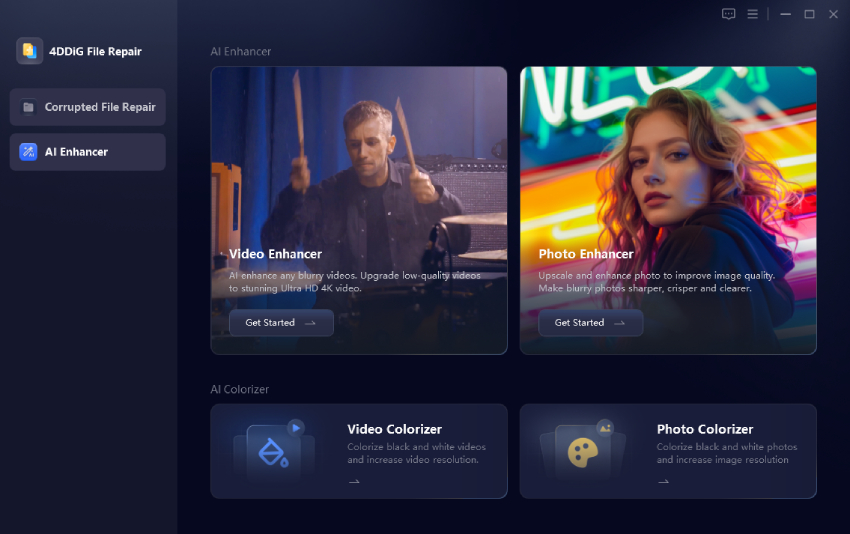
  • Download, install and launch the program. Proceed with selecting the left “AI Enhancer” tab and then choose “Photo Enhancer”. (If you want to upscale video footage quality, just choose “Video Enhancer”).

    FREE DOWNLOAD

    Secure Download

    FREE DOWNLOAD

    Secure Download

    open 4ddig ai photo enhancer
  • On the next screen, click “Add Photo” or use the drag-and-drop action to import your Getty file.

    import getty images to 4ddig
  • Choose your target upscaling options (e.g., 2X or 4X) and select an AI model suited to your image type:

    • General Model: Best for overall enhancement of landscapes, objects, and everyday photos.
    • Denoise Model: Ideal for noisy, low-light, or night shots.
    • Face Model: Perfect for portraits, which can sharpens faces and refines skin naturally.
    select ai model and resolution for getty images
  • Click “Enhance” and wait for minutes. When finished, you can preview the improved version, comparing it to the resolution before enhancement.

    preview and save enhanced photos
  • If you are satisfied with the enhanced results, click “Save” to export those high-quality Getty images to blow people away.

FAQs about Getty Images Downloader

Q1: Is GettyImages free and legit?

Getty Images is a legitimate, well-established stock platform. Most content requires a paid license, though free embed and Open Content options exist for specific non-commercial uses.

Q2: Is there a free version of Getty Images?

Yes, limited free options include the Embed tool for non-commercial blogs and the Open Content program for public domain images. Full commercial use generally requires purchasing a license.

Q3: What are the alternatives to downloading Getty Images?

Great free or affordable alternatives include Unsplash, Pexels, Pixabay, and Adobe Stock’s free tier. These provide high-quality options with clearer licensing terms for many projects.

Q4: Who is Getty Images biggest competitor?

Major competitors include Shutterstock, Adobe Stock, and iStock (which is actually owned by Getty). Each offers different strengths in pricing and content variety.

Q5: Can you use Getty images for free?

Only in limited cases: an eligible official embed on a noncommercial page, a temporary comp used privately, or an image clearly marked as open content. An ordinary Getty preview is not automatically free to publish.

Q6: Can I use a Getty image watermark remover to get clean images for free?

It is not recommended. Watermark removers and third-party downloaders often violate copyright terms and can lead to legal issues, especially for commercial purposes. Stick to official methods for safety.

Conclusion

Finding a top Getty Images downloader in 4K or HD can greatly boost your content quality, but it does not replace a valid license. Before using any third-party tool, check the image quality, website safety, and copyright risks. For reliable results, purchase the correct Getty license, use the official embed option, or choose open-content images. You can then enhance legally downloaded photos for higher resolution using 4DDiG Photo Enhancer without putting your website, business, or clients at risk.

William Bollson (senior editor)

William Bollson, the editor-in-chief of 4DDiG, devotes to providing the best solutions for Windows and Mac related issues, including data recovery, repair, error fixes.

(Click to rate this post)

You rated 4.5 ( participated)