Top 6 Best 4K Photo Enhancers & Image Upscalers in 2026

5 mins read

Updated on 2026-09-24 20:26:23 to Photo Tips

Low-resolution photos can look blurry, pixelated, or soft when enlarged. A 4K photo enhancer can increase resolution while improving sharpness, details, and overall clarity. AI upscalers are especially useful because they can reconstruct missing details instead of simply stretching pixels.

This guide compares six popular 4K photo enhancers based on output quality, free access, watermarks, sign-up requirements, resolution limits, and useful features to help you choose the right tool.

Part 1. What Is A 4K Photo Enhancer And How Does It Work?

A 4K photo enhancer is an image enhancement tool that increases a photo's resolution to 4K while improving visible quality. Most modern tools use AI to analyze pixels, edges, textures, colors, and other image patterns.

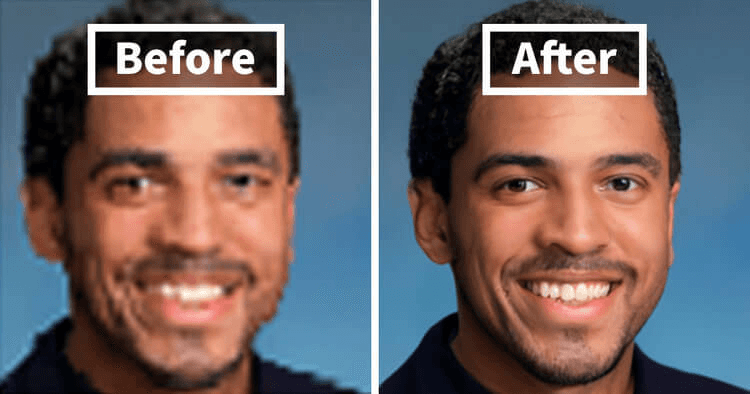
For example, a small portrait may contain only a few pixels across the eyes. An AI model can analyze the surrounding facial structure and generate sharper-looking details during enlargement. The result can include:

  • Higher image resolution
  • Sharper edges
  • Reduced noise
  • Better facial details
  • Improved color and contrast
  • Reduced compression artifacts
  • Cleaner textures

However, AI cannot recover information that was completely lost from the original image. A heavily blurred or extremely pixelated photo may still contain artificial-looking details after enhancement.

How We Ranked The Best 4K Photo Enhancers In 2026

The best 4K image enhancer is not simply the tool that produces the largest file. We considered the actual output resolution, image quality, free usage, watermark policies, sign-up requirements, and practical limitations.

Our evaluation criteria included:

  • True 4K Output: Whether the tool can produce an actual 4K-resolution image rather than simply enlarging the preview.
  • Enhancement Quality: How well it handles sharpness, faces, textures, noise, and compression.
  • Free Usage: Whether users can enhance an image to 4K without paying.
  • Watermarks: Whether free downloads contain a visible watermark.
  • Sign-up Requirements: Whether an account is needed before processing or downloading.
  • Usage Limits: Free credits, daily limits, image restrictions, or resolution caps.
  • Supported Formats: Compatibility with common formats such as JPG, PNG, WEBP, and HEIC.
  • Upscaling Range: Whether the tool supports 2x, 4x, 8K, or higher output.
  • Processing Options: AI models, enhancement controls, batch processing, and other useful features.
  • Ease of Use: How quickly users can upload, enhance, preview, and save images.

These criteria help separate tools that genuinely improve image quality from basic image resizing services.

⚡ Part 3. Discover 6 Top-Rated 4K Photo Enhancers & Image Upscalers In 2026

1. 4DDiG Photo Enhancer

4DDiG Photo Enhancer is a desktop AI enhancement tool designed to improve low-resolution, blurry, noisy, and pixelated images. It can upscale images to 4K and higher resolutions while applying targeted enhancement models for different image types.

It is particularly useful when simple enlargement is not enough. The software combines resolution upscaling with sharpening, noise reduction, color improvement, face enhancement, and other restoration features.

4ddig ai photo enhancer

Key Features of 4DDiG Photo Enhancer

  • Automatically upscale images to 4K and up to 8K with AI technology
  • Sharpen blurry photos through noise reduction and blur correction
  • Increase overall picture resolution and visual quality
  • Multiple specialized AI models (General, Denoise, Face, Colorize, Outpainting)
  • Colorize black-and-white photos and restore old pictures
  • Remove face blemishes and smooth skin
  • Batch processing support to save time
  • Works with JPG, PNG, HEIC, WEBP, BMP, and more formats
FREE DOWNLOAD

Secure Download

FREE DOWNLOAD

Secure Download

Max Image Quality:

:Up to 8K

Free Tier:

:Free download available with limitations on features and exporting

Best For:

:Desktop users who need advanced 4K/8K enhancement

  • Pros
  • Cons
    • Supports higher enhancement quality beyond 4K.
    • Provides specialized AI models and natural-looking effects.
    • Excellent face retouching and blemish removal
    • Includes noise reduction and face enhancement.
    • Supports batch processing and offline use.
    • Works with many image formats.
    • Requires software installation.
    • Some advanced functions are not available without upgrading.

Steps To Upscale Images To 4K Using 4DDiG Photo Enhancer

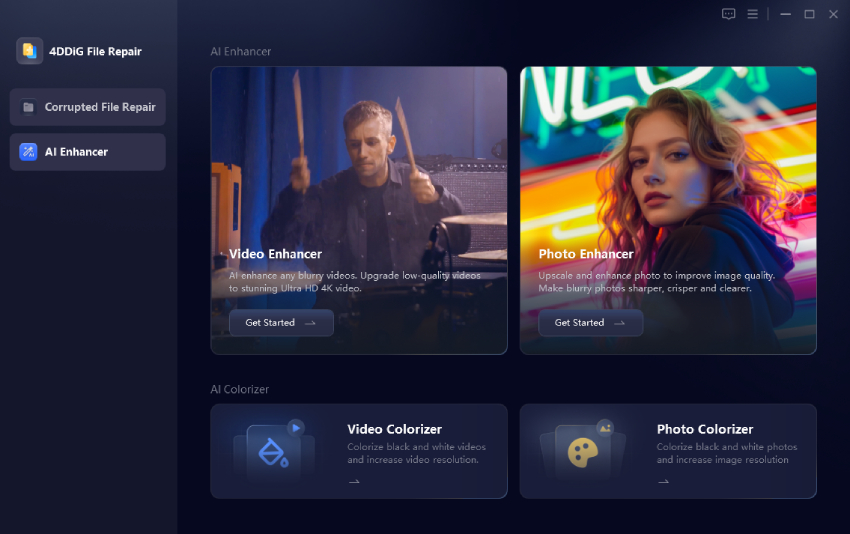
  • Launch 4DDiG File Repair on your computer and open "AI Enhancer". Select "Photo Enhancer" to access the image upscaling tools.

    4ddig ai photo enhancer
  • Click "Add Photos" and import the low-resolution image you want to enhance. You can also add multiple images when batch processing is required.

    add blurry photos to 4ddig
  • Select an AI model based on the image and choose the resolution level as X2or X4 for a 4K output. Click "Enhance" and wait for the AI processing to finish. The software will improve the image based on the selected model and resolution.

    Note:

    Choose "General" for standard photos, "Face" for portraits, or "Denoise" when the image contains noticeable grain.

    select ai model and resolution level to enhance photos
  • Preview the original and enhanced versions side by side. Check faces, edges, textures, and other important details before saving the final image. Click "Save" to export the enhanced photo to your computer.

    preview and save enhanced photos

2. Fotor 4K Image Upscaler

Fotor 4K Image Upscaler provides a browser-based online photo enhancer 4K free option for users who want to increase image resolution without installing desktop software. Its AI image upscaler supports 2x and 4x enlargement and can produce HD or 4K output.

It supports common image formats including JPG, JPEG, PNG, HEIF, HEIC, and WEBP. Fotor is particularly useful for quick online enhancement and portrait improvement.

fotor 4k image enhancer
Max Image Quality:

:Up to 2x upscale with Free; up to 4K with Pro

Free Tier:

:Free online access with feature and usage limitations of only 1 concurrent generation

Best For:

:Quick browser-based 4K enhancement

  • Pros
  • Cons
    • No software installation required.
    • Supports 4K image upscaling.
    • Handles JPG, JPEG, PNG, HEIF, HEIC, and WEBP.
    • Useful for quick portrait enhancement.
    • Full 4K downloads usually need a Pro plan
    • Free tier often includes watermarks or lower-resolution limits
    • Results can feel less detailed than specialized tools

3. Remini

Remini is an AI photo enhancement platform focused heavily on improving faces, portraits, and low-quality photographs. It can sharpen facial details and improve the appearance of older or blurry images. Its mobile-first workflow makes it useful for users who primarily enhance portraits and social media photos rather than process large batches of professional images.

remini ai photo enhancer
Max Image Quality:

:High-resolution enhancement, depending on the selected feature and plan

Free Tier:

:Limited free usage with ads and no batch processing

Best For:

:Portraits, faces, selfies, and old photos

  • Pros
  • Cons
    • Strong focus on facial enhancement.
    • Available across mobile-focused workflows.
    • Good at restoring old or blurry photos of people
    • Results can become overly processed on severely damaged faces.
    • Advanced capabilities may require a paid plan.
    • Less focused on precise 4K/8K resolution control than dedicated upscalers.

4. Pixelcut

Pixelcut offers an online AI image upscaler that can increase image resolution to 4K, 8K, or higher depending on the selected workflow. Its free upscaler supports JPG, PNG, and HEIC files and provides watermark-free downloads.

The tool is useful for product images, portraits, logos, social media graphics, and other everyday images. Pixelcut currently allows limited free upscaling and downloads without requiring a sign-up for its basic upscaler.

pixelcut free ai image upscaler
Max Image Quality:

:Up to 4K in free version; Up to 16K with paid plan

Free Tier

: Limited free usage, including up to three daily downloads for the free upscaler

Best For:

:Product photos, social media images, logos, and quick online upscaling

  • Pros
  • Cons
    • High output quality.
    • Free downloads do not add a watermark.
    • Basic upscaling does not require signup.
    • Supports JPG, PNG, and HEIC.
    • Works directly in a browser.
    • Free usage has daily limits to three daily downloads.
    • Unlimited and batch upscaling requires a paid plan.
    • Creative enhancement can produce different results from standard enlargement.

5. Krea

Krea is an AI creative platform that includes image enhancement and upscaling tools. Its enhancer can improve resolution, sharpness, clarity, and other visual details. It offers a free tier with daily compute units and limited image upscaling.

Krea is more suitable for users who want an AI creative workspace alongside image enhancement. Its paid plans provide higher upscaling limits and can reach much higher resolutions than the free tier.

krea free ai image enhancer
Max Image Quality:

:Up to 4× upscale in free access (can reach 4K depending on input size)

Free Tier:

:100 compute units per day with limited image upscaling

Best For:

:AI creators, designers, and users who need enhancement alongside creative tools

  • Pros
  • Cons
    • Provides a free daily allowance.
    • No credit card is required for the free plan.
    • Offers image enhancement and creative AI tools in one platform.
    • Supports very high-resolution upscaling on paid plans.
    • Designed for both enhancement and creative workflows.
    • Free image upscaling is limited.
    • Higher-resolution output requires a paid plan.
    • Results can vary depending on the enhancement model and source image.

6. Let's Enhance

Let's Enhance is an online image enhancement platform focused on resolution improvement, image quality, printing, and other professional use cases. It can increase image resolution while improving sharpness and visual detail. The service provides free processing credits for new users, but free outputs can contain a watermark. Watermark-free downloads require a paid plan or purchased credits.

lets enhance ai enhancer upscaler
Max Image Quality:

:High-resolution enlargement up to 512MP

Free Tier:

:10 initial credits

Best For:

:Print preparation, ecommerce images, and professional image enlargement

  • Pros
  • Cons
    • Designed for high-resolution image enlargement.
    • Useful for print and ecommerce images.
    • Provides free credits for testing.
    • Offers multiple image enhancement options.
    • Supports professional-oriented workflows.
    • Free results include a watermark.
    • An account is required.
    • Continued processing requires credits or a paid plan.

People Also Ask About 4K Photo Enhancers

Q1: Is There A 4K Photo Enhancer Free Without Watermark Or Signup?

Yes. Some tools offer limited free 4K upscaling without requiring an account or adding a watermark. Pixelcut, for example, currently offers a free basic upscaler with no signup and watermark-free downloads, subject to usage limits.

Q2: Which Is Better, Native 4K Or 4K Upscaling?

Native 4K generally contains more genuine image information because the camera or source created the image at that resolution. 4K upscaling is useful when the original image has a lower resolution and needs to be enlarged for displays, printing, or editing.

Q3: Does Free AI Image Upscaler Really Reach True 4K Quality?

A tool can produce an image with 4K pixel dimensions, but that does not mean it contains the same detail as a native 4K photograph. AI upscaling predicts missing information, so the final quality depends heavily on the original image.

Q4: Can ChatGPT Create 4K Images?

ChatGPT can generate and edit images, but the available output resolution depends on the image generation system and current product capabilities. A generated image can also be enhanced afterward with a dedicated 4k image enhancer when higher resolution or additional detail is needed.

Q5: What Is The Best 4K Image Enhancer Prompt For ChatGPT Or Gemini?

A useful prompt should specify the required resolution, sharpness, natural textures, noise reduction, and preservation of important details. For example, you can ask the model to enhance the image to 4K, preserve facial identity and composition, reduce compression artifacts, sharpen fine details, and avoid artificial textures.

Q6: How To Convert Image To 4K Resolution Without AI?

Use a conventional image editor or image resizer and set the output dimensions to 3840 × 2160 pixels for a standard 4K image. This changes the pixel dimensions but does not reconstruct missing details like an AI-based 4K photo quality enhancer.

Conclusion

A 4K photo enhancer can make low-resolution images sharper, cleaner, and more suitable for larger displays or prints. Online tools are convenient for quick jobs, while desktop software provides more control and advanced processing. 4DDiG Photo Enhancer stands out for users who need 4K or 8K upscaling, specialized AI models, noise reduction, face enhancement, and batch processing in one workflow.

FREE DOWNLOAD

Secure Download

FREE DOWNLOAD

Secure Download

William Bollson (senior editor)

William Bollson, the editor-in-chief of 4DDiG, devotes to providing the best solutions for Windows and Mac related issues, including data recovery, repair, error fixes.

(Click to rate this post)

You rated 4.5 ( participated)