How to Convert HEIC to WebP in 3 Easy Ways

5 mins read

Updated on 2026-10-14 11:42:03 to Photo Tips

HEIC files from iPhones save space but often cause compatibility issues on websites or other devices. Converting them to WebP solves this problem. WebP delivers smaller file sizes with good quality, making pages load faster. This guide shows easy ways to convert HEIC to WebP online for free or on your computer. You will find free tools, clear steps, and options for single or multiple files.

Part 1. How to Convert HEIC to WebP Online for Free

Online converters let you change HEIC files to WebP without installing software. They work in any browser and suit both one-off tasks and small batches. Two reliable free options stand out for speed and ease of use.

tips icon Tips

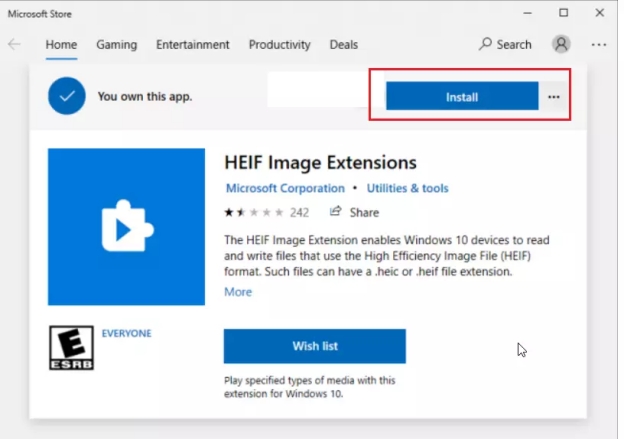
If you only want to view HEIC images on Windows smoothly, you can install the free Microsoft HEIF Image Extensions and HEVC Video Extensions to add HEIC-format supprt to Windows. This way, you can open HEIC photos directly with Windows built-in photo viewer.

Catch 2 Best HEIC to WebP Converter Free Online

1. Picflow HEIC to WebP Converter (Free, Fast & No Ads)

Picflow HEIC to WebP Converter processes files right in your browser. It needs no registration, shows no ads, and supports batch conversion. Your images stay private because nothing uploads to a server.

picflow heic to webp converter

2. FreeConvert HEIC Format to WebP Converter (with Advanced Settings)

FreeConvert offers extra controls such as quality adjustment, size changes, and orientation fixes. It handles multiple files and keeps the process simple while giving more flexibility when needed.

freeconvert heic to webp converter

Steps to Convert Files to WebP Online for Free

These tools follow a similar simple process. Here is how it works with either one:Open the converter page in your browser.

  • Drag and drop your HEIC files or click to upload them. Most tools accept several files at once.

  • WebP is automatically set as the output format. Just adjust quality or size only if you want.

    picflow converting heic to webp online free
  • Click the Convert button and wait a few seconds.

  • Download the finished WebP files, either one by one or as a zip folder.

Part 2. How to Convert HEIC to WebP on Windows & Mac with XnConvert

If you regularly work with iPhone photos or need to process an entire folder, desktop conversion is faster and easier to manage. XnConvert works on both Windows and macOS and is particularly useful when you need to bulk convert HEIC to WebP. Mac users can also use Preview as an intermediate solution when they do not want to install a full image editor.

Bulk Convert HEIC to WebP with XnConvert

XnConvert is a free program for Windows, Mac, and Linux. It reads HEIC files directly and exports them as WebP in one go. You can process entire folders at once, which makes bulk convert HEIC to WebP fast and straightforward. XnConvert is ideal when you have dozens or hundreds of photos.

  • Download, install, and open XnConvert for Windows or Mac.

  • Then open the Input tab. Click Add files to select individual HEIC images, or choose Add folder if you want to process an entire folder.

    xnconvert add heic files for conversion
  • Open the Actions tab if you want to resize, rotate, crop, or make other changes. Skip this section if you only need format conversion.

    xnconvert actions settings
  • Go to the Output tab and choose WebP as the output format.

    xnconvert turn heic to webp
  • Choose the destination folder and adjust the WebP quality settings if necessary and hit on Convert to kick off conversion procession.

⚡ Bonus: How to Fix HEIC or WebP Files Corrupted During Conversion

Sometimes a conversion does not go smoothly. The file may refuse to open, show strange colors, or look broken. This can happen with both HEIC and WebP files if the process is interrupted or the original photo already had issues.

When that occurs, a dedicated repair tool is the easiest solution. 4DDiG Photo Repair (inside 4DDiG File Repair) stands out because it uses AI to fix corrupted, damaged, blurry, or pixelated images.

It supports HEIC, WebP and many other common formats, works on both Windows and Mac, and can handle up to 3,000 photos in one batch. The software also lets you preview results before saving and offers extra options like quality enhancement if you want them.

FREE DOWNLOAD

Secure Download

FREE DOWNLOAD

Secure Download

book icon Note

4DDiG File Repair also features a built-in Batch HEIC to JPG Converter.

Steps to repair corrupted HEIC and WebP files with 4DDiG

  • Get and open 4DDiG File Repair software. Later, head to the left Photo Repair tab and touch on "Add Photos" to import all damaged HEIC or WebP images. Also you can drag them directly to 4DDiG.

    add corrupted heic webp files to 4ddig
  • After the files are loaded, click Repair All. The program will analyze the images and attempt to fix damaged or missing image data automatically.

    repair all corrupted heic webp files
  • Once the repair is complete, click Preview to check the results. Make sure the images open correctly and no longer appear distorted, pixelated, greyed out, or incomplete.

    preview repaired heic webp files
  • If the preview looks good, choose an output image format option, such as JPG, PNG, or the original. Finally, click Save or Save All to store them locally.

    save repaired heic webp files in preferred format

Conclusion

Converting HEIC photos to WebP that is more widely supported by devices or platforms is simple once you know the right tools. Online converters give you a quick free option, while programs like XnConvert handle larger batches on Windows or Mac.

If any files become corrupted during the process, 4DDiG Photo Repair can restore them with AI-powered accuracy. With these methods you can convert HEIC to WebP smoothly and keep your images ready for the web or any device.

FREE DOWNLOAD

Secure Download

FREE DOWNLOAD

Secure Download

William Bollson (senior editor)

William Bollson, the editor-in-chief of 4DDiG, devotes to providing the best solutions for Windows and Mac related issues, including data recovery, repair, error fixes.

(Click to rate this post)

You rated 4.5 ( participated)