My ChatGPT Images Are Low Quality: Why It Happens and How to Fix It

ChatGPT images are low quality? Don't worry and try the 7 solutions, along side several standard ChatGPT prompts to enhance photo quality effectively.
5 mins read

Updated on 2026-08-28 10:22:49 to Photo Error

ChatGPT images can sometimes look blurry, lose fine details, or appear noticeably worse than expected after generation or editing. If you think "Why my ChatGPT images are low quality ", the cause may involve the prompt, image complexity, resolution, or generation conditions. This guide explains why quality drops, shows practical ways to improve prompts and generation results, and covers how AI enhancement can improve images that still look poor.

enhance chatgpt low quality images

Why Are My ChatGPT Images Low Quality?

Low-quality output can appear in several ways. A generated image may look sharp at first but lose detail when enlarged, while another may contain soft textures, distorted small elements, noisy backgrounds, or facial details that look less convincing than expected.

Several factors can contribute to ChatGPT image quality:

1. Vague or under-detailed prompts

Vague or short prompts give the model too much freedom to "guess". Without clear descriptions of texture, lighting, materials, camera angle, or mood, the AI often defaults to simpler, less refined outputs.

2. Speed-over-quality optimization

To keep generation fast and responsive, the ChatGPT photo enhancer system sometimes prioritizes quicker results over the highest possible fidelity. This can lead to softer edges, reduced sharpness, or simplified details.

3. Complex scenes are harder to generate

Scenes with many objects, intricate patterns, crowded compositions, or conflicting styles increase the chance of artifacts, blurring, or lost detail. The more elements the model has to balance, the more quality can suffer.

4. Image size and resolution limitations

ChatGPT/DALL·E generates images at fixed native resolutions. When you request extreme aspect ratios, very large sizes, or later try to enlarge the image outside the tool, softness and loss of detail become more noticeable.

5. Session, model, or temporary issues

Long chats, model updates, or temporary server conditions can degrade consistency and quality.

After making sense of why ChatGPT Image generation produces low quality images, you can select a suitable solution based on your scenarios.

How To Improve Quality Of ChatGPT Images (Step By Step)

Better output usually starts before generation rather than after it. The most effective approach to improve low-quality AI images is to give the model clear visual instructions, control the composition, and refine the result instead of expecting one short prompt to produce a finished image.

1. Write Highly Detailed And Specific Prompts

A detailed prompt gives the image generator a much clearer target and reduces the chances of making ChatGPT low quality images. Instead of describing only the subject, define its appearance, surroundings, lighting, camera perspective, composition, and desired visual quality.

You can also ask ChatGPT or another AI assistant to improve your rough idea before generating the image.

detailed specific chatgpt image prompt

For example, instead of "Create a photo of a woman in a city", but use: "Create a photorealistic editorial portrait of a woman in her early 30s standing on a modern downtown street after light rain. Natural skin texture, detailed dark hair, tailored beige coat, subtle reflections on wet pavement, soft evening light, shallow depth of field, realistic proportions, 85mm portrait lens, natural color grading, crisp facial details, professional photography".

2. Add Quality Focused Keywords To Your Prompts

Quality modifiers can reinforce the visual characteristics you want. Rather than repeatedly using vague terms such as "good quality", describe what quality means for the specific image.

quality focused prompt

Useful terms include:

  • Photorealistic
  • Highly detailed
  • Sharp fine details
  • Natural skin texture
  • Accurate material texture
  • Clean edges
  • Realistic lighting
  • Professional photography
  • High dynamic range
  • Detailed background
  • Natural color grading
  • Crisp focus

The best modifiers depend on the subject. For a portrait, facial detail and natural skin texture matter more than architectural precision. For a product image, clean edges, material texture, controlled lighting, and accurate proportions are more useful.

3. Control Lighting And Camera Settings

Bad lighting has a major effect on poor image quality. A vague lighting instruction can produce flat or inconsistent results, while a specific setup gives the model a clearer visual target.

  • Specify the light source and describe whether the light should be soft or hard.

    chatgpt prompt control lighting camera settings
  • State the time of day when relevant then define the camera perspective and and an appropriate focal length.

  • Specify depth of field and mention whether the subject should be sharply focused.

For example, a portrait prompt can specify "soft diffused window light, 85mm lens, shallow depth of field, eyes in sharp focus". A product prompt may work better with "controlled studio lighting, softbox illumination, clean shadows, and a neutral background".

4. Avoid Overly Complex Image Requests And Keep The Scene Focused

Trying to generate an entire advertisement, crowded street, detailed infographic, product catalog, and realistic portrait in one image can create competing requirements. A focused scene gives the model fewer elements to resolve and makes it easier to maintain consistent details.

scene focused chatgpt photo prompt

For example, instead of requesting ten people, five products, several signs, detailed architecture, and multiple text blocks, separate the project into smaller generations or edits.

5. Generate And Refine Images Through Multiple Iterations

The first generation does not always need to be the final version. When the composition is good but one element looks wrong, refining that specific area is often more effective than starting completely over.

  • Generate the initial image then identify the most obvious quality problem.

  • Describe only the required correction.

    refine edit chatgpt images
  • Keep the successful elements unchanged.

  • Generate the revised version and repeat until the important details are satisfactory.

ChatGPT supports editing generated images and lets users select a specific area before describing an edit.

6. Specify Aspect Ratio And Composition Before Generation

An unsuitable aspect ratio can make an otherwise good image less useful. A portrait intended for a social profile needs a different composition from a website banner or product listing. Specify the intended format before generation, such as:

  • 1:1: Square social posts and profile images

  • 4:5: Portrait oriented social content

  • 16:9: Videos, presentations, and website banners

  • 9:16: Mobile stories and vertical video content

    add aspect ratio to chatgpt prompt

You can select an aspect ratio in ChatGPT Images or include the desired ratio in your prompt.

7. Start A Fresh Chat

A long conversation can contain many previous instructions, edits, and visual references. If the output starts drifting from the original goal, beginning a new conversation can provide a cleaner context.

  • Save the image you want to keep.

  • Open a new ChatGPT conversation.

  • Describe the image from the beginning.

  • Upload the preferred reference image if needed.

    start new chatgpt chat to generate images
  • Use a complete prompt instead of relying on previous instructions.

  • Generate a fresh version.

Best ChatGPT Prompts For High Quality Imaxges

A reliable image prompt should describe more than the subject. Combining the subject, setting, style, lighting, technical characteristics, quality requirements, and composition gives the generator a more complete visual target.

Here are the best ChatGPT prompts for high-quality results:

Recommended Prompt Structure

[Subject] + [Environment/Setting] + [Style] + [Lighting] + [Camera/Technical Details] + [Quality Boosters] + [Aspect Ratio]

This structure can be adapted to almost any image type.

Realistic Photo Prompt

chatgpt realistic photo prompt
Click to Copy & Paste ⬇

"Create a photorealistic editorial photograph of a young professional man standing outside a modern glass office building at golden hour, wearing a tailored navy suit and white shirt, natural facial expression, realistic skin texture, detailed hair, soft directional sunlight, subtle background bokeh, 85mm lens, shallow depth of field, accurate proportions, natural color grading, crisp focus on the face, professional photography, 4:5 aspect ratio".

Product Image Prompt

chatgpt product image prompt
Click to Copy & Paste ⬇

"Create a premium studio product photograph of a matte black wireless headphone placed on a clean light gray surface, realistic plastic and metal textures, precise product proportions, softbox lighting from the upper left, subtle natural shadow underneath, clean reflections, sharp edges, commercial product photography, neutral background, high detail, accurate colors, centered composition, 1:1 aspect ratio".

Cinematic Scene Prompt

chatgpt cinematic scene prompt
Click to Copy & Paste ⬇

"Create a cinematic nighttime scene of a vintage car driving through a rain-soaked downtown street, glowing neon signs reflected across the pavement, realistic water droplets, atmospheric mist, dramatic blue and warm lighting contrast, detailed vehicle surfaces, realistic motion, shallow depth of field, 35mm cinema lens, filmic color grading, volumetric light, highly detailed environment, widescreen 16:9 composition".

⚡ What If ChatGPT Images Are Still Low Quality? Try AI Photo Enhancer

Better prompts can significantly improve generation results, but they cannot always restore missing pixels or recover fine details from an already generated low-resolution image.

When the composition is good but the image remains blurry, noisy, soft, or too small for its intended use, an AI photo enhancer can be more practical than generating the entire image again.

Why AI Photo Enhancers Can Work Better Than Regenerating Images?

4DDiG Photo Enhancer is an AI-powered image enhancement tool that can upscale images to high resolutions, reduce noise, sharpen blurry details, improve colors, and enhance faces. Its current feature set includes General, Denoise, Face, Colorize, and Outpainting models, along with batch processing and support for formats such as JPG, PNG, HEIC, WEBP, and BMP.

Its Face model is particularly useful when a generated portrait has soft facial details. The tool is designed to enhance facial features while retaining a natural appearance rather than simply applying aggressive sharpening. It also provides resolution scaling options and can upscale images beyond 4K, with the current product documentation describing output up to 8K.

FREE DOWNLOAD

Secure Download

FREE DOWNLOAD

Secure Download

How To Enhance ChatGPT Images With 4DDiG Photo Enhancer

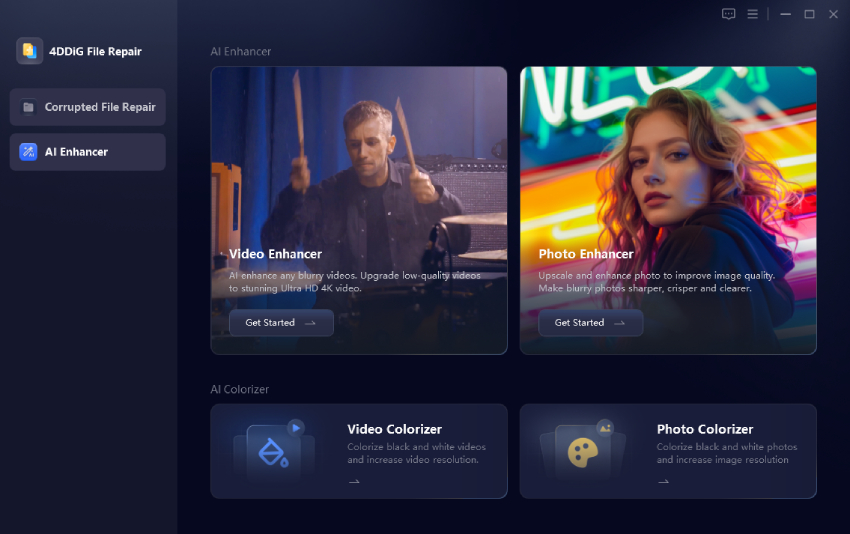
  • Download and launch 4DDiG File Reepair software and open "AI Enhancer" from the left panel then select "Photo Enhancer".

    open 4ddig ai photo enhancer
  • Click "Add Photos" and import your ChatGPT generated image.

    add low quality photos to 4ddig
  • Choose an AI model based on the image and select the required resolution or scaling level then click "Enhance".

    start enhancing low quality photos
  • Compare the original and enhanced version and after you preview the result, click "Save" to export the improved image.

    preview and save enhanced photos

For a general ChatGPT image, the General model is a suitable starting point. For a noisy image, use Denoise. For a portrait, try Face. The official workflow also supports batch processing when several images need enhancement.

FAQs About ChatGPT Low Quality AI Content

Q1: Can ChatGPT Create High Resolution Images?

Yes. ChatGPT Images supports different aspect ratios and image generation workflows, but the final visual quality still depends on the requested composition, image characteristics, and available generation capabilities. For an existing low-resolution result, an image enhancer can further increase resolution.

Q2: Why Is ChatGPT Image Generator So Bad?

Poor results can come from vague prompts, complicated scenes, unsuitable composition, difficult text or tiny objects, or limitations in the source image. A more specific prompt and iterative editing usually provide better control.

Q3: Are There Any Image Generators Better Than ChatGPT?

Different image generators have different strengths, so there is no single tool that is best for every task. The more useful comparison is based on the type of image you need, such as photorealistic portraits, product images, typography, illustration, or creative editing.

Conclusion

If your ChatGPT images are low quality, start by improving the prompt instead of immediately regenerating the image. Specific subjects, lighting, camera details, composition, aspect ratios, and quality requirements can produce more consistent results.

When an existing image is already useful but lacks sharpness or resolution, 4DDiG Photo Enhancer can upscale it, reduce noise, sharpen details, and improve overall clarity without requiring you to recreate the entire image.

FREE DOWNLOAD

Secure Download

FREE DOWNLOAD

Secure Download

Ehtsham Ahmed (senior editor)

Ehtsham Ahmed, the content writer for 4DDiG, is dedicated to offering workarounds for Windows Data Recovery, Windows Troubleshooting, iDevices System Repair, etc.

(Click to rate this post)

You rated 4.5 ( participated)