5 Best AI Image Sharpening Tools to Fix Blurry Photos

5 mins read

Updated on 2026-10-13 16:36:16 to Photo Tips

A slightly blurry photo does not always need to be deleted. With modern AI image sharpening tools, you can recover soft details, reduce blur, and make photos look clearer in just a few clicks. But different tools work better for different needs. This guide compares five useful AI sharpeners for casual users, photographers, batch editing, and quick online enhancement.

Part 1. What Is Image Sharpening

Image sharpening is the process of making a photo look clearer and more detailed. It works by increasing contrast along edges so objects stand out better against their backgrounds. It is commonly used to improve images that appear soft because of camera shake, missed focus, resizing, or compression.

Traditional methods adjust contrast manually, but results can look harsh or unnatural. Today, AI image sharpening does the work smarter. It studies the photo, detects real edges, and improves them while reducing noise. The goal is a natural, crisp finish that keeps the original look intact.

Note:

An AI photo sharpener is especially useful for portraits, old photos, product images, travel shots, and other slightly blurry pictures. However, it cannot fully restore details that were never captured in the original image.

How an AI Image Sharpening Tool Works

An AI tool for sharpening images uses trained models to understand what a sharp photo should look like. Here is a simple overview of the main steps:

  • The tool scans the entire image and identifies edges, textures, and soft areas.
  • It separates real detail from unwanted blur or noise.

  • Smart algorithms boost edge contrast only where needed, along with texture, faces, and fine details.

  • The process often includes mild noise reduction and resolution & overall image quality enhancement so the final result stays clean.

  • Many tools also allow strength control so you can keep the effect natural.

This approach helps sharpen blurry images more accurately than basic filters. The AI learns from thousands of photo examples, so it adapts well to different subjects: portraits, landscapes, or product shots. The result is clearer pictures with less effort and fewer artifacts.

⚡ Part 2. Top 5 Best AI Image Sharpening Tools We Tested [Free, Fast & Powerful]

After trying many options, we selected five standout AI image sharpening tools. Each one offers a different mix of speed, power, and ease of use. Some work online with no download, while others run on a desktop for faster batch work. Here is what we found.

1. 4DDiG AI Photo Enhancer -- Best Overall AI Image Sharpening Software

4DDiG AI Photo Enhancer is a desktop program that uses smart AI models to sharpen blurry photos, reduce noise, and upscale images up to 4K. It stands out because it handles everyday pictures, portraits, and old photos with very little effort. You simply choose a model and let the tool do the rest.

We recommend it as the best overall choice for most people. It delivers clear, natural results quickly and supports batch processing, which saves time when you have many photos.

FREE DOWNLOAD

Secure Download

FREE DOWNLOAD

Secure Download

4ddig ai photo enhancer

Key features of 4DDiG AI Photo Enhancer:

  • AI-powered sharpening for blurry or soft photos
  • Multiple AI models (General, Face, Denoise, Colorize) for different photo types
  • One-click sharpening and upscaling images to 4K
  • Photo noise reduction that keeps natural detail
  • Old photo restoration and colorization
  • Batch processing for many images at once
  • Suppor a wide range of image formats: JPG, PNG, TIFF, CR2, CR3, NEF, WebP, and more
  • Simple interface that works well for beginners
  • Pros
  • Cons
    • Delivers consistently natural and crisp results on blurry or soft photos
    • Strong results on blurry and low-resolution photos
    • Extremely easy to use with clear before-and-after preview
    • Fast processing even on larger files
    • Excellent batch support that saves real time
    • Multiple specialized models and reliable performance give better results than one-size-fits-all tools
    • Desktop only (no pure online version)
    • Full features require a paid license after the trial

Best for: Everyday users, families restoring old pictures, and anyone who wants fast desktop results without learning complex software.

2. ON1 Photo RAW -- Best AI Image Sharpening Software for RAW Photographers

ON1 Photo RAW is designed for photographers who want sharpening as part of a complete RAW editing workflow. Its Tack Sharp AI helps improve soft or slightly blurry photos, while NoNoise AI reduces grain without sacrificing too much detail. It is best for photographers who need sharpening, RAW processing, masking, and color correction in one application.

on1 photo raw
  • Pros
  • Cons
    • Excellent AI sharpening that looks natural
    • Works with RAW and supports batch processing
    • Includes extensive masking and editing tools
    • More features than casual users may need
    • Needs a reasonably strong computer for best speed

Best for: Serious photographers who work with RAW files and need both sharpening and advanced editing.

3. PicsArt -- Free AI Image Sharpener Online

PicsArt offers a free online AI image sharpener that works right in your browser. Upload a photo, and the tool will automatically improve clarity and detail in seconds. It is a solid free choice when you need quick results without installing anything. The interface is friendly and also includes extra creative tools if you want to keep editing.

picsart ai image sharpener
  • Pros
  • Cons
    • Completely free for basic use
    • No download required
    • Fast and simple one-click results
    • Works online and on mobile devices
    • Automatically sharpens details and fixes mild blur
    • Includes many additional creative editing tools
    • Free version may have limits on resolution or credits
    • Less control than dedicated desktop software
    • Not ideal for large professional photo batches

Best for: Casual users, students, and anyone looking for a free tool to sharpen image files on the go.

4. Topaz Sharpen AI -- Best for Professional Photographers

Topaz Sharpen AI (now part of Topaz Photo) is designed for serious work. It uses specialized models to fix motion blur, lens soft focus, and missed focus with impressive accuracy. Professionals trust it because it recovers detail that other tools often miss, especially in wildlife, sports, or portrait shots. Results stay natural when you choose the right model.

topaz sharpen ai
  • Pros
  • Cons
    • Strong sharpening and focus-recovery capabilities on difficult shots
    • Multiple models for different blur types
    • Works as a standalone tool or plugin
    • Includes denoising and upscaling
    • Can be slow on large files or older computers
    • Subscription pricing for newer versions
    • More complex than one-click consumer tools

Best for: Professional photographers who need high-quality recovery of slightly soft or shaky images.

5. Let's Enhance -- Online AI Sharpener for Sharpening and Upscaling

Let's Enhance is a browser-based tool that sharpens images while also upscaling them. It offers different AI models for photos, digital art, and old scans, making it flexible for many needs. We recommend it when you need both sharper edges and higher resolution in one step. The online format means you can use it from any device with an internet connection.

lets enhance online ai sharpener
  • Pros
  • Cons
    • Strong upscaling combined with sharpening
    • Multiple models and sharpening intensities for different image types
    • Batch processing available
    • Runs directly in a web browser and has a simple upload-and-process workflow
    • Useful for compressed and low-resolution images
    • Less suitable for users who need detailed manual photo editing
    • Credit-based pricing after the free trial
    • Requires a stable internet connection

Best for: Online users who want to sharpen and enlarge product photos, social media images, or low-resolution files.

Which AI Image Sharpening Tool Should You Choose?

The best option depends less on which tool has the longest feature list and more on what you actually need to fix.

Tool Best For Online/Desktop Key Strength
4DDiG AI Photo Enhancer Everyday users and batch enhancement Desktop Easy batch sharpening and 4K enhancement
ON1 Photo RAW RAW photographers Desktop RAW editing, sharpening, and denoising
PicsArt Quick casual edits Online/Mobile Fast and beginner-friendly
Topaz Sharpen AI Professional photography Online Advanced blur and focus correction
Let’s Enhance Sharpening plus upscaling Online Improves small and compressed images

⚡ Part 3. How to Sharpen Images with AI (Step-by-Step)

Once you choose the right tool, sharpening a blurry image is usually straightforward. Below are two simple methods for desktop batch processing and quick online enhancement.

1. Batch Sharpen Images with 4DDiG AI Photo Enhancer

If you have several blurry or low-quality photos, 4DDiG AI Photo Enhancer is a convenient option because it supports batch processing.

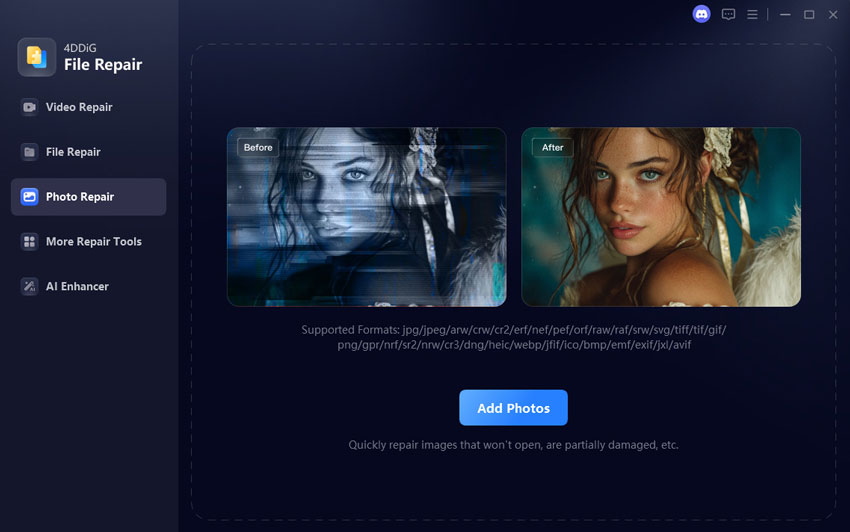
  • After installing and launching the 4DDiG File Repair program (4DDiG AI Photo Enhancer is inside it), click the "AI Enhancer" tab on the left and select "Photo Enhancer."

    FREE DOWNLOAD

    Secure Download

    FREE DOWNLOAD

    Secure Download

    open 4ddig ai photo enhancer
  • Click "Add Photos" or simply drag and drop your images. You can select multiple files at once for batch processing.

    add blurry photos to 4ddig for sharpening
  • Choose the AI model that fits your photos (General for most shots, Face for portraits, Denoise for grainy images). Under AI Enhancer section, select "Sharpen". Also, adjust the output resolution if needed.

    select ai model and sharpen enhancement option
  • Click "Enhance" and wait a few moments. The tool processes everything automatically. Once finished, preview the results side by side, then click "Save" to export your sharpened photos in high quality.

    preview and save sharpened images

2. Use AI to Sharpen an Image with PicsArt Free AI Image Sharpener

If you prefer a free online option, and want to shrpen a single photo, PicsArt provides a quick browser-based option without requiring desktop installation.

  • Open the PicsArt AI image sharpening page in your browser.

  • Upload your photo by clicking the "Browse files" button or dragging the file into the browser.

  • Let the AI process the image. It automatically improves clarity, reduces blur, and boosts detail.

  • Preview the result. Make any small extra adjustments if you like.

  • Click Download to save the sharpened version. nMeanwhile, you can select "Edit image" for further retouching.

    picsart sharpening images with ai

Conclusion

The best AI image sharpening tools can make soft, blurry, or low-resolution photos look clearer without requiring advanced editing skills. Online tools like PicsArt and Let's Enhance are convenient for quick edits, while ON1 Photo RAW and Topaz Photo are better suited to photographers who need more control.

For users who want a simple desktop solution with batch processing, sharpening, denoising, and upscaling in one workflow, 4DDiG AI Photo Enhancer is a practical choice. It is especially useful when you need to improve multiple photos quickly while keeping the process easy to manage.

FREE DOWNLOAD

Secure Download

FREE DOWNLOAD

Secure Download

William Bollson (senior editor)

William Bollson, the editor-in-chief of 4DDiG, devotes to providing the best solutions for Windows and Mac related issues, including data recovery, repair, error fixes.

(Click to rate this post)

You rated 4.5 ( participated)