Top 3 Must-Try PSD File Repair Tools
5 mins read

Updated on 2026-10-08 21:42:56 to Corrupted File Repair

A corrupted PSD can prevent Photoshop from opening an important design project. This problem can happen after crashes, interrupted saves, storage errors, or damaged files. A reliable PSD file repair tool may recover layers and other project data when Photoshop cannot open the file normally.

This guide compares three repair options, including desktop software and online recovery, and explains how to repair multiple damaged PSD files efficiently. PSD corruption can affect both recent and older projects, making dependable recovery options important for designers handling valuable creative work.

Part 1. Why Do PSD Files Get Corrupted?

PSD files can become damaged for several reasons, especially when large projects are being edited or transferred. Identifying the likely cause can also help prevent the same problem from happening again.

Common causes include:

  • Unexpected Photoshop crashes during editing
  • Sudden computer shutdowns during saving
  • Interrupted file transfers or downloads
  • Failing hard drives or storage devices
  • Malware or filesystem-related damage
  • Incorrect file recovery procedures
  • Damaged Photoshop project data
  • Software conflicts during file processing

Large PSD projects can be particularly vulnerable because they may contain many layers, effects, masks, smart objects, and other complex elements. A damaged file may show an error when opening, fail to load completely, or open with missing design information.

Part 2. Top 3 Best PSD File Repair Tools for You [Free, Online, High Success Rate]

Different paid and free PSD repair tool options use different recovery approaches. Some provide desktop batch processing, while others focus on repairing individual files through a browser.

Tool 1. 4DDiG File Repair

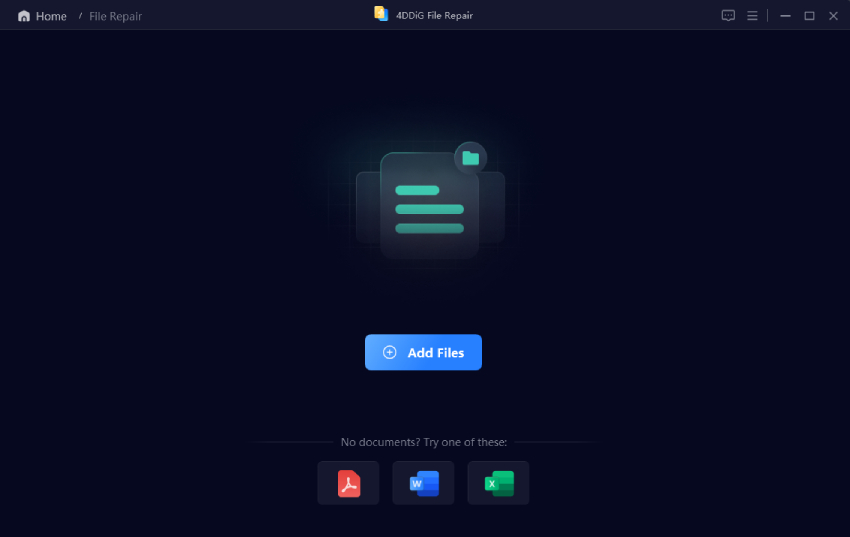
4DDiG File Repair is a desktop recovery tool designed to repair corrupted photos, videos, documents, and other files. Its document repair capability supports damaged PSD files and is particularly useful when Photoshop cannot open a project normally.

The main advantage is its structured desktop workflow. Users can add multiple damaged files, start the repair process, and preview the results before saving them. It is also useful when you have several corrupted PSD projects instead of just one file.

4ddig file repair

For users who need a dedicated PSD repair tool, 4DDiG provides a more complete workflow than browser-based recovery services.

Key Features:

  • Repairs corrupted PSD, PSB, and other documents
  • Supports batch repair for multiple files
  • Provides advanced repair with high success rate for severe corruption
  • Supports preview before saving repaired files
  • Uses sample files for advanced recovery
  • Handles different document corruption scenarios
  • Provides a dedicated desktop repair workflow
  • Supports additional photo and video repairs
  • Pros
  • Cons
    • Batch repair saves time
    • Advanced repair handles severe corruption
    • Preview helps verify recovered content
    • Desktop processing avoids file uploads
    • Supports multiple damaged file types
    • Requires desktop software installation
    • Advanced features may require a paid plan

Best for: Designers, photographers, agencies, and users with multiple damaged PSD projects.

Its broader repair capabilities also make it useful when PSD corruption occurs alongside damaged photos, videos, or other important documents.

Tool 2. PSD Repair Kit

PSD Repair Kit is an online recovery service focused specifically on Photoshop PSD files. It allows users to upload a damaged PSD and attempt recovery through a browser without installing desktop software.

Its focused workflow makes it suitable when you need to repair damaged PSD file data quickly and only have one or a few files to process. However, browser-based recovery requires uploading the damaged project to the service.

psd repair kit
  • Pros
  • Cons
    • Designed specifically for PSD recovery
    • Works through a web browser
    • No desktop installation required
    • Suitable for occasional recovery needs
    • Focuses on Photoshop project files
    • Requires uploading files online
    • Less suitable for bulk recovery
    • Recovery depends on file damage
    • Provides fewer desktop repair controls

Best for: Users needing occasional online PSD recovery.

Tool 3. Recovery Toolbox for Photoshop

Recovery Toolbox for Photoshop is a dedicated recovery application for damaged Adobe Photoshop files. It focuses specifically on PSD recovery and provides a guided process for analyzing damaged projects.

Unlike broader file repair suites, its purpose is centered on Photoshop files. This makes it relevant for users who primarily work with PSD projects and want a specialized PSD repair software workflow.

recovery toolbox for photoshop
  • Pros
  • Cons
    • Focused specifically on fixing Photoshop files
    • Guided recovery workflow
    • Desktop-based file processing
    • Useful for individual damaged projects
    • Designed around PSD recovery
    • Less versatile than broader repair suites
    • Batch capabilities are more limited
    • Focuses mainly on Photoshop recovery

Best for: Photoshop users seeking specialized desktop recovery.

Part 3. How to Repair Corrupted and Damaged PSD Files?

The right recovery process depends on the number of damaged files and their condition. 4DDiG is useful for batch repair, while an online service can be more convenient for individual PSD projects.

Before repairing any project, create a backup copy so the original PSD remains available if recovery does not work properly.

1. Batch Repair Multiple PSD Files with 4DDiG

Manual corrupted PSD file repair can already take a lot of time. The process becomes more frustrating when several projects are damaged simultaneously. 4DDiG File Repair provides a batch workflow that lets you add multiple PSD files and process them together.

Steps to Repair Damaged PSD Files All at Once with 4DDiG File Repair

  • Install and launch 4DDiG File Repair on your computer. From the main interface, select the "File Repair" option. Click "Add Files" and select the damaged PSD projects from your computer. You can select multiple PSD files during this step.

    add corrupted psd files to 4ddig
  • After adding the PSD files, click "Repair All" to begin the recovery process. 4DDiG analyzes the selected PSD files and attempts to reconstruct recoverable project data.

    start repairing corrupted psd files
  • Once processing finishes, use the "Preview" option to inspect the recovered results. Check whether the repaired project contains the expected visual content and design information.

    preview repaired psd files
  • Select the repaired PSD files you want to keep and click "Save". Choose a separate destination folder rather than overwriting the original damaged files.

Keeping the original files untouched gives you another recovery option if you need to try a different repair method later.

2. Repair Corrupted PSD File Online Free with PSD Repair Kit

An online PSD repair kit can be convenient when you only need to recover one damaged project. You do not need to install desktop software, but the damaged PSD must be uploaded to the service.

  • Open the PSD Repair Kit website in your browser. Click the "Select File" button and select the corrupted PSD file from your computer. Wait for the upload process to finish. Note: Make sure you have a backup copy before uploading an important project to any online service.

  • Follow the available instructions to start the repair process if it does not start automatically. The service will analyze the uploaded PSD and attempt to recover usable project data.

  • After processing, review the available recovery result. Check whether the recovered project contains the elements you need.

  • If the recovered content is useful, continue with the available download or recovery option. Download the recovered PSD file and save it to a safe location. Open it in Photoshop to verify that the recovered project works correctly.

For important projects, keep both the original damaged file and recovered copy until you confirm the recovery is successful.

⚡ Conclusion

A corrupted PSD can put hours of design work at risk, especially when the project contains complex layers and effects. A reliable PSD file repair tool can help recover usable project data when Photoshop fails to open the file.

4DDiG File Repair is particularly useful for batch recovery, advanced repair, and previewing results before saving. PSD Repair Kit and Recovery Toolbox provide more specialized alternatives for individual projects.

FREE DOWNLOAD

Secure Download

FREE DOWNLOAD

Secure Download

Sawart Mashab (senior editor)

Sawart Mashab, the content writer for 4DDiG, is adept at creating informative and practical solutions related to Windows and macOS issues, data recovery, file repair, and RAID storage.

(Click to rate this post)

You rated 4.5 ( participated)