How to Convert Video to 4K Online Free in Minutes [1080p/720p to 4K]

5 mins read

Updated on 2026-10-13 16:35:54 to Video Tips

Want sharper videos without paying or creating accounts? Many people look for ways to convert video to 4K online free. Modern free tools use AI to upscale lower-resolution clips, improve clarity, and keep files clean without signup or watermarks. In this guide, you'll see what is realistic, how these converters work, and the top free options that require no watermark or signup.

Part 1. Can You Really Convert a Video to 4K Online for Free?

Yes. Several browser-based tools can upscale 720p or 1080p footage and export it at 3840 × 2160, the standard UHD 4K resolution. In other words, it is possible to convert video to 4K resolution online free without installing traditional editing software.

There is one important distinction, though: converting a lower-resolution video to 4K does not turn it into footage that was originally recorded by a native 4K camera.

Native 4K vs. Upscaled 4K: What's the Difference

Native 4K is recorded or created at 3840×2160 from the start. Every pixel is original. Upscaled 4K starts with fewer pixels and uses software (often AI) to fill in the missing detail.

Good AI upscaling can look surprisingly sharp and clean. It is not the same as true camera-captured 4K, but for most everyday videos it works well enough for social media, YouTube, or larger screens.

How Free Online 4K Video Converters Work

Free online 4K video converters usually use AI upscaling to analyze each frame, increase the resolution, and improve details such as sharpness, edges, and clarity. You simply upload the video, choose 4K as the output resolution, and let the tool process it automatically.

Some tools also offer noise reduction, color enhancement, or frame-rate improvement. However, free versions may have limits on video length, file size, export quality, or daily usage.

Part 2. Top 5 Best Free Online 4K Video Converter Tools (N)

Here are five solid free or freemium tools that help you convert video to 4K online free no sign up or with very light barriers. Each one has strengths depending on your needs.

1. Free AI Video Upscaler

This browser-based tool runs entirely on your device using WebGPU. Nothing leaves your computer, which makes it one of the most private options available. It handles short clips especially well, including AI-generated or animated videos, and can take 720p or 1080p footage up to 4K. It does not require signup and is especially suitable for users who want a simple, privacy-friendly way to convert video to 4K online free without watermark.

free ai video upscaler
  • Pros
  • Cons
    • Fully free with no signup or watermark
    • Local processing keeps your files private
    • Simple one-click interface
    • Supports common formats (MP4, WebM, etc.)
    • No length or credit limits
    • Speed depends on your computer’s graphics card
    • Longer videos can take noticeable time
    • Quality is good but not the sharpest for complex real-world footage

2. Topaz 4K Video Converter

Topaz is known for high-quality AI enhancement. The online converter intelligently rebuilds detail instead of simply stretching pixels. You can choose different models suited to interviews, old footage, or general video. Best for people who want near-professional results and are okay testing the free tier.

topaz 4k video converter
  • Pros
  • Cons
    • Excellent detail recovery and natural-looking results
    • Multiple AI models matched to content type
    • Frame-rate boosting options (60/120 FPS)
    • Real-time preview available
    • Strong performance on both modern and older footage
    • Free usage is limited in length or features
    • Full power requires a paid plan
    • Processing can feel slower on the free tier

3. Fotor 4K Video Converter Online Free

Fotor offers a clean web interface for quick upscaling. Upload common formats, generate a preview, and export to 4K. It also improves frame rate in some modes. Best for casual users who need a fast 720p and 1080p to 4K converter online free experience.

fotor 4k video converter online free
  • Pros
  • Cons
    • Very easy three-step process
    • Supports popular formats (MP4, MOV, WebM, etc.)
    • No watermark on free exports (within limits)
    • Clean interface and mobile app available
    • Quick preview generation
    • Free tier often limits full-length downloads
    • Advanced modes usually require credits
    • Longer or higher-quality exports may need a paid plan

4. Vmake Labs Free AI 4K Video Converter Online

Vmake focuses on true quality enhancement rather than basic resizing. It analyzes frames and rebuilds missing detail for cleaner 4K output. The tool is free to try and works without forcing an account for basic conversion. Best for creators who want better-looking social or product videos.

vmake labs free ai 4k video converter online
  • Pros
  • Cons
    • Strong AI reconstruction that adds plausible detail
    • No watermarks on any export
    • Simple upload-and-convert workflow
    • Supports higher targets beyond 4K in some cases
    • Good results on short-to-medium clips
    • Free credits are limited
    • Heavier use requires a paid plan
    • Cloud processing means upload speed matters

5. Wink Free HD Video Converter

Wink's tool upscales to 1080p, 2K, or 4K while cleaning noise and improving color and texture. Scene-aware enhancement helps keep results natural. Best for everyday footage, old clips, or phone videos that need a quick polish. And it allows users to process multiple videos in one workflow. It is better suited to creators who need to upscale several clips efficiently.

wink ai hd video converter
  • Pros
  • Cons
    • User-friendly interface
    • Multiple resolution choices (1080p / 2K / 4K)
    • Natural-looking enhancement that preserves motion and texture
    • Free online access for basic use
    • Handles common formats well
    • Some advanced features or batch work may require signup
    • Free limits can appear on longer videos
    • Results are solid but not always the absolute sharpest available

These tools make it realistic to convert video to 4K online free without watermark for most everyday needs. Cleaner source footage always produces better final results.

Part 3. How to Convert Video to 4K Online Free without Watermark (Step-by-Step)

If you only have one or two short videos to upscale, an online tool is usually the quickest option. Fotor is beginner-friendly because the process is mostly automatic. It supports common video formats and lets new users try one free 4K upscale without registration. Fotor also states that the exported 4K video has no watermark.

  • Go to the Fotor 4K Video Converter page and click the upload button (or drag and drop your file). Supported formats include MP4, MOV, WebM, and AVI.

  • Once the video loads, choose the option to upscale to 4K. You can select Standard mode for a faster result or Advanced mode for better detail recovery.

  • Click "Generate Preview." The AI will process a short sample so you can check the quality.

    fotor video enhancer generate preview
  • If you are happy with the preview, start the full conversion. Wait for the process to finish (time depends on video length and your connection).

  • Download the finished 4K video. Within the free limits, the export usually comes without a watermark.

⚡ Part 4. Better Alternative to Convert Low-Quality Videos to 4K with AI in Batch (Fast, Batch & Powerful)

Online tools are convenient, but they can hit length limits, credit restrictions, or slower processing. If you regularly need to turn 720p or 1080p footage into sharper 4K files, especially multiple videos at once, a dedicated desktop AI tool is usually more efficient.

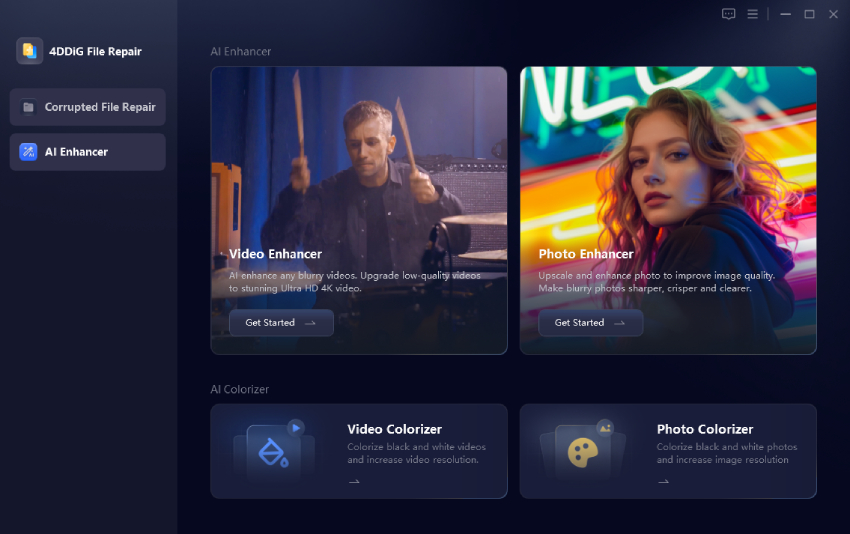
4DDiG AI Video Enhancer (part of 4DDiG File Repair) is a strong alternative. It can upscale low-resolution footage to HD or 4K in batch while improving clarity, reducing noise, and sharpening details. It is designed for different types of footage, including general videos, portraits, anime, and older recordings.

Main Features of 4DDiG AI Video Enhancer

  • Upscale low-resolution videos to 4K, 1080p, and up to 8K
  • Multiple AI models (General Denoise, Face, Anime, Colorize) tailored to different content
  • Batch processing for several videos at the same time
  • Noise reduction, sharpening videos with AI, and color/contrast enhancement
  • Preview before saving so you can compare results
  • No watermark on exported files
FREE DOWNLOAD

Secure Download

FREE DOWNLOAD

Secure Download

How to convert 720p/1080p to 4K with 4DDiG AI Video Enhancer

  • Install and launch 4DDiG File Repair, then select AI Enhancer > Video Enhancer from the left sidebar.

    open 4ddig ai video enhancer
  • Click Add Videos or drag and drop the videos you want to enhance into the program.

    add low quality videos to 4ddig
  • Choose an AI model that matches your footage (General for most videos, Face for people, Anime for animation). Also, select the upscale factor or target resolution (for example, 4× to reach 4K from 1080p) and click Enhance.

    select ai model and reset resolution to enhance videos
  • Preview the before-and-after comparison and click Save to export the enhanced 4K videos to your preferred folder.

    preview and save enhanced videos

FAQs about Video Convert to 4K Online Free

Q1: How to convert YouTube video to 4K online free?

First download the YouTube video using a reputable online downloader (choose the highest available resolution). Then upload the file to one of the free online converters listed earlier, such as Fotor or Free AI Video Upscaler, and select 4K as the output. Note that upscaling improves clarity but cannot create real detail that was never in the original video.

Q2: Is upscaled 4K as good as native 4K?

No. Native 4K is captured at full resolution. Upscaled 4K uses AI to reconstruct detail. Modern AI does a good job for most everyday use, but results depend heavily on the quality of the source footage.

Conclusion

You do not need professional editing skills to convert video to 4K online free. Tools such as Free AI Video Upscaler, Topaz, Fotor, Vmake, and Wink make it easy to upscale short 720p or 1080p clips directly in a browser.

If you need to enhance multiple low-quality videos, reduce noise, sharpen details, or get more consistent 4K results, 4DDiG AI Video Enhancer is a stronger desktop alternative. It combines AI upscaling with dedicated enhancement models, making it better suited to larger or more demanding video projects.

FREE DOWNLOAD

Secure Download

FREE DOWNLOAD

Secure Download

William Bollson (senior editor)

William Bollson, the editor-in-chief of 4DDiG, devotes to providing the best solutions for Windows and Mac related issues, including data recovery, repair, error fixes.

(Click to rate this post)

You rated 4.5 ( participated)