5 Best Wii Upscalers for 1080p & 4K TVs in 2026

5 mins read

Updated on 2026-10-08 21:41:48 to Video Tips

The Nintendo Wii was designed for older displays, so its 480p output can look soft on modern 1080p and 4K TVs. A Wii upscaler can improve compatibility and, with better processors, produce cleaner scaling and deinterlacing.

This guide compares five popular Wii HDMI solutions based on input type, output quality, setup, and price. It also explains how to upscale Wii recorded gameplay with AI when hardware scaling is not enough.

Part 1. What Is Wii Upscaler? What Should You Choose?

A Wii upscaler converts the console’s low-resolution analog video into a signal suitable for modern displays. However, not every Wii-to-HDMI adapter is a true upscaler. The original Wii outputs 480i or 480p in NTSC regions, so a device labeled “1080p” may only convert the signal to HDMI while your TV performs the final scaling. Nintendo itself lists 480i and 480p as the Wii’s display options.

For the cleanest results, prioritize a 480p-capable connection and a quality scaler or deinterlacer. A basic HDMI adapter is enough for simple TV compatibility, while a dedicated processor such as the RetroTINK-5X Pro offers much more control over scaling and deinterlacing.

Quick Comparison of 5 Top Wii Upscaler Choices

Wii Upscaler Best For Input Output Quality Setup Price
Portholic Wii to HDMI Basic HDMI connection Wii AV Multi-Out 480p converted to HDMI Easy About $10–$25
Autoutlet Wii to HDMI Affordable HDMI setup Wii AV Multi-Out Up to 720p/1080p signal Easy About $15–$30
RetroTINK-5X Pro High-quality 1080p scaling Component/Composite/S-Video Up to 1080p Advanced $325
MayFlash Wii2HDMI Branded budget adapter Wii AV Multi-Out HDMI from 480p source Easy About $15–$25
ElectronWarp Clean component-to-HDMI conversion Wii Component Native Wii resolution over HDMI Easy $23.99
Note:

Prices vary by retailer and region. Also, a higher HDMI output number does not mean the Wii is rendering games at that resolution.

Part 2. Top 5 Best Wii Upscaler Choices for Better Game Video Quality

These five options cover basic adapters, branded budget solutions, and dedicated video processors. Their biggest differences are signal quality, scaling hardware, latency, and how much control you have over the final image.

1. Portholic Wii to HDMI Upscaler

Portholic is a compact Wii-to-HDMI converter aimed at users who simply want to connect an original Wii to a modern TV. It accepts the Wii’s AV Multi-Out signal and outputs digital HDMI with stereo audio.

Importantly, Portholic itself states that the adapter is not a true upscaler. It converts the Wii’s native signal rather than creating native 1080p detail. It is best for casual players who want an inexpensive HDMI connection without adding the best upscaler for Wii.

portholic wii to hdmi upscaler

Key features:

  • Supports NTSC 480i and 480p
  • Supports PAL 576i
  • HDMI digital video output
  • Integrated 3.5mm audio output
  • Compact console-mounted design
  • No external power supply required
  • Works with modern HDMI displays
  • Wii Mini is not supported

Price:

About $10–$25, depending on the retailer.

Maximum output quality:

HDMI display compatibility up to 1080p, but the Wii’s source remains 480i/480p.

2. Autoutlet Wii to HDMI Converter

The Autoutlet Wii-to-HDMI converter targets users who want an inexpensive HDMI connection with additional audio flexibility. It supports the Wii’s display modes and advertises 720p and 1080p HDMI output. The important distinction is that these output labels describe the HDMI signal rather than the Wii’s native rendering resolution.

It is a reasonable Nintendo Wii upscaler choice for a basic modern-TV setup when you want HDMI and a dedicated 3.5mm audio output.

autoutlet hdmi converter

Key features:

  • Supports Wii display modes
  • HDMI video and audio output
  • Advertised 720p and 1080p output
  • Dedicated 3.5mm audio jack
  • Supports Wii U
  • Includes HDMI cable
  • Compact plug-in design
  • No driver installation required

Price:

About $15–$30, depending on retailer.

Maximum output quality:

Up to 1080p HDMI signal, with source detail limited by the Wii’s native resolution.

3. RetroTINK-5X Pro: Best Proven Wii Upscaler for 1080p TVs

The RetroTINK-5X Pro is in a completely different category from inexpensive Wii2HDMI adapters. It is a dedicated retro video processor with component, composite, S-Video, RGB, and SCART inputs. This Wii upscaler 1080p can perform motion-adaptive deinterlacing and scale Wii signals to 1080p with very low latency.

For Wii owners who care about image quality rather than simply adding HDMI, this is the most capable option on this list. Its price is also much higher, making it better suited to serious retro-gaming setups.

retrotink 5x pro

Key features:

  • Supports Wii component input
  • Advanced motion-adaptive deinterlacing
  • Supports 480i and 480p sources
  • Scales output to 1080p
  • Offers 720p and 1200p modes
  • Experimental 1440p output
  • Very low processing latency
  • Multiple analog input types
  • Adjustable scaling and filtering
  • Supports integer scaling options

Price:

$325 from the manufacturer when available.

Maximum output quality:

Up to 1080p as a standard recommended output, with 1200p and experimental 1440p modes.

The biggest advantage is not simply the output resolution. Its deinterlacing, sampling, scaling, and filtering controls can produce a cleaner image than inexpensive converters.

4. MayFlash Wii2HDMI: Best Budget Wii-to-HDMI Adapter

MayFlash’s Wii2HDMI is a compact branded alternative to the many generic Wii HDMI upscaler dongles available online. It converts the Wii’s analog output into HDMI and includes a 3.5mm audio jack. Its main strength is consistency compared with inexpensive unbranded adapters.

It is suitable for players who want a simple HDMI setup but prefer an established accessory brand over a generic converter.

mayflash wii2hdmi

Key features:

  • Compact Wii AV Multi-Out design
  • HDMI digital video output
  • Dedicated 3.5mm audio output
  • Supports Wii display modes
  • Low-power operation
  • Plug-and-play connection
  • Compatible with modern HDTVs
  • No separate power adapter required

Price:

About $15–$30, depending on availability.

Maximum output quality:

HDMI output suitable for modern HD displays, while the Wii source remains limited to its native 480i/480p output.

MayFlash is a better fit for basic HDMI connectivity than for users seeking advanced image processing. If you want true scaling control, the RetroTINK-5X Pro is considerably more capable.

5. ElectronWarp: Best Budget Wii HDMI Upscaler

ElectronWarp takes a different approach from many inexpensive Wii2HDMI products. It uses a custom PCB and a higher-quality conversion IC to take the Wii’s native component video and analog audio and output them through HDMI.

The device is especially interesting for users who already prioritize the Wii’s 480p component signal. It does not artificially turn the console into a native 1080p or 4K system. Instead, it provides a cleaner digital path for the source signal.

electronwarp

Key features:

  • Uses the Wii’s component video signal
  • HDMI digital video output
  • Supports 480i and 480p
  • Supports PAL display modes
  • Supports 240p homebrew modes
  • Analog audio conversion
  • Very low processing latency
  • Custom PCB design
  • Compact console-mounted hardware

Price:

$23.99 from the manufacturer.

Maximum output quality:

Native Wii resolution over HDMI, including 480p for supported games.

ElectronWarp is a strong choice when you want a clean HDMI connection without paying for a dedicated external scaler to upscale Wii resolution. Your TV or another scaler still handles the final 1080p or 4K enlargement.

⚡ Part 3. Best AI Alternative to Wii Upscaler to Upscale Gaming Videos

Hardware upscalers work on the signal while you play. They are ideal for improving the live image on your TV. However, if you have already recorded low-resolution Wii gameplay, they rarely add true detail or fix compression artifacts, noise, or softness common in recorded gameplay. For recorded footage, an AI video enhancer can analyze individual frames and improve resolution, sharpness, and noise.

4DDiG AI Video Enhancer is useful for this workflow because it can upscale Wii to 4K while also improving clarity. It is a better fit for recorded gameplay, YouTube clips, and archived Wii footage than a hardware HDMI adapter.

Key Features of 4DDiG AI Video Enhancer

  • AI video upscaling to 4K, 1080p, or 8K (and support for higher frame rates such as 60 fps)
  • Noise reduction/denoising to clean up grainy or compressed footage
  • Sharpen videos with AI for more details and clarity
  • Color and contrast enhancement for more vibrant results
  • Specialized AI models for all users: General Denoise, Anime, Face, and Colorize
  • Support batch processing so you can enhance multiple clips at once
  • User-friendly interface aimed at beginners as well as content creators and gamers
  • Local processing on your PC (Windows or Mac)
FREE DOWNLOAD

Secure Download

FREE DOWNLOAD

Secure Download

Steps to Enhance Recorded Wii Gameplay

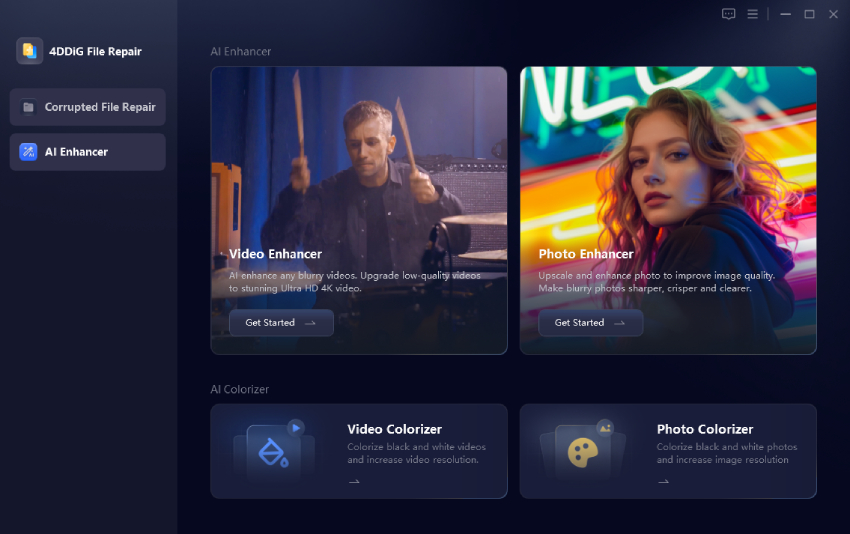
  • Open 4DDiG File Repair on your computer and select “AI Enhancer.” Choose “Video Enhancer” to access the AI video tools.

    open 4ddig ai video enhancer
  • Click “Add Videos” and select the Wii gameplay recording you want to improve. You can also drag the video directly into the application.

    add recorded wii gameplay videos to 4ddig
  • Select the AI model that best matches the footage. “General Denoise” is suitable for typical gameplay, while “Anime” can work well with stylized or cartoon-like game visuals. Meanwhile, choose the desired output resolution, click "Enhance," and allow the software to process the gameplay.

    select ai model and resolution to enhance videos
  • Preview the enhanced footage before exporting it. Compare edges, textures, character details, and background elements with the original recording. If the result looks good, click “Save” and select the output location. You can then use the enhanced video for editing, sharing, or uploading.

    preview and save enhanced wii recordings

FAQs About Wii Upscale

Q1: What Is the Best Upscaler for Nintendo Wii?

For a dedicated hardware solution, the RetroTINK-5X Pro is the most capable option here because it provides high-quality deinterlacing, scaling, filtering, and 1080p output. For a cheaper HDMI connection, ElectronWarp and MayFlash are better suited to different priorities.

Q2: Can I Upscale My Wii to 4K?

Yes, but the distinction between output resolution and native resolution matters. The Wii itself does not render games in 4K. A 4K TV, external Wii 4K upscaler, or video processor can enlarge the Wii’s 480p signal to fit a 4K display. The additional pixels do not contain new game-rendered detail.

Q3: How to Increase Wii Quality?

Start by setting the Wii to “EDTV or HDTV (480p)” when using a compatible component or HDMI solution. Nintendo confirms that 480p requires the appropriate video connection and that not every game supports progressive scan. For better scaling, use a quality processor such as the RetroTINK-5X Pro. For recorded gameplay, AI enhancement with 4DDiG can provide additional post-processing.

Q4: Is the Wii 480p or 720p?

The original Wii supports 480i and 480p in NTSC regions. Nintendo does not provide a native 720p output mode for the Wii. Some third-party adapters advertise 720p or 1080p HDMI output. This does not mean the console itself is rendering games at those resolutions.

Q5: Are Wii Games Upscaled on Wii U?

The Wii U can output video through HDMI at higher display resolutions, but this does not mean Wii games are rendered internally at native 1080p. Wii software still originates from the Wii’s lower-resolution video modes. The Wii U’s output pipeline and the TV can perform scaling for display.

Q6: Does the Wii Upscale GameCube Games?

The Wii does not natively render GameCube games at HD resolutions. GameCube games run at their supported original resolutions, with many supporting 480p through progressive scan. A quality external scaler can then enlarge that signal for a modern display.

Conclusion

Choosing the right Wii upscaler depends on whether you need simple HDMI connectivity or advanced video processing. Portholic, Autoutlet, and MayFlash are affordable options, while ElectronWarp focuses on a cleaner component-to-HDMI path.

RetroTINK-5X Pro provides the most advanced scaling and deinterlacing here. For recorded Wii gameplay, 4DDiG AI Video Enhancer offers a separate way to improve low-resolution footage up to 4K or higher.

FREE DOWNLOAD

Secure Download

FREE DOWNLOAD

Secure Download

William Bollson (senior editor)

William Bollson, the editor-in-chief of 4DDiG, devotes to providing the best solutions for Windows and Mac related issues, including data recovery, repair, error fixes.

(Click to rate this post)

You rated 4.5 ( participated)