5 Best PS2 Upscaler in 2026: How to Upscale PS2 to 4K, 1080p & HD

5 mins read

Updated on 2026-10-13 16:37:22 to Video Tips

Your PS2 still works but on modern televisions it looks soft, jagged and laggy. A PS2 upscaler solves much of this by taking the console’s old analog signal and turning it into a sharper HDMI image.

This manual will walk you through five hardware options, from cheap boards to 4K-ready boxes, plus one software option that uses AI to enhance recorded gameplay. Choose the best option for your television and budget

ps2 upscaler

Part 1. Why Does PS2 Look Bad on Modern TVs

Plug a PS2 into a flat-screen and edges shimmer and text turns fuzzy. That's why PS2 looks bad on modern TVs, and a few causes stack up:

  • Most games run at 480i. Progressive 480p exists in only some games and needs a component cable.
  • Interlaced video draws half the lines per pass, and your TV's deinterlacer will most likely add lag, even in Game Mode, according to RetroRGB.
  • The bundled composite cable blurs color and brightness together.
  • A 480 line source has to be stretched to 2160 lines for a 4K panel so the TV has to guess.

To improve PS2 picture quality, fix the signal before it goes to the TV. You can upscale PS2 games with hardware or software.

ps2 game bad resolution on modern tv

Part 2. What Is PS2 Upscaler

A PS2 upscaler takes the console's old low-resolution signal and makes it look sharper and cleaner on today's HDMI TVs. It's also sold as a PlayStation 2 upscaler or scan converter. Two kinds exist.

PS2 upscaler hardware sits between the console and the TV, takes analog video, and outputs HDMI.

  • Works live while you play
  • Adds a fraction of a frame of lag
  • Deinterlaces 480i better than most TVs
  • PS2 upscaler software processes video you've already recorded.
  • Uses AI to sharpen clips and raise them to 4K or higher
  • Cleans noise and compression artifacts
  • Needs no extra gear, but can't help live play

Part 3. Top 5 Best PS2 Upscalers Hardware for Higher Game Video Quality

The best upscaler for PS2 depends on whether you want image quality, lag, price, or simplicity. Prices change often.

1. RetroTINK-5X Pro: Best Overall PS2 Upscaler

The RetroTINK-5X Pro accepts composite, S-video, component, RGB, and SCART. It's a solid PS2 1080p upscaler that needs little tinkering.

retrotink 5x pro
  • Maximum video quality: 1080p, with experimental 1440p
  • Price: $325
  • Pros: about 0.25 frames of lag, and motion adaptive deinterlacing for 480i games
  • Cons: costly, and no true 4K. Use the component input, since 480p doesn't work over SCART.
  • Best for: most players

2. OSSC: Best Low-Latency PS2 HDMI Upscaler

The OSSC works on single scanlines instead of whole frames, so it adds almost no delay. That makes V1.8 a favorite PS2 HDMI upscaler for fast games.

ossc upscaler
  • Maximum video quality: 1080p line multiplication. The Pro reaches 1440p.
  • Price: €115 for V1.8, €295 for the Pro, before VAT
  • Pros: lag under two scanlines, and open source
  • Cons: some modes need compatible displays, and setup is more hands-on
  • Best for: fighting game and shooter fans

3. GBS-C: Best Budget PS2 Upscaler

GBS-C is a GBS8200 board running open-source GBS-Control firmware, the usual pick for a cheap PS2 upscaler. You tune it from a web page.

gbs c upscaler
  • Maximum video quality: up to 1080p
  • Price: about $55 to $65 DIY with an HDMI converter, or around $125 pre-built
  • Pros: very low lag, and motion adaptive deinterlacing that switches on only when needed
  • Cons: DIY builds need soldering, and HDMI is an add-on
  • Best for: tinkerers on a budget

4. RetroTINK-4K: Best Premium PS2 Upscaler for 4K TVs

The RetroTINK-4K is a real PS2 upscaler 4K setup that supports component, composite, S-Video, SCART, and HDMI up to 1080p60.

retrotink 4k upscaler
  • Best video quality: 4K @ 60 Hz with HDR10
  • Price: $750 for the Pro, $475 for the CE
  • Pros: flexible outputs, firmware updates, minimal lag
  • Cons: expensive, and overkill for a 1080p TV
  • Best for: 4K TV or OLED owners

5. mClassic: Easiest Plug-and-Play PS2 Option

The mClassic is a small dongle with anti-aliasing and upscaling. It takes HDMI input so the PS2 needs an HDMI to analog converter first.

mclassic upscaler
  • Maximum video quality: 1440p at 60 Hz
  • Price: $99.99 list
  • Pros: plug and play, and it smooths jagged edges
  • Cons: the adapter costs extra, and a GBAtemp review found 480i signals can mean no upscaling or no signal, a problem since the PS2 often outputs 480i
  • Best for: anyone with an HDMI adapter and 480p games

RetroTINK vs OSSC vs GBS-C: Which Is the Best PS2 Upscaler Should You Choose

If you want the cleanest picture with the least fuss, your best bet is the RetroTINK-5X Pro. The OSSC is for lag-sensitive players, the GBS-C wins on price.

⚡ Part 4. How to Enhance Recorded PS2 Game Videos to 4K with Software PS2 Upscaler

Hardware can't help footage you've already captured. For recorded sessions, 4DDiG Video Enhancer is the software PS2 upscaler to try. It uses AI to improve video quality and lifts recorded game footage to 4K and up to 8K.

  • Increase low-resolution PS2 recordings to 1080p, 4K, and up to 8K
  • Wide video format support
  • Offers four AI models (General, Anime, Face), and Anime is worth testing on cel-shaded games
  • Supports bulk enhance multiple videos at once
  • Cleans noise and compression artifacts in older game recordings
  • Sharpen videos with AI in textures, characters, menus, and game environments.
  • Previews before saving, on Windows and Mac
  • Additional: Repair videos that are corrupted, not opening, and more
FREE DOWNLOAD

Secure Download

FREE DOWNLOAD

Secure Download

After installing it, follow these steps, or see the 4DDiG guide.

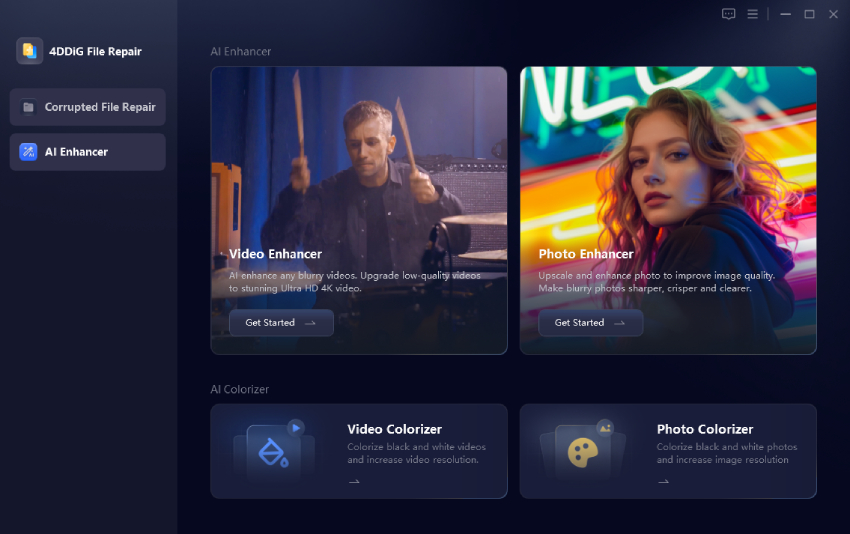
  • Import your video. Open the AI Enhancer tab, choose Video Enhancer.

    select 4ddig video enhancer
  • Then click Add Videos to upload your low-resolution PS2 game recordings to 4DDiG.

    add low resolution ps2 game recordings to 4ddig
  • Pick a model and resolution. Select the AI model, set the output to 4K, and click on Enhance.

    start enhancing ps2 game recordings
  • Preview and save. Check the result, then click Save.

    preview and save enhanced videos

Results depend on how clean your original recording is.

Tip:

Look for more AI video upscales for 4K solution.

Frequently Asked Questions About PS2 Upscaling

Q1: How to Upscale PS2 Games to HD, 1080p, or 4K

Connect the PS2 by component cable to a scaler. The RetroTINK-5X Pro outputs 1080p and the RetroTINK-4K reaches 4K. For recorded gameplay, use 4DDiG Video Enhancer.

Q2: Does PS3 upscale PS2 games?

Only early backward-compatible models play PS2 discs, and they can scale the picture to HD. It's still a 480-line image enlarged, so a dedicated scaler looks better.

Q3: Which is the best budget PS2 upscaler?

The GBS-C. A DIY build with an HDMI converter costs about $55 to $65.

Q4: What is the best upscaler for old consoles?

The RetroTINK-5X Pro is the best all-rounder. Pick the OSSC for the lowest lag, or the RetroTINK-4K for 4K output.

Q5: What is the best PS2 to HDMI upscaler?

The RetroTINK-5X Pro. It outputs clean 1080p and deinterlaces 480i with motion adaptive processing.

Conclusion

The right PS2 upscaler depends on your TV and your budget. The RetroTINK-5X Pro is good for most people. The OSSC is best for lag. The GBS-C is the budget option.

And if you record your sessions, 4DDiG Video Enhancer AI will upscale that footage to 4K. Download it for free and try it out on one clip and see how much sharper your favorite PS2 moments can look.

FREE DOWNLOAD

Secure Download

FREE DOWNLOAD

Secure Download

Sawart Mashab (senior editor)

Sawart Mashab, the content writer for 4DDiG, is adept at creating informative and practical solutions related to Windows and macOS issues, data recovery, file repair, and RAID storage.

(Click to rate this post)

You rated 4.5 ( participated)