How to Fix Amazon Prime Video Unavailable Error (Error Code 5001 & More)

5 mins read

Updated on 2026-02-02 18:55:13 to Video Error

Nothing is more frustrating than settling in to watch a show, only to see Amazon Prime Video unavailable appear on your screen. Whether it's Error Code 5001, a regional restriction message, or a sudden "title unavailable" notice, these interruptions can feel random and confusing.

The good news is that most Amazon Prime Video unavailable errors are caused by fixable account, app, or licensing issues. This guide walks you through what the error really means and how to fix it step by step.

amazon prime video unavailable

Part 1. What Does "Video Unavailable" Mean on Amazon Prime

Before jumping into fixes, it's important to understand what Amazon Prime Video is actually telling you. "Video unavailable" is not a single error, but a general playback status used in various situations. Depending on the message shown, the cause and solution can vary significantly.

1️⃣ What Does "Amazon Video Not Unavailable" Mean?

When Amazon Prime displays a video unavailable message, it means the platform cannot legally or technically deliver the content to your device at that moment. This could be due to account sync issues, app cache errors, expired licensing, or regional viewing restrictions. In many cases, the content still exists on Prime Video, it's just temporarily inaccessible.

2️⃣ Common Scenarios & Error Messages

Below are the most common Amazon Prime Video unavailable messages and what they usually indicate:

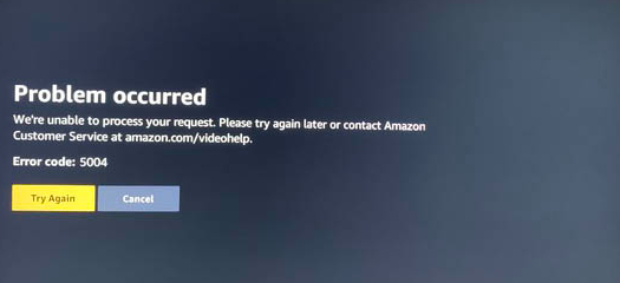
Error Code 5001

This error typically points to account authentication, cached data conflicts, or app sync problems. It often appears after app updates or sudden playback interruptions.

"This title is unavailable due to expired rights".

Amazon no longer holds streaming rights for this content in your region, or the license has temporarily expired.

"This video is currently unavailable to watch in your location".

The content is restricted by region and not licensed for your country or IP address.

"AirPlay is unavailable for this video".

Certain Amazon Prime titles restrict screen mirroring or AirPlay due to copyright protections.

3️⃣ Error Code 5001 vs Default Unavailable Error

Aspect Error Code 5001 Default Video Unavailable
Primary Cause App/account sync or cache issue Licensing or regional restriction
Appears Suddenly Yes Often, after content changes
Fixable Locally Usually Sometimes
Device Related Yes Not always

Part 2. Why Is My Amazon Prime Video Unavailable?

Understanding the root causes makes troubleshooting much easier. In most cases, Amazon Prime Video unavailable or Prime Video not working errors are not caused by server outages but by local or account-related issues. Common reasons include:

  • Temporary app glitches or corrupted cache
  • Account login desynchronization
  • Expired or region-locked streaming licenses
  • VPN or proxy interference
  • Device firmware or OS compatibility issues
  • Corrupted offline video downloads

These issues explain why users often ask, "Why does it keep saying video is unavailable?" even when their internet works fine.

Part 3. How to Fix Amazon Prime Video Unavailable Error [Step-by-Step]

Below are proven solutions. Each fix includes a clear introduction before the steps, as requested.

1. Log Out and Log Back In to the Amazon Account

Account authentication errors are one of the most common causes behind Error Code 5001 and generic unavailable messages. Logging out forces Amazon Prime Video to refresh your account's credentials and content permissions. This method is especially effective if the error appears suddenly without any app updates.

  • Open the Prime Video app or website, then Navigate to Settings (gear icon) or your account profile, and click "Sign Out".

    sign out amazon prime video
  • Close the app completely, then reopen Prime Video and sign back in

  • Try playing the video again

2. Restart Device and Prime Video App

Temporary memory or background process conflicts can prevent Prime Video from loading content properly. Restarting clears cached processes that may block playback authorization. This fix works well for Error Code 5001 and AirPlay-related unavailable messages.

  • Close the Prime Video app fully.

  • Then restart your device (TV, phone, PC, or tablet): Power it off completely (unplug if possible), wait 30–60 seconds, then turn it back on.

  • For Fire TV/Stick: Go to "Settings" > "My Fire TV" > "Restart".

  • Launch Prime Video again and retry playback.

3. Check Content in "My Stuff" & Sync Content in Settings

Some users report that videos disappear mid-watch due to content syncing issues. Re-syncing your saved titles refreshes Amazon's content availability check. This method is particularly effective when you see "This title is unavailable due to expired rights", but others can still watch it.

  • Open Prime Video and go to "My Stuff" or "Download".

  • Remove the unavailable downloaded title.

  • Once done, go to "Settings" and choose "Sync Amazon Content", then search and re-add the title.

    sync amazon content to fix unavailable video

4. Check Regional Licensing / Content Availability

Amazon Prime Video content availability varies by country due to licensing agreements. If you recently traveled or changed networks, your region may have shifted. This explains why you see the "This video is currently unavailable to watch in your location" error.

  • Check your Amazon account country settings by going to "Menu" in the Amazon app and tapping "Country/Region & Language". Tap "Done" to save changes to your Amazon account.

    check amazon prime content availability in app
  • Or, go to amazon.com/account > "Manage Your Content and Devices" > "Preferences" > "Country/Region Settings".

    check amazon prime account region online
  • Avoid switching regions repeatedly as content varies according to region, and changing regions using a VPN may not always work.

5. Search for Alternative Copy Version and Fast Forward

Some Prime titles exist in multiple versions (HD, UHD, remastered, bonus editions). Occasionally, one version becomes unavailable while another remains accessible. Users have successfully resumed playback by switching versions.

  • Search for the same title manually

  • Select a different version (HD/UHD), then start playback

  • Fast-forward to your last watched point

6. Clear Browser / App Cache

Corrupted cache files can prevent Prime Video from loading content permissions correctly. Clearing the cache resets local playback data without affecting your account. This is one of the most reliable fixes for Error Code 5001.

On Android:

  • Open device Settings and go to "Apps", then find the Prime Video app and go to its "Storage".

  • Choose "Clear Cache" or "Clear Data" and then restart the app.

    clear amazon privme video app cache android

On iOS:

  • Go to "Settings" > "General" > "iPhone Storage".

  • Find Prime Video. Tap "Offload App" (keeps data) or "Delete App" (removes everything).

    offload amazon prime video app
  • Reinstall from App Store.

For Smart TVs:

  • Navigate to "Settings" > "Applications" > "Prime Video".

  • Select "Clear Cache" and "Clear Data".

  • Restart your TV and log back into Prime Video.

For Web Browsers:

  • Go to "Settings" and then "Privacy and Security".

  • Choose "Delete Browsing Data" and set the time to "All time", then choose what data you want to delete and click "Delete Data".

    clear browser caches to fix amazon primve unavailable error

7. Disable/Enable VPN/Proxy

VPNs can trigger regional content blocks even if you are in a supported country. Amazon Prime actively detects IP masking, which can result in video unavailable errors. Temporarily disabling or switching your VPN often resolves this instantly.

  • Turn on/off VPN or proxy by using your VPN app.

    disable or enable vpn or proxy
  • Restart Prime Video and test playback .

⚡ Part 4. Bonus: How to Fix the Saved Amazon Prime Video Content Not Playing Issue

Sometimes the issue isn't availability, but corruption. Offline Amazon Prime videos can become damaged due to interrupted downloads, storage errors, or device crashes. In these cases, standard fixes won't work.

This is where 4DDiG Video Repair solves this fast with AI-powered fixes for unplayable Prime Video files (MP4/MOV/MKV). It specializes in repairing corrupted or unplayable video files, including offline Prime Video downloads black screen, won't load, freeze, or display errors. The tool supports high-resolution formats and restores playback without re-downloading.

Steps to repair Amazon Prime videos with 4DDiG Video Repair:

  • Download and install 4DDiG File Repair software on your computer and launch it. Click "Video Repair" from the left side and click "Add Videos" to add your corrupted videos.

    FREE DOWNLOAD

    Secure Download

    FREE DOWNLOAD

    Secure Download

    add corrupted amazon prime videos to 4ddig
  • Click the "Repair All" button to repair all videos automatically with 4DDiG without any manual efforts.

    start repairing corrupted prime videos
  • 4DDDiG will instantly repair your videos, and you can check the results by clicking "Preview". If you are satisfied with the results, click "Save" and choose a location to save the repaired video.

    preview and save repaired amazon prime videos

People Also Ask about Amazon Video Unavailable Error

Q1: Why does it keep saying video is unavailable?

Usually due to app glitches, poor internet, server issues, or authentication errors (like error code 5001). Restart device/app, log out/in, or clear cache often fixes it.

Q2: What does "currently unavailable" mean on Amazon Prime?

The title can't play right now, due to regional blocks, expired licenses, technical glitches, VPN detection, or content removal.

Q3: Why are some Amazon Prime videos unavailable in my location?

Content licensing varies by country. Your IP shows your location, so titles not licensed there (or blocked by VPN) become unavailable.

Q4: What does it mean when it says unavailable due to expired rights?

Amazon's licensing deal for that title ended, so it's no longer streamable in your region (common for older content).

Q5: Why can't I access Prime Video if I have Amazon Prime?

Check for login issues, payment problems, too many streams, outdated app, or device limits. Verify subscription status and sign out/in.

Conclusion

Seeing Amazon Prime Video unavailable doesn't always mean the content is gone forever. Most errors, especially Error Code 5001, are caused by temporary app, account, or licensing issues that can be fixed in minutes.

By following the step-by-step solutions above, you can restore playback quickly and avoid future interruptions. If offline videos fail to play due to corruption, 4DDiG Video Repair provides a reliable way to recover and watch your saved content again.

FREE DOWNLOAD

Secure Download

FREE DOWNLOAD

Secure Download

William Bollson (senior editor)

William Bollson, the editor-in-chief of 4DDiG, devotes to providing the best solutions for Windows and Mac related issues, including data recovery, repair, error fixes.

(Click to rate this post)

You rated 4.5 ( participated)