What Is NAS (Network Attached Storage)? Complete Beginner’s Guide

5 mins read

Updated on 2026-04-17 15:36:11 to Windows Recovery Solutions

If you’ve ever wondered what is NAS, you’re not alone. As data storage needs grow, more people are turning to Network Attached Storage for a flexible and reliable solution.

Whether for home backups or business file sharing, NAS offers a powerful alternative to traditional storage methods without requiring advanced technical knowledge.

what is nas

What Is Network-attached Storage?

To understand what is NAS storage, think of it as your own private cloud that lives in your home or office. Network Attached Storage (NAS) is a dedicated device connected to your network that allows multiple users and devices to store, access, and share files in one central location.

Unlike a regular external hard drive that connects to one computer, a NAS device connects to your router. This means anyone on the same network (and even remotely, if configured) can access the stored data.

In simple terms, the NAS storage meaning is centralized, network-based file storage that is always available when powered on. It acts like a mini server but is designed to be easy to use, even for beginners.

How Does NAS Storage Work?

Now that you know what is a NAS device, it’s important to understand how it actually works.

A NAS device connects to your local network through an Ethernet cable. Once connected, it gets an IP address from your router, allowing other devices to communicate with it. Users can then access files using computers, smartphones, or tablets.

Here’s how does NAS storage works in simple terms:

  • The NAS stores data on internal hard drives
  • It runs its own lightweight operating system
  • Devices on the network send requests to access files
  • The NAS processes these requests and delivers data

Most NAS systems also support remote access, meaning you can access your files from anywhere via the internet. This is why many users compare NAS to cloud storage, but with more control and privacy.

What Are the Key Features of NAS?

NAS devices are popular because they offer a wide range of useful features. Here are the key features that define what is NAS network attached storage.

  • Centralized file storage accessible by multiple users
  • Remote access from anywhere via an internet connection
  • Automatic backup and data synchronization
  • RAID support for data redundancy and protection
  • Media streaming to TVs, smartphones, and devices
  • User access control and permission management
  • Cross-platform compatibility (Windows, macOS, Linux)
  • Expandable storage by adding more drives
  • Energy-efficient compared to full servers
  • Built-in apps for file sharing, backups, and security

These features make NAS suitable for both personal and professional use.

What Is NAS Used For?

Understanding what is NAS used for is essential because it highlights why this technology has become so popular across both personal and professional environments.

A NAS device is not limited to just storing files; it acts as a central hub for managing, accessing, and protecting data efficiently. Its flexibility allows users to adapt it for multiple real-world applications depending on their needs.

what is nas used for

File Storage and Sharing Across Devices

One of the most common uses of NAS is centralized file storage and sharing. Instead of keeping files scattered across different devices, a NAS allows users to store everything in one location.

This makes it easy to access files from laptops, smartphones, or tablets within the same network. Additionally, multiple users can access or edit shared files simultaneously, making collaboration smoother and more efficient.

Backup Solution for Computers and Mobile Devices

NAS is widely used as a reliable backup solution for both personal and business data. You can set up automatic backups for your computer, phone, or even cloud accounts, ensuring your data is always protected.

Unlike manual backups, NAS systems can run scheduled backups in the background without user intervention. This reduces the risk of losing important files due to accidental deletion, system crashes, or hardware failure.

Media Server for Streaming Movies and Music

Another popular use of NAS is as a media server. Users can store movies, TV shows, music, and photos on the NAS and stream them directly to smart TVs, gaming consoles, or mobile devices.

This eliminates the need for multiple storage devices and allows seamless entertainment access throughout your home. Many NAS systems also support media management apps that organize content automatically.

Surveillance Storage for Security Cameras

NAS devices are often used in home and business security systems. They can store video footage from IP cameras, acting as a centralized surveillance hub. With built-in monitoring tools, users can view live feeds, playback recordings, and manage storage efficiently. This makes NAS a cost-effective alternative to dedicated surveillance systems.

Hosting Personal Cloud Services

A NAS can function as a private cloud, allowing users to store and access files remotely without relying on third-party cloud providers. This gives users complete control over their data while maintaining privacy. You can upload, download, and share files securely from anywhere with an internet connection.

Managing Large Data Libraries

For users dealing with large amounts of data, such as photographers, videographers, or businesses, NAS provides scalable storage. You can expand storage capacity by adding more drives, making it ideal for growing data needs. This ensures long-term usability without constantly replacing storage solutions.

Overall, NAS is a multi-purpose storage solution that adapts to various needs, from simple home backups to advanced business operations.

What are the Key Components of a NAS System?

To fully understand what is NAS storage, it’s important to look inside the system and understand the components that make it work. Each part plays a specific role in ensuring performance, reliability, and data protection.

Hard Drives (HDD/SSD)

Hard drives are the core storage units of any NAS system. These drives store all your data, including documents, media files, and backups. NAS devices usually support multiple drives, allowing users to configure RAID setups for better data protection and redundancy.

You can choose between HDDs for higher capacity or SSDs for faster performance, depending on your needs.

Processor (CPU)

The CPU is responsible for processing data and managing system operations within the NAS. It handles tasks such as file transfers, media streaming, and running applications. A more powerful processor ensures smoother performance, especially when multiple users access the NAS simultaneously. High-end NAS systems often include advanced CPUs for demanding workloads.

RAM (Memory)

RAM helps the NAS handle multiple tasks at once by temporarily storing active data. More RAM allows the system to run faster and manage more users or applications simultaneously. It is especially important for tasks like media streaming, virtualization, or running multiple services. Upgradable RAM is a useful feature for many NAS devices.

Network Interface (Ethernet Port)

The network interface connects the NAS to your local network, enabling communication with other devices. Most NAS systems use Ethernet ports for stable and fast connections. Some advanced models include multiple ports or support link aggregation for higher speeds. This ensures smooth data transfer and better performance across the network.

Operating System

Every NAS device runs a specialized operating system designed for storage management. This OS provides a user-friendly interface to manage files, users, permissions, and applications. It also includes built-in tools for backups, security, and system monitoring. Popular NAS brands offer intuitive interfaces that make setup and daily use easy.

RAID Controller

The RAID controller manages how data is distributed across multiple drives. It ensures redundancy, meaning your data is protected even if one drive fails. Different RAID configurations offer varying levels of performance and safety. This component is crucial for maintaining data integrity and minimizing the risk of data loss.

Each of these components works together to create a reliable and efficient storage system, making NAS a powerful solution for both personal and professional use.

What Are the Different Types of NAS Devices?

Not all NAS devices are the same. They vary based on performance, capacity, and intended use. Understanding these types helps you choose the right NAS for your specific needs.

Personal/Home NAS

Personal or home NAS devices are designed for individual users or families. They are typically compact, affordable, and easy to set up, making them ideal for beginners. These devices are perfect for storing photos, videos, and backups in one centralized location.

Despite their simplicity, many home NAS systems still offer advanced features like remote access and media streaming.

Small Business NAS

Small business NAS systems are built to handle multiple users and larger workloads. They offer better performance, increased storage capacity, and enhanced security features compared to home NAS devices.

These systems support file sharing, collaboration, and automated backups for teams. They are ideal for small offices that need reliable and scalable storage solutions.

Enterprise NAS

Enterprise NAS devices are designed for large organizations with heavy data requirements. They provide high performance, massive storage capacity, and advanced features such as virtualization support and data redundancy.

These systems are built to handle thousands of users and large-scale operations. While powerful, they are also more expensive and require professional management.

Cloud-integrated NAS

Cloud-integrated NAS combines local storage with cloud services, offering the best of both worlds. Users can store data locally while also syncing it with cloud platforms for remote access and backup. This setup enhances data accessibility and security. It is especially useful for users who want flexibility without fully relying on third-party cloud storage.

DIY NAS

DIY NAS systems are custom-built using standard computer hardware and NAS software. They offer maximum flexibility and customization for advanced users. You can choose your own components and configure the system according to your needs. However, they require technical knowledge to set up and maintain properly.

Choosing the right type of NAS depends on your storage needs, budget, and level of technical expertise.

NAS vs Other Storage Solutions

To better understand what is NAS, it’s useful to compare it with other storage options.

1NAS vs SAN

NAS is file-based and easy to use, while SAN is block-based and designed for high-performance enterprise environments. NAS is more affordable and beginner-friendly.

2NAS vs DAS

DAS (Direct Attached Storage) connects directly to one device, while NAS connects to a network and supports multiple users. NAS offers better flexibility.

3NAS vs Cloud Storage

Cloud storage stores data on remote servers, while NAS stores data locally. NAS provides better privacy and control, while the cloud offers convenience and accessibility.

4NAS vs External Hard Drive

External drives are simple but limited to one device. NAS allows multiple users and remote access, making it more versatile.

Advantages and Disadvantages of NAS

Like any technology, NAS has its pros and cons.

  • Pros:
  • Cons:
    • Centralized storage for easy access
    • Supports multiple users simultaneously
    • Data redundancy with RAID protection
    • Remote access capabilities
    • Scalable storage expansion
    • The initial setup cost can be high

    • Requires basic network knowledge

    • Performance depends on network speed

    • Needs regular maintenance and updates

How to Choose the Right NAS Device?

Choosing the right NAS can feel overwhelming at first, especially with so many models and configurations available. However, focusing on a few key factors can simplify the decision and help you pick a device that meets both your current and future needs.

  • Start by estimating how much data you currently have and how quickly it is growing. It’s always better to choose a NAS with extra capacity so you don’t run out of space within a year or two.
  • HDDs are more affordable and offer larger storage capacity, making them ideal for backups and media storage. SSDs, on the other hand, provide much faster read/write speeds, which are useful for tasks like video editing or running applications.
  • NAS devices come with different numbers of drive bays, typically ranging from 1 to 8 or more. More bays allow you to expand storage later and also enable better RAID configurations for data protection.
  • RAID helps protect your data by duplicating it across multiple drives or distributing it intelligently. Choosing a NAS with flexible RAID options ensures your data remains safe even if one drive fails.
  • A more powerful CPU and higher RAM allow the NAS to handle multiple users, file transfers, and applications smoothly. This is especially important if you plan to use your NAS for streaming, backups, or business tasks.
  • Make sure the NAS supports your operating systems, such as Windows, macOS, Android, or iOS. Compatibility ensures seamless file sharing and easy access across all your devices.
  • Many NAS systems allow you to access your files remotely through apps or web interfaces. This feature is useful if you travel often or need access to your data outside your home or office network.
  • While budget is important, it’s also essential to choose a reliable brand known for good support and regular updates. Investing in a trusted NAS brand can save you from potential issues in the long run.

A well-chosen NAS can serve you for years without issues, providing reliable and flexible storage for all your data needs.

What Are Some Popular NAS Brands?

Several brands dominate the NAS market with reliable products.

  • Synology: Known for its user-friendly interface and powerful features
  • QNAP: Offers high-performance NAS devices with advanced capabilities
  • Western Digital (WD): Great for beginners and home users
  • Seagate: Reliable storage-focused NAS solutions
  • Asustor: Balanced performance and affordability

These brands offer a wide range of devices for different needs.

How to Set Up and Use a NAS?

Setting up a NAS might sound complex, but most modern devices make the process simple. First, install the hard drives into the NAS enclosure. Then connect the device to your router using an Ethernet cable. Power it on and follow the on-screen setup instructions via a web browser.

Once configured, you can create folders, set permissions, and start transferring files. Many NAS systems also provide apps for backups, media streaming, and remote access. Learning how to use NAS storage becomes easier with time, especially with user-friendly interfaces provided by modern brands.

⚡ NAS Data Recovery: What to Do If Data Is Lost?

Despite its reliability, data loss can still happen due to hardware failure, accidental deletion, or system errors. In such situations, having a reliable recovery solution is essential.

4DDiG Data Recovery is a powerful tool designed to recover lost data from NAS systems, RAID configurations, and external drives. It helps retrieve files even in complex scenarios, ensuring your valuable data is not permanently lost.

FREE DOWNLOAD

Secure Download

FREE DOWNLOAD

Secure Download

  • Download and install 4DDiG on your computer. Launch it and select the “NAS Data Recovery” tab.

    4ddig nas data recovery interface
  • If the NAS device can be detected, you can promptly enter the next step. If not, you can follow to enter the corresponding information to connect to NAS manually, then click the “Connect Now” button.

    enter nas information to connect
  • 4DDiG will immediately connect to your NAS device and show the details. You can select the location where you want to recover the data from.

    select a location on nas
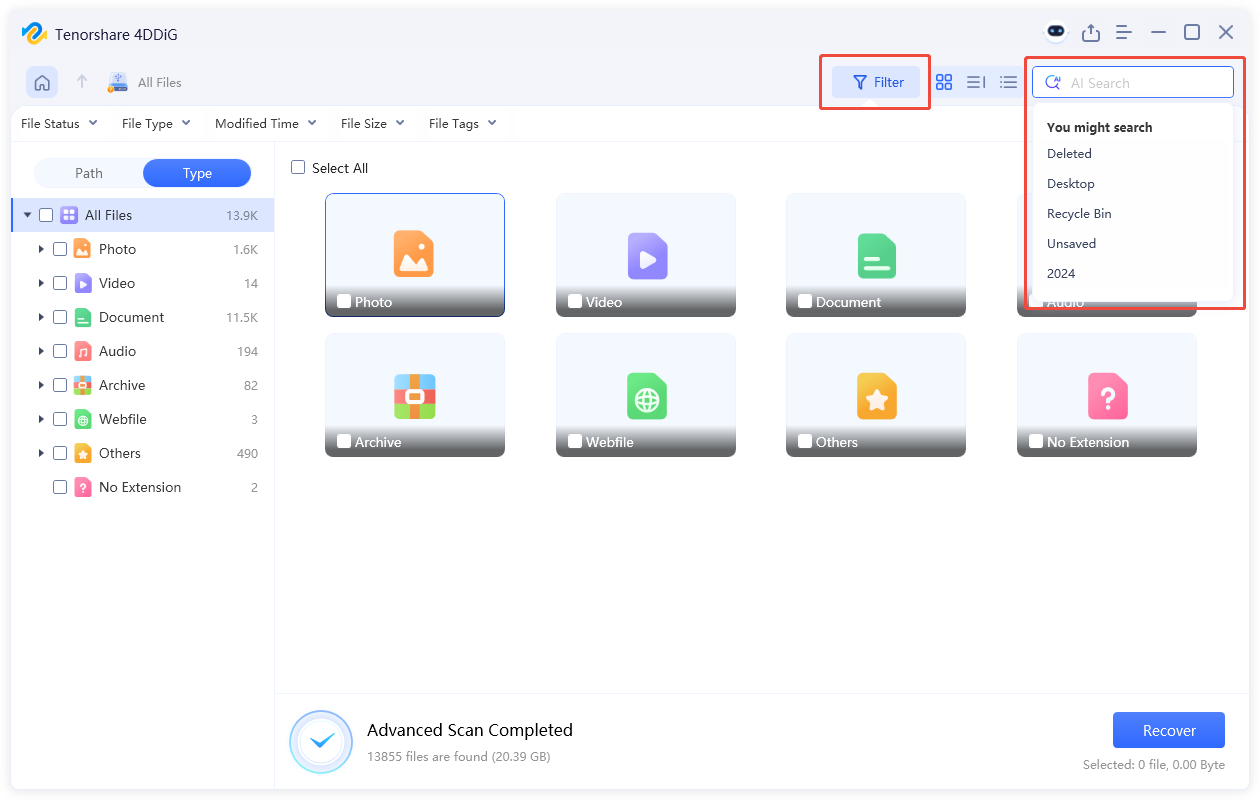
  • The process will take a few minutes. When it’s done, you can use the Filter or Search feature to find the files you want to recover.

    scan nas device
  • You can click any file you want to have a quick preview, then click “Recover” to restore the recoverable files and save them to a safe location.

    recover nas files

FAQs About NAS

Q1: Can a NAS be used without the internet?

Yes, a NAS can work without the internet as long as it's connected to a local network. You can still access files within the same network without any issues.

Q2: Is NAS better than cloud storage?

NAS offers more control and privacy, while cloud storage provides convenience and remote access. The better option depends on your needs and preferences.

Q3: Do I need a router for a NAS?

Yes, a router is required to connect the NAS to your network. It allows multiple devices to access the NAS simultaneously.

Q4: Are NAS drives worth it for home use?

Yes, NAS devices are worth it for home users who need centralized storage, backups, and media streaming capabilities.

Conclusion

Now that you understand what is NAS, it’s clear why it has become a popular storage solution for both homes and businesses. From centralized storage to remote access and data protection, NAS offers powerful features in an easy-to-use package.

If data loss occurs, 4DDiG Data Recovery provides a reliable way to recover files from NAS systems and other storage devices, ensuring your important data is always protected and accessible.

FREE DOWNLOAD

Secure Download

FREE DOWNLOAD

Secure Download

William Bollson (senior editor)

William Bollson, the editor-in-chief of 4DDiG, devotes to providing the best solutions for Windows and Mac related issues, including data recovery, repair, error fixes.

(Click to rate this post)

You rated 4.5 ( participated)