Normal Photo to HD Photo Converter | 7 Best AI Upscalers

5 mins read

Updated on 2026-04-08 17:08:13 to Photo Tips

Have you ever captured a perfect moment only to find the image looks blurry, grainy, or pixelated? Finding a reliable normal photo to HD photo converter can solve this frustration instantly. Whether you need a normal to HD photo converter free or a professional suite, upscaling technology has evolved.

This article explores the best normal image to HD image converters like ImgUpscaler AI, Upscale.Media, LetsEnhance, etc. and shows you how to transform your low-res photo into a stunning masterpiece.

normal photo to hd photo converter

Part 1. What Is a Normal to HD Photo Converter & How Does It Work?

1. What Does "HD Photo" Really Mean? (720p vs 1080p vs 4K)

"HD" stands for High Definition. In the context of photography, it refers to the density of pixels and the overall sharpness of the image.

A normal image to HD image converter is a tool that increases image resolution and improves visual quality using algorithms or artificial intelligence.

  • 720p (Standard HD): 1280 x 720 pixels. Good for small screens.
  • 1080p (Full HD): 1920 x 1080 pixels. The gold standard for web content and social media.
  • 4K (Ultra HD): 3840 x 2160 pixels. Provides incredible detail for printing and large displays. See: 8 Best 4K Image Converter You Should Never Miss 2026

When you use a tool to transform a normal image to hd image, you are essentially increasing the pixel count while maintaining or enhancing the clarity of the original subject.

2. AI vs Traditional Upscaling: What's the Difference?

Traditional upscaling works through interpolation. It looks at existing pixels and "guesses" what the new pixels should look like based on surrounding colors. This often results in a blurry, "stretched" look.

AI Upscaling, used by modern converters, employs deep learning. The AI has been trained on millions of high-res images. When it sees a low-res photo, it doesn't just guess. It reconstructs missing details, sharpens edges, and removes noise, effectively "reimagining" the photo in high definition.

Part 2. Best Powerful Normal Image to HD Image Converter for Desktop

4ddig photo enhancer

When online tools aren't enough, 4DDiG Photo Enhancer provides the raw processing power of your computer to convert normal image to hd image with unmatched precision. This desktop software is built for high-performance tasks and can handle massive files without the lag often found in web browsers.

This is a dedicated AI-powered desktop application that specializes in restoring old, blurry, or overexposed photos. It features three specialized AI models, such as the General Model, the Denoise Model, and the Face Model. It works offline and handles large files efficiently.

FREE DOWNLOAD

Secure Download

FREE DOWNLOAD

Secure Download

Best For: Professional photographers or anyone looking to restore old family archives in high definition.

Key Features:

  • Pros
  • Cons
    • Excellent detail reconstruction and high-quality output suitable for professional use;
    • Works offline after installation;
    • Handles severely degraded photos well
    • Handles bulk processing effortlessly;
    • No file size limits
    • Free tier uses limited credits
    • Free tier uses limited credits
    • Free tier uses limited credits
    • Free tier uses limited credits
    • Free tier uses limited credits

Part 3. Top 5 Best Free & Online Normal Photo to HD Photo Converters

If you don't want to install heavy software, a normal photo to HD photo converter online free is your best bet. Here is a quick comparison of the top options.

Quick Comparison of the Best HD Photo Converters

Tool Best For Price Max Upscale
ImgUpscaler AI Quick, Free HD Conversion Free / Paid 400%
Canva Social Media Design Free / Pro Varies
Upscale.Media No Watermarks Free 4x
LetsEnhance Professional Textures Paid (Free Trial) 16x
Fotor Portraits Paid (Free Trial) 4x

1. ImgUpscaler AI -- Best Free Normal Photo to HD Photo Converter

imgupscaler free online ai hd photo converter

ImgUpscaler AI is a dedicated platform designed for users who need a normal photo to hd photo converter online for free. It focuses on resolution enhancement, making it incredibly streamlined. You simply upload your file, choose the magnification (200% or 400%), and let the AI do the work. It is particularly good at handling "noisy" photos taken in low light.

Best For: Users who want a no-fuss, one-click solution for quick upscaling.

Key Features:

  • Batch processing support.
  • AI-powered sharpening.
  • Supports massive upscaling up to 16K resolution.
  • No account registration required for basic use.
  • Specific "HD Converter" algorithm.
  • Supports JPG, PNG, and WebP.
  • Pros
  • Cons
    • Truly free with no mentioned limits or watermarks;
    • Excellent quality preservation;
    • Supports very high resolutions.
    • Easy for beginners
    • Limited daily credits for free users;
    • Lack of advanced editing tools

2. Canva HD Photo Converter -- Best for Beginners

canva hd photo converter

Canva is a powerhouse for design, but many don't realize it has a built-in HD converter. When you upload a photo to Canva, you can use their "Enhance" or "Magic Edit" tools to sharpen the image before exporting it in high-resolution formats like SVG or print-quality PDF. Canva provides a seamless experience for those who aren't tech-savvy.

Best For: Small business owners and social media managers.

Key Features:

  • Upscale images by up to 4x larger
  • Custom export settings for DPI and resolution.
  • Works with all Canva design tools.
  • Massive library of filters.
  • Direct sharing to social media platforms like Instagram and LinkedIn.
  • Pros
  • Cons
    • Extremely user-friendly;
    • Works on any device;
    • Great for reat for combining upscaling with social media or print designs
    • Requires a Canva account;
    • Some advanced AI features are behind a Pro paywall

3. Upscale.Media -- Best Online HD Converter Without Watermark

upscale media

Upscale.Media stands out for its simplicity and the ability to convert a photo to HD 1080p online free without watermark. It provides several scaling options (2x, 4x, 8x) and even includes a "Remove Artifacts" toggle to reduce JPEG compression noise. The real-time preview feature lets you compare before-and-after results side by side before you commit to a download.

Best For: Quick tasks where you need a high-res image for personal use without any branding.

Key Features:

  • Multiple upscaling options (2x, 4x, 8x).
  • AI-powered artifact and noise removal.
  • High-quality output suitable for professional presentations.
  • Real-time preview to check results before downloading.
  • Pros
  • Cons
    • Strong free tier without watermarks;
    • Fast and effective for natural results;
    • Versatile for digital and print projects
    • Batch processing mainly for paid/enterprise users;
    • Advanced features may push toward upgrades

4. LetsEnhance -- Best for High-Quality AI Upscaling

letsenhance

LetsEnhance is an advanced platform designed for high-quality normal image to HD image conversion. It offers specialized "recipes" for different types of images, like "Digital Art," "Photo," or "Text." This platform is designed for photographers and creators who need the highest possible fidelity. It doesn't just upscale, it adds texture and clarity that wasn't there before.

Best For: Professionals and print-on-demand sellers.

Key Features:

  • Professional-grade AI models for different image types (Portraits, Landscapes).
  • Ability to reach 4K and higher resolutions with ease.
  • API integration for business automation.
  • Enhances colors and lighting automatically.
  • Pros
  • Cons
    • Industry-leading AI algorithms,
    • Very high detail retention
    • Professional results suitable for prints and e-commerce;
    • Easy no-install workflow
    • Free tier uses limited credits;
    • Larger file sizes after enhancement

5. Fotor AI Photo Enhancer -- Best for Portrait & Social Media Photos

fotor ai photo enhancer

Fotor AI Photo Enhancer is a powerful "one-tap" solution. It is especially effective at detecting faces and applying specialized sharpening to eyes and skin. The tool is web-based and includes additional editing features. It's particularly effective for social media images.

Best For: Portraits and quick social media repairs.

Key Features:

  • 2x lossless upscaling with detailed reconstruction.
  • Secure and private processing (images deleted after 24 hours).
  • 16-bit depth retention for superior color accuracy.
Editor's Note:

Fotor strikes a great balance between simplicity and power, especially for mobile users via its app. Free credits allow testing the advanced mode without watermarks, but full unlimited exports may require a Pro plan, still one of the most accessible options for quick, high-clarity social-ready results.

Part 4. Best App to Convert Normal Photo to HD for Mobile

remini normal photo to hd photo converter

Remini has become a viral sensation for its ability to turn "potato quality" mobile photos into stunning HD portraits. It is the go-to app for mobile users. Remini uses movie-grade AI technology to reconstruct facial details. It is perfect for those blurry shots taken in low light or screenshots of old photos.

Best For: Improving old mobile photos or enhancing social media posts on the go.

Key Features:

  • Incredible facial detail enhancement.
  • Video enhancer to upgrade low-quality clips.
  • AI Photo Generator to create professional headshots.
  • One-tap "Enhance" button for quick fixes.
  • Pros
  • Cons
    • Extremely easy and fast with impressive results on portraits and old photos;
    • Works directly on your phone gallery
    • Incredible facial reconstruction
    • Very easy to use
    • The free version is heavy on ads;
    • Subscription can be expensive

⚡ Part 5. How to Convert Normal Photo to HD Photo (Step-by-Step)

Turning a low-quality image into HD is now incredibly simple thanks to AI tools. Whether you prefer desktop software, online platforms, or mobile apps, here are three effective ways to convert normal photos to HD with ease.

Method 1: Convert Normal Photo to HD Using AI Tool (4DDiG AI Photo Enhancer)

If you want the highest-quality results with advanced AI processing, 4DDiG Photo Enhancer is the best choice.

Steps:

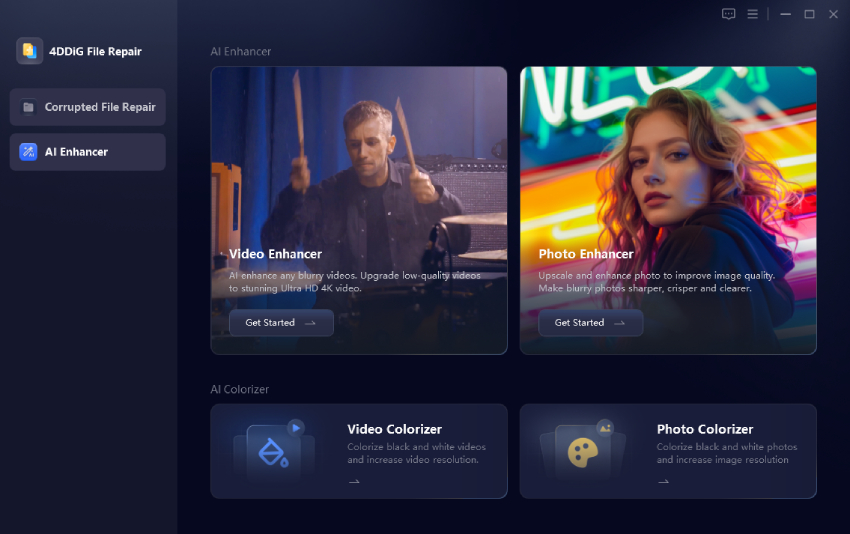
  • Download and install 4DDiG AI Photo Enhancer on your computer. On the left side, click "AI Enhancer" then select "Photo Enhancer."

    select 4ddig photo enhancer
  • Click "Add Photos" to upload blurry or low-quality normal images, or drag and drop them directly.

    add normal photos to enhance
  • Choose an AI model (e.g., General, Denoise, Face Enhancement). Select resolution (e.g., enhance resolution by 2X or 4X). Then click "Enhance." The tool will process your image automatically using AI.

    select ai model and resolution option for enhance
  • Preview the result. If satisfied, click "Save" to export your HD image.

    preview and save enhanced images

Best for users who want professional-quality results and batch processing.

Method 2: Convert Photo to HD 1080P Online Free without Watermark (ImgUpscaler)

For users who want a normal photo to an HD photo converter online for free, ImgUpscaler is a quick and easy browser-based solution.

  • Go to the ImgUpscaler website

  • Click "Upload Image" and select your photo

  • Choose the scaling ratio option (200% or 400%)

  • Let the AI process the image automatically

  • Download the enhanced HD image without a watermark.

    imgupscaler enhance images

Best for fast, free conversion without installing software.

Method 3: Change Normal Picture to HD on Phone with Remini

If you prefer mobile editing, Remini is one of the easiest apps to use.

Steps:

  • Download and install the Remini app (Android or iOS)

  • Open the app and upload your photo

  • Tap the "Enhance" button

  • Wait for AI processing to complete

  • Save the HD version to your phone.

Best for quick edits, selfies, and social media photos on the go.

Part 6. AI Prompts for Better Normal Image to HD Image Conversion

Sometimes, you aren't just upscaling. You are generating. When you are using an AI tool that supports prompts (like an AI Image Expander), try these:

  • "Ultra-realistic 4K textures, sharp focus, cinematic lighting, 8k resolution."
  • "Remove noise and upscale to HD 1080p with natural colors"
  • "Improve lighting, sharpen edges, and increase resolution to Ultra HD."
Tip:

Use 4DDiG File Repair. Its built-in AI Image Expander can enhance pictures based on simple prompt texts. It allows you to not only upscale but also extend the background of your images creatively.

FREE DOWNLOAD

Secure Download

FREE DOWNLOAD

Secure Download

People Also Ask about Normal Photo to HD Photo

Q1: Can we convert a normal photo to HD?

Yes, absolutely! You can add missing pixels and reconstruct details that traditional editing software cannot by using AI-powered tools.

Q2: What is the best normal photo to HD photo converter free?

ImgUpscaler AI and Upscale.Media are excellent free options. ImgUpscaler is great for high resolutions (up to 16K), while Upscale.Media is perfect for quick, watermark-free results.

Conclusion

Restoring your cherished memories doesn't have to be a complicated task. With a reliable normal photo to HD photo converter, you can easily breathe new life into old captures. For the most professional and private results, we highly recommend 4DDiG AI Photo Enhancer. It is the ultimate solution to convert normal photos to HD with ease.

FREE DOWNLOAD

Secure Download

FREE DOWNLOAD

Secure Download

William Bollson (senior editor)

William Bollson, the editor-in-chief of 4DDiG, devotes to providing the best solutions for Windows and Mac related issues, including data recovery, repair, error fixes.

(Click to rate this post)

You rated 4.5 ( participated)