Stranger Things Filter: Create Stunning Stranger Things Style Photos with AI
With Stranger Things Season 5 approaching, global interest in the series continues to surge in 2025. It reflects the lasting cultural impact of the show's dark sci-fi aesthetic and nostalgic 80s vibe. At the same time, the visual style of Stranger Things has evolved into a popular creative trend across social media, photography, and digital art.
Many users now want to create Stranger Things–style photos for avatars, posters, and social content. However, users may lack complex Photoshop skills or professional color grading, and free apps only give cartoonish, low-quality results. This is where the expert AI Stranger Things Filter tool becomes the most efficient solution, allowing anyone to generate cinematic Upside Down–inspired images quickly and effortlessly.
1. Most Popular Stranger Things Filter Styles Users Actually Want
Different Stranger Things–inspired filters create very different visual moods. From dark cinematic effects to nostalgic retro looks, each style serves a unique creative purpose. Below are the most popular filter styles and what they're best used for.
1.1 Dark Red Upside Down Filter (Most Iconic Style)
This is the most recognizable and in-demand Stranger Things photo filter. It recreates the Upside Down with dark red tones, heavy shadows, strong backlighting, and silhouette effects, creating a mysterious, cinematic mood that makes the subject look like a main character between two worlds.
🎬 Visual Features:
- Deep dark red and black color palette
- Heavy fog / mist covering the background
- Floating dust, spores or particles in the air
- Twisted shadow vines or organic textures
- Cold blue rim light outlining the subject
- High contrast and low-key lighting
- Eerie, apocalyptic, horror sci-fi atmosphere
🚩 Main Uses:
- Profile photos or avatars with strong "main character" vibes
- Movie-style posters and cinematic wallpapers
- YouTube thumbnails and video covers
- Fan art and dramatic storytelling visuals
1.2 80s Retro Neon Stranger Things Filter (Aesthetic Style)
This filter highlights the retro 1980s neon sci-fi look with purple and blue lighting, soft glow, and VHS-style grain. It creates a dreamy, nostalgic aesthetic that emphasizes youth, friendship, and emotional storytelling rather than horror.
🎬 Visual Features:
- Neon pink, cyan, and purple glow
- Strong 1980s retro color grading
- Soft bloom around lights
- VHS-style noise, film grain, or scan lines
- High saturation with vibrant highlights
- Synthwave / arcade-style lighting
- Nostalgic, futuristic, and energetic mood
🚩 Main Uses:
- Instagram stories, feed posts, avatars and aesthetic profile photos
- Couple portraits and friendship photos
- Fashion photography and cyber-retro street shots
- Social media branding visuals
- Moodboards, Spotify playlist covers, and Reels
This style performs extremely well on Instagram and Pinterest because of its high visual appeal and soft emotional tone.
1.3 "Car Ride" Cinematic Stranger Things Filter (TikTok Trend Style)
The Car Ride filter recreates a night-driving cinematic scene with streetlights, window reflections, motion blur, and side-face lighting. With warm yellow or cool blue tones and strong light–dark contrast, it delivers a moody, film-still look focused on storytelling rather than fantasy.
🎬 Visual Features:
- Moody nighttime lighting
- Streetlight reflections through the car window
- Blue-orange cinematic color contrast
- Soft motion blur and light streaks
- Shallow depth of field (background out of focus)
- Natural skin tones with cinematic shadows
- Suspenseful, story-driven atmosphere
🚩 Main Uses:
- TikTok short videos and Instagram cinematic reels
- Emotional storytelling clips
- Night photography and urban aesthetic scenes, turning any ordinary car selfie into an instant classic
- Music video-style visual content, song covers and sad edits
This filter is especially popular among short-video creators and narrative content producers.
1.4 Character-Inspired Filters (Vecna, Max, Eleven Style)
These filters are inspired by iconic characters in Stranger Things (Vecna, Max, Eleven, etc.) rather than official templates. Those filters capture the spirit of each iconic role and translate it into a customizable visual language using AI prompts, reflecting a different emotional tone:
- Vecna-style: dark horror lighting, red fog, supernatural shadows
- Max-style: 80s street vibe, skateboard elements, headphone aesthetics
- Eleven-style: psychic red glow, nose-bleed effect, lab-style lighting
These are fan-creation friendly styles, ideal for AI prompt-based image generation and secondary creative works.
🚩 Main Uses:
- Fan art and character re-creations
- CP (couple pairing) artworks
- Story-based posters and comics
- AI character redesign projects
How to Do Studio Ghibli Filter for Photos [Latest Update in 2025]
2. Where Do Users Usually Look for Stranger Things Filters?
Before turning to advanced AI tools, most users first explore social platforms for ready-made Stranger Things–style filters. However, different platforms offer very different levels of quality, customization, and creative control. Here 3 main channels:
- Snapchat Stranger Things Filters – Easy but Limited
- Instagram Stranger Things Filters – Trend-Driven
- TikTok Stranger Things Filters – Trend-Driven
Search Ways and Features of Instagram/TikTok/Snapchat Stranger Things Filters
3. Best Tool to Add Stranger Things Filter to Photo with AI Simply
Entertainment filters in Snapchat, Instagram, or TikTok are fast, but they lack realism, resolution, and creative freedom. To truly recreate the dark atmosphere of the Upside Down, the neon glow of the 80s, or character-inspired scenes, a more powerful AI solution is required.
That's where 4DDiG Photo Enhancer stands out. With its built-in AI Expand Image feature, users can easily add Stranger Things–style cinematic effects to ordinary photos while maintaining high image quality and full creative control, no professional editing skills needed. It provides cinematic quality, with only simple prompts.
What Makes 4DDiG Ideal for Stranger Things Photo Filters
4DDiG Photo Enhancer helps you make it easier, but that's not all:
- Add Stranger Things–style cinematic filters to any photo
- Automatically enhance image resolution and quality to 4K or higher
- Merge your photo with anime / game / film characters
- Turn real-life portraits into anime-style versions
- Create CP fan artworks for secondary creations
- Redress characters in new outfits
- Drop characters into brand-new scenes (bedroom, street, alternate world)
- Turn yourself into an anthropomorphic anime figure
- Uncrop images or expand photo background with AI
- Add multiple visual styles including film, anime, game, sci-fi, and more
Secure Download
Secure Download
Steps to Add Stranger Things Upside Down Filter to Photos in 4DDiG
Unlike social media filters, this method provides true creative freedom and high-resolution output. Just follow the steps below to generate magic photos in Upside Down filter and share to impress others.
-
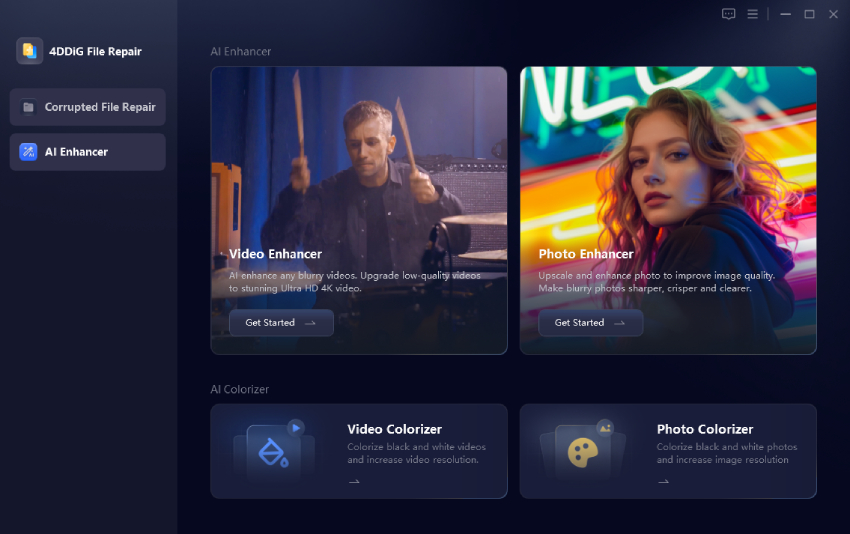
Fire up 4DDiG File Repair the executable. Then head to "AI Enhancer" from the left sidebar and click on "AI Expand Image" afterward.
-
Tap on "Add images to expand" or drag your image that you wanna add Stranger Things Upside Down filter into 4DDiG.
-
Enter the prompts such as the box shows and hit the "AI Expand Image" button to kick off the process.
Click the Prompt Below to Copy & Test NowRemove background and change it to Stranger Things inspired style, dark 80s sci-fi horror atmosphere, red-and-black color palette, glowing red backlight, eerie cinematic fog, floating dust particles, dramatic shadows, supernatural “Upside Down” vibe, neon rim lighting, high-contrast portrait -
Wait for seconds and check the Upside Down filter effect when completed. Click "Export" to save the image, otherwise, change the prompts and "Retry".
4. Latest News Fans Wanna Know about Stranger Things Season 5
With Netflix officially confirming the final chapter, curiosity about Stranger Things Season 5 is at its peak.
4.1 When Is Stranger Things 5 Coming Out?
Unlike past seasons' single drops, Season 5 is split into three holiday-tied volumes to maximize the hype (and your binge sessions).
4.2 What Are the Stranger Things 5 Cast?
The ensemble returns almost intact, with the "kids" now in their late teens/early 20s on-screen (the actors have aged into their 20s off-screen). Focus is on emotional growth amid the chaos. Will's arc shines brightest. New faces add military/lab intrigue, while fan-faves like Eddie Munson stay dead (sorry, no resurrection teases).
This staggered release echoes Season 4's volumes but adds a theatrical finale twist, as confirmed by the Duffer Brothers. International times vary (e.g., 1 a.m. GMT for Volume 1), so check Netflix for your zone.
4.3 How Many Episodes of Stranger Things Season 5 & Episodes Length?
8 episodes total. Most ~60-80 min. Finale = 2 hours 1 minute.
4.4 Is Stranger Things Season 5 the Final Season?
Yes. Season 5 has been officially confirmed as the final season of the series. It will serve as the conclusion to the Hawkins storyline and the Upside Down arc, bringing the long-running narrative to a definitive close.
4.5 Stranger Things Season 5 Ending and Character Fates
Volume 1 is out, no major deaths yet. Expect 2–4 big goodbyes in the finale. Hawkins gets closure, some characters survive and move on.
4.6 What Happens in Stranger Things Season 5 First 5 Minutes (Spoiler Alert!)
Cold open flashback to 1983: Vecna force-feeds young Will the black particles in the Upside Down, explaining his lifelong connection. Mind-blowing full-circle moment.
Zootopia 2: Release Date, Trailer, Cast, and What Fans Can Expect
FAQs about Stranger Things Season 5
Q1: What Is there a real Stranger Things filter on Instagram?
No official licensed filter exists. Most available filters are fan-made AR effects, not cinematic-grade filters.
Q2: Can I use an AI Stranger Things filter for commercial projects?
No, you cannot use an AI Stranger Things filter for commercial projects without explicit permission from Netflix, as it likely infringes on their intellectual property rights. Consider creating original designs or licensing official assets instead.
Conclusion
From the most popular Upside Down effects to retro 80s aesthetics and character-inspired styles, Stranger Things filters have become a powerful visual trend in 2025. While social platforms offer quick entertainment options, only AI tools can truly deliver cinematic quality and creative freedom.
With the help of AI image expansion features like those in 4DDiG Photo Enhancer, anyone can easily transform ordinary photos into high-impact Stranger Things–style visuals for social media, fan art, or even commercial projects—without professional editing skills.
Secure Download
Secure Download
💡 Summarize with AI:
You May Also Like
- Home >>
- AI Image Tips >>
- Stranger Things Filter: Create Stunning Stranger Things Style Photos with AI
ChatGPT
Perplexity
Grok