7 Ranked Low-Quality to High-Quality Image Converter | 2026 New List
5 mins read

Updated on 2026-03-19 21:49:00 to Photo Tips

Blurry, pixelated, or compressed photos are a common problem when images are downloaded, shared on social media, or taken with older cameras. Luckily, modern AI tools can now transform poor images into sharp, detailed visuals. A reliable low quality to high quality image converter uses advanced upscaling algorithms to rebuild lost details and improve image clarity.

This article explores the best apps that turn low-quality image to high quality, helping you quickly enhance photos for social media, printing, or professional use. You can convert low-quality images to high quality using AI upscaling tools like 4DDiG Photo Enhancer, Topaz Gigapixel AI, and LetsEnhance. These tools rebuild details, sharpen images, and increase resolution without quality loss.

low quality to high quality image converter

Part 1. Can We Convert Low Quality Image to High Quality? (Main User Pains & Fixes)

Yes, you can transform poor-quality photos into stunning high-definition visuals. The secret lies in AI-driven upscaling technology, which does not simply stretch pixels. Instead, it analyzes image patterns and intelligently predicts new pixel data to rebuild lost details.

Users often experience issues such as compression artifacts from social media uploads or motion blur caused by camera shake. These problems can be resolved quickly using a modern low resolution photo to high resolution converter.

Another common concern is the "uncanny valley" effect, where enhanced images look overly smooth or artificial. Modern AI models address this by learning from massive datasets of high-resolution photos. As a result, textures such as skin, hair, and fabric can be reconstructed realistically while preserving natural detail.

User Pain Points and Recommended High-Quality Image Converters

If you're looking for the fastest way to choose a tool, here’s a quick breakdown:

  • Best overall: 4DDiG AI Photo Enhancer (all-in-one + batch)
  • Best for printing: Topaz Gigapixel AI (extreme detail preservation)
  • Best online tool: LetsEnhance (no install, fast results)
  • Best for AI art: Magnific AI (generative detail enhancement)
  • Best for anime: Waifu2x (optimized for 2D images)
  • Best for selfies: Remini (face reconstruction)
  • Best for bulk processing: HitPaw FotorPea (automation-friendly)

Recommended Tools by Scenario

User Cases Recommended Tool Why
Any kind of images 4DDiG AI Photo Enhancer Exceptional face restoration and colorization.
Large-format printing Topaz Gigapixel AI Best for preserving sharp edges at massive scales.
Quick online upscaling LetsEnhance Fast, cloud-based, and very beginner-friendly.
AI-generated art enhancement Magnific AI Adds creative textures that didn't exist before.
Anime and digital art Waifu2x Tuned specifically for 2D line art and flat colors.
Social media selfies Remini Market leader for mobile portrait reconstruction.
E-commerce batch processing HitPaw FotorPea Optimized for high-speed bulk image processing.

These tools help users convert low resolution picture to high resolution, improve sharpness, and enhance photo clarity.

Part 2. Top 7 Best Low Quality to High Quality Image Converters for 2026 (Free & Paid)

Choosing the right tool depends on your needs, including budget, platform preference, and image type. Here are the top tools ranked for 2026.

1. 4DDiG AI Photo Enhancer - Best All-in-One Batch 4K/8K Photo Quality Enhancer (Editor's Pick)

4ddig ai photo enhancer

4DDiG AI Photo Enhancer is widely considered one of the best tools available for professional image enhancement without requiring advanced editing skills. This powerful software can batch enhance the quality of multiple photos at once, saving hours of manual work for photographers and archivists.

It effectively removes noise, grain, and facial blemishes while also restoring old photos and colorizing black-and-white images. The AI models can dramatically increase clarity, sharpen blurry images, and upscale photos to high resolutions.

✌ Best for: Users who need a powerful low to high resolution image converter with batch processing.

✨ Key Features:

  • One-click AI facial restoration for blurry portraits.
  • Removes noise, grain, blur, and compression artifacts for low-light photography.
  • Advanced face & body enhancement (blemish removal, skin smoothing)
  • Intelligent colorization of vintage monochrome images.
  • Sharpness enhancement for out-of-focus shots.
  • Colorizes old black-and-white photos.
  • Support for 4K and 8K resolution exports.
  • Batch processing for multiple photos at once
  • Pros
  • Cons
    • Extremely versatile all-in-one features
    • User-friendly interface for beginners and pros
    • Excellent for old photo restoration and bulk editing
    • High-quality natural results without over-processing
    • Batch processing support (huge time saver)
    • Remove blemishes from protraits
    • Full features require a paid subscription

2. Topaz Gigapixel AI - Best for Print-Ready High Resolution Output

topaz gigapixel ai

Topaz Gigapixel AI is widely known among photographers for its industry-leading AI upscaling technology. It can enlarge images up to 600% while preserving detail and texture. The software is especially useful when preparing images for high-resolution printing or commercial projects.

Its machine learning model reconstructs missing pixels to maintain sharpness. This makes it a reliable option to change image to high resolution with professional quality.

✌ Best for: Professional photographers and print-ready high-resolution projects.

✨ Key Features:

  • High-fidelity detail addition during upscaling.
  • Specific models for Art, CG, and Natural scenes.
  • Works as a plugin for Adobe Photoshop and Lightroom.
  • Resolution enhancement up to 6×
  • Batch processing for professional workflows.
  • Pros
  • Cons
    • Industry-leading detail preservation for photography
    • Excellent for large prints and professional work
    • AI face refinement + texture recognition
    • Works offline (privacy-friendly)
    • Expensive (subscription or high upfront cost)
    • Desktop-only
    • Less “creative enhancement” than newer tools

3. LetsEnhance - Best Free Online Image Upscaler, No Watermark

letsenhance photo enhancer online free

LetsEnhance is a cloud-based AI upscaling tool that works entirely online. It offers several "Smart Enhance" modes that automatically detect whether the subject is a person, a landscape, or a digital illustration. It is an excellent low quality to high quality image converter without watermark for users who want quick results without heavy desktop software.

✌ Best for: Online businesses, eCommerce teams, and quick browser-based fixes.

✨ Key Features:

  • Web-based interface. No installation required.
  • 512 Megapixel Support High enough for any application
  • Smart Enhance mode for automatic artifact removal.
  • Presets for e-commerce and social media platforms.
  • Batch upload support for premium users.
  • Pros
  • Cons
    • Free tier available
    • Fully web-based (no install)
    • Excellent portrait detail & realism
    • Removes JPEG artifacts and improves lighting
    • Export images with watermark
    • Credit-based pricing for heavy use
    • Requires internet connection

4. Magnific AI - Best AI Converter for Generative Detail Enhancement

magnific ai low quality to high quality image converter

Magnific AI is a unique low to high resolution image converter that doesn't just clear up pixels. It reimagines them. Generative AI can add realistic skin textures, fabric weaves, and environmental details that weren't present in the original low-res file.

This makes it a favorite among concept artists and AI enthusiasts. It features a "Creativity" slider that lets the AI "hallucinate" textures like skin pores or fabric weaves.

✌ Best for: AI artists, concept designers, and creative detail enhancement.

✨ Key Features:

  • Generative detail addition for hyper-realistic textures.
  • Adjustable "Creativity" slider for artistic control.
  • Upscaling for AI-generated art (Midjourney, DALL-E).
  • Ultra-high resolution output up to 10K.
  • Pros
  • Cons
    • Adds extreme detail using generative AI
    • Produces hyper-realistic textures
    • Great for AI art & concept design
    • High-quality output
    • Expensive subscription
    • May alter original image (less accurate)
    • Skin textures can be inconsistent

5. Waifu2x - Best Free Converter for Anime, Manga & Digital Illustration

waifu2x low quality to high quality image converter

Waifu2x remains the gold standard for fans of Japanese animation. It is a specialized low resolution to high resolution photo converter that focuses on reducing the specific artifacts found in compressed illustrations.

It uses a specialized convolutional neural network (CNN) to reduce noise and sharpen lines. Waifu2x is excellent for maintaining the sharp edges and bright colors of manga and digital drawings.

✌ Best for: Anime fans, manga artists, and digital illustration enthusiasts.

✨ Key Features:

  • Noise reduction optimized for compressed JPEG art.
  • Specialized models for 2D illustration and photography.
  • Completely free and open-source.
  • Multiple community-hosted web versions.
  • Pros
  • Cons
    • Completely free
    • Excellent for anime, manga, line art
    • Strong noise reduction
    • Simple and lightweight
    • Weak for real photos
    • Limited features vs modern AI tools
    • Output can look overly smooth

6. HitPaw FotorPea - Beginner-Friendly One-Click Photo to HD Converter

hitpaw fotorpea

HitPaw FotorPea is designed with the user in mind. It provides a simple "One-Click" solution to convert image to high resolution without needing to understand the underlying complex AI mathematics. This software has a user-friendly interface.

It includes multiple AI Models, including Denoise Model, General Model, Face Model, Colorize Model, and more. The 2026 version includes a new "Smarter Workflow" that automatically detects image type and applies the best model without user input.

✌ Best for: Casual users looking for a quick and effective one-click photo fix.

✨ Key Features:

  • Simple, one-click "Auto-Enhance" button.
  • Real-time preview of enhancement results.
  • Dedicated models for Animals and Faces
  • Works with many image formats.
  • Pros
  • Cons
    • Very easy one-click enhancement
    • Multiple AI models (faces, denoise, colorize)
    • Good balance of quality + simplicity
    • Fast processing speed
    • Paid for full features
    • Less control than pro tools

7. Remini - Best Mobile AI for Instant HD Portrait Restoration

remini photo enhancer for mobile

Remini is one of the most popular AI photo enhancer apps on mobile devices. It specializes in restoring old portraits and blurry selfies. It is famous for its "Face Enhance" technology, which can take a blurry, pixelated selfie and transform it into a magazine-quality portrait.

If you need to change an image to high resolution directly from your phone's gallery, Remini's mobile app is consistently the highest-performing option.

✌ Best for: Mobile users, social media influencers, and portrait restoration.

✨ Key Features:

  • Advanced facial reconstruction for low-res selfies.
  • Video enhancement features for mobile clips.
  • Automatic brightness and contrast adjustment.
  • Removes scratches and sepia noise.
  • Pros
  • Cons
    • Best-in-class mobile AI face enhancement
    • Turns blurry selfies into sharp HD portraits
    • Very fast processing
    • Great for old photo restoration
    • Heavy focus on faces (not general images)
    • Ads / subscription required
    • Can over-sharpen or look artificial

Part 3. Step-by-Step Guide to Convert Low-Quality Images to High Quality

If you want the easiest and most reliable way to enhance images, 4DDiG AI Photo Enhancer is a great choice. Its AI models can automatically detect problems in your photos and restore details in seconds. Whether you need to sharpen images, upscale resolution, or repair old photos, the software makes the process simple.

FREE DOWNLOAD

Secure Download

FREE DOWNLOAD

Secure Download

Steps to Enhance Your Photos with 4DDiG:

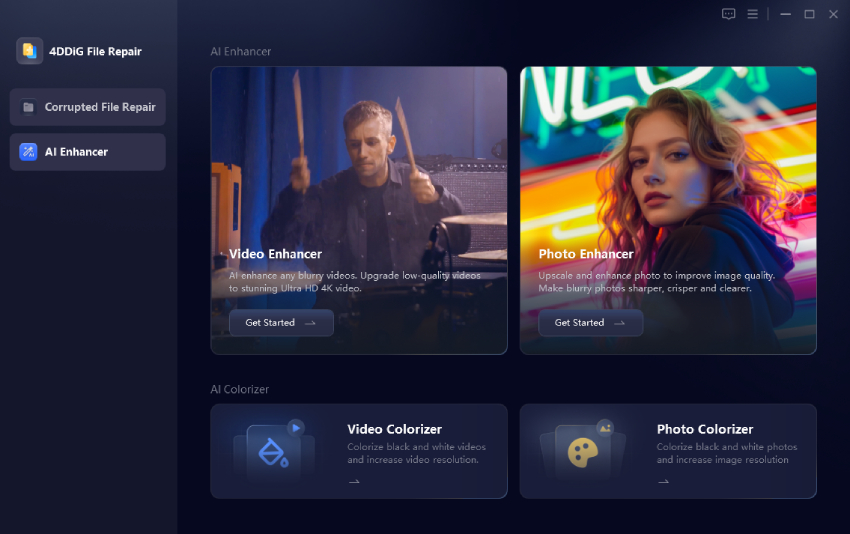
  • Install and open 4DDiG AI Photo Enhancer on your computer, then go to "AI Enhancer" and select "Photo Enhancer."

    select 4ddig photo enhancer
  • Click "Add Photos" and upload one or more blurry or low-resolution images you want to improve.

    add low quality photos to 4ddig photo enhancer
  • Choose the "AI model" that fits your photo, such as General Model, Denoise Model, or Face Model, and then select the output resolution.

    Note:

    If you wanna to enhance multiple images at once, please toggle on the button of "Apply to all photos".

    select ai model and resolution for high quality enhancement
  • Click "Enhance" and wait while the AI improves the clarity, removes noise, and sharpens the image. Preview the enhanced image and click "Save" to export the final high-quality photo.

    preview and save enhanced high quality images

With these simple steps, you can quickly convert a low-quality photo into a clear and high-resolution image.

FAQs about Image Upscaling Software

Q1: Is there a way to make low quality pictures high quality?

Yes. AI photo enhancement software can analyze missing pixels and reconstruct realistic details. Tools like 4DDiG AI Photo Enhancer and Topaz Gigapixel AI are designed to upgrade image resolution and clarity automatically.

Q2: Which photo enhancers have no watermark?

Most desktop apps like 4DDiG and HitPaw offer watermark-free exports in their licensed versions. Online tools like LetsEnhance often provide a limited number of watermark-free credits for new users.

Q3: How do I upscale an image without losing quality?

The key is to avoid standard resizing. Instead, use neural network models that predict and fill in the missing details. It ensures the final output looks sharp and natural rather than pixelated.

Q4: What is the best free tool for image enhancement online?

LetsEnhance and Waifu2x are two popular free online tools that can upscale images effectively.

Conclusion

Improving blurry or pixelated photos is easier than ever thanks to AI technology. A reliable low quality to high quality image converter can restore details, remove noise, and upscale resolution in seconds. 4DDiG AI Photo Enhancer stands out for its powerful AI models, batch processing capability, and professional-level results. It is an excellent solution for anyone who wants sharper, clearer, high-resolution images with minimal effort.

FREE DOWNLOAD

Secure Download

FREE DOWNLOAD

Secure Download

Sawart Mashab (senior editor)

Sawart Mashab, the content writer for 4DDiG, is adept at creating informative and practical solutions related to Windows and macOS issues, data recovery, file repair, and RAID storage.

(Click to rate this post)

You rated 4.5 ( participated)