CR3 File: What It Is and How to Open It

5 mins read

Updated on 2026-05-21 17:19:06 to Photo Tips

Canon camera users working with RAW photography formats get confused about What are .CR3 files. CR3 files store compressed RAW image data with higher efficiency than older CR2 files while preserving image quality.

This guide explains CR3 format, compare CR3 with CR2 and JPG, lists the best CR3 file viewers, and how to open CR3 files on Windows, Mac, mobile, and online platforms.

how to open cr3 files

Quick Answer: What Is CR3 File & How to Open CR3 Files

A CR3 file is a Canon RAW image file used by many newer Canon cameras. It stores high-quality, unprocessed photo data, giving photographers more flexibility for exposure, color, white balance, and detail editing than JPG files.

You can open CR3 files with tools such as Canon Digital Photo Professional, Adobe Lightroom, Adobe Photoshop, Apple Preview / Photos, Microsoft Raw Image Extension, and several online CR3 viewers.

Device or Situation Best Way to Open CR3 Files
Windows Install Microsoft Raw Image Extension or use Adobe Lightroom
Mac Use Apple Preview, Apple Photos, Canon Digital Photo Professional, or Lightroom
iPhone / Android Use Lightroom Mobile or Canon-compatible mobile apps
Online Use an online CR3 viewer or CR3-to-JPG converter
Photoshop not opening CR3 Update Photoshop and Adobe Camera Raw
Lightroom not opening CR3 Update Lightroom or check camera model support
Damaged CR3 file Use a photo repair tool such as 4DDiG File Repair

Part 1. What Is a CR3 File?

A CR3 file is a Canon RAW image format introduced with Canon's CR3-based cameras, including the EOS M50 and EOS R series. CR3 replaced the older CR2 format to reduce file sizes and improve storage efficiency without significantly affecting image quality.

Why Canon Introduced CR3 Instead of CR2?

Canon developed CR3 using the ISO Base Media File Format structure, allowing better compression and faster processing compared to CR2. CR3 files can reduce storage usage by nearly [40%] if you enable the compact 'C%2DRaw' option on the M50%2C the files will be 30%2D40% smaller than their losslessly compressed equivalents without any reduction in resolution.

Benefits of CR3 Files

  • Better image quality for editing
  • Smaller file sizes compared to CR2
  • Improved burst shooting performance
  • Higher dynamic range and color depth
  • More efficient storage management
  • Better support for modern Canon cameras

CR3 vs CR2 vs JPG

Format Quality File Size Editing Flexibility Best For
CR3 Excellent Medium Very High Newer Canon RAW editing
CR2 Excellent Large Very High Older Canon RAW workflows
JPG Compressed Small Limited Sharing, uploading, casual use

Adobe reports that RAW workflows preserve significantly more editable image data compared to JPG formats, especially for exposure and color correction tasks.

Common Canon Cameras That Use CR3 Files

Many newer Canon cameras save RAW images as CR3 files, including models such as:

  • Canon EOS R
  • Canon EOS RP
  • Canon EOS R3
  • Canon EOS R5
  • Canon EOS R6
  • Canon EOS R7
  • Canon EOS R8
  • Canon EOS R10
  • Canon EOS R50
  • Canon EOS R100
  • Canon EOS M50
  • Canon EOS M6 Mark II
  • Canon EOS 90D
  • Canon EOS 250D / Rebel SL3

Camera support may vary depending on your operating system, app version, and RAW processing software.

Part 2. Summary Table: What Programs Open CR3 Files

Adobe Lightroom, Photoshop, Canon Digital Photo Professional, and built-in operating system tools are some of the best programs for opening CR3 files.

The table below compares major CR3 file viewer options across platforms, pricing, usability, and recommended use cases.

Program Platform Free or Paid Best For Editing Support
Microsoft Raw Image Extension Windows Free Quick Windows preview Basic viewing
Apple Preview / Photos Mac Free Built-in Mac viewing Basic editing
Canon Digital Photo Professional Windows, Mac Free Canon RAW processing Advanced RAW editing
Adobe Lightroom Windows, Mac, Mobile Paid / Freemium Professional RAW workflow Advanced editing
Adobe Photoshop Windows, Mac Paid Retouching and advanced edits Advanced editing
Lightroom Mobile iPhone, Android Freemium Mobile RAW viewing and editing Mobile editing
Online CR3 Viewer Browser Usually free Quick preview without install Limited

In short, For the best color accuracy with Canon RAW files, Canon Digital Photo Professional is a strong option. For professional editing workflows, Lightroom and Photoshop are usually better choices.

Part 3. How to Open CR3 Files on Windows and Mac?

Windows and Mac devices can open CR3 files using built-in extensions, Canon Digital Photo Professional, or Adobe editing programs.

The methods below cover the most reliable solutions for users searching for how to open CR3 raw files on desktop systems.

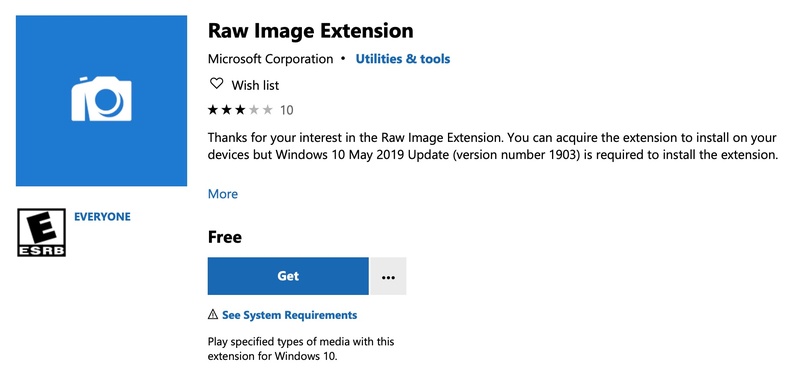
Method 1: Install Microsoft Raw Image Extension (Best Method for Windows)

Microsoft Raw Image Extension is one of the simplest ways to open CR3 files directly in Windows File Explorer. This method enables thumbnail previews, image viewing, and metadata support for CR3 RAW photos.

  • Open the Microsoft Store and search for "Raw Image Extension".

    microsoft raw image extension
  • Click "Get/Install" to download the extension.

  • Restart File Explorer or your PC, as it will save the installation changes.

  • Double-click your CR3 file to preview it normally.

This method works especially well for users who only want to preview or organize RAW photos quickly.

Method 2: Use Mac's Latest Built-in Preview App

macOS Preview supports CR3 files on newer macOS versions without requiring third-party software. This method works best for users who need quick image previews and basic viewing functionality.

  • Locate the CR3 file in "Finder" and double-click the file.

  • The image will automatically open in "Preview".

    mac preview app open cr3 files
  • Use Zoom or editing tools if needed.

This is one of the easiest methods because no extra installation is required.

Method 3: Canon Digital Photo Professional (for Windows & Mac)

If you want Canon's official software with advanced RAW controls, try Canon Digital Photo Professional. It provides more accurate color rendering for Canon cameras. During testing, many Canon users noticed skin tones looked more natural in DPP compared to some third-party editors.

  • Download and install "Canon Digital Photo Professional," then launch the program.

  • Click "File" and select the "Open" option to choose the folder containing your CR3 files or the file itself.

    canon digital photo professional
  • Double-click the image to edit or preview it.

Method 4: Open CR3 Files in Lightroom/Photoshop

Adobe Lightroom and Photoshop support CR3 editing through Adobe Camera Raw integration. This method is recommended for professional editing workflows or when advanced retouching tools are required

  • Open "Adobe Lightroom" or "Photoshop," whichever is installed on your system.

  • Click "File" then "Open" and select your CR3 photos.

    open cr3 files in photoshop
  • Click "Open" again to add them to the library and open them.

Adobe tools are ideal for photographers who need advanced color grading and non-destructive editing.

Part 4. How to Open CR3 Files on Mobile? (iPhone & Android)

The easiest way to open CR3 files on mobile is to use Lightroom Mobile or a Canon-compatible mobile app. The app supports direct RAW import, cloud syncing, and mobile RAW editing tools.

Method: View CR3 in Lightroom Mobile

If you need to preview RAW photos directly on your phone, Lightroom Mobile is one of the most reliable apps available. In real-world testing, Lightroom Mobile handled large CR3 files smoothly on both iPhone and Android flagship devices.

  • Install "Lightroom Mobile" from the App Store or Google Play.

  • Open the app, select an album, and tap "Add Photos" to upload the CR3 files from your camera roll or local folders.

    lightroom mobile add and open cr3 photos
  • Select your CR3 files from storage.

  • Wait for the files to import and preview.

This method works well for photographers editing while traveling.

Part 5. How to Open CR3 Files Online?

Online CR3 viewers allow users to access RAW files without installing desktop software. These tools are useful for quick previews, lightweight conversions, and browser-based file access.

1. View CR3 Online with Image to STL

Image to STL provides browser-based CR3 viewing without software installation. The tool supports drag-and-drop uploads and quick RAW image previews.

2. Evoto Free Online RAW Converter & Viewer

Evoto supports online RAW viewing and conversion with AI-enhanced image processing features. The platform supports CR3 uploads, RAW previewing, and image export workflows.

  • Open the Evoto RAW converter page and upload your CR3 image by clicking "Add Images."

    evoto online raw converter
  • Preview the file online and convert or download if needed.

Evoto works great because interface feels cleaner and faster than older online viewers.

3. ezyZip Online CR3 File Viewer

ezyZip is a lightweight browser-based CR3 file viewer for opening CR3 files without desktop applications. The tool works directly in modern browsers and supports quick uploads.

  • Visit the ezyZip CR3 viewer page.

    ezyzip cr3 viewer online
  • Click "Select CR3 files to view" and upload the image.

  • Preview the file instantly by clicking "View Images" then "Preview".

Part 6. Alternative Way: Convert CR3 Files to JPG

Converting CR3 files to JPG improves compatibility with image viewers, websites, and mobile devices that do not support RAW formats. JPG conversion is also useful for reducing storage size and simplifying image sharing workflows.

FreeConvert supports browser-based CR3-to-JPG conversion without requiring software installation. The tool allows batch conversion and supports high-quality JPG exports.

  • Open the "FreeConvert CR3 to JPG Converter".

    freeconvert cr3 to jpg converter
  • Click "Choose Files" and upload your CR3 images.

  • Select "JPG" as the output format and click "Convert".

  • Download the converted JPG files.

JPG files are much easier to share on social media, messaging apps, and older devices.

⚡ Part 7. Why Are CR3 Files Not Opening or Converting & How to Fix It?

Even after trying the recommended methods, CR3 files sometimes refuse to open or convert. This is usually caused by one of the following common issues:

Common Reasons CR3 Files Fail to Open:

  • Corrupted file metadata or header damage
  • Incomplete file transfer (especially from SD card)
  • Outdated Adobe Camera Raw / Lightroom version
  • Incompatible operating system or software
  • Damaged SD card or storage device
  • Rare codec conflicts in older Windows/macOS versions

Recommended Solution: 4DDiG Photo Repair

4DDiG Photo Repair is one of the most reliable tools for fixing corrupted Canon CR3, CR2, and other RAW files. It supports batch repair, preview before saving, and can fix issues like broken headers, blurry images, and unreadable files caused by card errors or improper ejection.

FREE DOWNLOAD

Secure Download

FREE DOWNLOAD

Secure Download

Steps to Repair Corrupted CR3 Files

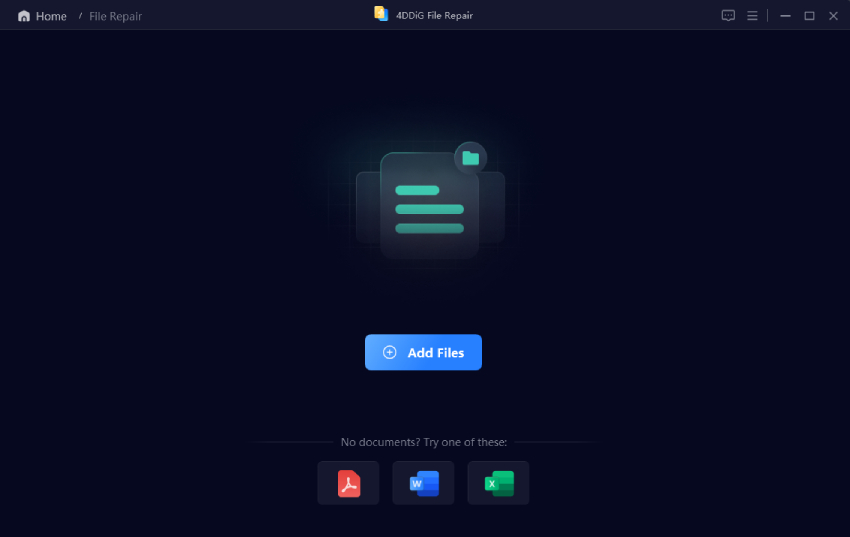
  • Install and launch the 4DDiG File Repair software. Go to "Photo Repair" and click "Add Photos" to upload damaged CR3 files.

    add corrupted cr3 files to 4ddig
  • Click "Repair All" to begin repairing all the CR3 image files at once.

    start repairing cr3 files
  • Preview the repaired images with the "Preview" button to check the results.

    preview repaired cr3 files
  • If satisfied, select a preferred output format such as JPG or PNG and click "Save" to export repaired CR3 photos to a secure location.

    select output format and export repaired cr3 files

This solution is especially helpful if important RAW photos become inaccessible after storage errors.

People Also Ask about CR3 File Type

Q1: Does Lightroom support CR3 files?

Yes. Adobe Lightroom supports Canon CR3 RAW files through Adobe Camera Raw integration. For CR3 files not opening in lightroom usually it is required to update Lightroom or install the latest Camera Raw compatibility updates.

Q2: Can Photoshop open CR3 files?

Yes. Adobe Photoshop supports CR3 files through Adobe Camera Raw. If CR3 files not open in photoshop, the issue is commonly related to outdated Photoshop versions or unsupported Camera Raw plugins.

Q3: How to convert CR3 to DNG?

CR3 files can be converted to DNG using Adobe DNG Converter, Lightroom, or online RAW conversion tools. DNG conversion can improve compatibility across older image editing software that does not support Canon CR3 files natively.

Conclusion

What are .CR3 files is an important topic for Canon RAW photography workflows. CR3 files provide improved compression, smaller file sizes, and better efficiency than older CR2 formats. This guide taught how to open CR3 files on desktop, mobile, and online CR3 viewing methods along with conversion and repair solutions. For damaged or inaccessible RAW images, 4DDiG Photo Repair remains one of the most effective recovery solutions for corrupted CR3 files.

FREE DOWNLOAD

Secure Download

FREE DOWNLOAD

Secure Download

William Bollson (senior editor)

William Bollson, the editor-in-chief of 4DDiG, devotes to providing the best solutions for Windows and Mac related issues, including data recovery, repair, error fixes.

(Click to rate this post)

You rated 4.5 ( participated)