How to Open .ARW Files on Mac (Step-by-Step Guide)

5 mins read

Updated on 2026-04-08 17:08:13 to Photo Tips

Sony cameras are famous for their incredible image sensors and detail. Capturing high-quality photos with your Sony camera is a rewarding experience. But you might find yourself stuck wondering how to open .arw files on Mac once you transfer them. Knowing exactly what program opens ARW files is vital for your workflow. This guide provides six proven methods for viewing and managing your Sony Raw images effortlessly.

how to open arw files on mac

Part 1. What Is an ARW File? (ARW File Format Explained)

The ARW file format stands for "Sony Alpha Raw." It is a proprietary image format used by Sony digital cameras to capture "raw" data directly from the camera's sensor. Unlike processed formats, ARW files contain all the information captured at the moment of exposure, without any compression or in-camera processing.

ARW files store image information using TIFF specifications. It preserves every detail the sensor records at the moment of capture.

Key Characteristics of ARW Files

  • Uncompressed Data: They store 12-bit or 14-bit depth per pixel, providing a massive range of colors and tones.
  • Large File Size: Because they store so much data, they are significantly larger than JPEGs.
  • Metadata Storage: They include extensive EXIF data, such as lens type, ISO settings, and focal length.
  • Color Space: Stores linear gamma data before color space conversion, allowing flexible color grading
  • Format Structure: Based on TIFF/EP standard with Sony-specific extensions

Why Photographers Use It

Photographers prefer the ARW format because it offers unparalleled post-processing flexibility. Since the white balance, exposure, and saturation aren't "baked in," you can adjust these settings in software later without degrading the image quality. This is vital for recovering details in shadows or highlights that would be lost in a compressed format.

ARW vs. JPEG vs. PNG: Comparison Table

Feature ARW (Sony RAW) JPEG PNG
Compression Uncompressed/Lossless Lossy Lossless
File Size Large (22-100 MB) Small (100 KB-5 MB) Medium
Bit Depth 12-14 bit 8-bit 8-16 bit
Editing Flexibility Maximum Limited Moderate
Ready to Share No (requires processing) Yes Yes
Best Use Professional editing Web sharing, quick viewing Graphics with transparency

Part 2. Why Can't My Mac Open ARW Files?

It can be frustrating when you try to read an ARW file on Mac only to see a generic icon or an "Unsupported Format" error. There are several reasons why this happens:

  • Outdated macOS: Apple releases "Digital Camera RAW Compatibility" updates. If you have a brand-new Sony camera (like an A7R V), an older version of macOS may not yet recognize that specific ARW structure.
  • New Camera Models: If you just bought the latest Sony Alpha camera (like an A7C II or A9 III), Apple might not have released the specific RAW support profile yet. There is often a delay of several months between a camera's release and its support in macOS.
  • Preview/Photos Limitations: While macOS Preview is powerful, it lacks the specialized codecs for certain "Compressed RAW" or "Lossless Compressed" variations used by newer Sony sensors. These files require more processing power to decompress on the fly.
  • Incompatibility with Lightroom: Sometimes, ARW files not opening in Lightroom is due to an outdated Camera Raw plugin or an older version of the software that doesn't support your specific camera's RAW profile. Adobe requires you to stay updated to ensure new hardware works.
  • Corrupted Metadata: If the file transfer from the SD card was interrupted by pulling the card early or a power failure, the header information might be damaged. This "header" is what tells your Mac the file type and resolution.
  • Permission Issues: In some cases, your Mac might have restricted access to the folder where the files are stored, preventing the ARW file reader from accessing the data.

Part 3. How to Open.ARW Files on Mac in 6 Proven Ways

Opening Sony RAW files doesn't have to be complicated. Here are the six most effective methods.

1. Open Sony ARW Files Using macOS Preview (Free & Built-in)

Preview is the quickest way to view ARW files on Mac without installing third-party apps. It uses the system's native RAW engine to render the image.

Steps:

  • Make sure your Mac is updated to the latest version of macOS.

  • Locate your ARW file in Finder

  • Double-click the file or right-click and select “Open With,” and then “Preview.”

    open arw files with preview
  • If supported, the image will display

Limitations: Preview cannot immediately handle the latest "Compressed RAW" formats from brand-new Sony cameras upon release. It also offers very limited editing capabilities compared to a dedicated ARW file reader.

Best for: Quick viewing and basic culling of supported camera models.

2. Use FastRawViewer – Best ARW Viewer for Mac

FastRawViewer is a professional-grade tool designed specifically for photographers who need to read arw files on Mac at lightning speed. Unlike other viewers, it renders the actual RAW data rather than just the embedded JPEG thumbnail.

Steps:

  • Download, install, and launch FastRawViewer and go to your ARW files via the built-in browser.

  • Use keyboard shortcuts for rapid image culling and rating

  • View histograms, focus peaking, and exposure warnings in real-time.

    fastrawviewer open arw files

Best for: Professional photographers who need to cull thousands of images quickly and check for focus or exposure issues.

3. View ARW Files Online with PhotoKit

When you are on a guest computer or don't want to install software, you can open ARW files online using web-based tools like PhotoKit ARW Image Viewer. These platforms run in your browser and provide a robust environment for RAW files.

Steps:

  • Open your web browser and then go to PhotoKit's website and tap on “Try it online for free” to get started.

    photokit arw image viewer
  • Click "Upload" or drag your ARW file into the browser window

  • Wait for the file to upload and process (may take 30-60 seconds for large files)

  • View your image with basic zoom and pan controls.

Best for: One-off edits or viewing files when you don't have access to your primary workstation.

4. Open ARW Files in Lightroom or Photoshop

Adobe's ecosystem is the industry standard. However, you might face issues like ARW files not opening in Lightroom if your software is out of sync with your camera hardware.

Steps:

  • Subscribe to Adobe Creative Cloud Photography plan ($9.99/month)

  • Download and install Lightroom Classic or Lightroom

  • Launch Lightroom, click Library, then "Import."

    import arw files to lightroom
  • Navigate to your ARW files and select them.

    find added images lightroom
  • Edit using Lightroom's comprehensive RAW processing tools.

Best for: Comprehensive photo editing, color grading, and professional portfolio management.

5. Use Sony Imaging Edge Desktop (Official Free Tool)

Sony provides its own software suite designed to handle the specific intricacies of the ARW file format. This is often the most reliable way to open Sony ARW files on Mac when other programs fail.

Steps:

  • Visit Sony's official website and download Imaging Edge Desktop

  • Install all three components: Viewer, Edit, and Remote.

    install imaging edge desktop components
  • Launch "Viewer" to browse and organize ARW files.

  • Double-click any ARW file to open it in "Edit" for adjustments

  • Make RAW adjustments using Sony's processing engine

    open arw files in imaging edge desktop
  • Export to JPEG, TIFF, or other formats

Best for: Users who want the most accurate color reproduction as intended by Sony’s engineers.

6. Convert ARW to JPEG/PNG on Mac

Sometimes, you just need to send a photo to a client or post it on Instagram. In this case, you need to perform an ARW file to JPG conversion.

Steps:

  • Open your ARW file in “Preview”.

  • Go to the top menu and choose “File”, then “Export Selected Image”

    convert are files to jpg
  • In the format dropdown, choose “JPEG.”

  • Adjust the quality slider (80-90% is usually the "sweet spot").

  • Click “Save.”

Best for: Sharing photos with friends and family, or uploading them to the web.

Pro Tip:

If you have 500 files, don't do them one by one. Use the macOS Automator app to create a "Quick Action" that converts any selected RAW file into a JPEG with one click.

⚡ Part 4. What to Do If ARW Files Still Won't Open on Mac

If you've tried the methods above and still can't see your photos, the problem might be deeper. Follow these steps:

Step 1: Try Basic Fixes

Make sure your macOS is fully updated via System Settings. If the file fails to open in one viewer, try another. Sometimes re-downloading the file from the SD card solves the issue if the original transfer was interrupted.

Step 2: Check If the File Is Corrupted

If the thumbnail looks static or the file size is 0KB, the file is likely corrupted. This happens due to SD card errors or "pulling" the card before the camera finishes writing the data.

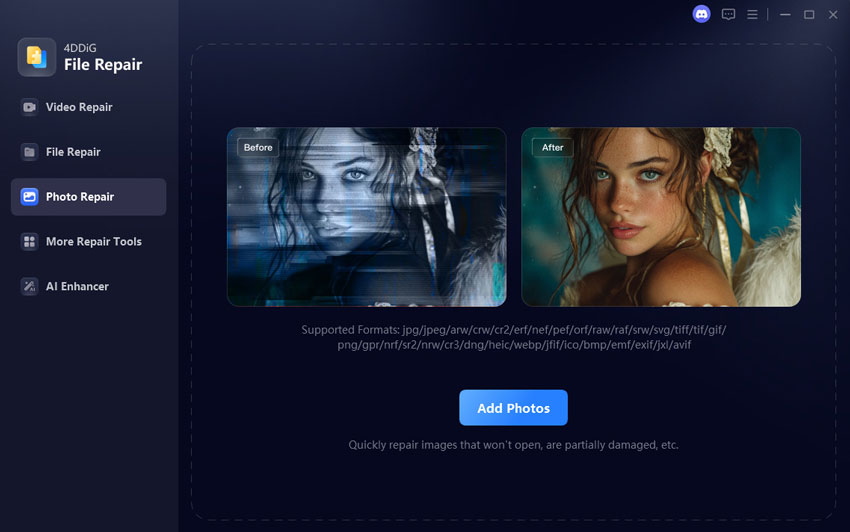
Step 3: Repair ARW Files Using 4DDiG Photo Repair

When basic fixes fail and corruption is confirmed, a dedicated repair tool can salvage your precious Sony RAW images. 4DDiG File Repair (also known as 4DDiG Photo Repair) is highly effective for this.

It supports a wide range of image formats, including ARW, CR2, RSV, NEF, RAW, RAF, SRW, and more. It fixes issues like files not opening, corruption, blurry/pixelated results, grayed-out images, or heavily damaged data using its Advanced Repair Mode. The tool offers a simple interface suitable for beginners, batch processing (up to 3000 files), and works on Mac.

FREE DOWNLOAD

Secure Download

FREE DOWNLOAD

Secure Download

  • Install and launch the 4DDiG File Repair app on Mac or Windows PC and select “Photo Repair” mode. Click “Add Photos” or drag-and-drop your corrupted .arw files into the window.

    add corrupted arw files to repair
  • Once uploaded, hit the bottom-right “Reapir All” button to kick off the ARW file repairing. It waste seconds and wait for the process to complete.

    start to repair all arw files
  • Preview the repaired ARW files, then save them to a new folder (original files remain untouched).

    preview and save repaired arw files

People Also Ask about Sony ARW Files

Q1: How to preview ARW files on Mac?

You can use the Spacebar for "Quick Look" in Finder. If it doesn't show, ensure your macOS is updated to the latest version to support your specific camera model.

Q2: How to open .arw files on Mac free?

The best free way is to use the built-in Preview app or Sony’s official Imaging Edge Desktop software. Both allow you to view and perform basic edits without a subscription.

Q3: Can Lightroom or Photoshop open ARW files?

Yes, both can. If you encounter an error where the file won't open, it usually means your version of Camera Raw is older than your camera. Update your Adobe apps to fix this.

Conclusion

Here are all about how to open .arw files on Mac. Managing raw photography shouldn’t be a headache. Whether you use the built-in Preview app, Adobe Lightroom, or an online viewer, there are many ways to handle your Sony images. If you encounter stubborn files that refuse to open due to corruption, 4DDiG Video Repair is the best tool to restore your work. With these steps, you can focus on what matters most and capture great photos.

FREE DOWNLOAD

Secure Download

FREE DOWNLOAD

Secure Download

William Bollson (senior editor)

William Bollson, the editor-in-chief of 4DDiG, devotes to providing the best solutions for Windows and Mac related issues, including data recovery, repair, error fixes.

(Click to rate this post)

You rated 4.5 ( participated)