What Is TGA & How to Open TGA Files on Any Device

5 mins read

Updated on 2026-04-08 20:53:52 to Photo Tips

You've just downloaded a .tga file, and nothing happens when you double-click it. Sound familiar? TGA files aren't as universally supported as JPEGs or PNGs, so opening them can feel confusing at first. Whether you're on Windows or Mac, this guide walks you through every practical way on how to open TGA files, including free tools, built-in apps, and online viewers.

Part 1. What Is a TGA File? Why Can't I Open TGA Files by Default?

A TGA file (also known as TARGA) is a raster image format developed years ago for high-quality graphics. It stands for Truevision Graphics Adapter and is popular in game development, 3D modeling, animation, and professional design because it supports lossless compression and a strong alpha channel for transparency.Unlike everyday formats like JPG or PNG, TGA files keep more detailed color information and handle transparency very well. That's why many game textures and VFX frames still use the TGA file format today.

Why Can't You Simply Open TGA Files Directly?

The short answer is that most operating systems don't include native support for the TGA format out of the box. Windows Photo Viewer and macOS Preview have historically ignored it, leaving users without a default program to open TGA files. This is purely a compatibility gap, not a sign that your file is broken.

There are a few other common reasons you might struggle to open a TGA file:

  • The file is corrupted --- especially if it was downloaded incompletely or transferred from a damaged storage device.
  • The file extension is wrong --- some TGA files are saved without an extension or mislabeled.
  • You don't have the right software installed --- most standard image viewers simply don't recognize the format.

The good news? There are plenty of reliable ways to view TGA files on both Windows and Mac, and we'll cover all of them below.

Part 2. How to Open TGA Files on Windows

Windows doesn't offer a straightforward way to handle TGA files by default, but you have several solid options depending on what you already have installed --- or what you're willing to download.

1. Use the Built-in Windows Photos App

You might be surprised to learn that the Windows Photos app (available on Windows 10 and 11) can actually open TGA files --- though this depends on whether your system has the right codec installed.

Here's how to try it:

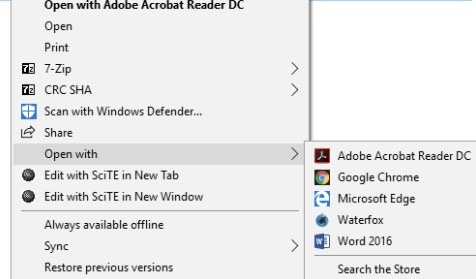
  • Right-click your .tga file and select Open with.

  • Choose Photos from the list.

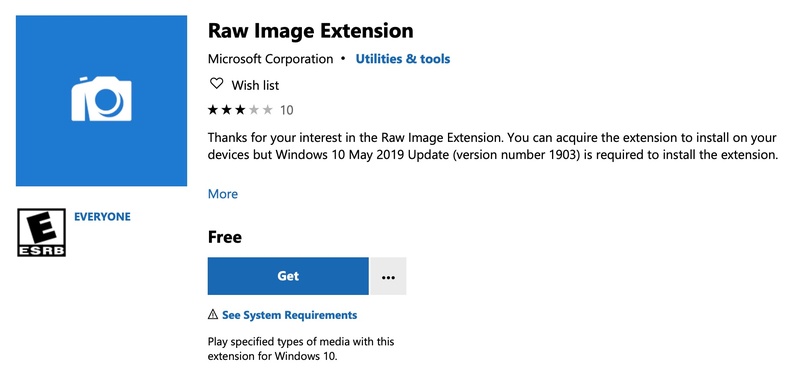
  • If the image opens, you're all set. If it shows an error, you may need to install the Raw Image Extension from the Microsoft Store, which adds support for additional image formats including TGA.

    install raw image extension to view tag files windows
Note:

This method works best for simply viewing the image. If you need to edit or convert the file, you'll want one of the tools below.

2. Open TGA Files in Photoshop

If you have Adobe Photoshop installed, this is arguably the most powerful way to work with a TGA file. Photoshop has supported the TGA format for decades, making it ideal not just for viewing but also for editing, exporting, and knowing how to save a TGA file in Photoshop in a different format.

To open a TGA file in Photoshop:

  • Launch Photoshop and go to File > Open.

  • Browse to your .tga file and click Open.

  • A dialog box may appear asking about the bit depth (16-bit or 32-bit). Choose based on your project needs and click OK.

To save or export it to another format (such as JPG or PNG):

  • Go to File > Export > Export As or Save for Web (Legacy).

    export tga file as jpg png in photoshop
  • Select your preferred format (JPEG, PNG, etc.) and click Export.

Photoshop is also a capable TGA file editor, letting you adjust colors, layers, transparency, and much more before exporting.

3. Use the Dedicated IrfanView TGA File Viewer

If you don't have Photoshop, IrfanView is one of the best free alternatives --- and one of the most lightweight program to open TGA files available on Windows. It's fast, free, and handles a huge range of image formats with ease.

irfanview image viewer

To open a TGA file with IrfanView:

  • Download and install IrfanView from irfanview.com (make sure to also install the plugins package for full format support).

  • Once installed, right-click your .tga file and select Open with > IrfanView.

  • The image will load immediately in the viewer.

IrfanView also doubles as a basic TGA file format converter. That means you can batch convert TGA files to JPG, PNG, BMP, and other formats via File > Save As or the built-in batch conversion tool (File > Batch Conversion). It's a particularly handy option if you need to convert a TGA file to JPG quickly without any complex setup.

Part 3. How to Open TGA Files on Mac

Mac users don't have quite as many built-in options for TGA files as Windows users do, but don't worry, the two methods below cover most use cases, whether you just want to take a quick look or do some serious editing.

1. Use the Built-in Preview App

Apple's Preview app is the default image viewer on macOS, and the good news is that it does support the TGA format --- at least for viewing purposes. If your Mac is running a relatively recent version of macOS, there's a good chance Preview can handle your .tga file without any additional software.

Here's how to open a TGA file using Preview:

  • Locate your .tga file in Finder.

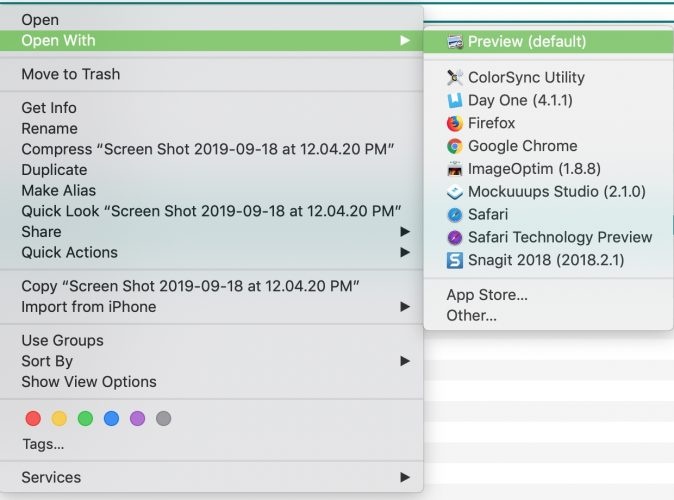
  • Right-click the file and select Open With > Preview.

  • The image should load right away in the Preview window.

If Preview doesn't open the file or displays an error, try this alternative:

  • Open Preview first (you can find it in your Applications folder).

  • Go to File > Open and manually browse to your TGA file.

  • Select it and click Open.

Preview also lets you do some basic edits (such as cropping, rotating, adjusting color, etc.) and you can export the file to a more common format like JPEG or PNG via File > Export. It's not a full tga file editor by any means, but it's a perfectly capable option for quick viewing and simple conversions.

2. Open TGA Files in GIMP for Mac

If you need more control over your TGA file, whether that's editing layers, adjusting transparency, or converting to another format, GIMP is the go-to free solution for Mac users. It's a powerful open-source image editor that fully supports the .tga format, and it works just as well as Photoshop for most everyday tasks.

To get started:

  • Download and install GIMP from gimp.org (it's completely free).

  • Once installed, open GIMP and go to File > Open.

  • Navigate to your .tga file, select it, and click Open.

  • The image will load in GIMP's editing workspace, where you can make any adjustments you need.

To save or export the file in a different format:

  • Go to File > Export As.

  • Type your desired filename with the new extension (e.g., .jpg or .png) and click Export.

  • Adjust any format-specific settings in the dialog that appears, then click Export again.

GIMP is especially useful if you're working with TGA files that contain alpha channel transparency, since it handles that data cleanly without flattening or distorting the image.

Whether you're on Windows or Mac, the methods above should cover most situations. But what if you need to quickly view a TGA file without installing anything at all? That's where online viewers come in.

Part 4. How to View TGA Files Online (3 Best TGA File Viewers)

Sometimes you just need a fast, no-install way to peek at a TGA file --- maybe you're on a work computer, using a borrowed device, or simply don't want to download new software. A good TGA file viewer online is the perfect solution in those cases. Here are three of the best options available right now.

1. Jumpshare TGA Viewer --- Best Overall

jumpshare free online tga viewer

Jumpshare is a well-established file sharing and preview platform that also offers a dedicated TGA file viewer online. It's clean, fast, and doesn't require any account or login to view a file --- making it the most frictionless option on this list.

Best for: Users who want a reliable, all-around online viewer with a polished interface.

How to view a TGA file with Jumpshare:

  • Visit jumpshare.com/viewer/tga.

  • Click the Upload button and select your .tga file from your device.

  • Wait a moment for the file to process. The image will appear in the preview window automatically.

  • You can zoom in, share the file via a link, or download a copy directly from the viewer.

  • Pros
  • Cons
    • Clean, intuitive interface
    • No sign-up required for basic viewing
    • Supports file sharing with a generated link
    • Fast loading even for larger TGA files
    • Free plan has file size and storage limitations
    • Sharing features require a Jumpshare account

2. ImageToStl TGA Viewer --- Best Simple & Lightweight

imagetostl tga viewer online

ImageToStl is a straightforward, no-frills tool designed for users who just want to view TGA files quickly without any distractions. The interface is minimal by design, making it one of the fastest ways to get a TGA image on screen right from your browser.

Best for: Users who want a simple, lightweight viewer with zero setup and no unnecessary features.

How to view a TGA file with ImageToStl:

  • Go to imagetostl.com/view-tga-online.

  • Click Choose File and select your .tga file.

  • The image will render in the browser window within seconds.

  • Use your browser's built-in options to save or screenshot the image if needed.

  • Pros
  • Cons
    • Extremely lightweight and fast
    • No account, no ads, no distractions
    • Works on any browser, including mobile
    • Great for quick spot-checks
    • Very limited features — viewing only, no editing or sharing tools
    • No batch upload support

3. GroupDocs TGA Viewer --- Best for Privacy & Multi-Format Support

groupdocs tga viewer online

GroupDocs is a trusted name in document and image processing tools, and their online TGA viewer reflects that reputation. What sets it apart from the other two options is its strong emphasis on privacy: uploaded files are automatically deleted from their servers after a short period. And its broad support for dozens of file formats beyond TGA.

Best for: Users handling sensitive images, or those who regularly work with multiple file formats and want one reliable tool to handle them all.

How to view a TGA file with GroupDocs:

  • Navigate to products.groupdocs.app/viewer/tga.

  • Click Drop or upload your file and select your .tga file.

  • The viewer will render the image on screen once the upload is complete.

  • You can zoom, scroll, and download the rendered image directly from the viewer interface.

  • Pros
  • Cons
    • Files are deleted automatically after processing, good for sensitive content
    • Supports a wide range of image and document formats
    • Clean viewer interface with zoom controls
    • Backed by a reputable developer tools company
    • Slightly slower upload and rendering compared to the other two options
    • Advanced features (like conversion) may require a paid GroupDocs plan

⚡ Part 5. What To Do If You Still Can't Open TGA Files

Even after trying the methods above, some TGA files refuse to open. This usually happens when the file is corrupted, incomplete, or damaged during transfer or storage.

If basic viewers and editors still show errors, a blank screen, or distorted colors, it's time to consider a repair tool. One reliable option is 4DDiG Photo Repair (part of the 4DDiG File Repair suite). It supports a wide range of image formats and uses AI technology to fix common photo corruption issues like pixelation, blurriness, wrong colors, or files that won't open at all.

FREE DOWNLOAD

Secure Download

FREE DOWNLOAD

Secure Download

How to repair a corrupted TGA file with 4DDiG Photo Repair:

  • Download, install,a nd launch 4DDiG File Repair. Then select the "Photo Repair" module and click "Add Photos" or drag and drop your problematic .tga file into the interface.

    add corrupted tga files to 4ddig
  • Click the Repair All button and wait for the process to complete.

    repair tga files
  • Preview the repaired image. If it looks good, save it to a new location.

    preview and save tga files

This tool is especially useful when you have important game assets, 3D textures, or old design files that you don't want to lose. Keep in mind that no repair tool can fix every single damaged file, but 4DDiG handles many common corruption problems effectively.

Part 6. Other Bonus Tips about TGA Files

1. How to Import TGA Files into Blender

Many people working in 3D modeling search for ways to use TGA files as textures. Blender supports TGA files very well.Quick steps:Open your project in Blender.

  • Select the object or material you want to texture.

  • In the Shader Editor, add an Image Texture node.

  • Click "Open" and choose your .tga file.

  • Connect the node to the Base Color (and Alpha socket if your TGA has transparency).

Make sure to set the color space to Non-Color for normal maps or roughness maps, and enable Alpha handling for transparent textures. This is a common workflow for game modders and 3D artists.

2. How to Convert TGA Files to JPG or PNG

TGA files are high quality but not as widely supported as JPG or PNG. Converting them makes sharing and web use much easier.

You can convert using free tools like GIMP or Paint.NET:

  • Open the TGA file in GIMP or Paint.NET.

  • Go to File > Export As.

  • Choose PNG (best for keeping transparency) or JPG (smaller file size).

  • Adjust quality settings if needed and save.

For quick batch conversion, online tga file format converter tools also work well, but desktop programs give you better control over quality and the alpha channel.These simple steps help turn your TGA files into more universal formats without losing too much detail.

FAQs

Q1: What is the difference between PNG and TGA?

PNG is a modern, widely supported format that offers good compression and transparency. TGA (TARGA) is an older format that often provides higher color depth and lossless quality, making it popular for game textures and professional VFX work. TGA files tend to be larger than PNG but preserve more detailed information, especially when working with alpha channels in 3D applications.

Q2: Are TGA files still used today?

Yes, TGA files are still used in 2026, particularly in game development, 3D modeling, animation, and film VFX. Many game engines and 3D software prefer TGA for textures because of its reliable alpha channel support and lossless quality. However, for everyday web and sharing purposes, most people convert them to PNG or JPG.

Conclusion

Now you know exactly how to open TGA files on Windows, Mac, online, and in Blender. Whether you need a quick view or full editing, the methods above should solve most problems. If your TGA file is corrupted and still won't open, try 4DDiG Photo Repair. It's a reliable tool that can fix many damaged image files quickly and safely.

FREE DOWNLOAD

Secure Download

FREE DOWNLOAD

Secure Download

William Bollson (senior editor)

William Bollson, the editor-in-chief of 4DDiG, devotes to providing the best solutions for Windows and Mac related issues, including data recovery, repair, error fixes.

(Click to rate this post)

You rated 4.5 ( participated)