5 Best DNG Viewers to Open DNG Files in Windows Easily

5 mins read

Updated on 2026-09-07 18:54:51 to Photo Tips

Modern photography often relies on the Digital Negative (DNG) format to preserve maximum image data. However, many users struggle when they encounter these files for the first time, wondering which DNG viewer is best for their needs. Whether you are a professional photographer or a casual user, knowing how to open DNG files efficiently can save you time and frustration.

This guide covers everything from built in Windows extensions and specialized desktop software to quick online solutions and advanced AI driven repair tools for corrupted images.

best dng viewer

Part 1. Quick Comparison: Which Is the Best DNG Viewer in 2026

When choosing a DNG file viewer, free or premium, it is essential to balance speed with feature depth. Below is a comparison of the top five options available today.

Feature FastStone Image Viewer IrfanView XnView Adobe Lightroom Jumpshare
💻 Platform Windows Windows Windows, macOS, Linux Desktop, Mobile, Web Web (All browsers)
🚩 Best Use Case Browsing large photo collections Lightweight, fast viewing All in one free management Professional editing/sync Quick online viewing
💰 Price 100% Free (Personal use) Free for Non commercial use Free (Private/Edu) Subscription Free (100MB limit)
✨ Main Feature High speed browsing/Slideshow Plugin extensibility 500+ format support AI powered presets/Sync Secure sharing/Feedback
❌ Limitations Windows only Requires plugins for DNG Interface complexity Paid subscription Daily upload limits

Part 2. How to Open DNG Files in Windows 11/10 [Step by Step]

Windows 10 and 11 do not support RAW and DNG files natively "out of the box" in the default Photos app. However, you can easily enable this support or use a dedicated DNG opener. Here are the most effective methods for opening a .dng file in Windows 10 and 11.

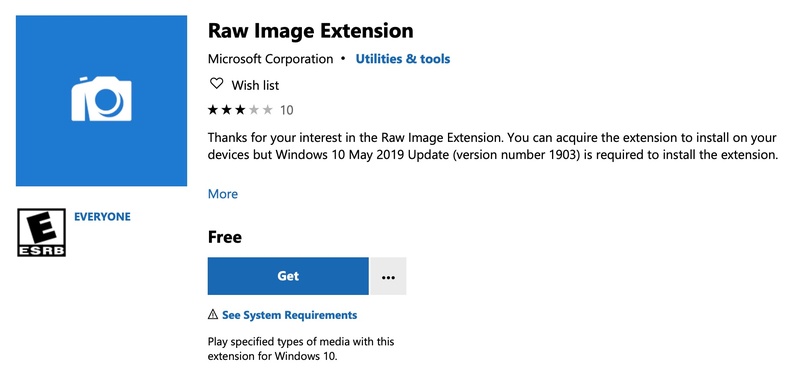
Method 1. Install Microsoft RAW Image Extension

The Microsoft Raw Image Extension is a system codec that adds native support for DNG and other RAW formats to Windows 10 and 11. It is not a standalone app but a plugin that enables thumbnails and metadata viewing.

Steps:

  • Open the Microsoft Store on your Windows 10 or 11 device.

  • Search for "Raw Image Extension".

  • Click "Get" to add the extension to your system

  • Once installed, you can view DNG thumbnails directly in Windows File Explorer and open the full images in the Photos app.

    install raw image extension to open dng files
💡 Requirements:

  • Windows 10 May 2019 Update (version 1903) or later is strictly required to install this extension.
  • Supports formats like DNG and CR3, though some formats like .GPR are not supported.

Method 2. Use a Dedicated DNG Viewer (FastStone Image Viewer)

If you need more than just viewing, such as batch renaming or color adjustments, a dedicated tool like FastStone Image Viewer is superior.

  • Download and install FastStone Image Viewer from the official website.

  • Launch the application and navigate to the folder containing your DNG files using the internal file browser.

  • Double-click a DNG file to view it in full-screen mode.

    open dng in faststone image viewer
  • Use the side panels to access editing tools, metadata, and batch conversion options.

Part 3. 5 Top Rated DNG Viewers for Windows 11/10 [Detailed Review]

Selecting the right DNG image viewer depends on your specific needs, whether you require high speed browsing, professional grade editing, or an easy way to open DNG files online. Here is a look at the five best tools available in 2026.

1. FastStone Image Viewer - Best for Browsing Large Photo Collections

FastStone Image Viewer is a highly efficient DNG viewer that balances speed with a robust set of features. It functions as an image browser, converter, and editor, supporting all major formats including DNG and various camera RAW files. It is particularly noted for its "musical slideshow" feature and comprehensive batch processing tools.

faststone image viewer

  • Pros
  • Cons
    • Completely free for personal use.
    • Supports a wide range of formats (BMP, JPEG, HEIC, WEBP, GIF, PNG, PSD, TIFF, etc.).
    • Includes advanced features like red-eye removal, resizing, and color adjustments.
    • High performance on older Windows versions (XP through Windows 11).
    • Only available for the Windows platform.
    • Its interface can feel slightly dated compared to modern AI driven editors.

✨ Best for: Users who need to manage and compare large volumes of photos quickly.

2. IrfanView + Plugins - Lightweight DNG File Viewer

IrfanView is legendary for its speed and tiny footprint (only 8 MB). While the base program is minimal, its power comes from an extensive library of plugins. By installing the necessary RAW plugins, IrfanView becomes a highly capable DNG viewer that opens large files almost instantly on even older hardware.

irfanview dng viewer

  • Pros
  • Cons
    • Fast and compact; best for quick file checking.
    • Freeware for non commercial use.
    • Extensive plugin support for multimedia and advanced formats.
    • Supports both 32-bit and 64-bit Windows architectures
    • Requires manual plugin installation for DNG and other RAW formats.
    • The user interface is very basic and may require a learning curve for advanced settings.

✨ Best for: Users on older hardware or those who prefer a minimalistic, fast application.

3. XnView MP - Best Free DNG Viewer Overall

XnView (including XnView MP and Classic) is a versatile windows DNG viewer that excels in organization and metadata management. It natively supports more than 500 formats, making it one of the most compatible viewers available for Windows, macOS, and Linux. It is also a powerful DNG metadata viewer, allowing for detailed IPTC and XMP editing.

xnview dng file viewer

  • Pros
  • Cons
    • Native support for DNG, CR2 , and over 500 other formats.
    • Management tools like batch rename and duplicate image finder.
    • Supports color adjusting, resizing, cropping, and screen capture.
    • Free for private, educational, and non profit use
    • The interface can be complex due to the sheer number of features.
    • Commercial use requires a paid license.

✨ Best for: Power users who need a cross platform organizer with heavy metadata editing capabilities.

4. Adobe Lightroom - Best for Professional Photographers

Adobe Lightroom represents the gold standard for professional photographers using an Adobe DNG viewer. Unlike the other tools, Lightroom offers a sophisticated browser based experience that allows you to edit DNG files with AI powered precision. It focuses on high quality adjustments and cross device synchronization.

view dng in adobe lightroom

  • Pros
  • Cons
    • Works smoothly with the Adobe Creative Cloud ecosystem.
    • Advanced healing tools and AI powered presets for professional results.
    • Projects sync automatically across mobile, desktop, and web.
    • Powerful masking tools for selective editing.
    • Requires a monthly subscription.
    • Has a steeper learning curve than dedicated viewers.

✨ Best for: Professionals who need cloud based workflows and high end AI editing tools.

5. Jumpshare Free Online DNG Viewer

Jumpshare provides a specialized solution for those who want to open a dng file online without installing any software. This web based tool is compatible with any modern desktop or mobile browser and uses secure HTTPS connections for file handling and supports over 200 formats. It is an excellent choice for quick visual communication and feedback.

jumpshare free online dng viewer

  • Pros
  • Cons
    • No registration or software installation required.
    • Military grade AES 256 encryption for secure file storage.
    • Allows recipients to comment on files directly in the browser.
    • Responsive design works on Chrome, Firefox, and Safari.
    • The free tier is limited to 100MB per file and 2 uploads per day.
    • Files are deleted after 24 hours unless an account is created.

✨ Best for: Quickly checking a file on a public computer or sharing a DNG with a client for feedback.

Part 4. Bonus: What If You Can't Open DNG Files in Any Viewer

Sometimes, a DNG file refuses to open even in the best viewers. This is often due to file corruption, header damage, or data loss during transfer. Many users face the frustration of "file not supported" or "cannot open file" errors when their precious memories are at stake. In such cases, we recommend 4DDiG Photo Repair.

This AI powered utility is specifically designed to restore corrupted, greyed out, or blurry DNG images to their former glory in seconds using advanced algorithms. It supports a wide range of formats, including DNG, RAW, and JPG, and can repair multiple images at once with exceptional speed.

Key Features of 4DDiG Photo Repair:

  • Repairs DNG and other RAW photo formats
  • Fixes severely damaged and corrupted photos
  • Repairs up to 3,000 photos in one batch.
  • Previews repaired photos before saving them
  • Enhances photo quality, sharpens details, and removes noise
  • Supports photos from cameras, SD cards, and USB drives
  • It also supports both Windows and macOS platforms.
FREE DOWNLOAD

Secure Download

FREE DOWNLOAD

Secure Download

Steps to fix DNG not opening with 4DDiG:

  • Launch the software and select "Photo Repair". Click "Add Photos" or drag and drop your broken DNG files into the interface.

    add corrupted dng photos to 4ddig
  • Click "Repair All". after adding your photos. The software will scan the files and try to fix the detected problems.

    4ddig repair all dng photos
  • When the repair is complete, click "Preview". Check whether the photos now open correctly.

    preview repaired dng files
  • Click the triangle beside "Save" or "Save All". Choose an output format, such as JPG, PNG, or Original.

    save repaired dng in preferred format

Then save the repaired images to your preferred folder. You can click "Open Folder" afterward to find the saved photos.

FAQs about DNG Viewer

Q1: Can I convert a DNG file to JPG?

Yes. FastStone, IrfanView, XnView, and Lightroom can export DNG images to JPEG. Keep the original DNG because JPEG is a more compressed copy.

Q2: Why can't I open my DNG file?

Possible causes include an unsupported camera variant, outdated codecs, file corruption, incomplete copying, or an incorrect file association. Try Microsoft's extension, then XnView or Lightroom. If all fail, copy the file again or repair it.

Q3: Is DNG the same as RAW?

DNG is a standardized Digital Negative format for RAW image data and metadata. RAW is a broader category that also includes CR3, NEF, and ARW. DNG can be RAW, but not every RAW file is DNG.

Q4: Can Photoshop or Lightroom open DNF files?

If you meant DNG, Photoshop and Lightroom can open compatible files through Adobe Camera Raw. "DNF" is usually a typing mistake or another extension, so confirm the filename first.

Q5: How do I open a DNG file on Mac?

Mac users can use the built in Preview app or download cross platform tools like XnView MP and Adobe Lightroom. 4DDiG Photo Repair is also available for macOS (v10.12 and above) if the files are corrupted.

Conclusion

Choosing the right DNG viewer is vital for any modern photography workflow. Whether you prefer the lightweight efficiency of IrfanView, the professional depth of Adobe Lightroom, or the convenience of an online tool like Jumpshare, there is a solution for every need. For those facing corrupted files, we highly recommend 4DDiG Photo Repair to ensure your images are never lost to technical errors. Stay creative and keep your raw workflow running smoothly!

FREE DOWNLOAD

Secure Download

FREE DOWNLOAD

Secure Download

Sawart Mashab (senior editor)

Sawart Mashab, the content writer for 4DDiG, is adept at creating informative and practical solutions related to Windows and macOS issues, data recovery, file repair, and RAID storage.

(Click to rate this post)

You rated 4.5 ( participated)