How to Open a .DAT File on Windows, Mac, Mobile & Online (Full Guide for Different Types)

5 mins read

Updated on 2026-04-30 17:20:56 to File Tips

Got an email with a mysterious winmail.dat or ATT00001.dat attachment instead of the file you expected? That's the most common reason people search how to open a .DAT file. The short answer: Outlook sent it in Rich Text Format, which wraps attachments in Microsoft's TNEF encoding (application/vnd.ms-tnef) that Gmail, Apple Mail, and Thunderbird can't decode. The fastest fix is a free online decoder like winmaildat.com, no install, extracts the real attachments in seconds.

This 2026 guide covers that winmail.dat fix plus how to open .DAT files of every other type: VCD videos, text/config files, and binary game or registry files on Windows, Mac, Android, and iPhone.

how to open dat files

Quick Answer: How to View Different .DAT File Types

To open a .DAT file, first identify its type by source, then use the matching tool:

  • Open Email attachment (winmail.dat / ATT00001.dat) → upload to winmaildat.com (Online) or use Letter Opener (macOS).
  • Play Video CD file (AVSEQ##.DAT) → open with VLC (Media > Open File).
  • Open Configuration or log file → open with Notepad++ (Windows), TextEdit / BBEdit (macOS), or QuickEdit (Android).
  • View unknown binary → inspect with HxD (Windows) or Hex Fiend (macOS); read the first 4 bytes to identify the format.
  • Repair corrupted video .DAT → repair with 4DDiG File Repair before opening.

If you don't know the source, jump to the Common Types of DAT File table below for identification.

What Is a .DAT File (Definition & Identify Your File Type Easily)

A .dat file is a generic data container with no fixed format. The right way to open it is to identify what created it first: Outlook, a VCD, a text editor, a game, or Windows itself. Then pick the matching tool.

1. What Does DAT Stand For

A .DAT file is a generic data file format used by software to store various types of information in binary or text form. Unlike standardized formats such as .txt (plain text) or .mp4 (video), the .DAT extension carries no defined internal specification or universal structure. Each program defines its own format, which is why no single universal .DAT reader exists and opening them depends entirely on knowing the originating application.

2. Why DAT Files Don't Have a Standard Format

DAT files are flexible containers used by different software for different purposes. Because each program defines its own structure, there's no universal .dat file reader that works for all cases.

This means:

  • Some DAT files are readable as plain text, for example, config.dat or log.dat files
  • Others are videos or media files, like AVSEQ01.DAT on Video CDs (MPEG-1 video at 352×240 or 352×288 resolution).
  • Some are encrypted or binary system files that only one specific program can open, like NTUSER.DAT, which only the Windows Registry Editor can read
  • Others are email attachments, like winmail.dat, which carries Outlook's TNEF format (MIME type: application/vnd.ms-tnef).

3. Common Types of DAT File (Classification Table)

File Type Typical Source What It Contains How to Open / Use It
winmail.dat / ATT00001.dat Microsoft Outlook / Exchange emails Encoded email attachments (TNEF format, MIME type application/vnd.ms-tnef) TNEF decoder tools
.dat (Video CD) Older Video CDs MPEG-1 video data stream Media players like VLC
config.dat Application settings Plain text, XML, or structured config data Text editors (e.g., Notepad++)
game save .dat Games (e.g., Minecraft, RPGs) Saved progress and game state (binary data) Game-specific editors or the game
science/data.dat Research tools (SPSS, GIS, sensors) Organized datasets or recorded measurements Excel, R, Python, or analysis tools
NTUSER.DAT Windows operating system User-specific registry information Windows Registry Editor
program data .dat Various software applications Internal data used by programs (varies widely) Usually opened by the originating app

Understanding your file type is the key step in deciding how to view .dat files correctly.

How to Open Winmail.dat or ATT0001.dat – The Most Common Case

Winmail.dat files (sometimes named ATT00001.dat or ATT00005.eml) are email attachments generated when Outlook sends mail in Rich Text Format using Microsoft's proprietary TNEF encoding. The easiest way to open them is through a dat file viewer online like Winmaildat.com. It extracts hidden attachments instantly without requiring software installation, making it accessible on Windows, Mac, and mobile devices.

  • Go to https://www.winmaildat.com/ click "Browse Files" to upload your Winmail.dat file

    open winmail dat files in winmaildat com
  • Click "Start" to process the file and download the extracted attachments.

  • Now your file will be converted to an "RTF" file and saved on your computer, which you can normally open by double-clicking.

⚡ How to Open Video .DAT Files (VCD, SVCD, CCTV, etc.)

Play video DAT files directly in VLC, or rename to .mpg/.mp4 to open them in other media players. If the file is corrupted, jump to the repair section below.

Method 1: View DAT Files Using VLC Media Player

If your DAT file is a video (such as VCD or CCTV footage), VLC Media Player is the best solution. It supports a wide range of formats and can directly open .dat files without conversion. This makes it the most reliable dat file viewer for multimedia files across all platforms.

  • Open VLC Media Player and click "Media" then "Open File".

    vlc open dat files
  • Select your .dat file and play the video

Method 2: Convert DAT File to MP4

If VLC cannot play the file, you can convert it using a dat file to MP4 converter. Simply renaming the extension or using a converter tool can make the file compatible with most devices. This method is useful when dealing with unsupported or outdated formats.

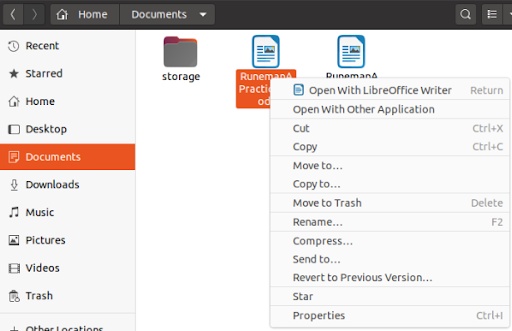
  • Right-click the file and click "Rename", then rename ".dat" to ".mp4"

    rename dat extension to mp4
  • Confirm extension change and open with a DAT player.

Bonus: When the Video .DAT File Is Corrupted or Won't Play

If your VCD .dat opens with a green screen, freezes, plays audio without video, or won't load at all, the .dat itself is damaged, usually from scratched discs, CCTV power loss, or interrupted transfers. Switching players won't help; the MPEG-1 stream inside the .dat is broken and needs to be rebuilt.

4DDiG Video Repair handles this, fixing corrupted MP4, DAT, MOV, and various other video formats. Since VCD .dat is just an MPEG-1 stream in a .dat wrapper, the same repair logic that fixes broken MP4 or MKV files also works on .dat. That is, reconstructing missing keyframes, repairing broken headers, and recovering playable segments.

It runs on Windows 7–11 and macOS 10.12+, with batch processing and preview-before-save. Its Advanced Repair mode deal with heavily damaged .dat videos well.

FREE DOWNLOAD

Secure Download

FREE DOWNLOAD

Secure Download

Steps to Repair Video with 4DDiG

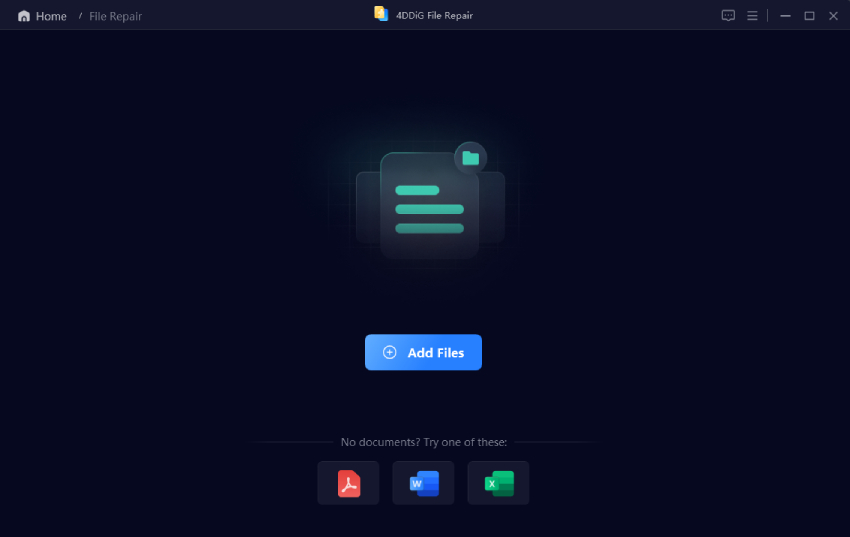
  • Install and launch 4DDiG File Repair software, then go to "Video Repair" and add your corrupted .dat file with the "Add Videos" button.

    add corrupted dat videos to 4ddig
  • Click the "Repair All" button after adding all the corrupted videos and wait as 4DDiG repairs them for you.

    start to repair all dat files
  • Preview the repaired videos by clicking "Preview", and if you are satisfied with the result, click "Save".

    preview and save repaired dat files

How to Open Text/Config .DAT Files (Settings, Logs, Database)

If the .dat is plain-text config or log data, open it in the right editor for your platform: Notepad++ on Windows, TextEdit on Mac, QuickEdit on Android, or Textor on iOS.

1. Open .dat Files on Windows in Notepad / Notepad++

If your DAT file contains text or configuration data, you can open it using Notepad or Notepad++ on Windows. These tools allow you to read dat files easily and inspect their contents. Notepad++ is especially useful for structured or large files due to its advanced formatting support.

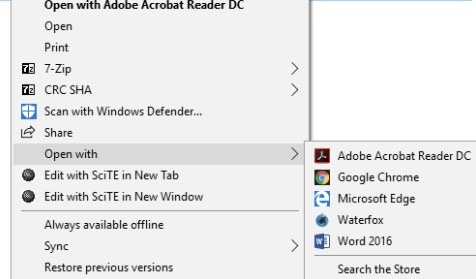
  • Right-click the DAT file, then select "Open With" and choose "Notepad".

    open dat files with notepad
  • If the content looks garbled, switch the encoding from the "Encoding" menu.

2. Open the DAT File on a Mac with TextEdit

Mac users can use TextEdit to open text-based DAT files. This built-in tool allows you to view readable content quickly. It defaults to Rich Text mode, which can mangle plain-text .dat files. However, if the file is binary, it may display unreadable symbols, in which case you'll need a specialized viewer or editor.

However, it can't handle binary DAT files like NTUSER.DAT or game saves; for those, use Hex Fiend instead.

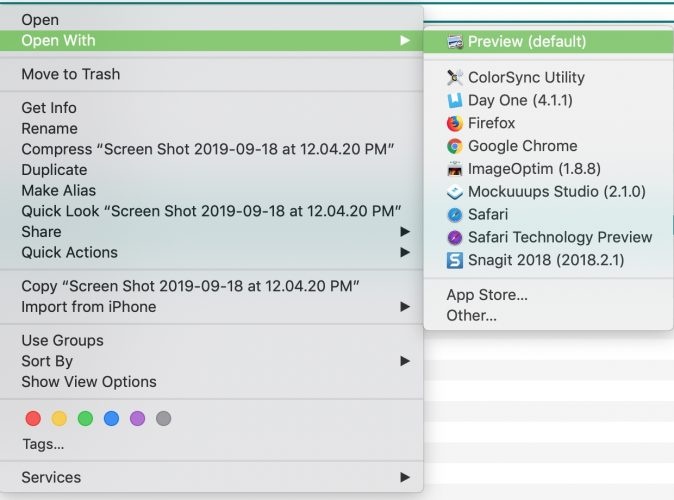
  • Right-click the .dat file and select "Open With", then choose "TextEdit".

    open text config dat files with ios textedit
  • View content

3. View DAT Files on Android with QuickEdit Text Editor

On Android devices, QuickEdit Text Editor is a powerful app to open and edit DAT files. It supports large files and multiple encoding formats, making it a reliable .dat file opener for mobile users dealing with configuration or log files. However, it can only well-show text-only binary DAT files will look like garbage. For those, use HEX Editor by Stealthcopter on Android.

  • Install QuickEdit from the Google Play Store and open the app

  • Tao "3-dots" from the top and choose "Open" to open your DAT file.

    android quickedit text editor open dat files
  • Select "DAT file" from your device and view or edit it.

4. Read DAT Files on iPhone/iPad with Textor

iPhone and iPad users can use Textor to read DAT files. It's designed for viewing text-based files and supports cloud storage integration. This makes it easy to open dat files stored locally or in services like iCloud or Google Drive.

  • Install the Textor app from the App Store and choose the location where your DAT file is saved.

    textor dat file viewer
  • Tap the DAT file to import it into the app and view its contents.

How to Open .DAT Files in Other Types (Games, Database, Binary & More) Using a Hex Editor

Some DAT files are binary and cannot be opened using normal tools. For game saves, NTUSER.DAT, and unknown binary .dat files, use a HEX editor to inspect the raw bytes, for instance, HxD on Windows, Hex Fiend on Mac, Bless on Linux.

Recommended HEX Editors

Platform HEX Editor Reasons
Windows HxD Free, supports large files, and advanced editing
Mac Hex Fiend Fast, handles multi-GB binary files efficiently
Linux Bless Lightweight and open-source
Cross-platform wxHexEditor Built for huge files; edits disk images directly without loading them into memory

On Windows, HxD is the standard pick: freeware, ~3.19 MB installer (version 2.5.0.0), memory-mapped file I/O so it loads multi-GB files near-instantly, unlike HEX editors that read everything into RAM and crash on files over 4 GB.

Use cases for a HEX editor:

  • Identify what an unknown .dat actually is by reading its magic-number header
  • Pull out readable strings buried inside binary data
  • Edit specific bytes (only if you understand the file structure)
  • Inspect game saves, registry hives, or proprietary binary formats

This method is useful when dealing with game files, databases, or unknown formats.

People Also Ask about DAT Files

Quick answers to the most-searched DAT file questions, with each kept short and self-contained for easy reference.

Q1: What program can open .DAT files?

No single program opens every DAT file. VCD video DAT files open in VLC; Outlook winmail.dat opens in winmaildat.com or Winmail Opener; text-based config DAT files open in Notepad++ on Windows or TextEdit on Mac; binary game saves and registry hives need a HEX editor like HxD. Identify the source first, then pick the tool.

Q2: Can I open a DAT file in Excel?

Only if it contains structured text data, like CSV, TSV, or fixed-width fields. In Excel, go to File > Open, switch the filter to "All Files", pick the .dat, and Excel's Text Import Wizard will let you set delimiters. Binary DAT files (video, registry, game saves) display as garbage in Excel.

Q3: What opens DAT files on Mac?

Pick by file type: TextEdit (in Plain Text mode, ⇧⌘T) for text DAT; VLC for video.dat; winmaildat.com or Letter Opener for winmail.dat; Hex Fiend for binary or game saves. With those four, a Mac handles nearly every real-world DAT file.

Q4: How to open a winmail dat file on Mac?

Fastest path: open winmaildat.com in Safari, upload the file, and download the extracted attachments, no install. For sensitive work mail, use Letter Opener (App Store, integrates with Apple Mail) or Klammer instead. which decode locally so the file never leaves your Mac.

Q5: Is a .dat file safe to open?

The .dat extension itself isn't a virus, just a container, but its contents could be. A winmail.dat from a stranger may hide malicious Office macros. Before opening anything from an untrusted source, scan it with Windows Defender, ClamAV, or VirusTotal (free, runs 70+ antivirus engines at once).

Q6: How do I repair a corrupted DAT file?

For video DAT damaged by scratched VCDs, interrupted CCTV recordings, or transfer drops (green screen, freezing, no playback), use 4DDiG Video Repair. It rebuilds MP4 moov atoms, MKV indexes, and missing GOPs. For text-based corruption, a HEX editor lets you locate the broken bytes manually.

Q7: How to change the .dat file to PDF?

There's no direct conversion, identify the content first. For text .dat (e.g., config.dat), open in Notepad++ and use File → Print → "Microsoft Print to PDF". For winmail.dat, run it through winmaildat.com first to extract the real PDF/Word attachments. Video .dat should be converted to MP4 instead of PDF.

Conclusion

Understanding how to open .dat file s becomes much easier once you identify the file type. Outlook attachments decode through winmaildat.com or a local TNEF tool; VCD and CCTV video play in VLC and convert with a quick rename or HandBrake; configs and logs open in Notepad++, TextEdit, QuickEdit, or Textor depending on your device; game saves and registry hives reveal their structure under a HEX editor.

For damaged video DAT files, tools like 4DDiG Video Repair provide a reliable way to restore and access your content without hassle.

FREE DOWNLOAD

Secure Download

FREE DOWNLOAD

Secure Download

William Bollson (senior editor)

William Bollson, the editor-in-chief of 4DDiG, devotes to providing the best solutions for Windows and Mac related issues, including data recovery, repair, error fixes.

(Click to rate this post)

You rated 4.5 ( participated)