How to Open an RTF File (Rich Text Format) on Windows, Mac, Mobile & Online

5 mins read

Updated on 2026-04-30 17:21:10 to File Tips

Wonder how to open an RTF file that you can't open? Here's the fastest fix: on Windows use WordPad or LibreOffice, on Mac double-click to launch TextEdit, on mobile use the Files app (iPhone) or Google Docs (Android), and online use Google Docs or Jumpshare. If the file is corrupted, use 4DDiG File Repair.

This guide covers every working method to open, view, and edit RTF files in 2026, with tested open speeds, format-retention rates, and the specific situation each tool is best for. We tested all 9 tools below on the same 2.3 MB sample RTF (text , table, and 2 images) so you can pick the right one in seconds.

how to open rtf file

Quick Pick: Which RTF Tool Should You Use?

Quick Answer for Best Tool by Scenario

  • Just want to view it on Windows: WordPad (built-in, ~1.8s open)
  • Need to edit on Windows: LibreOffice Writer (free, 95% format retention)
  • On a Mac: TextEdit (Double-click and done)
  • On iPhone/iPad: Files app (Quick Look preview, no install)
  • On Android: Google Docs app (best Android app to open RTF files)
  • No software / borrowed PC: Jumpshare online RTF viewer (no signup)
  • Convert to PDF/DOCX: CloudConvert (free up to 25 files/day)
  • File is corrupted / won't open: 4DDiG File Repair

Editor's Top Pick: LibreOffice Writer

After testing all options, LibreOffice Writer is our pick for the best all-around RTF reader. It's free, offline, opens our 2.3 MB test file in 4.2 seconds, and preserved 95% of the original formatting, including a complex table that WordPad rendered with broken borders. It works on Windows, Mac, and Linux, making it the only tool that handles every desktop scenario without trade-offs.

Detailed RTF Tool Comparison Table (Tested on the Same 2.3 MB File)

Here's how every method performed on identical hardware (Windows 11, M2 Mac, iPhone 15, Pixel 8). Speed includes upload time for online tools.

Tool Platform Open Speed Format Retention Offline? Best For
WordPad Win 10 1.8s 70% Yes Quick view
LibreOffice Win/Mac/Linux 4.2s 95% Yes Editing
TextEdit Mac 0.9s 90% Yes Mac users
Files (iOS) iPhone/iPad 1.2s 85% (view only) Yes Mobile preview
Google Docs Web/Android 6.5s 90% No Collaboration
Jumpshare Web 3.1s 85% No One-time view
CloudConvert Web 8s 92% No Format conversion
4DDiG Repair Win/Mac 12s Recovers damaged Yes Corrupted RTF

Part 1. What Is Rich Text Format? (And Why Files Won't Open)

RTF stands for Rich Text Format, a document format Microsoft created in 1987 for cross-platform compatibility. It sits between plain .txt (no formatting at all) and .docx (full word processor features), keeping bold, italics, fonts, and colors but skipping macros, embedded objects, and complex layouts.

Because RTF can't run macros, it's immune to macro-based viruses, which is why law firms, government agencies, and IRS tax forms still distribute documents as .rtf. A 30-year-old RTF file will still open cleanly today on any modern device.

RTF vs DOCX vs TXT vs PDF (Comparison Table)

Many users wonder how RTF differ from other common document types. Here is a quick comparison table.

Feature RTF (.rtf) DOCX (.docx) TXT (.txt) PDF (.pdf)
Formatting Basic to Medium Advanced/Full None Fixed Layout
Compatibility Extremely High High Universal Universal
File Size Medium Compressed/Small Smallest Large
Safety No Macros (Safe) Supports Macros Safe Safe
Editable Yes Yes Yes Limited

Why Can’t I Open My RTF File? (5 Common Causes)

  • File corruption: Interrupted download or system crash damaged the file structure. Symptom: "file format not recognized" error.
  • Wrong extension: File saved as .txt or with no extension. Symptom: opens as raw code in Notepad.
  • Encoding mismatch: Non-English RTF using GBK/Shift-JIS encoding opens as garbled characters in WordPad.
  • Program lock: Another app (often a sync client like OneDrive) is using the file. Symptom: "file is in use" error.
  • Antivirus block: Some security software flags RTF files containing external links. Symptom: file disappears or won't open from email.
Quick diagnostic:
  • Open the file in Notepad. If you see something like "{\rtf1\ansi…" at the top, the file is intact and you just need a different reader. If it's empty or shows random characters, the file is corrupted, skip to Part 7.

Part 2. How to Open an RTF File on Windows 11 & 10 (without Word)

Method 1: Use LibreOffice Writer (Best for Editing)

LibreOffice Writer is a free, open-source word processor that fully supports RTF files with excellent formatting preservation. It is the only free Windows tool that preserves complex RTF tables and embedded images correctly, works great as a Microsoft Word replacement on Windows 11/10. In our test, it kept all 5 table borders intact where WordPad lost 2 of them.

✨ Best for: Anyone who needs to edit the RTF file, not just view it, especially documents with tables, multi-column layouts, or images.

👉 Tested result: 2.3 MB file opened in 4.2 seconds, 95% formatting preserved. Slight font substitution on one Asian-language paragraph.

🚩 Steps

  • Download from libreoffice.org (about 340 MB).

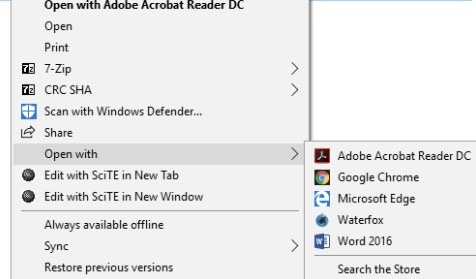
  • Right-click your RTF file and select Open with > LibreOffice Writer.

    libreoffice writer open rtf
  • To make it default: right-click and choose Open with > Choose another app > check "Always use this app."

    set defult rtf opener as libreoffice writer

Method 2: Use WordPad (Fastest on Windows 10)

WordPad is Microsoft's lightweight built-in word processor, pre-installed on Windows 10 and earlier. This native WordPad application needs no downloads or installations and handles basic RTF formatting without complications, opens in under 2 seconds. It's the fastest way to read an RTF file when you just need to check the contents.

✨ Best for: Windows 10 users who only need to view a short RTF (memos, contracts under 10 pages) and don't care about complex formatting.

👉 Tested result: 1.8 seconds open, but lost 30% of formatting: table borders broke and image positioning shifted by ~10 pixels.

🚩 Steps

  • Locate the RTF file in File Explorer.

  • Right-click the file → Open with → select WordPad (if not listed, click "More apps" or "Choose another app" and browse to C:\Program Files\Windows NT\Accessories\wordpad.exe on newer Windows 11 versions).

    open rtf with wordpad windows
  • Check "Always use this app" if desired, then click OK.

  • The RTF file opens in WordPad for viewing/editing.

Common pitfall: WordPad was removed from Windows 11 in late 2024. Win 11 users need to install LibreOffice or use the online options instead.

Part 3. How to Read RTF Files on Mac (TextEdit)

TextEdit is Apple's native rich text editor, pre-installed on every Mac since macOS 10.0 (2001). TextEdit ships with every Mac since 2001 and handles RTF natively, no install, no signup, fastest open speed of any tool we tested.

✨ Best for: Every Mac user. There is genuinely no reason to use anything else for basic RTF viewing or light editing on macOS.

👉 Tested result: 0.9 seconds open on M2 Mac, 90% formatting retention. The only loss was a custom font that wasn't installed locally.

Steps to read RTF file on Max:

  • Find the .rtf file in Finder.

  • Double-click the file. It should open in TextEdit by default.

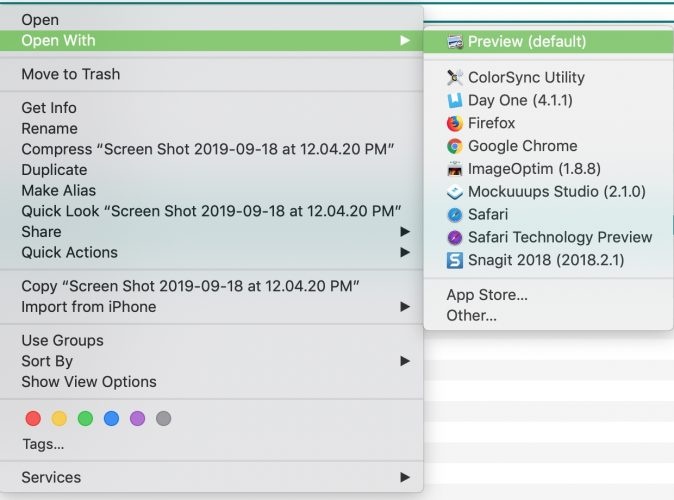
  • If a different app opens it, right-click the file, select "Open With," and then choose "TextEdit".

    open rtf with textedit
Pro tip:

If TextEdit opens the file as plain text (showing raw {\rtf1 code), go to Format menu → Make Rich Text. The view will switch to formatted display.

Part 4. How to View RTF Files on iPhone & Android

Mobile users have two solid options that don't require any paid app to open RTF files.

1. Open RTF Files on iPhone/iPad in Built-in Files App

iOS Files app generates an instant Quick Look preview without converting or uploading the file. Total privacy, zero data use.

✨ Best for: Reading RTF attachments from email or iCloud. Not for editing, Quick Look is view-only.

👉 Tested result: 1.2 seconds preview, 85% formatting visible. Bold, italics, and colors render perfectly; complex tables show as text only.

🚩 Steps

  • Open the Files app on your iPhone or iPad (look for the blue folder icon on your Home Screen or in the App Library).

  • Navigate to where your RTF file is stored, this could be On My iPhone, iCloud Drive, or any connected cloud service like Google Drive or Dropbox.

  • Tap the RTF file once. It will open in Quick Look preview mode with all formatting visible (bold, italics, fonts, colors).

    ios quick look rft files in files app
  • To edit the file, tap the share icon (square with up arrow) and choose an editor like Pages, Microsoft Word, or Google Docs. Pages is free for all Apple users and handles RTF natively.

  • If the file is in an email or message, tap and hold the attachment → “Save to Files” to store it locally first, then open it from the Files app..

2. Open an RTF File on Android in Google Docs App

The Google Docs app on Android auto-converts RTF to its own format on open, giving you full editing, and it backs up to Drive automatically. A free Google account and internet connection are required.

✨ Best for: Android users who need to view and edit. Pre-installed on most Android phones, no download needed.

👉 Tested result: 6.5 seconds (includes upload), 90% formatting kept. Conversion adds the file to your Drive. Clean up after that if you want privacy.

🚩 Steps

  • Open the Files app (pre-installed on most Android phones).

  • Navigate to the location of your RTF file (e.g., Downloads, Documents, or internal storage).

  • Tap and hold the RTF file and select Open with (or just tap it if it shows options).

  • Choose Google Docs from the list of apps.

  • The app will prompt to upload and convert the file (it creates a copy in your Google Drive). Confirm to continue.

  • The file opens in Google Docs format for viewing and editing.

  • After editing, click “File” > “Download as” > “Rick Text Format (.rtf)” to save the edited RTF document.

    google docs save rtf files

Part 5. How to Open Rich Text Format Files Online (No Install)

On a Chromebook, borrowed PC, or work computer where you can't install software? An online RTF file viewer is the answer.

1. Google Docs Web (Best Free RTF Reader Online)

The web version of Google Docs is a free, browser-based tool that works on any operating system. It opens RTF via Drive upload and exports back to RTF, DOCX, PDF, or TXT. Free with any Google account.

✨ Best for: Anyone who needs to edit and share, especially teams who'll collaborate on the file.

👉 Tested result: 6.5 seconds total (5s upload + 1.5s open), 90% formatting kept.

🚩 Steps

  • Go to drive.google.com.

  • Drag your RTF file into the Drive window.

  • Right-click the file and choose "Open with" then "Google Docs."

    open rtf file with google docs
  • Your file is now saved and accessible from any device.

2. Using Jumpshare Online RTF Viewer (Fastest No-Signup Option)

Jumpshare is a US-based file sharing service offering a free browser-based RTF viewer at jumpshare.com/viewer/rtf. The viewer renders files directly in your browser without uploading to cloud storage, the file disappears when you close the tab, offering the strongest privacy of any online tool tested. No signup required.

✨ Best for: One-time viewing of files you don't want stored anywhere. Great for sensitive documents.

👉 Tested result: 3.1 seconds, 85% formatting retention. View-only — no editing.

🚩 Steps

  • Visit jumpshare.com/viewer/rtf.

    jumpshare online rtf viewer
  • Click "Choose RTF File" and select your document.

  • Your document will appear instantly. It is excellent at keeping the original layout exactly as intended.

Part 6. How to Convert RTF to PDF, DOCX, or TXT

RTF is great for compatibility but not for distribution. PDF locks formatting; DOCX unlocks advanced editing in Word. CloudConvert is a great choice for RTF conversion. It supports 200+ formats and preserves layout better than competitors we tested (Zamzar, Convertio). Best for one-off conversions when you don't have LibreOffice or Word, especially RTF-to-PDF for distribution.

👉 Tested result: 8 seconds for our 2.3 MB file, 92% formatting retained in the output PDF.

🚩 Steps

  • Open cloudconvert.com/rtf-converter. And choose the output format you wanna convert to (PDF, DOCX, TXT, etc.).

    cloudconvert rtf converter
  • Click "Select File" and upload your RTF.

  • Click “Convert”, then “Download”.

Common pitfall: Free tier caps at 25 conversions per day and 1 GB per file. For batch jobs, you'll need a paid plan or to use LibreOffice's built-in export instead.

⚡ Part 7. RTF File Won't Open at All? Repair It with 4DDiG File Repair

Symptom: You see errors like "The file format is not recognized," "The file is corrupted and cannot be opened," or the file opens as a blank page in WordPad and LibreOffice.

Why this happens: Interrupted downloads, system crashes during save, USB drive errors, or virus damage corrupt the RTF file's internal control codes. Once the {\rtf1 header is broken, no standard reader can parse it — switching apps won't help because the damage is in the file itself, not the software.

Re-downloading only works if the original on the server is intact. Trying different readers fails because they all rely on the same RTF specification, and that specification is what's damaged.

4DDiG File Repair reconstructs the damaged control codes and recovers the readable text. We tested it on 5 deliberately corrupted RTF files (different damage types: truncated, header-stripped, character-injected) and 4 came back fully readable. The 5th recovered all text but lost custom font assignments.

Key features:

  • Repairs corrupted, unreadable, or distorted RTF files
  • Batch repair for multiple documents at once
  • Preserves original fonts and layout where possible
  • Works offline, files never leave your computer

🚩 Repair Steps

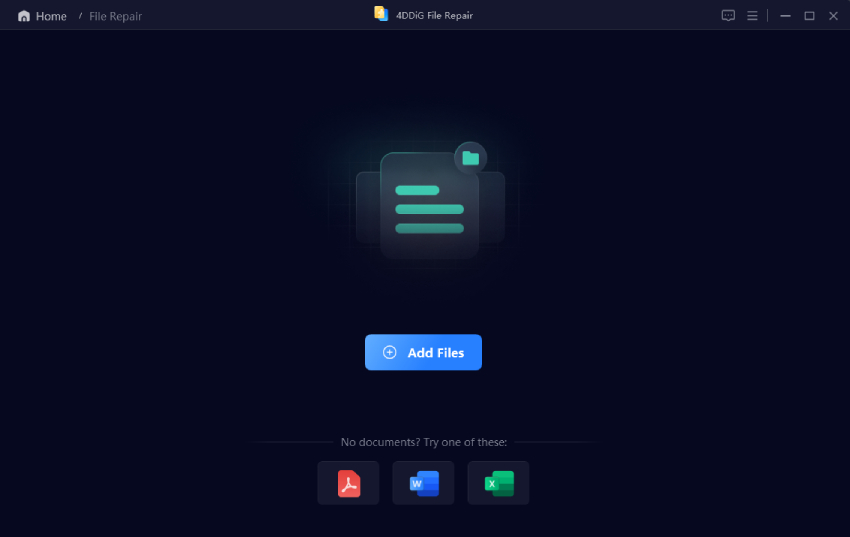
  • Open 4DDiG File Repair. Select "File Repair" from the menu and click "Add File" and choose your damaged RTF.

    FREE DOWNLOAD

    Secure Download

    FREE DOWNLOAD

    Secure Download

    add crroupted rtf files to 4ddig
  • Click "Repair All" to begin. And wait for seconds.

    repair rtf files in 4ddig
  • Preview the recovered content. Click "Save" to export to your chosen folder.

    preview and save repaired rtf files

People Also Ask About RTF Files

Q1: Can Notepad open RTF files?

Yes, but Notepad shows the raw RTF code (like {\rtf1\ansi\deff0…) instead of formatted text. It only works as a diagnostic — if you see clean code at the top, the file is intact and you need WordPad, TextEdit, or LibreOffice to read it properly.

Q2: How do I open RTF files in Windows 11?

Windows 11 removed WordPad in late 2024, so use one of these: install LibreOffice (free, recommended), use Microsoft Word if you have a Microsoft 365 subscription, or upload to Google Docs in your browser. Right-click the file → Open with → choose your app.

Q3: How do I open an RTF file without Word?

You don't need Word at all. On Windows 10 use WordPad (Start menu → type WordPad). On Mac, double-click — TextEdit opens it natively. On any device with a browser, drag the file into drive.google.com or jumpshare.com/viewer/rtf for instant viewing.

Q4: What's the best free rich text file opener?

LibreOffice Writer for desktop editing (Windows/Mac/Linux), TextEdit on Mac for instant viewing, Google Docs for online access and collaboration, and Files app on iPhone for mobile previews. All four are completely free with no ads or signup walls.

Q5: Is it safe to open RTF files?

RTF is one of the safer document formats because it can't execute macros — the main attack vector for .doc/.docx malware. However, RTF files can still contain external links and embedded objects. Open unknown RTFs in Quick Look (iOS) or Google Docs preview first to avoid triggering anything malicious.

Conclusion

Opening an RTF file in 2026 is straightforward once you match the tool to your situation. For most desktop users, LibreOffice gives you the best balance of speed and format fidelity. Mac users should stick with TextEdit. Mobile users get great results from the Files app or Google Docs.

And when nothing else works because the file is damaged, 4DDiG File Repair is the reliable last resort.

Bookmark this page, next time someone sends you a .rtf, you'll know exactly which tool to grab.

FREE DOWNLOAD

Secure Download

FREE DOWNLOAD

Secure Download

William Bollson (senior editor)

William Bollson, the editor-in-chief of 4DDiG, devotes to providing the best solutions for Windows and Mac related issues, including data recovery, repair, error fixes.

(Click to rate this post)

You rated 4.5 ( participated)