Top 5 Best SVG Viewer for Windows 11& 10 in 2026

5 mins read

Updated on 2026-04-08 17:08:14 to Photo Tips

If you’ve ever tried opening an SVG file on Windows and ended up confused, you’re not alone. Many users struggle to find the best SVG viewer that can properly display vector graphics, thumbnails, and animations. Whether you’re a designer or casual user, choosing the right tool makes a huge difference.

Part 1. Comparison Table: Which SVG File Opener & Reader Should You Choose?

Tool Price File Explorer Thumbnail Animated SVG Support Edit SVG Export Formats Best Use Case
Microsoft PowerToys Free Yes No No No Thumbnail previews in Explorer
SVG Explorer Extension Free Yes No No No Lightweight preview integration
Inkscape Free No Partial Yes PNG, PDF, EPS, more Full editing and design
IrfanView Free No Limited No JPG, PNG, BMP Fast viewing and conversion
SVGViewer.dev Free No Yes No PNG export Online viewing and animation

Part 2. How to View SVG Files in Windows 11/10 via Web Browser Directly?

Sometimes you don’t need to install any SVG file viewer at all. Modern browsers can instantly open SVG files with excellent rendering quality, making them one of the easiest solutions. This method works great for quick previews, especially if you don’t frequently work with SVG files.

Steps to Open SVG in Browser

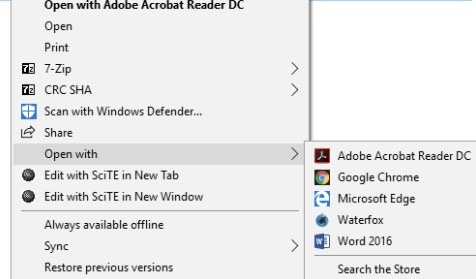
  • Right-click the SVG file and select “Open With," then choose “Google Chrome” or any other available browser.

    open svg file with browser
  • Your SVG will open instantly in a new tab, and you may zoom in/out to inspect details.

Part 3. Top 5 Best SVG Viewers for Windows? (Enable SVG Thumbnails and Previews)

If you want to install an SVG format viewer, here are our top 5 picks you must try:

1. Microsoft PowerToys — Official SVG Viewer for Thumbnail & Preview

microsoft powertoys

Microsoft PowerToys is an official utility suite from Microsoft that enhances Windows functionality. Its SVG file viewer preview module integrates directly with File Explorer, allowing users to view SVG thumbnails and previews without opening files. It’s lightweight, reliable, and ideal for users who want native-like SVG support in Windows environments.

Key Features:

  • Enables SVG thumbnails directly inside File Explorer
  • Preview pane support for quick file inspection
  • Seamless integration with Windows 10 and 11 systems
  • Lightweight installation with minimal system resource usage
  • Regular updates and support from Microsoft developers
  • Pros
  • Cons
    • Native-like experience without third-party interface clutter
    • Extremely lightweight with negligible system performance impact
    • Easy setup requiring minimal configuration after installation
    • Safe and reliable tool maintained by the Microsoft team
    • Does not support editing or exporting SVG files
    • Cannot render animated SVG content properly

Best For: Users who want a simple SVG preview and thumbnails in File Explorer

2. SVG Explorer Extension — Best for File Explorer Thumbnail Preview

svg explorer extension

SVG Explorer Extension is a simple tool designed to bring SVG thumbnail previews to Windows File Explorer. This SVG document viewer integrates directly into the system, allowing users to quickly identify SVG files visually. This tool is especially useful for users managing large collections of vector graphics without needing advanced editing features.

Key Features:

  • Adds thumbnail previews for SVG files in Explorer
  • Works seamlessly with the Windows File Explorer interface
  • Lightweight plugin with minimal background resource consumption
  • Supports most static SVG formats for accurate previews
  • Quick installation without complicated setup steps
  • Pros
  • Cons
    • Simple tool focused only on thumbnail preview functionality
    • Minimal system resource usage, even with many SVG files
    • Easy installation and no learning curve for beginners
    • Works well for organizing large design asset libraries
    • Does not support SVG editing or advanced viewing features
    • Limited compatibility with complex or animated SVG files

Best For: Users needing quick thumbnail previews for SVG collections

3. Inkscape — Best Free Desktop SVG Viewer & Editor

inkscape svg viewer

Inkscape is a powerful open-source vector graphics editor that doubles as a full-featured SVG viewer. It supports advanced editing, rendering, and exporting options, making it a top choice for designers. While it’s more complex than basic viewers, this SVG animation viewer offers unmatched control over SVG files.

Key Features:

  • Full SVG editing with professional-grade vector tools
  • Supports multiple export formats, including PNG and PDF
  • Advanced rendering engine for complex SVG structures
  • Open-source software with frequent community updates
  • Cross-platform compatibility across Windows, Mac, and Linux
  • Pros
  • Cons
    • Completely free with powerful design and editing capabilities
    • Supports complex SVG files with layers and effects
    • Wide export options for professional workflows
    • Strong community support and regular feature updates
    • A steeper learning curve for beginners unfamiliar with design tools
    • Heavier software compared to lightweight SVG viewers

Best For: Designers and professionals needing full SVG editing

4. IrfanView — Best Lightweight SVG Reader for Windows

irfanview svg viewer

IrfanView SVG Reader is a fast and lightweight image viewer that supports SVG files through plugins. It’s ideal for users who want quick access to images without heavy software. While it lacks editing tools, it excels at fast viewing and basic conversion of SVG files into other formats.

Key Features:

  • Lightweight viewer with fast loading speed for SVG files
  • Plugin support to extend functionality and format compatibility
  • Batch conversion feature for converting SVG to other formats
  • Simple interface suitable for beginners and casual users
  • Supports a wide range of image file formats beyond SVG
  • Pros
  • Cons
    • Extremely fast performance even on older Windows systems
    • Small installation size with minimal system resource usage
    • Supports batch processing for multiple file conversions
    • Easy-to-use interface with minimal learning required
    • Requires additional plugins to enable SVG support
    • Limited rendering accuracy for complex SVG graphics

Best For: Users wanting fast and simple SVG viewing

5. SVGViewer.dev — Best Online SVG Viewer with Animation Support

svgviewer dev

SVGViewer.dev is a web-based tool that allows users to view SVG files instantly without installation. It supports animated SVG viewer rendering, making it unique among viewers. Ideal for quick previews and testing, it works directly in browsers and provides a convenient solution for occasional SVG usage.

Key Features:

  • Fully browser-based tool requiring no installation or setup
  • Supports animated SVG rendering for dynamic graphics preview
  • Allows drag-and-drop file upload for quick access
  • Provides zoom and inspection tools for detailed viewing
  • Works across all major browsers and operating systems
  • Pros
  • Cons
    • No installation required, works instantly in any browser
    • Supports animated SVG files better than many desktop tools
    • Accessible from any device with an internet connection
    • Simple interface ideal for quick previews and testing
    • Requires an internet connection to use effectively
    • No offline access or integration with the local file explorer

Best For: Users needing a quick online SVG preview with animation

Part 4. Why Windows Can’t Open SVG Files by Default?

Windows does not include native support for SVG thumbnails or advanced viewing in File Explorer.

Here’s why:

  • SVG is a vector-based format, not a traditional raster image
  • Windows prioritizes common formats like JPG, PNG, and BMP
  • Lack of a built-in rendering engine for SVG preview
  • Security restrictions for script-based SVG elements
  • Limited demand from general users compared to standard formats

⚡ Part 5. Bonus Tip: What To Do If an SVG File Doesn't Open or Is Corrupted

If your SVG file won’t open, the issue may not be the viewer; it could be file corruption. In such cases, using a repair tool is the most effective solution. 4DDiG Photo Repair is designed to fix damaged or unreadable files, including SVG images. It can restore file structure and make them usable again without requiring advanced technical knowledge.

4DDiG repairs corrupted HEIC, SVG, JPG, PNG, and other image formats efficiently. It supports batch repair of multiple damaged files simultaneously. The software uses advanced algorithms to recover file structure accurately. It provides a preview before saving repaired images and offers a simple interface suitable for beginners and professionals alike.

FREE DOWNLOAD

Secure Download

FREE DOWNLOAD

Secure Download

Steps to Repair SVG Files

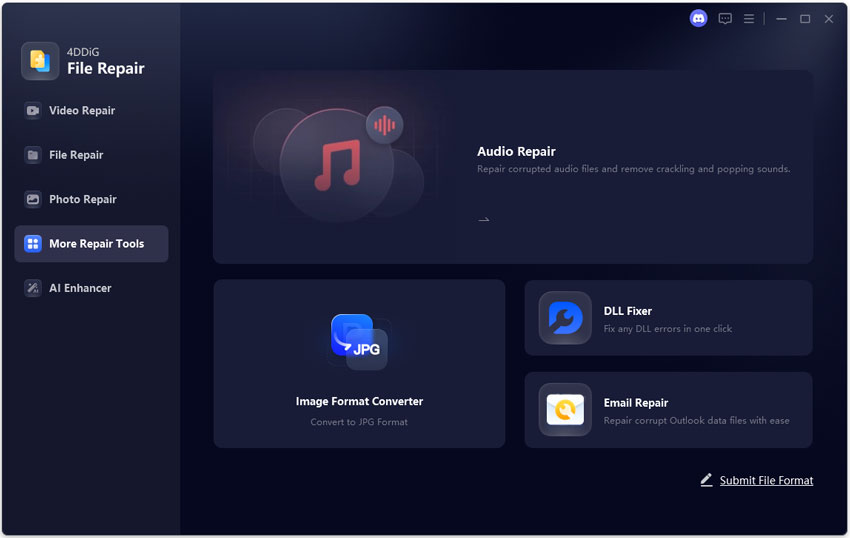
  • Install and open 4DDiG File Repair. Select the "Photo Repair" feature from the left side and click "Add Photos" to add your corrupted SVG files.

    add corrupted svg files to 4ddig
  • Click “Repair All” to start fixing files automatically and wait as 4DDiG fixes those add SVG files for you.

    repair all added svg files
  • Preview repaired files with the “Preview” button and save them by clicking “Save” once you are satisfied with the results.

    preview and save repaired svg files

FAQs about SVG File Viewers

How do I view an SVG file on Windows?

You can open SVG files using browsers like Chrome or Edge, or install tools like PowerToys or Inkscape. Browsers are quickest, while dedicated viewers offer better features such as thumbnails and editing capabilities, depending on your needs.

Which is the best free SVG file viewer for Windows?

The best SVG viewer depends on your needs. PowerToys is great for previews, Inkscape is ideal for editing, and IrfanView works well for fast viewing. Each tool serves different purposes, so choosing the right one depends on your workflow.

Can I see SVG thumbnails in Windows 11 File Explorer without extra software?

No, Windows does not support SVG thumbnails natively. You need tools like PowerToys or SVG Explorer Extension to enable thumbnail previews. These tools integrate directly with File Explorer and provide a seamless viewing experience.

Does PowerToys support animated SVG?

No, PowerToys does not support animated SVG files. It is mainly designed for static previews and thumbnails in File Explorer. For animated SVGs, browser-based tools like SVGViewer.dev provide better rendering and playback support.

Conclusion

Finding the best SVG viewer depends on your needs, whether it’s quick previews, editing, or animation support. Tools like PowerToys and Inkscape cover most use cases, while online viewers add flexibility. If your SVG files fail to open, 4DDiG File Repair can restore them easily, ensuring smooth viewing without data loss.

FREE DOWNLOAD

Secure Download

FREE DOWNLOAD

Secure Download

William Bollson (senior editor)

William Bollson, the editor-in-chief of 4DDiG, devotes to providing the best solutions for Windows and Mac related issues, including data recovery, repair, error fixes.

(Click to rate this post)

You rated 4.5 ( participated)