Top 8 Best EPUB Readers for Windows in 2026 (Tested & Compared)

5 mins read

Updated on 2026-03-05 16:45:33 to File Tips

EPUB has become the standard format for ebooks thanks to its flexibility and responsive layout. However, Windows does not natively support EPUB files like PDFs. That is why choosing one of the best EPUB readers for Windows is essential for smooth reading, annotation, and syncing across devices. This article explores 8 top rated EPUB readers, comparing their features to help you choose the best solution for your reading needs.

best epub readers for windows

Part 1. Comparison Table: Which Is the Best Windows EPUB Reader

Choosing the right EPUB reader software for windows often comes down to specific feature sets. Here is a quick comparison of the most popular EPUB reader software for Windows in 2026.

Tool Name Free or Paid Best For Dark Mode Text-to-Speech DRM Support Cloud Sync Annotations and Highlights Supported Windows Version
Calibre Free Library management Yes Plugin required Limited No Yes Windows 7 to Windows 11
Thorium Free Accessibility and TTS Yes Yes Yes No Yes Windows 10 and 11
Freda Free with optional purchase Casual reading Yes Yes Limited Yes Yes Windows 10 and 11
Koodo Reader Free Minimalist experience Yes Yes No Yes Yes Windows 8 to 11
Adobe Digital Editions Free DRM books Yes No Yes Yes Yes Windows 7 to 11
Sumatra PDF Free Lightweight use Yes No No No No Windows 7 to 11
Icecream Ebook Reader Free and Paid User interface Yes Limited Yes No Yes Windows 7 to 11
Aquile Reader Free and Paid Modern UI and sync Yes Yes Yes Yes Yes Windows 10 and 11

Part 2. How to Open EPUB Files on Windows (Quick Guide)

An EPUB file (short for Electronic Publication) is a popular digital eBook format used to read books on computers, tablets, smartphones, and eReaders. It uses the file extension .epub.

EPUB is one of the most widely accepted eBook formats because it is flexible and reader-friendly. Unlike PDF files, EPUB files are reflowable, which means the text automatically adjusts to fit different screen sizes. This makes reading easier on small devices like phones.

If you are unsure how to open EPUB files, here are three simple ways to read them on Windows. Each method works for different situations, whether you want a quick view or a long-term reading solution.

Method 1: Convert EPUB to PDF

One of the easiest ways to open an EPUB file on Windows is to convert it into PDF format. PDF files are supported by most browsers and built-in Windows apps. If you only need to read the book and do not require advanced features like annotations or text-to-speech, converting EPUB to PDF can be a quick solution.

You can use free online tools like CloudConvert or offline software such as Calibre to complete the conversion.

Steps to Convert EPUB to PDF:

  • Open your browser and go to CloudConvert.com.

  • In the convert section, select EPUB as the input format. Meanwhile, choose PDF as the output format.

  • Click “Select File” and choose the EPUB file from your computer.

    cloudconvert epub to pdf converter
  • Click “Convert,” then wait until the conversion finishes.

  • Once converted, download the converted PDF file.

  • Open the PDF using any PDF reader on Windows.

This method works well if formatting accuracy is not your top priority.

Method 2: Open via Browser Extensions

Another simple way to open EPUB files is by using browser extensions. This is helpful if you do not want to install separate software on your computer. Many browsers like Chrome, Edge, and Firefox support EPUB reading through add-ons.

Browser extensions allow you to upload and read EPUB files directly in your browser window. Some extensions even support offline reading and basic text-to-speech features.

Steps to Use a Browser Extension:

  • Open Google Chrome and then go to the "Chrome Web Store" (or Add-ons store).

  • Search for “Readium” or another EPUB reader extension.

  • Click “Add to Chrome” and confirm installation.

  • After installation, click the “extension icon” near the address bar.

  • Select “Add to Library” and upload your EPUB file.

    readium epub reader for chrome
  • Double-click the book cover to start reading.

This method is convenient for occasional reading but may not offer advanced features like full library management or DRM support.

Method 3: Use a Free EPUB Reader for Windows

If you read EPUB books regularly, installing a free EPUB reader for Windows is the best long-term solution. Dedicated software provides better features like bookmarks, highlights, annotations, DRM content, dark mode, text resizing, and text-to-speech (TTS) support.

Next, we explore the top 8 best EPUB reader software for Windows in 2026. 👇

Part 3. Top 8 Best EPUB Readers for Windows (2026 Latest List)

Choosing the right EPUB format reader for Windows depends on your needs. Some focus on accessibility, while others prioritize design or DRM compatibility. Here is our tested list of the best free and premium solutions in 2026.

1. Calibre - Best All-in-One Windows EPUB Reader & Manager

  • Best for: Managing and converting large ebook libraries

  • Free or Paid: Free and open-source

  • Supported Formats: EPUB, MOBI, PDF, AZW3, TXT, and more

    calibre ebook manager

Calibre is one of the most complete tools available if you need more than just a basic reader. It combines powerful library management, built-in reading support, and advanced format conversion in one platform. This EPUB reader software for Windows offers unmatched flexibility and control for users who manage hundreds or even thousands of ebooks.

👍 What Makes Calibre Special

  • Built-in ebook viewer with advanced organization by title, author, series, or tags
  • Automatic metadata download (covers and descriptions)
  • Powerful conversion tools for Kindle, Kobo, Nook with customizable settings
  • Full ebook editor with CSS and source code view
  • Device sync support

👎 Trade-Offs

  • Interface is outdated compared to modern apps
  • Can be overwhelming for beginners
  • No built-in cloud syncing by default

Overall, Calibre stands out as an all-in-one software to read EPUB on Windows and manage digital libraries efficiently.

2. Thorium EPUB Reader - Free & Open-Source EPUB Viewer with Text-to-Speech & Dark Mode

  • Best for: Accessibility, EPUB 3 support, and DRM-protected books

  • Free or Paid: Completely Free

  • Supported Formats: EPUB 2, EPUB 3, PDF, DAISY, LPF

    thorium epub reader

Thorium EPUB Reader is a modern, open-source reading application developed by EDRLab. It is widely recognized as one of the best EPUB 3 readers available today. It is designed with accessibility in mind. It supports multiple formats and offers a clean, ad-free interface. If you need a reliable windows epub reader with tts (text-to-speech) and strong DRM compatibility, Thorium is a solid choice.

👍 What Makes Thorium Special

  • Full EPUB 3 multimedia support including MathML rendering
  • Built-in text-to-speech for read-aloud functionality
  • Comfortable reading themes (sepia and night mode)
  • LCP DRM support for borrowed or purchased ebooks
  • Compatible with NVDA and JAWS screen readers; ; OPDS catalog and Calibre integration

Trade-Off

  • Large installation size
  • No built-in advanced library management like Calibre
  • No direct cloud sync system

Thorium is ideal if accessibility and modern EPUB standards are your priority.

3. Freda - Best Free EPUB Reader for Windows 11 (Native-Like Option)

  • Best for: Windows 10 and 11 users who want a native-style experience

  • Free or Paid: Free with optional Pro features

  • Supported Formats: EPUB, MOBI, FB2, HTML, TXT (DRM-free)

    freda epub readers

Freda is a feature-rich EPUB reader designed specifically for Windows devices. It offers a smooth and native-like experience on Windows 10 and Windows 11. With a high user rating and support for multiple formats, it is one of the most trusted free options available. The app combines customization, cloud integration, and accessibility tools, making it a strong choice for users who want flexible and reliable ebook reading software.

👍 What Makes Freda Special

  • Access to 50,000+ public domain books
  • Cloud integration with OneDrive, Dropbox, Google Drive
  • Highly customizable display including dyslexia-friendly OpenDyslexic font
  • Dictionary lookup and translation tools
  • Offline reading support; Syncs reading position across devices

Trade-Off

  • Only supports DRM-free books
  • Continuous text-to-speech requires the premium version
  • Cross-device reading sync is a paid feature

Overall, Freda is a best choice if you are looking for the best epub reader for windows 11 with strong customization and cloud support.

4. Koodo Reader - Best Minimalist EPUB File Opener with Dark Mode & TTS

  • Best for: Minimalist reading with customization

  • Free or Paid: Free with optional Pro features

  • Supported Formats: EPUB, PDF, MOBI, AZW3, TXT, FB2, DOCX, HTML, and comic book files

    koodo reader

Koodo Reader is a modern and minimalist ebook reader designed for users who want a clean interface with powerful features. It supports a wide range of formats and works across multiple platforms, including Windows. With built-in dark mode, text-to-speech, AI tools, and cloud synchronization, it offers more than just basic reading. Despite its simple design, it delivers advanced functionality for both casual and serious readers.

👍 What Makes Koodo Reader Special

  • Clean, distraction-free interface with dark mode and fully customizable themes
  • Text-to-speech feature with adjustable settings
  • AI tools for translation, dictionary, summarization, and OCR
  • Cloud sync, backup, and cross-platform support

👎 Trade-Offs

  • Some AI features and advanced voice tools require Pro version
  • Large installation size than lightweight readers

Overall, Koodo Reader is a great choice if you want a windows epub reader with dark mode on Windows.

5. Adobe Digital Editions - Best for DRM-Protected EPUB

  • Best for: DRM-protected and borrowed library ebooks

  • Free or Paid: Free

  • Supported Formats: EPUB, PDF, DRM-protected PDF and EPUB (Adobe DRM)

    adobe digital editions

Adobe Digital Editions, often called ADE, is one of the most trusted tools for reading DRM-protected EPUB files. Many major publishers and public libraries use it to distribute secure eBooks. It supports EPUB, EPUB3, and PDF formats, offering a stable reading experience across Windows and Mac devices. If you purchase or borrow protected eBooks, ADE is often required to open and manage them properly.

👍 What Makes Adobe Digital Editions Special

  • Industry-standard DRM support for purchased and borrowed eBooks
  • EPUB3 support with audio, video, and interactive content
  • Borrow eBooks directly from public libraries; sync across devices via Adobe ID
  • Full-text search, bookmarking, highlights, and note-taking tools
  • Works with screen readers for accessibility

👎 Trade-Offs

  • Interface is outdated compared to modern readers
  • Can be slow with large libraries
  • Primarily designed for DRM content; not suitable as a general library manager

Overall, ADE is essential if you regularly purchase or borrow protected EPUB titles.

6. SumatraPDF - Best Lightweight EPUB File Opener

  • Best for: Lightweight EPUB and PDF reading on low-spec devices

  • Free or Paid: Free and open source

  • Supported Formats: EPUB, PDF, FB2, MOBI, CBZ, CBR (comic formats), DjVu, XPS, TXT, HTML

    sumatrapdf epub file opener

Sumatra PDF is a fast, lightweight document and ebook viewer designed for Windows users who prefer simplicity and speed. As an open-source tool, it supports EPUB along with PDF, MOBI, XPS, DjVu, and comic formats. It is built to use minimal system resources, making it ideal for older PCs or users who just want a clean reading experience without extra features.

👍 What Makes Sumatra PDF Special

  • Extremely lightweight and fast startup and minimal CPU/RAM usage
  • Portable version available (no installation required)
  • Clean, distraction-free interface
  • Multi-tab viewing for handling multiple documents

👎 Trade-Offs

  • No annotation, editing, or text-to-speech tools
  • Very limited customization options
  • Windows-only (no macOS or mobile support)

It is perfect if you just want a fast EPUB opener without extra features.

7. Icecream Ebook Reader - Good Windows EPUB Viewer with Best UI Experience

  • Best for: Attractive interface and simple library management

  • Free or Paid: Free with optional Pro version

  • Supported Formats: EPUB, MOBI, PDF, FB2, CBR, CBZ, TXT, and more

    icecream ebook reader

Icecream Ebook Reader is a user-friendly Windows EPUB viewer designed for readers who value a clean interface and smooth reading experience. It supports multiple ebook formats and offers helpful tools like text-to-speech, dark mode, and library organization. It combines simplicity with useful features, making it a solid choice for casual readers and students alike.

👍 What Makes Icecream Ebook Reader Special

  • Clean, modern interface with night mode and customizable fonts and layout
  • Built-in text-to-speech feature
  • Highlighting, notes, and bookmarks
  • Library management with categories, tags, and cross-device progress sync

👎 Trade-Offs

  • Some advanced features require Pro version
  • Performance may slow with very large libraries
  • Windows-only support

It’s a strong option for users who want style and simplicity together.

8. Aquile Reader - Modern Windows EPUB File Reader with TSS and Cross-Sync

  • Best for: Cross-device sync and advanced customization

  • Free or Paid: Free with in-app purchases

  • Supported Formats: EPUB (.epub); main and only format focus

    aquile reader

Aquile Reader is a modern and highly customizable EPUB reader designed for Windows and Android users. It offers smooth performance, cloud synchronization, and built-in text-to-speech for an immersive reading experience. With strong library organization tools and detailed reading insights, Aquile Reader is ideal for users who want a clean interface combined with powerful features across multiple devices.

👍 What Makes Aquile Reader Special

  • Cross-device cloud sync between Windows and Android
  • Built-in Text-to-Speech for hands-free reading
  • Fully customizable reader with 2-column book-style layout option
  • In-app dictionary, translation tools, and detailed reading statistics
  • Built-in online bookstore with 50,000+ free ebooks and powerful library management

👎 Trade-Offs

  • Supports only DRM-free EPUB and PDF; no MOBI or comic file support
  • Slightly heavier than lightweight readers

Aquile Reader is ideal if you want a feature-rich reading experience with syncing and customization.

⚡ Part 4. Troubleshooting: What If EPUB Files Are Not Opening on Windows

If your EPUB file won't open, appears blank, or shows garbled text, the file is likely corrupted. The fastest fix is 4DDiG File Repair, a dedicated tool for repairing damaged documents on Windows.

Why 4DDiG File Repair:

  • Repairs EPUB files that fail to open, display blank pages, or show unreadable content
  • Restores internal file structure without altering your original formatting
  • Supports batch repair for multiple files at once
  • Preview repaired files before saving
FREE DOWNLOAD

Secure Download

FREE DOWNLOAD

Secure Download

Steps to Fix Corrupted EPUB Files Using 4DDiG File Repair

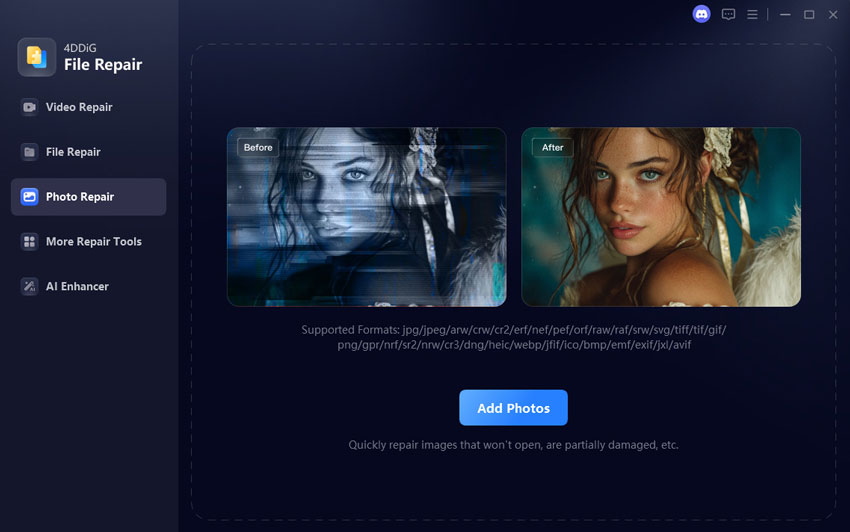
  • Open 4DDiG File Repair and choose "File Repair" from the left panel. Click "Add Files" or drag files to upload your corrupted EPUB.

    add corrupted epub files
  • After adding the files, click "Repair All." The software will automatically scan and fix detected corruption issues.

    repair all corrupted epub files
  • Click "Preview" to verify the result, then "Save" to export the repaired EPUB file.

    preview and save repaired epub files

After saving, try opening the repaired file again using your preferred software to read EPUB on Windows.

People Also Ask about Windows EPUB Reader

Q1: How to open EPUB files without Adobe?

You can use Calibre, Thorium, Freda, Koodo Reader, or even browser extensions. Many options work as EPUB reader Windows freeware without needing Adobe Digital Editions.

Q2: Which app is best for EPUB files?

It depends on your needs. Calibre is best for management. Thorium is ideal for accessibility. Aquile Reader offers cloud sync. For simple reading, Sumatra PDF works well. Overall, Calibre remains one of the best EPUB readers for Windows.

Conclusion

Choosing among the best EPUB readers for Windows depends on whether you want simplicity, DRM support, or advanced library management. Free tools like Calibre and Thorium work well for most users, while Aquile and Icecream provide modern features.

If your EPUB file does not open due to corruption, 4DDiG File Repair is a reliable solution to restore your eBooks quickly and safely.

FREE DOWNLOAD

Secure Download

FREE DOWNLOAD

Secure Download

Sawart Mashab (senior editor)

Sawart Mashab, the content writer for 4DDiG, is adept at creating informative and practical solutions related to Windows and macOS issues, data recovery, file repair, and RAID storage.

(Click to rate this post)

You rated 4.5 ( participated)