7 Best NEF File Viewers to Open Nikon RAW Images

5 mins read

Updated on 2026-10-14 11:42:03 to Photo Tips

Nikon cameras save photos in the NEF format, a type of RAW file that keeps more detail than regular JPEGs. Many computers and phones cannot open these files right away, which makes viewing them harder than expected.

This guide covers the 7 best NEF file viewers for Windows, Mac, Android, and iOS to open RAW NEF files anywhere. You will also learn a simple free method that uses tools already built into Windows.

Part 1. How to View NEF Files on Windows Directly

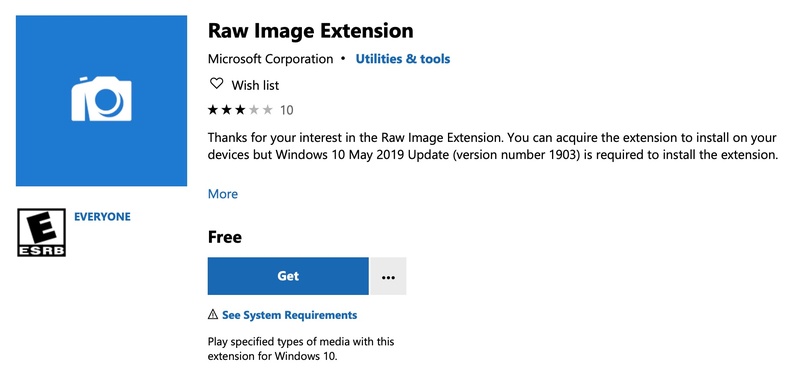
Windows does not open NEF files by default. The easiest fix is to install Microsoft's free Raw Image Extension. After that, you can view the files with the built-in Photos app and see thumbnails in File Explorer. This method needs no extra paid software and works on Windows 10 and Windows 11.

Here is how to set it up:

  • Open the Microsoft Store from the Start menu.

  • Search for "Raw Image Extension." Choose the one published by Microsoft Corporation.

  • Click Get or Install and wait for it to finish.

    get microsoft raw image extensions to open nef files on windows
  • Open File Explorer and go to the folder that holds your NEF files. Thumbnails should appear. If they do not, restart your computer.

  • Double-click any NEF file. It should open in the Windows Photos app.

Part 2. Discover 7 Must-Try NEF File Viewers for Windows, Mac, Android & iOS

Once the basic Windows method is not enough, dedicated tools make viewing and managing NEF files much easier. Below are seven reliable options that cover desktop, online, and mobile needs. Each one offers a different balance of speed, features, and convenience.

1. Nikon NX Studio --- Official Free NEF Viewer

Nikon NX Studio is the free official software from Nikon for viewing and basic editing of NEF and NRW files. It keeps Nikon's own color and Picture Control settings accurate. It works well for Nikon shooters who want reliable results on Windows or Mac without paying for extra software.

nikon nx studio
  • Pros
  • Cons
    • Free and officially supported by Nikon
    • Accurate color and camera settings
    • Combines browsing and editing in one app
    • Help check image EXIF data
    • Available for both Windows and Mac
    • Interface can feel slower with very large folders
    • Fewer advanced tools than paid editors

2. FastStone Image Viewer --- Free Lightweight NEF Viewer for Windows

FastStone is a fast, lightweight program to view nef files on Windows. It handles NEF and many other RAW formats, shows clear thumbnails, and includes batch tools. It suits users who want a simple, no-frills viewer that opens files quickly.

faststone image viewer
  • Pros
  • Cons
    • Free for personal use
    • Very fast browsing and batch conversion
    • Supports many RAW formats including NEF
    • Check and keep EXIF data
    • Portable version available
    • Windows only
    • Interface looks dated
    • Commercial use needs a paid license

3. XnView MP --- Free Software to View Large NEF Collections on Windows

XnView MP is a free multi-platform image browser that reads NEF and dozens of other RAW formats without extra codecs. It shines when you need to organize and view large photo collections. Best for people who manage many files on Windows, Mac, or Linux.

xnview mp viewing nef files
  • Pros
  • Cons
    • Free for personal use
    • Handles 500+ formats including NEF
    • Strong batch tools and metadata support
    • View image metadata info
    • Available on Windows, Mac, and Linux
    • Not a full RAW editor
    • Learning curve for advanced features

4. FastRawViewer --- Fast RAW Viewer for Mac & Windows

FastRawViewer is built specifically for quick culling of RAW files. It renders the actual NEF data rather than just embedded JPEGs, so you can check exposure, focus, and detail accurately. Ideal for photographers who need to sort hundreds of shots fast on Mac or Windows.

fastrawviewer nef file viewer
  • Pros
  • Cons
    • Extremely fast RAW rendering
    • Useful technical tools (histograms, focus peaking)
    • Supports many camera models
    • Can check image metadata
    • Works on both Windows and Mac
    • Paid software (trial available)
    • More technical interface
    • Limited editing features

5. Jumpshare NEF File Viewer Online

Jumpshare offers a free browser-based NEF file viewer online. Upload a NEF file and view it directly without installing anything. It is useful when you need a quick look or want to share a single file with someone else.

jumpshare nef file viewer online
  • Pros
  • Cons
    • No installation required
    • Works on any device with a browser
    • Easy sharing via link
    • Secure upload
    • File size limits on free plan
    • Files are stored temporarily on servers
    • Not ideal for large batches

6. Framebird Free NEF Image Viewer

Framebird provides a privacy-focused online viewer that processes NEF files in your browser. Your files stay on your device and never get uploaded. It is a solid choice when you want a quick preview without installing software or sending data to the cloud.

framebird free nef image viewer
  • Pros
  • Cons
    • Completely free and private
    • No upload required
    • Supports multiple RAW formats
    • Simple drag-and-drop interface
    • Limited features beyond viewing
    • Depends on browser performance
    • Not designed for heavy organization

7. Snapseed --- Free NEF File Viewer for Android & iOS

Snapseed is Google's free mobile photo app that now opens NEF and other RAW files on Android and iOS. It includes a dedicated Develop tool for basic RAW adjustments plus many editing options, such as rotating NEF files. Perfect for photographers who want to check and lightly edit NEF files on a phone or tablet.

snapseed nef file viewer
  • Pros
  • Cons
    • Completely free with no ads
    • Strong mobile editing and rotating tools
    • Improved RAW support in recent versions
    • Available on both Android and iOS
    • Not a full desktop replacement
    • Some newer camera models may still need testing
    • Best for single files rather than large libraries

Part 3. Quick Pick: Which NEF File Format Viewer Should You Use?

Choosing the right tool depends on your device, budget, and how many files you need to handle. Here is a simple comparison of the options covered above:

NEF Viewer Best For Availability Free or Paid
Nikon NX Studio Nikon shooters who want accurate colors and basic editing Windows, Mac Free
FastStone Image Viewer Fast everyday browsing and batch work on Windows Windows Free for personal use
XnView MP Managing large photo collections Windows, Mac, Linux Free for personal use
FastRawViewer Quickly reviewing and culling large RAW photo sets Windows, mac Paid (free trial available)
Jumpshare Quick online viewing and sharing Online Free with limits
Framebird Private browser-based viewing without uploads Online Free
Snapseed Viewing and light editing on a phone or tablet Android, iOS Free

If you mainly shoot with a Nikon camera and work on a computer, start with Nikon NX Studio. For pure speed on Windows, FastStone or XnView MP are excellent free choices. Photographers who cull large shoots often prefer FastRawViewer. When you need something that works anywhere without installing software, the online viewers or Snapseed on mobile cover those needs well.

⚡ Bonus: How to Fix NEF Files Not Opening or Corrupted Issues

Sometimes a NEF file simply will not open, shows as greyed out, or looks damaged after a transfer, memory card error, or sudden power loss. In these cases a dedicated repair tool can help recover the image data.

4DDiG Photo Repair (also available as part of 4DDiG File Repair) is designed for this situation. It uses AI to fix corrupted, unreadable, or damaged photos, including RAW formats such as NEF.

Its key strengths include support for many image types, batch repair, preview before saving, and extra AI tools that can enhance quality or reduce noise after the file is fixed. IMoreover, it provides multiple output video formats, such as JPG, PNG, or the original format.

FREE DOWNLOAD

Secure Download

FREE DOWNLOAD

Secure Download

Steps to repair corrupted NEF files with 4DDiG Photo Repair

  • Launch 4DDiG Photo Repair, select Photo Repair from the left menu, and click Add Photos to import one or more damaged NEF files.

    add corrupted nef files to 4ddig
  • Click Repair All and wait for the software to process the selected photos.

    repair all damaged nef files
  • Once the repair is complete, click Preview to check whether the NEF images display correctly.

    preview repaired nef files
  • If they look correct, choose an output format you want and then export and save the repaired files to a safe location.

    save repaired nef files in preferred format

Conclusion

Finding a good NEF file viewer no longer needs to be complicated. You can start with the free Microsoft Raw Image Extension on Windows, then move to dedicated tools like Nikon NX Studio, FastStone, XnView MP, FastRawViewer, online options, or Snapseed on mobile depending on your needs.

When a NEF file becomes corrupted or refuses to open, 4DDiG Photo Repair offers a practical way to recover it. With the right viewer and a solid repair option ready, you can keep working with your Nikon RAW photos smoothly across Windows, Mac, Android, and iOS.

FREE DOWNLOAD

Secure Download

FREE DOWNLOAD

Secure Download

William Bollson (senior editor)

William Bollson, the editor-in-chief of 4DDiG, devotes to providing the best solutions for Windows and Mac related issues, including data recovery, repair, error fixes.

(Click to rate this post)

You rated 4.5 ( participated)