What Is a NEF File & How to Open NEF Files Smoothly

5 mins read

Updated on 2026-07-02 12:06:25 to Photo Tips

You just imported photos from your Nikon camera and see.NEF files instead of .JPG, what are they? If you’ve found yourself asking what is a NEF file, the answer is simple: NEF stands for Nikon Electronic Format, Nikon's proprietary RAW image format. Unlike JPEGs, NEF files preserve far more image data, giving photographers greater flexibility during editing.

In this guide, you’ll learn what are NEF format images, how to open NEF files on different devices, view them with free tools, convert them to JPG, and fix NEF files that won’t open.

What Is a NEF File & Why Nikon Saves Photos as NEF Files?

Nikon cameras often give users the choice between JPEG and NEF formats. While JPEG is easier to share, NEF offers significantly more editing potential because it retains the original sensor data captured by the camera.

What Does NEF Mean (NEF Definition)

If you’re wondering what is a NEF file, NEF stands for Nikon Electronic Format. It is Nikon’s RAW image format used by DSLR and mirrorless cameras. Instead of processing and compressing image data like JPEG files, NEF stores nearly all information captured by the camera sensor. This includes color data, exposure details, dynamic range information, and metadata.

Because the image remains largely unprocessed, photographers can make extensive adjustments later without sacrificing image quality.

NEF vs JPEG: What’s the Difference?

Many Nikon users immediately compare NEF and JPEG when deciding how to shoot photos.

  • Feature
  • NEF (RAW)
  • JPEG
  • Image Quality
  • Highest possible quality
  • Compressed
  • Editing Flexibility
  • Excellent
  • Limited
  • File Size
  • Larger
  • Smaller
  • Dynamic Range
  • Preserved
  • Reduced
  • White Balance Adjustment
  • Flexible
  • Limited
  • Camera Processing Applied
  • No
  • Yes
  • Best For
  • Professional editing
  • Quick sharing

Understanding this difference helps explain why photographers often choose NEF even though the files require additional processing.

Key Advantages of Shooting in NEF Format

There are several reasons photographers prefer NEF files:

  • Maximum image quality retention.
  • Greater flexibility when adjusting exposure.
  • Easier recovery of highlight and shadow details.
  • Better color correction capabilities.
  • Non-destructive editing workflow.
  • Improved white balance adjustments.
  • Ideal for professional photography projects.
  • Better results in difficult lighting conditions.

These advantages explain why Nikon continues to make NEF the preferred format for serious photography work.

How to Open NEF Files on Windows and Mac (Fastest)?

One reason people search for “how to open NEF files” is that many default image viewers don't immediately recognize Nikon RAW formats. Fortunately, both Windows and macOS provide relatively simple solutions. Once properly configured, you'll be able to preview NEF photos directly without converting them first.

1. Open NEF Files on Windows Using Microsoft RAW Image Extensions

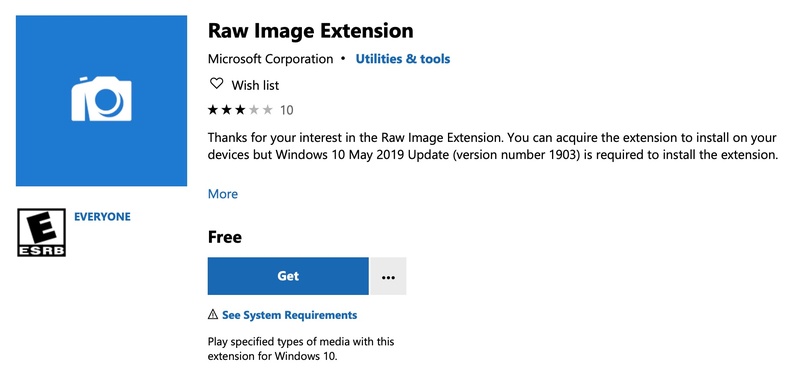
Windows doesn’t natively support every Nikon RAW format out of the box, which is why many users see blank thumbnails or receive errors when trying to view NEF photos. Microsoft’s free RAW Image Extensions solve this problem by adding support for NEF and other RAW formats directly to File Explorer and the Photos app.

Once installed, you can preview, open, and manage Nikon RAW images without downloading a dedicated NEF reader or editing software.

  • Open Microsoft Store and search for “RAW Image Extension”.

    install ms raw image extension for opening nef
  • Install the extension and restart “File Explorer” if necessary.

  • Navigate to your NEF files and open the image using Windows Photos.

2. Open NEF Files on Mac Using Preview

Mac users have it a little easier because macOS includes built-in support for many Nikon RAW formats. If your camera model is supported, you can open NEF images directly in Preview without installing additional applications.

This is often the fastest solution for photographers who simply want to view their files before editing. Preview also supports zooming, basic image inspection, and Quick Look, making it convenient for everyday photo management.

  • Locate the NEF file in “Finder” and double-click the file.

  • Preview will launch automatically, where you can view the image.

    macos preview opens nef files

Top 3 Free NEF Viewers in 2026

If your operating system doesn’t fully support your camera model, dedicated NEF viewers provide a reliable alternative. The following tools are among the most practical options available for viewing Nikon RAW images.

1. Jumpshare NEF Viewer: Open NEF Files Online

jumpshare free online nef viewer

Jumpshare Free Online NEF Viewer offers a convenient browser-based solution for users who want to open NEF files online without installing software. Since it runs directly in a web browser, it works across Windows, Mac, Chromebooks, tablets, and many mobile devices.

It’s particularly useful when you need quick access to a NEF file on a computer where image editing software isn’t installed.

  • Pros
  • Cons
    • No installation or signup required.
    • Works in any browser on all devices.
    • Secure sharing with password and expiration.
    • Built-in comments and markup tools.
    • Needs internet connection.
    • Limited editing features.
    • Free version has upload size limits.

Steps to View NEF Files Using Jumpshare

  • Open Jumpshare NEF Viewer and click “Upload” to upload the NEF file.

  • Preview the image in your browser and download or share if needed.

2. Nikon NX Studio: Official Solution

nikon nx studio

If you regularly shoot in Nikon RAW format, using Nikon’s own software often provides the most accurate viewing experience. NX Studio is Nikon’s free image management and editing application designed specifically for NEF files.

It understands Nikon camera settings, color profiles, and metadata better than most third-party tools, making it an excellent choice for photographers who want to review and edit their images exactly as intended.

  • Pros
  • Cons
    • Best color accuracy for Nikon cameras.
    • Full RAW support and updates.
    • Non-destructive editing tools like like tone curves, lens corrections, etc.
    • Free updates and compatible with newest Nikon models.
    • Batch processing included.
    • Requires software installation.
    • Steeper learning curve.
    • Windows and Mac only.

Steps to Open NEF Files in NX Studio

  • Install Nikon NX Studio and launch the software.

  • Browse to your image folder using the left pane to select the NEF file. Or, click “Import” to upload your NEF files.

    nikon nx studio opens photos
  • Preview and edit as needed.

3. IrfanView: Free NEF File Viewer for Windows

irfanview photo viewer

For Windows users who prefer lightweight software, IrfanView remains one of the most reliable image viewers available. Despite its small installation size, it supports a surprisingly large number of file formats, including Nikon RAW images through additional plugins.

If your goal is simply to view, organize, or quickly convert NEF files without installing heavy photo-editing software, IrfanView offers a fast and efficient solution.

  • Pors
  • Cons
  • Very lightweight and fast even with large folders of NEF files.
  • Needs RAW plugin for NEF.
  • Low system resource usage.
  • Windows only.
  • Good thumbnail browsing.
  • Basic editing only.
  • Supports thumbnails, batch conversion, and plugins for extended RAW handling.
  • Highly customizable with slideshows, EXIF display, and multi-format support.

Steps to Open NEF Files in IrfanView

  • Install IrfanView and plugins, then launch the application.

    irfanview open photos
  • Open the NEF file by clicking “File” then “Open” and locate the NEF file in the file explorer window. Click “Open” to open the NEF file.

How to Convert NEF Files to JPG for Convenient Sharing?

While NEF files offer excellent editing flexibility, they aren’t ideal for sharing with friends, clients, or social media platforms. Many websites and applications don’t support RAW formats directly, making JPG conversion a practical step before distribution.

Converting NEF to JPG creates smaller, more compatible files that can be viewed on virtually any device without requiring specialized software or a dedicated NEF reader.

Steps to Convert NEF Files to JPG

  • Open Nikon NX Studio or another converter and import the NEF file.

  • Select “Export” and choose JPG as the output format.

    nikon nx studio convert nef to jpg
  • Set desired quality settings if available and save the converted image by clicking “Export”.

Tips:

You can also go to online NEF to JPG converters, such as iLoveIMG, FreeConvert, CloudConvert, etc.

⚡ Why can't Open NEF Files Still & How to Fix It?

Sometimes even after installing viewers or extensions, your NEF files still won’t open. This is usually caused by file corruption, incomplete transfers, memory card errors, or unsupported camera models.In such cases, the file itself may be damaged. When this happens, repairing the file is often the most effective solution.

4DDiG Photo Repair is a reliable tool designed to fix corrupted NEF and other RAW files. It uses AI technology to analyze and repair damaged image data in high success rate, supports batch repair, and includes a preview function so you can check the results before saving.

FREE DOWNLOAD

Secure Download

FREE DOWNLOAD

Secure Download

Steps to Repair Corrupted NEF Files Using 4DDiG Photo Repair

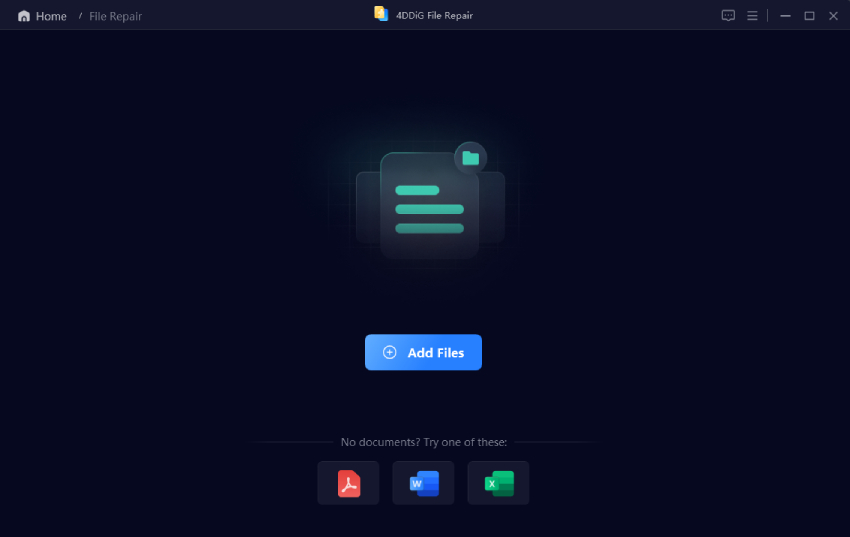
  • Install and launch 4DDiG File Repair, then select “Photo Repair” and click “Add Photos” to import the damaged NEF files.

    add corrupted nef raw images to 4ddig
  • Click the "Repair All” button at the bottom right to start the repair process.

    repair all problem photos
  • When the process is complete, preview repaired images by clicking “Preview”.

    preview repaired nef files
  • Tap th triangle icon next the Save and select one preferred photo format (e.g., JPG, PNG, or Original format) from the drop-down list. Export the repaired files when you are satisfied with the results by clicking “Save”.

    export repaired photos in preferred format

People Also Ask About NEF Files

Is NEF Better Than JPEG?

For editing flexibility and image quality, yes. NEF retains significantly more image data, allowing photographers to make extensive adjustments after capture. JPEG is more convenient for sharing and everyday use.

Is NEF the Same as RAW?

NEF is Nikon’s version of a RAW file. While all NEF files are RAW images, not all RAW files are NEF because different camera manufacturers use their own RAW formats.

What Apps Can Open NEF Files?

Popular options include Nikon NX Studio, Microsoft Photos with RAW Image Extensions, Apple Preview, IrfanView, Adobe Lightroom, Adobe Photoshop, and online tools such as Jumpshare.

Can Google Photos Open NEF Files?

Google Photos may upload and store many RAW formats, including some NEF files, but support can vary depending on camera model and file version. Converting to JPG often provides the most reliable compatibility.

Conclusion

If you’ve been asking what is a NEF file, it’s simply Nikon’s RAW image format designed to preserve maximum image quality and editing flexibility. Understanding what the NEF format image helps explain why professional photographers frequently choose NEF over JPEG.

Whether you open files using Windows, macOS, Nikon NX Studio, or an online viewer, several reliable options are available. If a NEF file becomes corrupted or refuses to open, 4DDiG Photo Repair provides an effective way to recover valuable images and restore access to your photos.

FREE DOWNLOAD

Secure Download

FREE DOWNLOAD

Secure Download

William Bollson (senior editor)

William Bollson, the editor-in-chief of 4DDiG, devotes to providing the best solutions for Windows and Mac related issues, including data recovery, repair, error fixes.

(Click to rate this post)

You rated 4.5 ( participated)