ChatGPT Caricature Trend: What It Is, How to Do It & 19 Trending Prompts (Copy-Paste)

5 mins read

Updated on 2026-03-18 20:16:33 to Photo Tips

The ChatGPT caricature trend is taking over social media right now, and chances are, users have seen these exaggerated AI generated cartoons flooding their feeds on Facebook, Instagram, and TikTok. This viral phenomenon transforms people into playful caricatures that highlight their jobs, hobbies, and personalities.

The magic happens with a simple prompt. ChatGPT then generates a cartoon-style image based on the user's conversation history and profile information. This guide explains the trend, shows how to create your own caricature, and provides prompt templates and tools to generate unique cartoon images.

viral chatgpt caricature trend

Part 1. What Is the ChatGPT Caricature Trend?

February 2026 marked the explosion of a new cartoon trend that reimagines people as exaggerated cartoon illustrations. The ChatGPT caricature trend on facebook, Instagram, TikTok, X, and LinkedIn transforms users into playful characters inspired by classic boardwalk caricature art.

Unlike simple filters, these AI-generated artworks exaggerate facial features while incorporating visual elements that represent the person’s career, hobbies, and personality traits.

Key Visual Characteristics

Several visual elements make these caricatures instantly recognizable:

  • Exaggerated facial features: Caricature art traditionally enlarges distinctive features like eyes, smiles, or hairstyles to highlight personality in a humorous way.
  • Vibrant cartoon aesthetics: Images often feature bold outlines, colorful shading, and expressive body language. These ChatGPT cartoon styles mimic hand-drawn illustrations while keeping the identity recognizable.
  • Personal storytelling: Instead of just a portrait, the image tells a story. Teachers may appear surrounded by books, designers by laptops, or gamers by neon setups.
  • Contextual backgrounds: AI tools often generate environments related to the user’s profession or lifestyle.

Why It Goes Viral in ChatGPT?

The reason the trend spread so quickly is its accessibility. Anyone can participate by uploading a photo and typing a simple prompt such as: “Create a caricature of me and my job based on everything you know about me”

ChatGPT then interprets both the image and the prompt to generate an illustration. In some cases, it may even use details from previous conversations to create surprisingly accurate depictions.

The result is a personalized cartoon portrait that people love sharing online. Many users compare their results with friends, which further fuels the viral cycle.

Part 2. How to Do the ChatGPT Caricature Trend: Step-by-Step Guide

Creating a viral caricature takes less than five minutes with the right approach. ChatGPT's free tier allows users to generate up to 5 images per day. This makes it accessible to anyone who wants to join the trend.

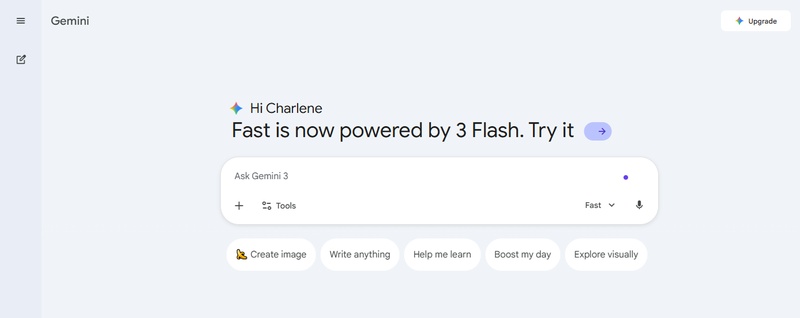
  • Access ChatGPT

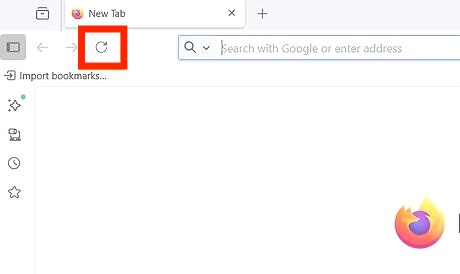
    Sign in to ChatGPT through the web browser or mobile app. No special subscription is required, though having a regular account helps the AI understand personal details better.

  • Upload a Clear Photo

    Click the attach button (marked with a '+' or paperclip icon) and upload a head-and-shoulders photo. Close-up selfies work best, while blurry group shots produce less accurate results. Clear facial features help ChatGPT capture specific details such as glasses, beard, or hair color.

  • Enter the Viral Prompt

    Type this exact phrase: “Create a caricature of me and my profession based on everything you know about me." This prompt leverages ChatGPT's Memory feature, which saves facts from past conversations to create personalized responses.

    enter viral caricature prompts to cahtgpt
  • Customize for Better Results

    New users without extensive chat history should add specific details directly into the prompt. For example: "Create a caricature of me and my job. I'm a nurse who works with children". Including routines, habits, professional life, and daily items produces more accurate results.

    chatgpt generated caricature
  • Refine and Share

    After generation, request revisions by describing desired changes in the chat. Once satisfied, download the image and share it across Facebook, LinkedIn, or Instagram.

Part 3. The 19 Viral ChatGPT Caricature Prompt Templates in 2026 (Copy-Paste Ready)

Many people discover that the original prompt depends heavily on conversation history. If the AI lacks context, results may be generic. Using a ChatGPT caricature prompt template helps provide the necessary details for better image generation.

Below are popular prompt ideas categorized by theme.

Category 1. The Viral Prompt: "Me and My Job"

This category represents the original format that launched the trend worldwide. The base prompt requires no customization and works instantly for users with established ChatGPT conversation history.

1. Me and My Job

Click to Copy & Paste ⬇

Create a funny caricature of me as a [JOB TITLE]. Exaggerate my facial features slightly, give me a huge smile, and place me in my work environment. Include props related to my job like [tools, laptop, books, etc.]. Use bright cartoon colors and a playful caricature style.

me and my job as teacher caricature

2. Me and My Job (With Photo)

Click to Copy & Paste ⬇

Using this photo of me, create a colorful caricature showing me as a [JOB TITLE]. Keep recognizable features but exaggerate them slightly. Add job-related props and a vibrant cartoon background.

me and my job with photo caricature

Category 2. The "Everything About Me“ Variants

Not everyone wants their profession to be the centerpiece. These variants shift focus from career to personal interests. It allows users to showcase different facets of identity. These templates celebrate hobbies, character traits, and overall lifestyle, whereas the original prompt emphasizes work life.

1. Me and My Hobbies

Click to Copy & Paste ⬇

Create a fun caricature of me surrounded by my hobbies: [hobby 1], [hobby 2], [hobby 3]. Exaggerate my expression with a big smile and lively cartoon energy.

me and my hobbies caricature

2. Personality-Focused

Click to Copy & Paste ⬇

Create a caricature portrait representing my personality: [funny, introverted, energetic, etc.]. Use exaggerated expressions and symbolic objects that represent my traits.

my personality focused caricature

3. Me and My Life

Click to Copy & Paste ⬇

Create a vibrant caricature showing key parts of my life including my career, hobbies, and lifestyle. Include symbolic objects and a joyful exaggerated cartoon style.

me and my life chatgpt caricature

Category 3. The Custom Description Prompt

Users without chat history need a different approach. Instead of letting ChatGPT guess, these prompts provide complete self-descriptions upfront. The workaround involves building context directly into the prompt rather than relying on conversation memory.

1. Full Description (Job + Personality + Props)

Click to Copy & Paste ⬇

Create a caricature of me based on this photo. I work as a [your job]. My daily life involves [2-3 specific activities]. I'm known for [personality traits]. Include [specific objects or details] in the scene.

full description chatgpt caricature

2. Physical Description-Focused

Click to Copy & Paste ⬇

Create a caricature emphasizing my [glasses, beard, curly hair, tattoos]. Exaggerate these features in a playful cartoon style while keeping my face recognizable.

physical description focused chatgpt caricature

3. Job-Focused (teacher, nurse, lawyer, etc.)

Click to Copy & Paste ⬇

Exaggerate a teacher holding oversized books, cartoonish expressions with big smiles and glasses, playful comic style, emphasize personality and profession, preserve facial identity, vibrant colors and exaggerated proportions.

job focused chatgpt caricature as teacher
Click to Copy & Paste ⬇

Draw a nurse caricature with an oversized stethoscope, exaggerated facial features, friendly playful expression, cartoonish style, emphasize uniform and caring personality, bright colors, maintain facial identity.

job focused chatgpt caricature as doctor

Category 4. Prompts by Art Style

Style selection determines visual impact more than any other factor. The ChatGPT cartoon styles below represent the most popular formats across TikTok and LinkedIn, each offering distinct esthetic appeal.

1. 90s Vintage Theme Park / Boardwalk Caricature

Click to Copy & Paste ⬇

Create a classic 90s theme park caricature with hand-drawn marker sketch style, exaggerated facial features, funny and nostalgic esthetic, preserve identity, vibrant colors

90s vintage theme park boardwalk caricature

This style mimics amusement park portraits, delivering a funny and classic look.

2. Hand-Drawn / Sketchy Ink Caricature

Click to Copy & Paste ⬇

Convert this image into a funny sketch cartoon with expressive ink-style outlines, exaggerated but recognizable facial features, hand-drawn style, vivid digital colors, clean background

hand drawn sketchy ink caricature

Bold lines and playful expressions create a whimsical effect.

3. Vibrant Digital Cartoon Caricature

Click to Copy & Paste ⬇

Create a vibrant digital caricature with vivid colors, subtle shading, mild hatching, exaggerated features, lively energetic style, clean background

vibrant digital cartoon caricature

Bright colors and smooth rendering produce modern, shareable images.

4. Pixar 3D Animation Style

Click to Copy & Paste ⬇

Turn this image into a Pixar-style animated character with big shiny eyes, smooth textures, joyful expression, colorful background

pixar 3d animation style caricature

This cinematic 3D style appears clean, bright, and professional.

5. Soft Watercolor Caricature

Click to Copy & Paste ⬇

Generate a watercolor-style caricature with gentle exaggeration, organic textures, warm artistic mood

soft watercolor caricature

Category 5. Prompts for Special Occasions

Special moments and milestones call for customized approaches beyond standard job focused caricatures. Couples planning weddings frequently request romantic cartoon versions for save the date cards and invitations.

1. ChatGPT Wedding Caricature Prompt

Click to Copy & Paste ⬇

Create a romantic wedding caricature of this couple photo in Disney/Pixar style with cute, playful expressions, soft colors, suitable for wedding invitation design

chatgpt wedding caricature prompt

Upload one couple photos or two individual photos. The AI merges separate images into cohesive romantic illustrations.

2. Family Cartoon Caricature

Click to Copy & Paste ⬇

Transform the people in this image into cheerful cartoon characters with bold colors, exaggerated facial features, and a warm, family-friendly look.

family cartoon caricature

ChatGPT handles multiple faces while retaining key details like hats, clothing patterns, and hair colors.

3. Caricature of Me and My Partner

Click to Copy & Paste ⬇

Create a caricature of my spouse and me based on this photo, highlighting our personalities and the unique dynamic of our relationship.

caricature of me and my partner

4. LinkedIn Professional Caricature Headshot

Click to Copy & Paste ⬇

Create a professional caricature headshot suitable for LinkedIn, subtle exaggeration, business-appropriate, clean background, approachable expression

linkedIn professional caricature headshot

5. Cute Big-Head Chibi Caricature

Click to Copy & Paste ⬇

Create a caricature of me and my job including personality traits, hobbies, work environment, and symbolic objects in a vibrant cartoon illustration. Make it humorous, exaggerated, and visually detailed.

cute big head chibi caricature

These prompts represent some of the best caricature prompt for ChatGPT variations currently trending online.

⚡ Part 4. Best Alternative to ChatGPT to Turn a Picture into Caricature for Free

The ChatGPT picture trend inspired millions of people to turn their selfies into cartoons. However, sometimes AI text prompts alone may not perfectly preserve facial details.

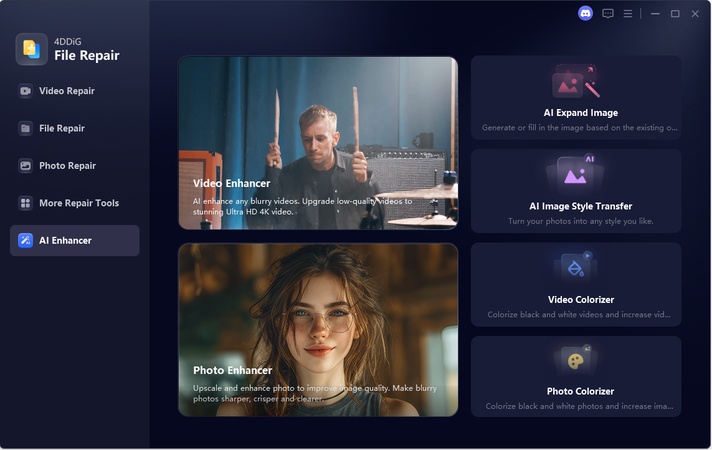
An excellent alternative is 4DDiG’s AI Image Expander (built into 4DDiG File Repair), a free-to-start tool that goes way beyond simple enlarging. It can also apply trending AI art styles to a normal picture, including caricature effects, directly to images, which gives far more accurate and faster results. Unlike many AI generators, it turns your real photo into a caricature or cartoon while keeping your facial details natural and recognizable, no uncanny valley weirdness.

Key Capabilities include:

  • One-click application of trending styles (chibi, vintage, Pixar, sketch, digital cartoon, etc.)
  • Enhances images up to 8K resolution.
  • Extends or uncrops photos with AI-generated content.
  • Improves portrait clarity and facial details.
  • Plain-English prompt support
FREE DOWNLOAD

Secure Download

FREE DOWNLOAD

Secure Download

Steps to Create Funny Caricature Using 4DDiG

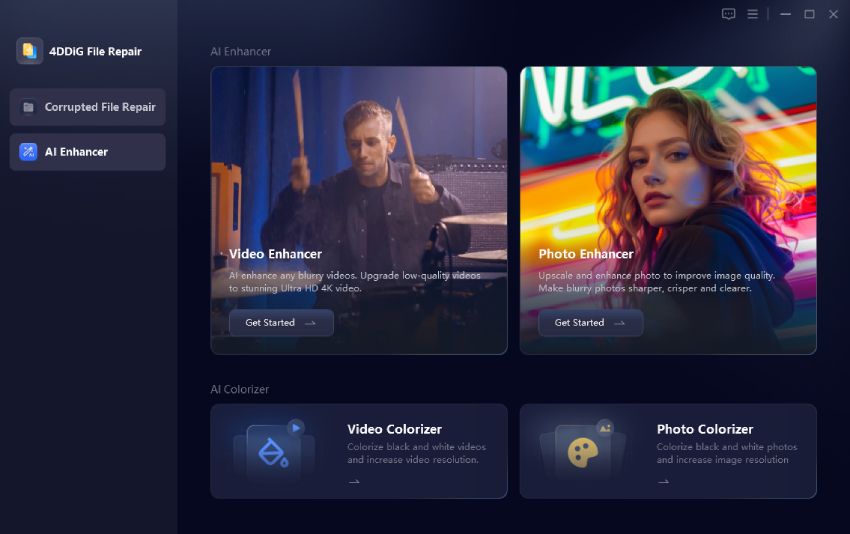
  • Install and fire up the 4DDiG File Repair program. Click the left “AI Enhancer” menu tab and choose “AI Expand Image”.

    select ai expand image
  • Then tap on “Add an image to expand” to upload your picture.

    add an image for creating caricature
  • Once uploaded, enter one of the above ChatGPT caricature prompt into the box under “AI Expand Prompt”. Then click “AI Expand Image” to kick off the caricature style transfer.

  • When finished, you can preview and compare the results before and after the caricature style transfer. If satisfied with the result, click “Export” to save the generated share-worthy caricature art.

Show Cases

Click to Copy & Paste ⬇

Convert the woman to the caricature style: big head chibi-like doctor cartoon, exaggerated happy smile, sparkling eyes, white coat + stethoscope, medical office scene with skeleton, ultrasound, pills. Preserve real face details, hair, eye color exactly, vibrant colors, cute and fun vibe.

me and my job as doctor caricature
Click to Copy & Paste ⬇

Convert the woman in the photo to match the caricature style: Big-head cute teacher cartoon, huge sparkling smile, big shiny eyes, exaggerated happy expression. Preserve her real face: same eyes (light blue/green), hair, skin tone, freckles. Same outfit (white shirt + beige cardigan), holding pencil, classroom scene with blackboard (math, apple, A+), books, globe, microscope. Vibrant colors, joyful vibe.

me and my job as teacher caricature 2

The lossless enlargement feature maintains content integrity while upscaling small-sized pictures.

Conclusion

The ChatGPT caricature trend has become one of the most entertaining AI art movements across social media. With simple prompts and creative cartoon styles, anyone can transform ordinary photos into playful caricatures that reflect personality and lifestyle. For those seeking even better results, tools like 4DDiG AI Image Expander offer a powerful solution. It enhances images and applies viral caricature styles while preserving natural facial details.

FREE DOWNLOAD

Secure Download

FREE DOWNLOAD

Secure Download

William Bollson (senior editor)

William Bollson, the editor-in-chief of 4DDiG, devotes to providing the best solutions for Windows and Mac related issues, including data recovery, repair, error fixes.

(Click to rate this post)

You rated 4.5 ( participated)