How to Make Old Photos Look New: The Easiest Ways in 2026

5 mins read

Updated on 2026-03-09 12:05:45 to Photo Tips

Old photographs carry priceless memories, but time is rarely kind to them. Fading colors, scratches, blur, and yellow stains slowly hide the details that once felt vivid. If you're wondering how to make old photos look new without complicated editing skills, today's AI tools make it easier than ever. In this guide, you'll learn the fastest and simplest ways to restore your cherished images.

make old photos look new

Part 1. Common Types of Damage in Old Photos & How to Fix Them

Before choosing a restoration method, it helps to understand what went wrong with your photo. Not all old pictures suffer from the same problems. Some are faded, some are scratched, and others are simply low-resolution scans from decades ago. Understanding the type of damage allows you to select the most effective solution instead of randomly applying filters.

1. Common Damage Types of Old Pictures

Here are the most frequent issues people encounter when restoring family photos:

  • Fading and discoloration: Colors become washed out or shift toward yellow or brown tones.
  • Black-and-white aging: Old monochrome photos lack vibrancy or have uneven exposure.
  • Scratches and creases: Physical damage from folding or improper storage.
  • Blur and low resolution: Scanned prints often look soft or pixelated.
  • Noise and grain: Older film cameras introduce visible grain patterns.
  • Water or stain marks: Exposure to moisture leaves visible blotches.

Each problem requires a slightly different restoration approach. Some issues need color correction, while others require AI-based reconstruction.

2. How Should You Choose to Change an Old Photo to a New Photo (Quick Table)

Here's a quick reference table to help you decide.

What's Wrong with Your Photo? Best Method for You Recommended Tool
Faded colors or black-and-white AI Colorization Tool 4DDiG – Colorize Model
Scratches and creases AI Restoration, Inpainting, & Repair 4DDiG – Repair Mode
Blurry or low-resolution image AI Upscaling & Enhancement 4DDiG – Enhance Mode
Yellowish aging tone Automatic Color Correction 4DDiG – Enhance Mode
Heavy noise or grain AI Denoise 4DDiG – Denoise Model
Severe physical damage Advanced AI Repair 4DDiG – Repair Mode

As you can see, different types of damage call for different fixes. But that doesn't mean you need a different tool for each one. The simplest approach is to use a single AI tool that handles all of it automatically: enhance quality, remove noise and grain, increase clarity, restore faded colors, and repair scratches all in one place, with no switching between apps and no technical skills required. That's exactly what we'll cover next.

Let's look at the easiest and fastest all-in-one solution available today.

⚡ Part 2. Best AI Tool to Instantly Make Old Photos Look New (Easiest & Fastest Method)

If you want the simplest and most reliable way to restore photos, AI automation is the clear winner. Instead of manually adjusting brightness, contrast, and sharpness, modern AI tools analyze the entire image and reconstruct missing details automatically. This approach eliminates guesswork and dramatically reduces editing time.

One of the most user-friendly tools available is 4DDiG AI Photo Enhancer. It is designed specifically for restoring damaged, faded, blurry, or colorize black-and-white photos with just a few clicks. It's built-in Colorize Model can intelligently add natural, realistic color to old monochrome pictures, bringing them back to life without oversaturation.

The biggest advantage is speed. Instead of spending hours adjusting sliders, the software analyzes your photo automatically and enhances it within seconds.

FREE DOWNLOAD

Secure Download

FREE DOWNLOAD

Secure Download

Steps to Restore and Convert Old Photos to New Photos Using 4DDiG

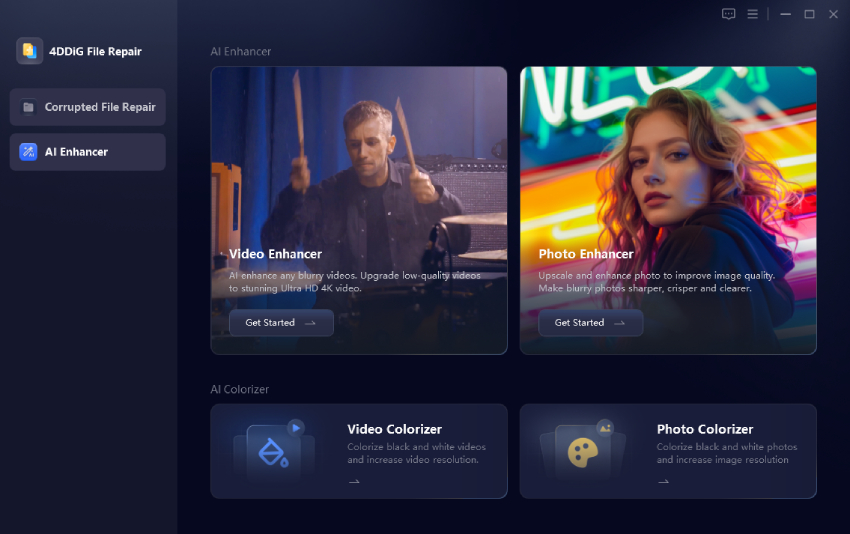
  • Download and install 4DDiG File Repair software, then launch it. Go to the "AI Enhancer" feature after launching it and select the "Photo Colorizer" feature.

    select 4ddig ai photo enhancer
  • Now, click "Add Photos" to select all the photos that you want to process.

    Add Photos to Colorize
  • Select your desired "AI Model" along with "Resolution" and "AI Enhance" method, then click "Enhance".

    add old photos to 4ddig for restoration
  • Once the image is enhanced, you can click "Save" after checking the side-by-side comparison.

    old photo restoration completed
Note:

You can also click here to see how use 4DDiG's magic AI to repair damaged old photos based on easy prompts.

The process is smooth and requires no prior editing knowledge. If your goal is to quickly transform old memories into vibrant, modern-quality images, this is the most efficient method.

Part 3. How to Make Old Photos Look New Free Online | 4 Tools

If you prefer not to install software, online AI restoration tools are another option. These platforms allow you to upload a photo directly to your browser and receive an enhanced version. While they may have file size limits or watermarks, they are convenient for quick fixes. Below are four popular online tools and how to use them.

1. Use Picsart Photo Restoration

If you want a quick and beginner-friendly way to enhance and restore an old photo, Picsart is a convenient place to start. It runs directly in your browser, so there's no need to install additional software. The AI restoration feature automatically improves clarity, adjusts lighting, and reduces visible aging effects. It works best for lightly faded or slightly blurry photos that don't require heavy reconstruction.

  • Visit the Picsart website and open the AI Photo Editor.

    picsart old photo restoration
  • Select "Browse Files" to upload your old image and restore automatically with AI.

  • Apply changes, preview results, and download the result.

This method is simple and beginner-friendly, though free exports may include watermarks.

2. Use VanceAI Photo Restorer

VanceAI is designed for users who want automatic restoration with minimal manual adjustments. Its cloud-based AI focuses on color correction, scratch removal, and overall clarity enhancement. The system analyzes your image and applies improvements within seconds after uploading. It is particularly useful for restoring moderately faded photos with visible aging marks.

  • Go to the VanceAI website and click "Upload Image".

    vanceai old ai photo restoration
  • Select restoration options if prompted. Then the old photo enhancement will start automatically.

  • Preview and download the enhanced version.

3. Use AirBrush Free AI Photo Restoration

AirBrush is well known for portrait retouching, but it also offers basic AI photo restoration features to change old photos to new ones. If your old image mainly needs sharpening and brightness correction, this tool can deliver quick improvements. The interface is clean and simple, making it suitable for users who prefer straightforward editing. It performs best when the damage is mild rather than severe.

  • Open the AirBrush website and upload your old image.

    make old photos look new with airbrush
  • Click "Restore" to automatically restore the image with AI.

  • Download the enhanced photo.

It works well for minor quality improvements but may not fully repair severe damage.

4. Use Remini AI

Remini specializes in enhancing facial details and restoring blurry portraits. If your old photos focus on people rather than landscapes, this tool can significantly improve facial clarity. Its AI model reconstructs details and sharpens features that may have faded over time. However, it is more optimized for portrait restoration than for repairing heavily scratched or stained prints.

  • Visit Remini's website and upload your image for Remini to automatically enhance it.

    remini ai photo restorer
  • The AI processes it in seconds, focusing on faces and overall sharpness.

  • Preview and download the restored high-definition version.

Remini performs strongly for portrait-focused photos but may over-sharpen background elements.

Pros and Cons of Online Ways to Restore Old Photos to New Photos

  • Pros
  • Cons
    • Cloud-based, no installation required
    • Easy-to-use and no tech skills needed
    • Fast processing
    • Cannot truely restore and enhancer old photos
    • Free downloads come with watermarks
airbrush failed to restore old images

Part 4. Advanced & Magic: How to Use AI Prompts to Make an Old Photo Look New 👍

If you want even more control over the restoration process, AI prompting provides creative flexibility. Instead of relying only on automatic enhancement, you can guide the AI with specific instructions.

4DDiG AI Image Expander not only enlarges images without quality loss but also allows intelligent editing based on text prompts. This means you can instruct the AI to adjust tones, enhance lighting, or restore missing details in a more customized way when you change an old photo to a new one using AI.

Moreover, it will enhance the quality of the old photo, fix blurry image, expand the image, and make it look more clearer.

For example, you can use prompts such as:

  • "Restore natural skin tones and remove the yellow aging effect".
  • "Enhance sharpness while preserving original facial features".
  • "Reconstruct faded colors with realistic vintage tones".

Result Showcase:

make old photos look new with 4ddig

By combining expansion and prompt-based enhancement, you gain more artistic control over the result. This method is especially helpful when dealing with highly damaged or complex historical images.

Part 5. Quick Comparison: 3 Ways at a Glance

Here's a simple comparison to help you choose the best method.

Feature AI Desktop Tool (4DDiG) Online AI Tool AI Prompt Editing
Ease of Use Very Easy Easy Easy
Speed Very Fast Moderate (depends on the internet) Moderate
Quality High-resolution output Often compressed High
Batch Processing Yes Limited Limited
Privacy Local processing Cloud upload Local processing
Best For Full restoration & serious damage Quick minor fixes Creative control

If your photos are heavily damaged or extremely valuable, desktop AI tools provide better reliability and quality.

Conclusion

Learning how to make old photos look new no longer requires professional editing skills. AI tools now restore color, remove damage, and enhance clarity within seconds. While online tools offer convenience, 4DDiG AI Photo Enhancer delivers the most complete and reliable solution for serious restoration. Bring your memories back to life quickly, safely, and beautifully in 2026.

FREE DOWNLOAD

Secure Download

FREE DOWNLOAD

Secure Download

Sawart Mashab (senior editor)

Sawart Mashab, the content writer for 4DDiG, is adept at creating informative and practical solutions related to Windows and macOS issues, data recovery, file repair, and RAID storage.

(Click to rate this post)

You rated 4.5 ( participated)