5 Top Free Shutterstock Downloaders without Watermark for 2026

5 mins read

Updated on 2026-09-30 09:15:55 to Photo Tips

Shutterstock is a major commercial platform offering millions of royalty-free stock photos, illustrations, videos, music, and other assets that normally require a paid subscription, credits, or license for high-quality, watermark-free downloads.

Many online tools promise easy access, but real user experiences reveal clear differences in quality, reliability, and usability. This guide compares five popular free Shutterstock downloaders based on actual results. You'll find practical pros and cons, supported content, maximum quality, and best use cases to help you choose the right tool for casual needs.

Part 1. What Is a Shutterstock Video & Image Downloader?

A Shutterstock Video & Image Downloader is a third-party tool, software, browser extension, or online service that enables users to save images, photos, vectors, and videos from the Shutterstock stock media library (shutterstock.com) to their device.

These downloaders are commonly sought to:

  • Obtain content without paying for an official license
  • Remove watermarks from preview files
  • Perform bulk or faster downloads of licensed assets (in some legitimate tools aimed at subscribers)
Important note:

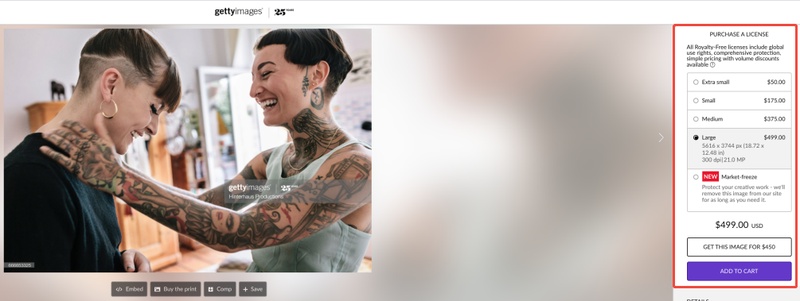
Unofficial tools that bypass Shutterstock's payment system, digital protections, or licensing typically violate the platform's terms of service and copyright law. They can also pose security risks (malware, phishing). The proper way to download content is through an official Shutterstock account and license.

Part 2. Top 5 Free Shutterstock Downloaders without Watermark in 4K/HD

Below are 5 commonly used Shutterstock download tools in 2026. These online tools claim to let users download Shutterstock images or videos for free without watermarks by pasting a URL. Each tool has different advantages, so the best choice depends on your specific needs.

1. Downpic -- High-quality & watermark-free

Downpic is a dedicated free Shutterstock downloader without watermark that targets images only. Users copy a Shutterstock image URL, paste it, and the tool processes it in three guided steps to claim high-resolution, watermark-free downloads without any subscription. Best for designers who need a simple, image-focused way to download images from Shutterstock for free.

downpic shutterstock downloader
Maximum Image Quality

: HD

Supported Content

: Primarily images (photos, illustrations)

Best Use Cases

: Fast downloading of individual stock photos

  • Pros
  • Cons
    • Simple, beginner-friendly interface
    • No account required
    • Free unlimited downloads
    • Relatively fewer ads than competitors
    • Mainly download images from Shutterstock and other stock sites like iStock/Getty
    • Low success rate and often delivers only low-resolution previews
    • Unreliable watermark-free or true HD results
    • Limited multi-platform and video support

2. SteptoDown -- HD Shutterstock image downloader

SteptoDown is a free multi-platform Shutterstock downloader covering 60+ stock sites. It lets users paste a Shutterstock image or video URL into a single field for claimed high-resolution results. Ideal for creators who want one free shutterstock downloader that also works across Getty, Envato, and similar libraries.

steptodown shutterstock downloader
Maximum Image Quality

: HD

Supported Content

: Images and videos

Best Use Cases

: Download images from multiple stock sites or occasional mixed media downloads

  • Pros
  • Cons
    • Supports many stock sites beyond Shutterstock (Getty, Envato, Storyblocks, etc.)
    • Handles both images and videos
    • Simple paste-and-download process
    • No registration needed
    • Aggressive ads, pop-ups, and redirects
    • Mostly low-resolution previews
    • Higher privacy and malware risk due to heavy advertising

3. Fliflik -- High-qaulity Shutterstock video & image downloader

Fliflik offers a free online tool marketed as a Shutterstock video downloader without watermark and an image saver in HD & 4K quality. It excels with no-signup access and can deliver clean files for both media types. Best for editors and content creators seeking a Shutterstock downloader HD option that works across devices.

fliflik shutterstock downloader
Maximum Image Quality

: HD

Supported Content

: Images and videos (MP4)

Best Use Cases

: High-quality image saving without software installation

  • Pros
  • Cons
    • Quick online use for basic downloads
    • Offers better speed, stability, up to 4K quality, and batch processing for paid version
    • Supports many platforms in the broader ecosystem
    • Free online version is limited and shares low-quality/ad issues
    • Full reliable features require paid desktop software
    • Mixed user reviews on support and stock media performance

4. Fetchpik -- Shutterstock downloader 4K

Fetchpik positions itself as a free Shutterstock downloader 4K focused on images (with a separate 720p/1080p video page). Users right-click to copy the image link, paste it, and receive claimed watermark-free 4K results; the site supports 300+ platforms overall. Best for users seeking a high-quality, free Shutterstock downloader tool with multi-site reach and a minimal interface.

fetchpik shutterstock downloader 4k
Maximum Image Quality

: 4K

Supported Content

: Images (main focus) and videos (separate page, typically 720p/1080p preview level)

Best Use Cases

: Downloading images from multiple stock websites

  • Pros
  • Cons
    • Cleaner, minimalist interface with fewer ads
    • Download Shutterstock images in 4K/HD
    • Fast processing when it works
    • No account needed
    • Primarily designed for Freepik (less reliable for Shutterstock)
    • High failure rate, broken links, or unresponsive behavior
    • Mainly image-focused with limited video support

5. Downloader.la -- HD Shutterstock Image Downloader

Downloader.la is a free multi-site tool that includes a dedicated Shutterstock photo downloader (plus a v2 fallback for errors). Users paste a Shutterstock image or vector URL into a minimal field to claim high-resolution downloads; it also covers Getty, Adobe Stock, and similar sites. Aimed at users who prefer a no-frills free Shutterstock downloader for occasional image needs across platforms.

downloader la shutterstock image downloader
Maximum Image Quality

: 4K

Supported Content

: Primarily images and vectors; limited video support

Best Use Cases

: Quick watermark-free Shutterstock downloads

  • Pros
  • Cons
    • Simple, clean paste-and-download interface
    • Works across devices
    • Supports both Shutterstock image and video downloads
    • No registration or installation required
    • Output quality is often low or inconsistent
    • Downloads fail fairly often
    • Ads and tracking make it feel less trustworthy
Things to Consider Before Using Shutterstock Download Tools:

Before using any shutterstock downloader, keep these points in mind:

  • Check usage rights: Downloaded images may still be protected by copyright. Always confirm whether the content can be used for your intended purpose.
  • Pay attention to quality: Some tools only provide compressed previews instead of original HD files.
  • Choose reliable websites: Avoid unknown download sites that may contain excessive ads or security risks.

Part 3. How to Free Download Shutterstock Images without Watermark

Using an online Shutterstock downloader can simplify the process because it usually only requires a media URL instead of installing extra software. However, before using any downloaded content, always check Shutterstock's licensing terms to ensure it can be used legally for your specific purpose.

  • Visit Shutterstock and find the image you want to download. Open the image page and copy the complete URL from your browser's address bar.

  • Go to a trusted online downloader service such as Downpic Shutterstock Downloader.

  • Paste the Shutterstock image URL into the downloader's search field and click "Get Images".

  • Then click the "Download" button to save the image.

    downpick free download shutterstock images without watermark

⚡ Part 4. How to Improve the Quality of Downloaded Shutterstock Images Up to 8K

Many users found that the saved images are not as sharp as expected after using a Shutterstock downloader and even downloading through official methods. The files can sometimes look soft, noisy, or lower in resolution than you need. This is especially true if you plan to use them for large prints, websites, or detailed design work. The good news is you can fix that quickly with the right tool.

4DDiG Photo Enhancer is a practical AI-powered solution that upgrades low-resolution or slightly blurry photos to sharp 4K quality (and close to 8K in many cases). It works well on images you already have, including those from free Shutterstock downloads.

Key Advantages of 4DDiG Photo Enhancer:

  • Upscales images to 4K and near-8K resolution with clear details
  • Removes photo noise and blur while sharpening edges
  • Dedicated AI models for faces, general scenes, noise reduction, old photo restoration and colorizing B&W photos
  • Supports batch processing so you can improve many images at once
  • Simple interface that works for beginners without complicated settings
  • Handles common formats like JPG, PNG, HEIC, and more
FREE DOWNLOAD

Secure Download

FREE DOWNLOAD

Secure Download

Steps to Enhance Shutterstock Images with 4DDiG Photo Enhancer

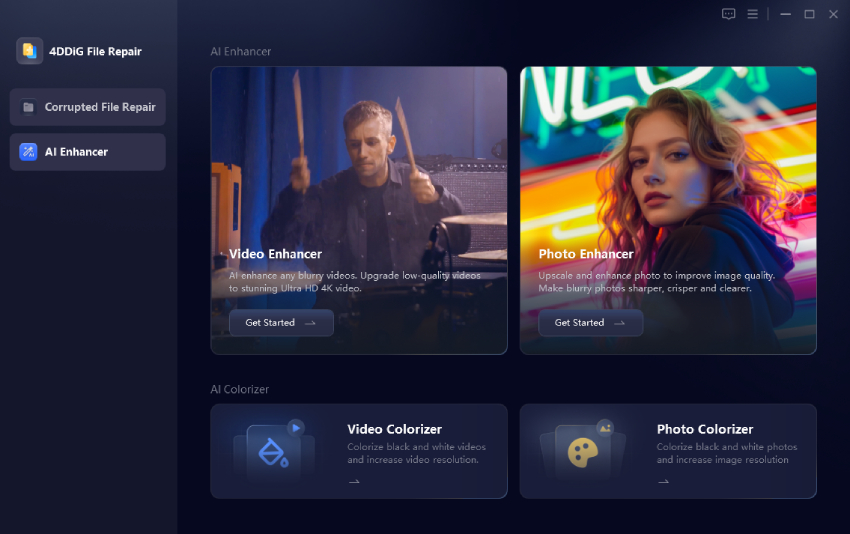
  • Download, install, and open 4DDiG File Repair. Go to the left AI Enhancer tab and choose the Photo Enhancer section.

    open 4ddig ai photo enhancer
  • Click Add Photos and select the Shutterstock images you want to improve. You can also drag and drop them.

    add shutterstock images to enhance
  • Choose a suitable AI model based on your image type, and adjust the resolution setting (X2 or X4) for higher options push toward 4K or beyond. Once done, click Enhance.

    a) General Model: Suitable for everyday photos and stock images.

    b) Portrait Model: Designed to improve faces and human details.

    c) Denoise Model: Helps reduce noise and improve clarity in low-quality images.

    select ai model and resolution settings to enhance
  • Preview the result side by side with the original. When you are happy with it, click Save to export the high-quality version.

    preview and save enhanced shutterstock images

FAQs about Shutterstock Downloader

Q1: How can I download Shutterstock images for free legally?

The legal way to use Shutterstock images is through official licenses or free resources with clear usage rights. Before using any downloaded image for commercial projects, always check the copyright and licensing requirements.

Q2: Is there any Shutterstock copyright-free images?

Shutterstock mainly provides licensed stock images rather than completely copyright-free content. Most images require users to purchase a license before commercial use. If you need free visual resources, you can look for platforms that offer royalty-free images or check Shutterstock's free image collections while reviewing their usage conditions carefully.

Q3: Does Shutterstock offer unlimited downloads?

Shutterstock does not provide unlimited downloads for all users by default. Download limits depend on the subscription plan or package you choose. Some plans include a specific number of monthly downloads, while enterprise solutions may offer different licensing arrangements based on business needs.

Q4: Is there a Shutterstock downloader extension for Chrome or Firefox?

Shutterstock does not offer an official browser extension for unlimited downloads. Be cautious with third-party extensions and always consider security and licensing issues.

Conclusion

While free Shutterstock downloader without watermark tools like Downpic, SteptoDown, Fliflik, Fetchpik, and Downloader.la offer convenient ways to grab images, they only deliver low-resolution previews and come with ads, reliability issues, and potential risks.

For better results, consider enhancing those low-quality downloads with 4DDiG Photo Enhancer, which can upscale and improve image clarity. Ultimately, for professional or commercial projects, stick to official Shutterstock licenses or free alternatives to ensure quality, legality, and safety.

FREE DOWNLOAD

Secure Download

FREE DOWNLOAD

Secure Download

William Bollson (senior editor)

William Bollson, the editor-in-chief of 4DDiG, devotes to providing the best solutions for Windows and Mac related issues, including data recovery, repair, error fixes.

(Click to rate this post)

You rated 4.5 ( participated)