Top 6 SWF File Downloader Extensions for Chrome/Firefox/Edge/More

5 mins read

Updated on 2026-08-07 19:16:03 to Video Tips

Although Adobe Flash Player has reached end of life, many websites, archives, and educational platforms still host SWF games, animations, and interactive content. Finding a reliable SWF file downloader extension can be difficult because many older browser add-ons no longer work. Our detailed guide reviews six browser extensions, including Flash Video Downloader, Allow Download SWF, etc., making downloading Flash content much easier.

Part 1. What Is An SWF File Extension & Why Do People Need SWF Downloaders?

An SWF (Small Web Format) file is a multimedia format originally developed by Adobe for delivering animations, browser games, advertisements, presentations, and interactive web applications. An SWF file can contain vector graphics, video, audio, ActionScript code, and user interactions within a single package.

Since most browsers no longer include Adobe Flash Player, downloading SWF files directly from websites has become more difficult. A dedicated SWF downloader helps locate embedded Flash resources, extract their original files, and save them locally for playback using compatible applications such as Ruffle or standalone SWF players.

Part 2. Top 6 Best SWF File Downloader Extensions In 2026

Modern SWF downloader browser extensions simplify the process of finding embedded Flash content that isn’t directly accessible through a normal download button. Here are 6 SWF file downloader extension for Chrome, Edge, Firefox, and more for you based on browser compatibility, detection accuracy, download reliability, and ease of extracting SWF files from web pages.

1. Flash Video Downloader – Fast Flash & Video Detector

Flash Video Downloader browser extension is capable of detecting numerous embedded media resources, including Flash videos and downloadable SWF content. Besides acting as a flash downloader, it also identifies many common streaming formats across websites, making it a versatile option for users who regularly save online media.

flash video downloader
  • Available Browsers: Chrome, Edge, Opera
  • Supported File Types: SWF videos, Flash animations, MP4, FLV, WebM, and other embedded media
  • Download Speed: Fast detection with direct downloads
  • Pros: Detects various embedded media formats (SWF and videos); Downloads original files when available; Shows organized download list
  • Cons: Detection depends on website structure; Not work with encrypted/dynamically generated streams

2. Allow Download SWF – Unlock SWF Downloads For Ruffle

Allow Download SWF is designed specifically for websites using the Ruffle Flash emulator. Normally, Ruffle hides the original SWF file from users, preventing direct downloads. This extension restores download functionality by exposing the original SWF resource. It is one of the most practical choices for anyone looking for a Shockwave Flash file download solution.

allow download swf
  • Available Browsers: Chrome, Edge, Chromium browsers
  • Supported File Types: Embedded SWF games, Flash animations, educational SWF content
  • Download Speed: Fast. Downloads the original SWF directly from the webpage
  • Pros: Work with Ruffle-powered sites; Download original SWF file; Keep original quality and metadata
  • Cons: Only work on website using Ruffle emulator; May fail to detect SWF files hidden by complex scripts

3. Flash Master – Batch SWF Finder & Downloader

Flash Master is designed for users who need to locate multiple Flash resources on a webpage. Instead of detecting only one file, it scans the page for embedded SWF objects and allows batch downloading. It especially useful as an SWF game downloader for websites hosting collections of Flash games or interactive content.

flash master
  • Available Browsers: Chrome, Edge
  • Supported File Types: SWF games, Flash animations, embedded SWF applications
  • Download Speed: Fast batch detection with simultaneous downloads
  • Pros: Detects multiple SWF resources; Supports batch download; Shows file names/URLs before saving.
  • Cons: Detection quality varies by embedding method; May show duplicates or miss fully removed SWF references.

4. SWF File Player For Google Chrome (Lite)

SWF File Player for Google Chrome (Lite) is a lightweight extension designed for users who want to open or test locally stored SWF files directly inside Chrome. Rather than scanning webpages for downloadable Flash content, it focuses on loading existing SWF files through the browser. It is useful for developers, educators, and users preserving archived Flash projects.

swf file player for google chrome lite
  • Available Browsers: Google Chrome, Chromium-based browsers
  • Supported File Types: Local SWF games, SWF animations, SWF applications
  • Download Speed: Instant loading for local files
  • Pros: Opens local SWF files directly in Chrome with Flash emulation; Minimal interface; Good for testing archived content.
  • Cons: Cannot download SWF files from websites; Limited support for embedded Flash resources

5. Ruffle-SWF-Grabber – Ruffle-Powered SWF Extraction

Ruffle-SWF-Grabber is built specifically for websites running the Ruffle Flash emulator. Instead of simply detecting media requests, it identifies the original SWF resource loaded by Ruffle and provides an easy way to save it locally. For users looking for a reliable SWF URL downloader to archive Flash games or educational content, it offers a focused and efficient solution.

ruffle swf grabber
  • Available Browsers: Chrome, Edge, Chromium-based browsers
  • Supported File Types: SWF games, SWF animations, educational Flash applications
  • Download Speed: Fast
  • Pros: Accurately detects and downloads original SWF from Ruffle sites; One-click extraction; Preserves original structure.
  • Cons: Only works with Ruffle; Cannot recover removed files or download non-Flash media.

6. DownThemAll – Full Page Resources Downloader

DownThemAll is a long-established browser extension that downloads nearly every downloadable resource on a webpage. Although it isn’t dedicated solely to Flash content, it can often locate linked SWF files alongside images, documents, and other downloadable assets. Users who need a flexible Firefox SWF downloader often include it in their toolkit.

downthemall online source downloader
  • Available Browsers: Firefox
  • Supported File Types: SWF, images, videos, documents, archives, and other downloadable resources
  • Download Speed: Excellent multi-threaded download performance
  • Pros: Scans for many resource types (including SWF); Multi-threaded batch downloads; Advanced filtering and management.
  • Cons: Not SWF-specific; Requires manual selection; May miss dynamically generated or hidden SWF files.

Part 3. How To Download SWF Files Using Browser Extensions (Step-by-Step)

Browser extensions make downloading Flash content much easier because they automatically detect embedded SWF resources that aren’t visible through standard download buttons. The following example uses Allow Download SWF, one of the simplest extensions for saving Flash files from Ruffle-powered websites.

  • Install Allow Download SWF from your browser’s Extension Store and open the webpage containing the Flash content.

  • Wait for the page to fully load, then click the extension icon in your browser toolbar.

    allow download swf downloading swf files
  • Locate the detected SWF resource and click “Download .swf”.

  • Save the SWF file to your preferred folder.

⚡ Part 5. How To Repair Corrupted SWF Files After Download Using 4DDiG File Repair

Sometimes the download completes successfully, but the SWF file still fails to open in a Flash player, Ruffle, or another compatible application. This usually happens because the file was only partially downloaded or corrupted while saving or being copied between storage devices.

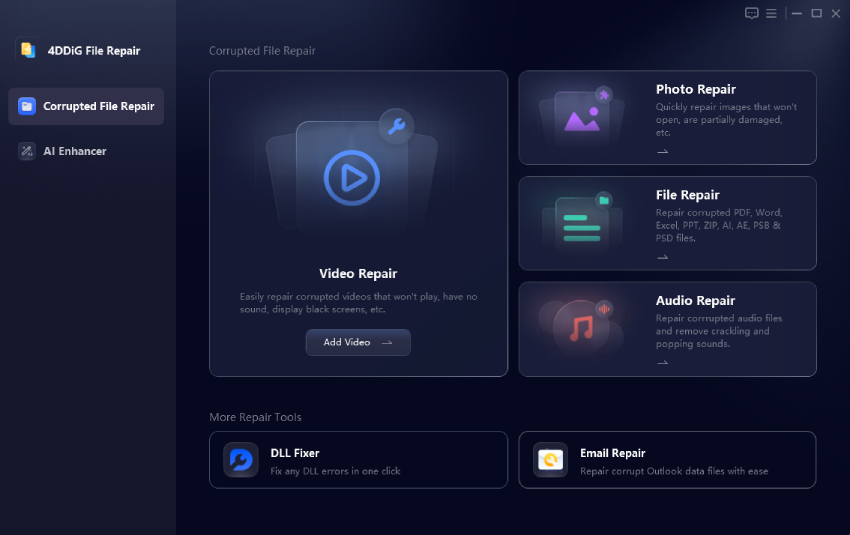
If the downloaded SWF contains embedded video content that has become damaged, 4DDiG Video Repair offers a convenient way to repair corrupted video data before you try opening the file again.

Why It’s Worth Considering?

  • Repairs damaged SWF, MP4, MOV, AVI, and many other video formats
  • AI-driven repair for multiple videos in batch
  • Handles all types of video scenarios and heavy damage
  • Supports multiple output format (MP4, MOV, AVI, MKV, original, etc.)
  • Allows to preview repaired results before saving
  • Fast and easy for both beginners and experienced users
FREE DOWNLOAD

Secure Download

FREE DOWNLOAD

Secure Download

Steps To Repair Corrupted SWF Videos with 4DDiG

  • Launch the “4DDiG File Repair" program after installation. Then select “Video Repair” > “Add Videos” to import the corrupted SWF video files.

    add corrupted swf videos to 4ddig file repair
  • Click “Repair All” then wait for the repair process to finish.

    4ddig repair corrupted swf files
  • Click “Preview” to see the results of the repaired videos. And finally save the repaired SWF files in a preferred format to a different location by clicking “Save” or “Save All”.

    preview and save repaired swf videos

Conclusion

Choosing the right SWF file downloader extension depends on the type of Flash content you want to save. Some extensions specialize in Ruffle-powered websites, while others work better for general media detection or batch downloads.

If your downloaded SWF video still won’t play because it has been damaged or only partially downloaded, 4DDiG File Repair is a great option to repair corrupted video files and restore normal playback.

William Bollson (senior editor)

William Bollson, the editor-in-chief of 4DDiG, devotes to providing the best solutions for Windows and Mac related issues, including data recovery, repair, error fixes.

(Click to rate this post)

You rated 4.5 ( participated)