6 Must-Try CR2 to PNG Converters Online (Free, High-Quality, Batch)

5 mins read

Updated on 2026-07-10 10:28:28 to Photo Tips

Canon CR2 files capture incredible detail, but they aren't always easy to share or edit. Whether you need a quick preview or professional-grade results, the right CR2 to PNG converter makes all the difference. In this guide, we review six top free online options (like ZamZar, FreeConvert, Evoto CR2 files to PNG converter, etc.) that handle everything from single files to large batches while preserving image quality. You'll find tools suited for speed, control, privacy, or professional workflows.

6 Best Free CR2 to PNG Converters Online

If you're looking to convert CR2 to PNG without installing heavy software, these browser-based tools deliver solid results. Each one stands out for specific needs, from advanced customization to lightning-fast local processing. Here's a detailed look at their strengths and limitations.

CloudConvert CR2 to PNG Converter (Best for advanced output control)

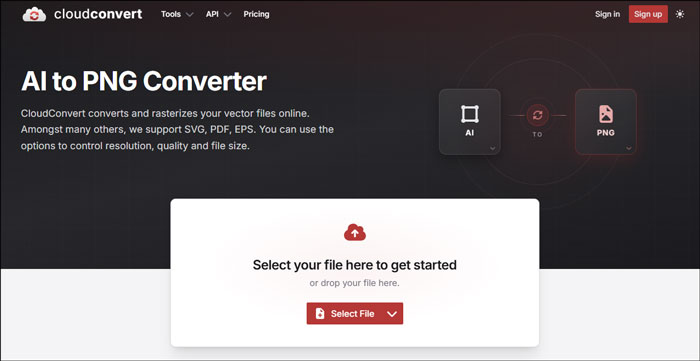
cloudconvert cr2 to png converter

CloudConvert is a versatile online platform that lets you convert CR2 file to PNG with a high degree of customization. It supports hundreds of file formats and provides options to adjust resolution, quality, compression, and more before conversion. The service integrates smoothly with popular cloud storage options like Dropbox and Google Drive, making it convenient for users who work across different platforms. Many people appreciate its reliable performance and clean interface for both occasional and regular conversions.

  • Pros
  • Cons
    • Detailed settings for image resolution and file size
    • Batch processing available
    • Good integration with Dropbox, Google Drive, and others
    • Fast and accurate conversions with minimal artifacts
    • High compatibility with many input and output formats
    • Generally fast and accurate results with minimal quality loss
    • Free tier has daily conversion limits
    • Files are processed on external servers (though deleted automatically afterward)
    • May require waiting during high traffic periods
    • Advanced features can feel overwhelming for complete beginners

FreeConvert (Best Quality & Large File Support)

freeconvert cr2 to png converter

FreeConvert stands out when you want to turn CR2 to PNG free while maintaining excellent image quality. It supports large files up to 1GB and offers advanced settings for compression, resizing, and optimization. The tool combines open-source and custom technology to ensure high-fidelity results from Canon RAW data, making it popular among photographers who need trustworthy conversions without compromising detail or color accuracy.

  • Pros
  • Cons
    • Excellent preservation of detail and color from RAW data
    • Strong focus on high-quality output with minimal artifacts
    • Strong large-file handling (up to 1GB)
    • Batch convert CR2 to PNG option
    • Secure processing with automatic file deletion
    • Requires upload to their servers
    • Free version has daily limits for heavy users
    • Advanced options may feel technical for beginners
    • Slightly slower for very large batches

ZamZar (Most Trusted & Long-Established Service)

ZamZar has been operating since 2006 and has converted hundreds of millions of files, earning user trust over the years. It offers a straightforward way to change CR2 files to PNG without complicated settings. The service emphasizes reliability and simplicity, with files delivered via email or direct download. Its long history makes it a go-to choice for users who value consistency and a proven track record in online file conversion.

zamzar cr2 to png converter
  • Pros
  • Cons
    • Long track record with millions of files converted
    • Clean, no-frills interface
    • Reliable email delivery of converted files
    • Good privacy policy with automatic deletion
    • Conversion speed can be slower during busy periods
    • Fewer customization options than competitors
    • Limited free conversions per day on the basic plan
    • Less ideal for very large batch jobs

Evoto (Best for Professional & Private RAW Quality & Batch)

evoto cr2 to png converter

Evoto is tailored for photographers seeking professional results when they convert CR2 to PNG. It delivers lossless conversions that preserve maximum detail, color accuracy, and sharpness from Canon RAW files. Processing happens directly in the browser for complete privacy with no uploads to external servers. The tool supports batch handling and focuses on high-end RAW processing suitable for editing and graphic design work.

  • Pros
  • Cons
    • Lossless conversion that preserves maximum RAW detail and color accuracy
    • Processes in-browser for full privacy, nothing uploaded
    • Strong batch support for multiple files
    • Designed specifically with professional RAW workflows in mind
    • May require a modern browser for best performance
    • Fewer general format options compared to all-purpose tools
    • Still building brand recognition compared to older services

Convertio (Simplest & No Signup Required)

convertio cr2 to png converter

Convertio makes convert CR2 to PNG extremely easy with a clean, no-frills approach. You can start converting immediately without creating an account or dealing with complicated menus. It handles Canon RAW files efficiently and provides basic adjustment options. This makes it particularly suitable for quick tasks or users who want a hassle-free experience without any registration barriers.

  • Pros
  • Cons
    • No registration needed for basic conversions
    • Clean and intuitive interface
    • Supports multiple output adjustments
    • Fast for individual files
    • File size limits on free plan
    • Server-based processing
    • Batch features improve with signup

Picflow (Fastest Browser-Based & Fully Private)

picflow cr2 to png converter

Picflow processes your files directly in the browser, offering one of the fastest and most private ways to mass convert CR2 to PNG. Because no files are uploaded to external servers, it provides excellent privacy and speed that depends mainly on your device. The tool is completely ad-free and focuses on simplicity for users who value security and quick local conversions.

  • Pros
  • Cons
    • Runs locally in-browser for maximum speed and privacy
    • No file uploads to external servers
    • Clean ad-free experience
    • Effective batch convert CR2 to PNG handling
    • Performance depends on your device’s hardware
    • Limited advanced editing options
    • Newer tool with a smaller user base

How to Batch Convert CR2 to PNG Online with Evoto

Once you've reviewed the top free tools, many users look for a reliable way to handle multiple files at once without compromising quality or privacy. Evoto is an excellent choice for batch convert CR2 to PNG because it works entirely in your browser, processes images locally, and delivers lossless results that keep the rich detail and color from your Canon RAW files. This makes it perfect for large photo sessions or when you need professional-grade PNGs quickly.

Here's a simple step-by-step guide:

  • Go to the Evoto Canon CR2 to PNG converter page and drag and drop your Canon CR2 files or an entire folder into the interface. Alternatively, touch on "Add Images".

  • Choose PNG as the output format and adjust any optional settings, such as target file size.

    evoto add and convert cr2 files to png online
  • Click to begin the conversion. Then everything happens on your device for fast, private processing.

  • Preview the results and click "Save All" to download the converted PNG files one by one or all together.

    evoto cr2 to png comversion completed

This straightforward process saves time and protects your privacy while producing high-quality results.

How to Change CR2 File to PNG in Photoshop Manually

For those who already use Adobe Photoshop and want more creative control, manual conversion is a great option. This method lets you fine-tune colors, exposure, and composition while you convert CR2 file to PNG, which is especially useful for images that need individual attention rather than straight batch processing.

Follow these steps:

  • Open Photoshop, go to File > Open to browse and upload your CR2 file to Photoshop.

  • Then choose File > Export > Save for Web (Legacy).

    photoshop save cr2 to png
  • Select PNG from the format options, set your quality and size preferences, then click Export.

    photoshop select output format

While this takes a bit longer per image, the extra control often makes it worthwhile for important photos.

⚡ Bonus: Best Way to Batch Convert Canon CR2 to JPG without Losing Quality at Once

Sometimes you need JPG files instead of PNG for smaller sizes and wider compatibility. If you're dealing with a large number of Canon CR2 files, a dedicated desktop tool can make the process much faster and more reliable than online options.

One standout recommendation is the 4DDiG Image Format Converter, a built-in feature in 4DDiG File Repair. It stands out for its clean interface, fast local processing, and strong support for RAW formats without requiring constant internet access.

Standout Features of 4DDiG Image Format Converter

  • Bulk convert multiple CR2, BMP, PNG, and HEIC to JPG at once
  • High-quality conversions that preserve excellent detail and color
  • Simple, user-friendly design suitable for both beginners and pros
  • Additional photo repair and enhancement tools in the same software
  • Works offline on Windows and Mac
  • Fast performance even with large folders
FREE DOWNLOAD

Secure Download

FREE DOWNLOAD

Secure Download

Steps to batch convert CR2 to JPG in seconds:

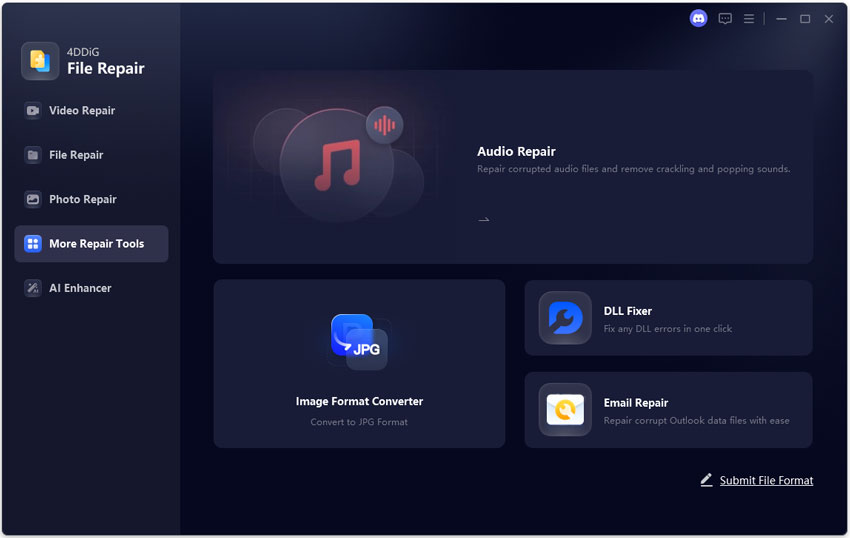
  • Get and launch 4DDiG File Repair. Navigate to the "More Repair Tools" from the left and select "Image Format Converter".

    open 4ddig image format converter
  • Import your CR2 files or entire folders by dragging them in or using the Add Files button.

    add multiple cr2 files to 4ddig
  • Select "Convert All to JPG" and hit the "Convert" button.

    4ddig starts cr2 to jpg conversion
  • Wait for the quick batch process to finish, then save the files to your chosen folder.

    4ddig cr2 to png conversion completed

Conclusion

Finding the right CR2 to PNG converter can transform how you handle your Canon RAW files. Whether you prefer quick online tools like Evoto for private batch processing, manual control in Photoshop, or a robust desktop solution, the options above cover most needs while preserving excellent image quality.

For the best all-around experience with fast batch conversions and extra repair features, we recommend trying the 4DDiG Image Format Converter. It offers speed, privacy, and reliability that make managing large photo collections much easier.

FREE DOWNLOAD

Secure Download

FREE DOWNLOAD

Secure Download

William Bollson (senior editor)

William Bollson, the editor-in-chief of 4DDiG, devotes to providing the best solutions for Windows and Mac related issues, including data recovery, repair, error fixes.

(Click to rate this post)

You rated 4.5 ( participated)