How to Open .Pages Files on Windows (2026 Updated Guide)

5 mins read

Updated on 2026-07-10 10:28:31 to File Tips

A .Pages file is Apple’s document format created with the Pages word processor, which is part of the iWork suite. Since Windows doesn’t include native support for this format, double-clicking the file usually won’t open it. This often happens when someone receives a document from a Mac user and needs to access it immediately. If you’re looking how to open .pages file on Windows, this guide covers five simple methods, from using iCloud to converting the file into Word or PDF.

how to open pages file on windows

What Is A .Pages File? Can You Open .Pages Files In Microsoft Word Directly?

Before choosing a solution, it helps to understand what a .Pages file actually is and why Windows struggles to recognize it. This section explains the Pages file format and answers one of the most common questions about opening it in Microsoft Word.

What Is the Pages File Extension?

A .Pages file is the default document format used by Apple Pages, Apple’s word processing application available on macOS, iPadOS, and iOS. Similar to a DOCX file in Microsoft Word, it can contain formatted text, tables, images, charts, shapes, and other document elements.

Unlike DOCX, however, the Pages format is proprietary to Apple. Although modern versions of Pages can export documents to Word, PDF, and other formats, the original .pages file isn’t designed to be opened directly by most Windows applications.

Can You Open .Pages Files in Microsoft Word Directly?

No, Microsoft Word cannot open a .Pages file directly. Word doesn’t natively recognize Apple’s Pages format. If you try opening a Pages document in Word without converting it first, you’ll typically receive an error, or Word will fail to recognize the file format.

Fortunately, there are several easy workarounds. You can:

  • Open the document through iCloud Pages.
  • Convert the Pages document into DOCX.
  • Export it as a PDF for viewing.
  • Extract preview content from the Pages package.
  • Use a dedicated Pages viewer.

The following methods explain each approach step by step.

⚡ How To Open .Pages Files On Windows?

There can be questions about what opens Pages files since Windows may not support Pages documents out of the box, but that doesn’t mean the file is inaccessible.

Depending on whether you need to edit the document or simply read it, there are several practical ways to open a Pages file on Windows without owning a Mac.

1. Quickest Way: Open .Pages Files via iCloud.com (Recommended)

If you want to preserve the original formatting and even edit the document, Apple’s own iCloud website is usually the best solution.

Since Pages is available as a free web application through iCloud, you can upload the file, open it in your browser, and export it in Microsoft Word format if needed. This method requires only an Apple ID and works on virtually any Windows computer.

Here's the quickest way to open .pages file on Windows:

  • Open iCloud.com in your browser and sign in with your Apple ID.

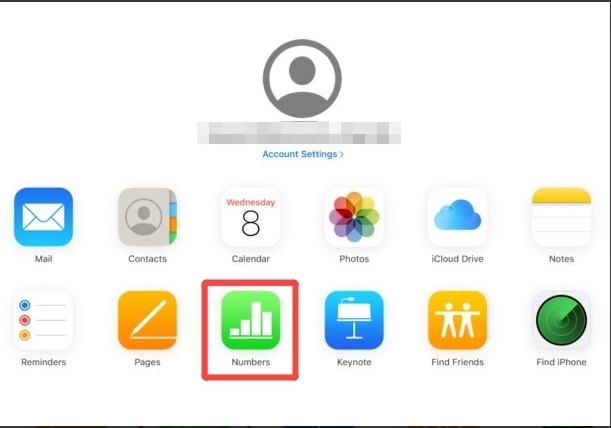
  • Click “Pages," then select “Upload Document" from the top to choose your .Pages file.

    icloud upload pages file
  • Wait for it to upload and open. View or edit the document and, if necessary, export it as Word (.docx) or PDF.

2. Convert .Pages to Word (.docx) Online With CloudConvert

If you don’t have an Apple ID or simply need a Word document quickly, CloudConvert provides a convenient alternative.

The online service converts Pages documents into DOCX while preserving most formatting, allowing you to continue editing the file in Microsoft Word. Since everything happens in your browser, there’s no software to install. The steps below shows how to open pages file on PC online:

  • Open CloudConvert Pages to DOCX Converter and click “Select File” to upload the Pages document.

    cloudconvert pages to word converter
  • Choose “DOCX” as the output format and click “Convert” to convert pages file to Word.

  • Download the converted Word document and open it using Microsoft Word.

3. Convert .Pages To PDF (Best For Viewing Only)

Sometimes you don’t need to edit the document at all. If your goal is simply to read, print, or share the file while preserving its original layout, converting it to PDF is often the safest option. PDF files display consistently across devices and don’t require Microsoft Word or Apple Pages to view.

Option 1: Using an Online Pages to PDF Converter

Option 2: Via Apple Pages on Mac

  • Open the Pages document via the Apple Pages app on a Mac or iPhone.

  • Click “Files” on the top menu and choose “Export To” > “PDF” from the dropdown list.

    apple pages saves pages file as pdf

4. Rename And Extract .Pages Package To ZIP

Many users don’t realize that a Pages document is actually a package containing multiple files. By changing the file extension from .pages to .zip, you can inspect its contents and sometimes access preview images or PDFs embedded inside the document.

Although this method doesn’t allow full editing, it can be useful when other options aren’t available.

If you were unable to decide which program can open a .Pages file, here is another way to check its contents.

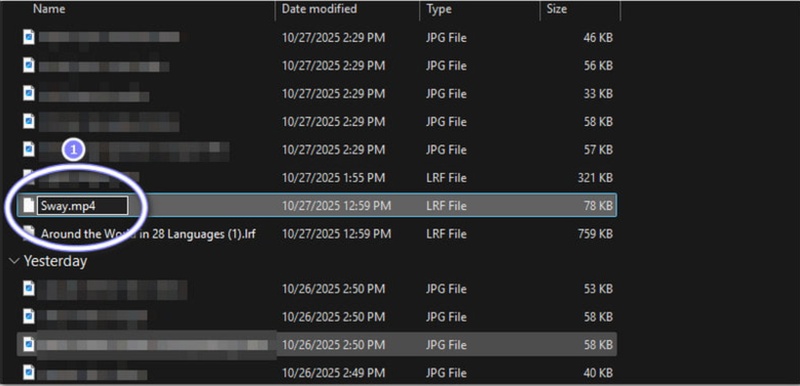
  • Create a copy of the original Pages file and rename the file extension from .pages to .zip.

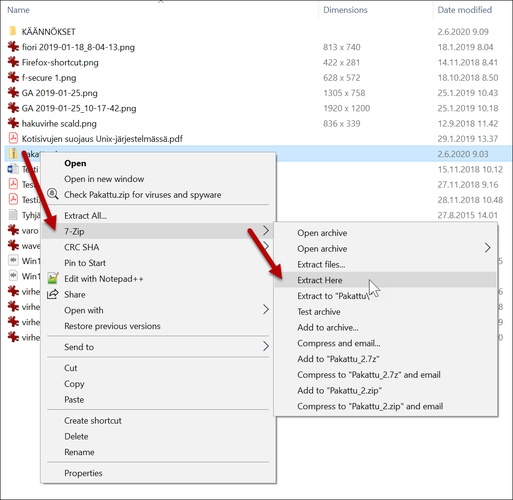
  • Confirm the extension change, then extract the ZIP archive.

  • Open the extracted folder and locate the required files.

  • Open the “Preview” file or the preview image if available.

Tips:

If the converted PDF, ZIP, Word file opens blank or won't open, they may be corrupted or damaged during conversion or renaming. Amid this, you can use 4DDiG File Repair to fix damaged Word (.docx) or PDF files quickly and easily. It supports common office document formats and helps recover content and formatting with a simple repair process.

FREE DOWNLOAD

Secure Download

FREE DOWNLOAD

Secure Download

4ddig repair corrupted word or pdf files

5. Use A Pages Viewer

If you regularly receive Pages documents but don’t need to edit them, a dedicated Pages viewer may be the most convenient solution. These web applications are designed specifically for opening or previewing Apple Pages files on Windows or Android devices.

They’re generally easy to use and eliminate the need to convert every document before viewing it. Just open a compatible Pages viewer like File Helper and click “Upload” to add the Pages file for viewing. Read on the next part and explore 3 convenient pages file viewer for Windows.

3 Top .Pages Viewers For Windows

If you frequently receive Apple Pages documents, installing a dedicated viewer can save time compared to converting every file manually.

The following software to open pages files makes it easier to preview or access these documents on Windows and other platforms, although each one has different strengths and limitations.

1. FileHelper PAGES Viewer

filehelper pages file viewer

FileHelper PAGES Viewer is a browser-based utility that focuses on quickly previewing Apple Pages documents without requiring Apple Pages or Microsoft Word. It is designed for users who occasionally receive Pages files and simply want to inspect the document before deciding whether to convert or download it. Since it runs entirely through a web browser, no installation is required.

  • Pros
  • Cons
    • Opens Pages files directly in a browser without installing desktop software.
    • Simple interface that requires only a few clicks to upload and preview documents.
    • Supports multiple file information pages that explain various file formats in addition to PAGES.
    • Suitable for occasional viewing when editing isn’t required.
    • Primarily designed for viewing rather than editing Pages documents.
    • Large files may take longer to upload depending on your internet connection.
    • Formatting accuracy depends on the complexity of the original document.

2. FileProInfo PAGES Viewer

fileproinfo pages viewer

FileProInfo offers another browser-based Pages viewer aimed at users who need quick access to Apple documents on Windows. During testing, the upload process was straightforward, and the service handled standard text documents without difficulty. It’s a convenient option when you don’t have access to Apple Pages or iCloud but only need to read the document.

  • Pros
  • Cons
    • Works entirely online with no installation required.
    • Supports a wide range of file viewers beyond the Pages format.
    • Easy drag-and-drop upload interface for first-time users.
    • Accessible from most modern desktop browsers.
    • Internet access is required for every document you open.
    • Complex layouts, graphics, or embedded objects may not render perfectly.
    • Upload limits may affect larger Pages documents.

3. PAGES File Reader - View PAGES

android pages file reader

PAGES File Reader - View PAGES is an Android application intended for users who need to access Apple Pages documents on their mobile devices. Instead of opening files on a Windows PC, it allows users to browse, view, and manage compatible documents directly from an Android phone or tablet. This Pages Reader makes it useful for quickly checking files while away from a computer.

  • Pros
  • Cons
    • Opens Pages documents directly from Android storage.
    • Mobile-friendly interface designed for touchscreens.
    • Allows quick access to documents received through email or messaging apps.
    • Doesn’t require Apple Pages or Microsoft Word to preview files.
    • Available only for Android devices.
    • Editing capabilities are limited or unavailable.
    • Display quality varies depending on document complexity.

FAQs About .Pages Files On PC

Q1: How To Open A .Pages File Without Pages?

You can open a Pages file without Apple’s Pages application by using iCloud Pages, converting it to DOCX or PDF, extracting the preview from the Pages package, or using a dedicated Pages viewer.

Q2: Can I Open .Pages File In Microsoft Word?

Not directly. Microsoft Word doesn’t support the Pages format natively. You’ll need to convert the file to DOCX first or export it from Apple Pages before opening it in Word.

Q3: How Do I Open an Apple Pages File On Windows Permanently?

The most reliable long-term solution is to ask the sender to save documents in DOCX format before sharing them. Alternatively, use iCloud Pages whenever you receive a new Pages document.

Q4: What’s The Difference Between .Pages, .DOCX, And .PDF?

  • .Pages: Apple’s native editable document format used by the Pages application.
  • .DOCX: Microsoft Word’s editable document format and the most widely supported office document standard.
  • .PDF: A fixed-layout document format designed primarily for viewing, printing, and sharing rather than editing.

Conclusion

Opening .pages file on Windows is easier than it first appears. Whether you choose iCloud Pages, convert the document to Word or PDF, extract the file contents manually, or use a dedicated Pages viewer, each method provides a practical way to access Apple documents on a Windows PC.

If the file itself is corrupted and won’t open regardless of the method you try, 4DDiG File Repair helps repair damaged documents and recover important content.

FREE DOWNLOAD

Secure Download

FREE DOWNLOAD

Secure Download

William Bollson (senior editor)

William Bollson, the editor-in-chief of 4DDiG, devotes to providing the best solutions for Windows and Mac related issues, including data recovery, repair, error fixes.

(Click to rate this post)

You rated 4.5 ( participated)