How to Open a .numbers File on Windows/Mac/Online

5 mins read

Updated on 2026-07-10 10:28:29 to File Tips

You received a .numbers file but don’t have a Mac. Here’s how to open it quickly. A .numbers file is simply a spreadsheet created in Apple Numbers, the macOS equivalent of Microsoft Excel. While these files are native to the Apple ecosystem, they often cause headaches for Windows users.

Whether you received a budget from a Mac using colleague or need to access old data on a new PC, this guide covers multiple solutions. This article shows you how to open a .numbers file using six easy, reliable methods.

how to open numbers file

What Is a .numbers File? Why It Won't Open on Windows

A .numbers file is a proprietary spreadsheet format developed by Apple for its "iWork" suite. Just as Microsoft Office uses .xlsx and Google uses its own cloud format, Apple uses .numbers to store data, tables, and complex charts.

The primary reason it won't open on Windows natively is that Microsoft Excel does not recognize the internal structure of a .numbers file. Excel uses a standard grid layout, while Apple Numbers lets you place multiple tables on a single page, making the two file formats work differently.

Numbers File vs. Excel File: What’s the Difference?

The main difference is in structure and compatibility. Microsoft Excel (.xlsx) uses an XML based format that is globally recognized by almost all spreadsheet applications. Apple Numbers (.numbers), however, focuses on a "canvas" approach, where a single sheet can contain multiple independent tables, images, and charts in a free form layout. While Excel is the powerhouse for data analysis, Numbers excels in visual presentation. Unfortunately, this unique layout is exactly what makes cross platform compatibility so challenging.

How to Open Numbers File on Windows PC (5 Best Methods)

Opening an Apple Numbers spreadsheet on a Windows machine can be frustrating because the .numbers format is proprietary to macOS and iOS. Fortunately, there are several reliable ways to view and edit these files without owning a Mac.

Here are the six best methods to get your data into a Windows compatible format.

Method 1: Open Numbers Files via iCloud.com

iCloud is Apple's cloud service and the most reliable way to access Numbers files on a non Mac device. Since it’s web based, you don't need to install any Apple software on your hard drive. It preserves all original formatting and formulas, making it the top choice for users wondering how to open numbers file on pc.

Steps:

  • Open your web browser and visit iCloud.com.

  • Sign in with your Apple ID (or create one for free).

  • On the iCloud homepage, click the "Numbers" icon.

    access numbers via icloud
  • Click the "Upload" button located at the top of the page.

    upload numbers file to icloud numbers
  • Select the .numbers file from your computer and click "Open."

  • Wait for the file to finish uploading. Double click the uploaded file to open it.

    windows open numbers file online via icloud
  • You can now view and edit the spreadsheet in your browser. If needed, download the file as Excel (.xlsx) or PDF for use on your Windows PC.

Method 2: View Numbers File Online with FileHelper.com

If you need a quick way to view your data without logging into a personal account, FileHelper.com is an excellent resource. This web based utility allows you to upload and view proprietary Apple formats directly in your browser as a read only preview. It’s perfect for those looking for how to open a numbers file in Windows.

Steps to Open Numbers File Online:

  • Visit the FileHelper Numbers page.

    filehelper open numbers file online
  • Upload your file to the secure portal.

  • The site will render a preview of the spreadsheet, allowing you to see the data immediately without needing to install software.

Method 3: Convert .numbers to Excel (.xlsx) on Mac First

Sometimes the best solution is to convert the file before it even reaches your PC. If you have access to a Mac at work or at home, you can use the built-in export feature to convert the format to a format Windows can read natively. This is the most accurate method for anyone learning how to open a .numbers file.

Steps:

  • Open the file in the Numbers app on a Mac.

  • Go to the "File" menu, choose "Export To", and then select "Excel...".

    apple numbers convert numbers file to excel
  • Choose the ".xlsx" format and click "Next".

  • Choose the location where you want to save the converted file.

  • Type a name for the file, then click "Export." After the export is complete, move the .xlsx file to your Windows PC and open it in Microsoft Excel or any compatible spreadsheet application.

Method 4: Convert .numbers to Excel/PDF/CSV Online with Zamzar

Zamzar is a legendary online conversion tool that handles thousands of file formats. It’s particularly useful for .numbers files because it can transform them into Excel, PDF, or CSV formats in seconds. This method is ideal if you want a permanent copy of your data in a format Windows software recognizes.

Steps:

  • Go to the Zamzar Numbers to XLS converter.

  • Click "Choose Files" to upload your spreadsheet.

    zamzar numbers to xls converter
  • Select " xlsx" (for Excel) or csv from the "Convert To" dropdown menu. Click "Convert Now."

  • Once the conversion is complete, click "Download" to save the file to your PC.

Method 5: Use LibreOffice or Microsoft Excel with Workarounds

For those who prefer desktop software, LibreOffice is one of the few free office suites that can natively open .numbers files. If you only have Microsoft Excel and no internet connection, you can also use a simple ZIP trick to view a preview of the spreadsheet without converting the file.

Steps (LibreOffice):

  • Download and install the free LibreOffice suite.

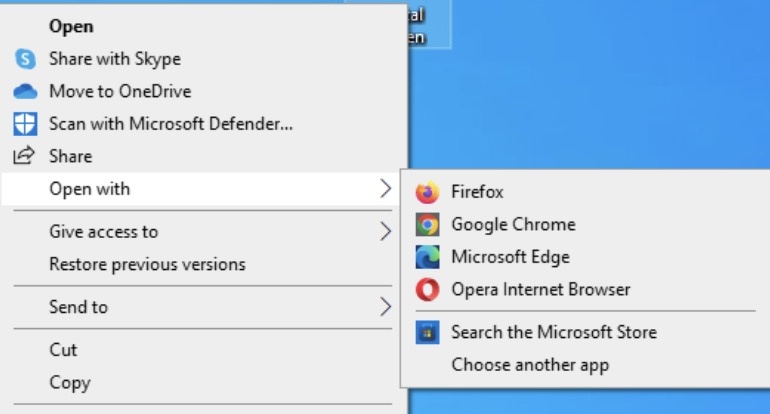
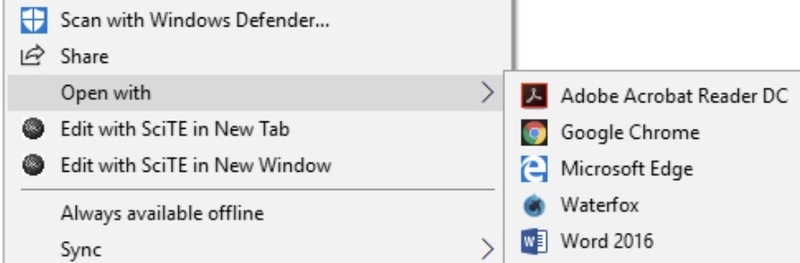
  • Right click your ".numbers" file and select "Open with", then choose "LibreOffice Calc"

    open numbers file in libreoffice

Which Method Should You Choose?

  • Method
  • Can Edit the File?
  • Free
  • Best For
  • iCloud
  • Yes
  • Yes
  • Best overall compatibility and formatting preservation
  • FileHelper
  • No
  • Yes
  • Quickly viewing a Numbers file online
  • Mac Conversion
  • Yes
  • Yes (requires a Mac)
  • The most accurate file conversion
  • Zamzar
  • Limited
  • Yes
  • Fast online conversion to Excel, PDF, or CSV
  • LibreOffice Workaround
  • Partial
  • Yes
  • Offline viewing and editing of converted files

How to Open a .numbers File on Mac with Apple Numbers Natively

If you are lucky enough to be sitting in front of a MacBook or an iMac, opening these files is as intuitive as clicking a button. Apple’s ecosystem is designed for seamless integration, and the Numbers application is pre-installed on almost every device. To ensure you are getting the most out of the software and viewing your data correctly, follow these simple steps to use the native app.

  • Locate your file in the Finder.

  • Double click the file. By default, macOS will launch the Numbers app immediately.

  • If the file was sent via email or AirDrop, you may need to right click and select "Open With," then click "Numbers."

    open numbers file with apple numbers app
  • Once open, you can use the "Format" and "Organize" sidebars to adjust your tables and charts.

Note:

If the file won't open on your Mac, ensure your Numbers app is updated to the latest version via the Mac App Store, as older versions of the software cannot open files created in newer versions.

⚡ What If the Converted Excel File Won’t Open?

Sometimes, a converted Excel file may fail to open even after the conversion process finishes successfully. You might see error messages, blank worksheets, unreadable text, missing charts, or Excel may simply refuse to load the file. This usually happens because the file becomes corrupted during conversion, download, or transfer. If that happens, a professional repair tool like 4DDiG File Repair can help restore your spreadsheet without recreating it from scratch.

4DDiG File Repair uses advanced AI powered repair technology to recover damaged documents while preserving as much original content as possible. It supports repairing multiple document types and can process several files at once. This makes it an excellent choice for both personal and professional users.

Key Features

  • Repairs corrupted Excel files that won't open or display errors.
  • Supports Excel formats including .xlsx, .xls, .xlsm, and more.
  • Restores worksheets, tables, charts, formulas, formatting, and other important data.
  • Address Excel not responding, not opening, crashing, opens blank, gibberish content, etc.
  • Repairs multiple Excel files in batch with a single click.
  • Uses advanced AI algorithms to fix severe file corruption.
  • Preview repaired files before saving to verify the results.
FREE DOWNLOAD

Secure Download

FREE DOWNLOAD

Secure Download

Steps to Fix Corrupted Excel Files Using 4DDiG File Repair

  • Download and install 4DDiG File Repair from the official site. Open the program and choose the "File Repair" tab. Click "Add files" and select the Excel files that won't open.

    add corrupted excel files to 4ddig
  • Click "Repair" to let the software analyze and fix the file headers and data structures.

    repair corrupted excel files
  • Preview the repaired files and click "Save" or "Save All" to save the healthy versions to your PC.

    preview and save repaired excel files

People Also Ask about .numbers File

Q1: Can I open a .Numbers file in Excel?

No, you cannot open it directly. You must first convert it to a .xlsx file using iCloud, Google Sheets, or an online converter like Zamzar. Once converted, Excel can open the file without issues.

Q2: How to convert a .Numbers file to PDF?

The easiest way is through iCloud.com. Open the file in the online Numbers app, click the "More" icon, select Download a Copy, and choose PDF. Alternatively, use an online converter like Zamzar.

Q3: Can I open the numbers file online?

Yes, iCloud.com and FileHelper.com are the best online options. Google Drive also allows you to upload and view them in Google Sheets.

Q4: How to open a numbers file in Google Sheets?

Google Sheets cannot directly open .numbers files. The .numbers format is a proprietary file type used by Apple Numbers, and Google Sheets does not natively support it.

Conclusion

In summary, while Apple’s proprietary format can be a hurdle for Windows users, it is easily overcome. Whether you use iCloud, Google Sheets, or a third party converter, knowing how to open a .numbers file ensures you never lose access to important data. If your conversion results in a broken file, don't panic. Simply use 4DDiG File Repair to quickly restore your spreadsheets and get back to work.

FREE DOWNLOAD

Secure Download

FREE DOWNLOAD

Secure Download

William Bollson (senior editor)

William Bollson, the editor-in-chief of 4DDiG, devotes to providing the best solutions for Windows and Mac related issues, including data recovery, repair, error fixes.

(Click to rate this post)

You rated 4.5 ( participated)