8 Best AI Features for Enhancing UGC Video Quality: A Practical Guide

5 mins read

Updated on 2026-10-14 11:42:03 to Video Tips

UGC videos often feel more authentic than polished brand content and are loved by brands and creators, but poor lighting, shaky footage, low resolution, or background noise can make them difficult to watch.

The good news is that modern AI tools can lift these clips to sharp 4K or even 8K without losing that authentic feel. This practical guide walks you through the best AI features for enhancing UGC video quality so your content looks clearer and performs better on any screen.

Part 1. What Is UGC Video and Why Enhancing UGC Video Quality Matters

Before looking at AI enhancement features, it helps to understand what makes UGC different from professionally produced video. Its informal style is part of its appeal, but that does not mean viewers will tolerate poor visual or audio quality.

UGC Video Meaning

UGC video meaning is simple: it stands for user-generated content video. These are clips made by real people: customers, fans, or everyday creators, rather than a professional studio team.

Most are shot on smartphones in natural settings, with honest talking, unboxing moments, or product demos. The raw style builds trust because viewers see it as genuine, not polished advertising.

Why Enhancing UGC Video Quality Matters

Even the most authentic clip can lose impact if it looks blurry or grainy. Raising the quality to 4K or 8K keeps the real-person feel while making the video easier to watch and share. Here are the main reasons it helps:

  • Viewers stay longer when the picture is clear and steady.
  • Trust grows because sharp details make products and faces look more reliable.
  • Social platforms and ads reward higher-quality uploads with better reach.
  • The same clip can be used across TikTok, Reels, websites, and larger screens without looking weak.
  • Brands convert more viewers into customers when the video feels both real and professional.

Improving quality does not erase the original charm, it simply removes the distractions that stop people from watching and believing.

Part 2. 8 Best AI Features for Enhancing UGC Video Quality to 4K & 8K

Once you understand why clear UGC matters, the next step is knowing which tools actually deliver results. Here are eight practical best AI features to enhance UGC video quality that turn everyday phone clips into sharp 4K or 8K content while keeping the real-person feel.

1. AI Video Upscaling --- Best for Low-Resolution UGC

Most phone videos start at 720p or 1080p. AI upscaling smartly adds missing detail so the same clip looks crisp in 4K or even 8K. It works especially well for product shots and talking-head videos that need to look good on larger screens.

4ddig ai video upscaling

2. AI Noise Reduction --- Best for Low-Light Smartphone Videos

Nighttime or indoor clips often look grainy. AI noise reduction cleans up the speckles without making faces or products look plastic. The result is smoother footage that still feels natural and is easier to watch on any device. It works well for restaurant clips, concerts, night scenes, indoor testimonials, and other UGC recorded without professional lighting.

4ddig ai noise reduction

3. AI Deblurring and Detail Recovery --- Best for Soft Faces and Products

Soft focus or slight motion blur can hide important details. This feature sharpens edges and restores texture on skin, logos, and packaging so viewers clearly see what matters. It keeps the authentic look while making everything more readable. It is particularly helpful for product demonstrations, beauty videos, unboxings, and talking-head content where clarity matters.

4ddig ai video deblurring

4. AI Video Stabilization --- Best for Shaky Handheld UGC

Handheld UGC often includes unwanted camera movement because creators usually record without tripods or gimbals. AI stabilization tracks movement between frames and reduces distracting shake while keeping intentional motion. It can make walking videos, travel clips, demonstrations, and handheld product reviews much more comfortable to watch.

ai video stabilization

5. AI Relighting and Color Correction --- Best for Poor Lighting

Uneven light or odd colors can make a video feel unprofessional. AI relighting balances exposure and corrects skin tones so the clip looks consistent and inviting. It helps different creators' videos match a brand's overall look without heavy editing.

ai video relighting and color correction

6. AI Frame Interpolation --- Best for Choppy Video and Slow Motion

Older phones or compressed clips can look jumpy. Frame interpolation creates extra frames for smoother motion and better slow-motion effects. Action moments and product demos become fluid and more enjoyable to watch.

ai frame imterpolation

7. AI Audio Enhancement --- Best for Noisy UGC Videos

Background noise, wind, or weak mic quality often ruins good visuals. AI audio tools reduce unwanted sounds and clear up voices so the spoken message comes through cleanly. Clear sound pairs perfectly with the improved picture. It is particularly valuable for testimonials, interviews, tutorials, livestream recordings, and outdoor creator videos.

ai audio enhancement

8. AI Auto-Reframing --- Best for TikTok, Reels, and Shorts

Horizontal phone videos need vertical versions for short-form platforms. AI auto-reframing detects important subjects and automatically adjusts the crop as they move. This makes it easier to turn 16:9 UGC into 9:16 TikTok, Instagram Reels, or YouTube Shorts while keeping faces and products inside the frame.

ai auto reframing

⚡ Part 3. How to Improve UGC Video Quality to 4K or 8K in One Click [Step-by-Step]

Once you know which problems are affecting your footage, , the next step is choosing a tool that can improve the UGC videos. The easiest way to put them all to work is with a simple all-in-one program. 4DDiG AI Video Enhancer (inside 4DDiG File Repair) stands out because it combines upscaling, noise cleaning, sharpening, and color fixes in one place. It is beginner-friendly and works well for everyday smartphone footage.

Main Strengths of 4DDiG AI Video Enhancer

  • Upscales low-resolution videos to clear 4K (and higher 8K in many cases)
  • Removes grain and noise while keeping natural detail
  • Improves overall clarity and helps restore missing details in blurry or low-quality footage
  • Sharpens soft faces and products without looking fake
  • Offers multiple ready-made AI models for general clips, faces, anime, or old footage
  • Restore old videos and colorize black-and-white footage with vivid hues
  • Adjusts color and contrast for a brighter, more balanced look
  • Processes videos in just a few clicks with easy preview options
  • Batch process multiple videos simultaneously
FREE DOWNLOAD

Secure Download

FREE DOWNLOAD

Secure Download

Steps to make UGC video clearer and high quality with 4DDiG

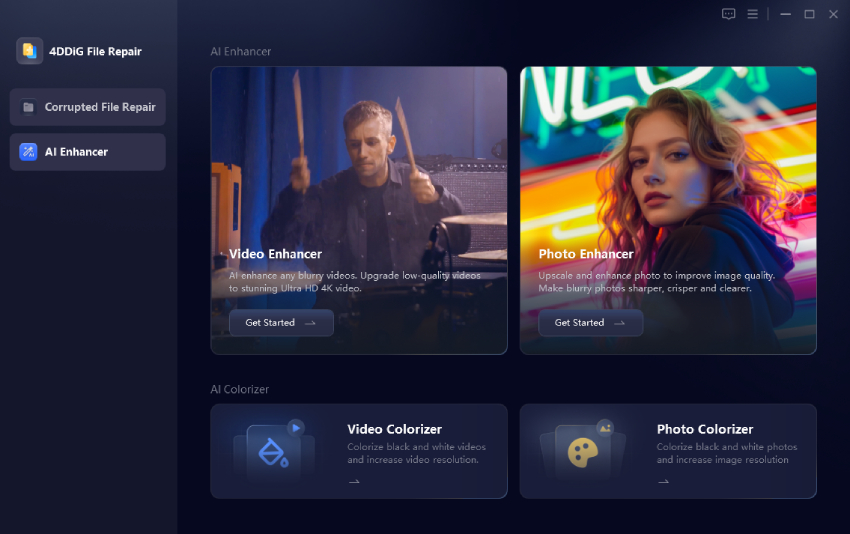
  • Download and open 4DDiG File Repair (which includes the Video Enhancer). Go to the AI Enhancer section and choose Video Enhancer.

    open 4ddig ai video enhancer
  • Click Add Videos or drag your UGC clip into the window.

    add ugc videos to 4ddig
  • Pick the AI model that fits your video (General Denoise for most clips, Face for talking-head videos). Also, choose the output resolution level (2x or 4x) you want for 4K or 8K UGC videos.

    select ai model and resolution level for higher quality ugc videos
  • Click Enhance and wait a short time while the tool cleans and upscales the footage. When finished, preview the result. If you like it, click Save to export the improved UGC video.

    preview and save enhanced ugc videos

Conclusion

Raw UGC videos already carry real trust and authenticity. When you add the best AI features for enhancing UGC video quality, those same clips become clearer, more engaging, and ready for 4K or 8K screens.

Tools like 4DDiG AI Video Enhancer make the process fast and simple, so anyone can turn ordinary footage into high-quality content that holds attention and builds confidence. Start with one of your own clips today and see the difference for yourself.

FREE DOWNLOAD

Secure Download

FREE DOWNLOAD

Secure Download

William Bollson (senior editor)

William Bollson, the editor-in-chief of 4DDiG, devotes to providing the best solutions for Windows and Mac related issues, including data recovery, repair, error fixes.

(Click to rate this post)

You rated 4.5 ( participated)