Which Is the Best SD to HD Video Converter in 2026

5 mins read

Updated on 2026-07-03 22:04:43 to Video Tips

Tired of blurry old home videos or low-res footage looking terrible on your 4K TV or phone? Many of us have boxes of precious memories stuck in SD quality that don't hold up anymore. A good SD to HD video converter does more than change formats, which uses AI to upscale resolution, reduce noise, sharpen details, and bring your clips back to life. In this guide, we compare the top tools tested in 2026 and show you exactly how to get great results.

Part 1: What's the Difference Between SD to HD Video Converter

If you've ever uploaded an old clip to YouTube or played it on a big screen, you've probably noticed how soft and outdated it looks. That's where understanding SD versus HD becomes important.

SD (Standard Definition) typically means resolutions like 480p (720x480 pixels). It was the norm for older TVs, camcorders, and early digital files. These videos use less storage and bandwidth but appear pixelated or blurry on today's high-resolution displays.

HD (High Definition) starts at 720p (1280x720) and goes up to 1080p or higher. It offers sharper images, better color depth, smoother motion, and a wider 16:9 aspect ratio that fits modern screens perfectly. The jump in pixel count makes a huge difference in clarity and overall viewing experience.

Here's a quick comparison:

  • Aspect
  • SD Video
  • HD Video
  • Typical Resolution
  • 720x480 pixels
  • 1280x720 or 1920x1080
  • Image Clarity
  • Soft, pixelated on big screens
  • Sharp details, crisp edges
  • File Size/Bandwidth
  • Smaller, easier to stream
  • Larger, needs more speed
  • Best For
  • Old archives, low data
  • Modern viewing, YouTube

Converting SD to HD video isn't just about stretching the picture. Good converters use AI to intelligently add details, reduce grain, and improve colors so the result looks natural rather than artificially upscaled. This process helps revive old family videos, archival footage, or low-quality content for better sharing and enjoyment.

Part 2: Top 7 Best SD to HD Video Converters in 2026

After testing numerous tools, here are the best SD to HD video converters that deliver strong results for upscaling old footage. Each one uses AI to improve clarity, reduce noise, and sharpen details. We've ranked them based on output quality, ease of use, speed, and value in 2026 tests.

1. 4DDiG AI Video Enhancer

4ddig ai video enhancer

4DDiG AI Video Enhancer stands as the top-performing SD to HD video converter in our 2026 tests. This powerful desktop software uses advanced AI models to upscale videos to HD, 4K, or even 8K while recovering fine details, reducing noise, and restoring colors.

It handles challenging old footage better than most competitors, offering batch processing, multiple specialized models, and excellent artifact control. For users seeking professional-quality results on precious family videos or archives, 4DDiG delivers the most reliable and impressive enhancements available today.

  • Pros
  • Cons
    • Delivers excellent detail recovery on faces and textures with specialized AI models
    • Supports batch processing for multiple videos at once
    • Come with multiple powerful AI Models: General, Face, Anime, Colorize, etc.
    • Upscale videos to 4K, 1080P, 8K, or higher
    • Offers customizable options for quality vs speed trade-offs
    • Built-in colorization and restoration tools for restoring old videos or black-and-white footage
    • Produces stable results with minimal artifacts on most SD sources
    • Installation required
    • Saving enhanced videos need a paid license after trial

2. Vmake AI

vmake free ai video converter

Vmake AI offers a convenient browser-based SD to HD video converter that requires no installation. It quickly upscales videos to 4K, reduces grain, and improves sharpness, making it a favorite for content creators needing fast results on short clips. The tool performs impressively on moderately compressed footage and includes helpful extras like watermark removal.

  • Pros
  • Cons
    • Browser-based with no installation required
    • Strong 4K upscaling that noticeably improves texture and clarity
    • Fast processing suitable for short to medium clips
    • Includes useful extras like watermark removal
    • Free tier available for testing and light use
    • File size and length limits on the free plan
    • Less control over fine AI settings compared to desktop tools
    • Results can vary on heavily damaged or very old footage

3. Wink AI HD Video Converter

wink ai hd video converter online

Wink AI provides an easy, one-tap SD to HD video converter available on mobile and web platforms. It delivers quick improvements in brightness, face clarity, and overall sharpness, which works well for casual users enhancing personal videos or phone recordings. Its simple interface makes video upscaling accessible to beginners.

  • Pros
  • Cons
    • Extremely beginner-friendly with minimal steps needed
    • Good face retouching or enhancement and brightness correction
    • Fast processing for short personal videos
    • Available as a convenient mobile app
    • Effective noise reduction on lightly compressed clips
    • Weaker fine-detail recovery on complex scenes
    • Limited customization options for advanced users
    • Some features locked behind subscription paywall

4. ArtGuru

artguru hd video converter

ArtGuru is a user-friendly online SD to HD video converter that quickly improves clarity, sharpness, and resolution of older videos. Operating entirely in the browser, it provides fast noise reduction and color vibrance boosts, which appeals to users wanting simple enhancements without complex setups or downloads.

  • Pros
  • Cons
    • Simple web interface with fast upload and processing
    • Solid video sharpening and noise reduction for basic SD footage
    • No software installation required
    • Good color vibrance improvements after enhancement
    • Affordable credit-based pricing for occasional use
    • Less effective on severely degraded videos
    • Limited batch capabilities
    • Output quality plateaus compared to dedicated desktop AI

5. Pixazo

pixazo ai hd video converter

Pixazo integrates AI video enhancement into a broader creative design platform. As an SD to HD video converter, it suits users who need upscaling alongside image generation and editing tools. Its modern interface supports collaborative projects and delivers decent quality improvements for creative content.

  • Pros
  • Cons
    • Integrated platform for video, image, and design work
    • Modern, intuitive user interface
    • Decent AI upscaling for creative projects
    • Collaboration features for teams
    • Fast rendering for shorter clips
    • Video enhancement is not the primary focus
    • Steeper learning curve for pure upscaling tasks
    • May require subscription for full video capabilities

6. Topaz Labs AI HD Video Converter Online

topaz hd video converter online

Topaz Labs brings professional-grade AI to its SD to HD video converter tools. Known for natural-looking enhancements, it excels at deinterlacing old footage and adding realistic details during upscaling, making it a strong choice for archival video restoration.

  • Pros
  • Cons
    • High-quality natural detail reconstruction
    • Excellent deinterlacing for old camcorder footage
    • Regular AI model improvements
    • Strong control over enhancement parameters
    • Reliable results on challenging archival videos
    • Can be slower without powerful hardware
    • Online version has usage limitations
    • Higher learning curve for best settings

⚡ Part 3: How to Convert SD to HD Video (Step-by-Step Tutorial)

Once you pick the right tool, actually turning your old clips into clear HD video is straightforward. Below are two practical methods: one using desktop software for the best control and quality, and another using a convenient online option.

1. Using Dedicated SD to HD Video Converter Software

For serious results with old or challenging footage, desktop software often outperforms quick online tools. 4DDiG AI Video Enhancer stands out for its powerful AI models that handle upscaling, denoising, sharpening, and even color restoration in one go. It supports scaling up to 4K or 8K, offers multiple specialized models, and processes videos with impressive detail recovery while keeping files manageable.

Key standout features:

  • Multiple AI models tailored for different video types (General, Faces, Colorize, Anime, etc.)
  • Effective noise reduction and artifact removal
  • Batch processing for multiple files
  • Options to prioritize quality or speed
  • Additional tools like colorization for old footage
FREE DOWNLOAD

Secure Download

FREE DOWNLOAD

Secure Download

Step-by-step guide to upscale SD video to HD with 4DDiG Video Enhancer:

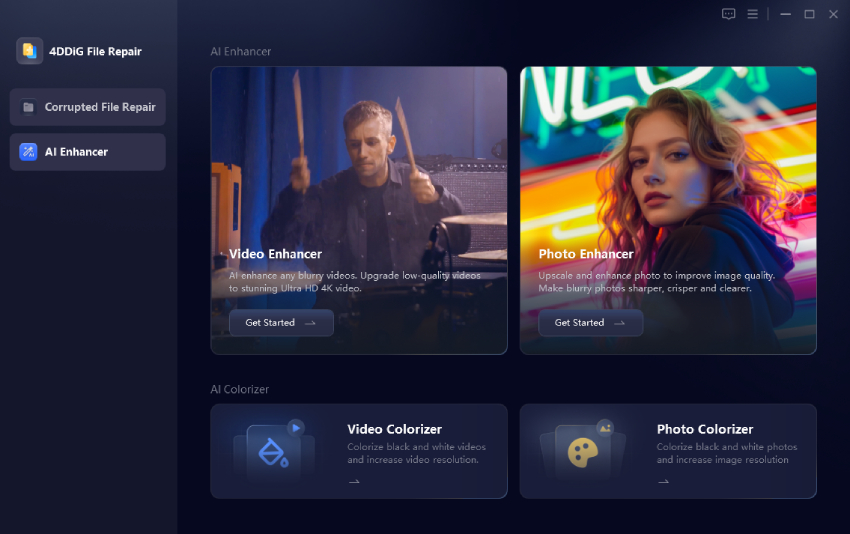
  • Get the software by clicking the above Free Download button. Launch it and click the "AI Enhancer" > "Video Enhancer" module.

    select 4ddig video enhancer
  • Import your SD video file by dragging and dropping or using the add button.

    add sd videos to 4ddig for enhancement
  • Choose your AI model and target resolution (e.g., upscale to 1080p, 4K, or 8K). Adjust settings like denoise level or sharpness if needed. Preview a short section to check the improvements, then click "Enhance".

    select ai model and resolution for enhancement
  • Export the final video in your preferred format and quality. Processing time varies by file length and your hardware.

    preview and save enhanced hd videos

This approach gives you more control and often better results for important videos you want to preserve long-term.

2. Convert SD Video to HD Video Online Free with Topaz Labs

Many creators turn to browser-based enhancers when they want fast results without downloads. Topaz Labs tools shine at refining low-quality footage through smart AI that adds realistic details while controlling artifacts. It's ideal for testing a few clips before committing to heavier processing. Expect good sharpness improvements on moderately challenging SD files.

Basic steps:

  • Click "Upload a video" or drag your SD videos to the screen directly.

  • Select the enhancement or upscaling Model and Output Resolution (e.g., to HD/1080p).

    topazlabs upscel sd to hd
  • Let the AI process the clip, you may see a preview of noise reduction and sharpening.

  • Download the enhanced version once complete.

People Also Ask about SD to HD

Q1: Can I convert SD to HD without losing quality?

You can't create information that wasn't originally there, but modern AI SD to HD video converters do an excellent job of enhancing and upscaling while preserving (and often improving) perceived quality through smart reconstruction. Results look much better than simple resizing.

Q2: Is SD or HD better?

HD is better for most modern viewing. It provides sharper details, better colors, and a more enjoyable experience on today's screens. SD still works for basic needs or low-bandwidth situations, but HD wins for quality.

Conclusion

Choosing the right SD to HD video converter can transform your old blurry videos into clear, enjoyable HD footage that looks great on any screen. After thorough testing, 4DDiG Video Enhancer earns the top recommendation for its powerful AI models, batch support, and impressive detail recovery. Start with it to bring your precious memories back to life today.

FREE DOWNLOAD

Secure Download

FREE DOWNLOAD

Secure Download

William Bollson (senior editor)

William Bollson, the editor-in-chief of 4DDiG, devotes to providing the best solutions for Windows and Mac related issues, including data recovery, repair, error fixes.

(Click to rate this post)

You rated 4.5 ( participated)