12 Best MKV players for Windows/Mac/Mobile [2026 New List]

5 mins read

Updated on 2026-08-17 17:17:56 to Video Tips

Looking for a reliable way to open MKV files in 2026? These versatile Matroska videos often include multiple audio tracks and subtitles, yet many built-in players struggle with them. This guide covers the 12 best MKV player options across Mac, Windows, Android, and iOS. Whether you need a free cross-platform tool or a polished native app, you will find clear recommendations that match real search intent and everyday viewing needs.

Part 1: Top 4 Best MKV Format Players for Mac

Mac users frequently run into compatibility issues because QuickTime does not support MKV natively. The right MKV file player solves this quickly while delivering smooth playback, solid subtitle handling, and a clean interface that feels at home on macOS.

IINA is the best overall choice to play MKV files on Mac, while VLC is ideal for free cross-platform playback. Elmedia Player stands out for casting videos from a Mac to a TV, and Movist Pro is better suited to users who want premium playback and subtitle controls.

1. IINA -- Best Overall Mac MKV Viewer & Player

IINA stands out as a free, open-source player built specifically for macOS. Powered by the mpv engine, it handles nearly every format, including complex MKV files with multiple audio tracks, chapters, and advanced subtitles.

Its native design includes Picture-in-Picture, trackpad gestures, Touch Bar support, and automatic dark mode. On Apple Silicon Macs it delivers efficient 4K and HDR playback with low resource use, making it an excellent daily mkv video player.

iina playing mkv
  • Pros
  • Cons
    • Clean, modern macOS-native interface
    • Excellent subtitle, Picture-in-Picture, and multi-track support
    • Free and actively maintained
    • Strong hardware acceleration on M-series chips
    • Limited DVD/Blu-ray menu support
    • Occasional focus or stability quirks reported by some users

2. VLC Media Player -- Best Free Cross-Platform MKV Player

VLC remains one of the most dependable free options for any platform. It plays virtually every MKV file without extra codecs, supports extensive subtitle and audio track controls, and offers useful extras such as conversion and streaming features. While its interface feels less polished on Mac than native apps, its reliability and broad compatibility make it a go-to mkv opener when other players struggle with unusual files.

vlc media player for mkv
  • Pros
  • Cons
    • Completely free, ads-free, and open source
    • Exceptional format compatibility
    • Available on Mac, Windows, and mobile
    • Built-in tools beyond basic playback
    • Interface looks dated compared with native Mac apps
    • HDR and color accuracy can vary

3. Elmedia Player -- Best MKV Player for Casting From Mac

Elmedia Player is a better fit when your main goal is to watch local MKV files on a larger screen. This MKV video player can play media directly on Mac and stream content to AirPlay, DLNA, Chromecast, Roku, and compatible smart TVs. It can also transcode unsupported media while streaming, which helps when the receiving TV cannot directly handle the original video, audio, or subtitle format.

elmedia player playing mkv
  • Pros
  • Cons
    • Easy AirPlay, Chromecast, and DLNA casting
    • Smooth 4K playback and good subtitle tools
    • Native Apple Silicon support
    • Advanced streaming limited in the free version
    • Slightly higher resource use than lighter players

4. Movist -- Best Premium MKV Player for Mac

Movist Pro is aimed at Mac users who are willing to pay for a refined interface and deeper playback controls. It supports hardware-accelerated H.265/HEVC decoding, multiple subtitle and audio tracks, HDR tone mapping, customizable shortcuts, and playback directly from SMB, SFTP, FTP, and WebDAV servers.

movist mkv viewer

Its strong subtitle features are particularly useful for multilingual movies, foreign-language content, and users who regularly watch media stored on a network server.

  • Pros
  • Cons
    • Outstanding HDR and color accuracy
    • Efficient hardware decoding and battery performance
    • Strong subtitle customization
    • Network and web video support
    • Paid app with no free version
    • Fewer extra tools than all-in-one players like VLC

Part 2. Top 4 Best MKV Players for Windows

Windows users have plenty of choices for MKV playback, but the best option depends on how much control you need. VLC is the easiest all-around pick, PotPlayer offers deeper customization, mpv is ideal for advanced users, and GOM Player adds useful subtitle tools. If you are looking for a reliable MKV format player for Windows, these four options cover most common playback needs.

1. VLC Media Player for Windows

VLC is also a practical choice for Windows users who want to open MKV files without installing extra codec packs. On Windows, VLC works much the same as on Mac: it opens nearly any MKV file without extra codecs and stays completely free. The familiar interface and broad compatibility make it a safe starting point for most people.

2. PotPlayer -- Customizable Player

PotPlayer is a strong option for users who like to fine-tune how videos look, sound, and behave. It handles MKV files smoothly, offers strong hardware acceleration for 4K content. Moreover, it lets you adjust almost every aspect of playback, from hotkeys and skins to equalizer settings and filters. Many Windows users prefer it when they want more control than basic players provide.

potplayer
  • Pros
  • Cons
    • Extensive hardware acceleration and codec options
    • Highly customizable video and subtitle settings
    • Strong performance with high-resolution MKV files
    • Highly customizable video and subtitle settings
    • Settings can feel overwhelming for beginners
    • Windows only

3. mpv -- Best for Advanced Users

mpv is a free, open-source media player built for users who value performance, scripting, and precise video control over a traditional interface. It plays MKV files with excellent HDR performance, supports advanced scripting and keyboard shortcuts, and uses very few system resources. However, its command-driven design makes it better suited to experienced users than casual viewers.

mpv player
  • Pros
  • Cons
    • Excellent performance and low resource use
    • Deep customization through config files and scripts
    • Strong format and subtitle support
    • Free and open source
    • Steeper learning curve
    • Basic interface without extra tools

4. GOM Player

GOM Player is particularly useful for opening incomplete or slightly damaged MKV files that some players may struggle with, while the Windows version also supports external codecs for files that cannot be decoded normally. It includes built-in codecs, automatic subtitle search, and solid support for high-resolution content. The free version works well for everyday use, though ads appear.

gom player
  • Pros
  • Cons
    • Plays damaged or incomplete files well
    • Plays MKV files with broad codec support , including external codecs
    • Automatic subtitle search and good codec support
    • Simple interface with useful shortcuts
    • Strong subtitle features, including subtitle search or generation
    • Ads in the free version
    • Interface feels a bit dated

Part 3. 3 Recommended iPad/iPhone/Android MKV Players

Mobile playback of MKV files has improved a lot. On iPhone and iPad you need a third-party app, while Android offers more native flexibility. To open MKV files on Android or iOS, here are three strong recommendations: Infuse is particularly strong across Apple devices, nPlayer is useful for accessing videos stored on networks and cloud services, and MX Player remains a practical Android option.

1. Infuse (for iPhone and iPad)

Infuse is widely regarded as one that can open MKV files without requiring conversion and supports hardware-accelerated 4K HDR playback on compatible Apple devices. You can stream from NAS devices, Plex, Emby, or Jellyfin, and the interface feels polished. For anyone searching for a reliable MKV player on iPhone, Infuse delivers excellent quality and ease of use.

infuse mkv viewer
  • Pros
  • Cons
    • Beautiful native design and smooth playback
    • Strong support for HDR, Dolby Vision, and subtitles
    • Excellent network and media server streaming
    • Automatic library organization
    • Full features require a paid subscription
    • Apple devices only

2. nPlayer (for Network and Cloud MKV Playback)

nPlayer is designed for people who store videos across multiple devices, servers, and cloud accounts rather than keeping everything on their phone or tablet. It supports MKV and other common formats without conversion and can connect through SMB/CIFS, WebDAV, FTP, SFTP, HTTP, and UPnP/DLNA. It also supports services such as Dropbox, Google Drive, OneDrive, and Box, along with detailed subtitle controls.

nplayer mkv viewer for mobile
  • Pros
  • Cons
    • Strong network and cloud streaming support
    • Good format compatibility and gesture controls
    • Available on iOS and Android
    • Hardware acceleration for smoother playback
    • Paid app
    • Interface can feel less modern than newer alternatives

3. MX Player (Best Android MKV Player)

MX Player remains a top pick for Android users who simply want a capable and widely used MKV file player. It uses multi-core decoding for better performance, offers flexible hardware and software decoding modes, and provides excellent subtitle controls. Most MKV files play smoothly even on mid-range phones, and the free version covers the essentials.

mx player for mkv files
  • Pros
  • Cons
    • Strong multi-core and hardware decoding
    • Excellent subtitle options and gesture controls
    • Wide format support
    • Free version available
    • Ads in the free version
    • Some advanced codecs need the Pro upgrade

Part 4. Best Online MKV Video Player for Browser

Sometimes you need to play an MKV file in Chrome, Edge, Safari, etc. without installing anything. An online MKV player from URL or simple browser tool can solve this quickly, especially when sharing files with others.

Jumpshare MKV Player -- Best for Uploading and Sharing MKV Files

Jumpshare MKV Player offers a free online MKV player that works directly in your browser. Upload your file, and it plays almost immediately without any software or account required. Files are protected with strong encryption and automatically deleted after 24 hours.

You can also generate a shareable link so others can watch the video without downloading it. This makes it a practical choice when you simply need a quick mkv video player in the browser or want to share Matroska files easily.

jumpshare free online mkv player
  • Pros
  • Cons
    • No installation or account needed for basic playback
    • Secure upload with automatic file deletion after 24 hours
    • Easy sharing via link and embed options
    • Works across modern browsers
    • Free plan has file size limits (around 250MB)
    • Larger files or advanced features require an upgrade

⚡ Part 5. How to Fix MKV Files Not Playing Anywhere

Many people run into the same frustrating problem: an MKV file refuses to play on every device and every MKV player. Common scenarios include sudden freezes, black screens, distorted audio, or files that open but show only static or choppy video. When standard mkv player apps all fail, the problem usually lies in the file itself rather than the software.

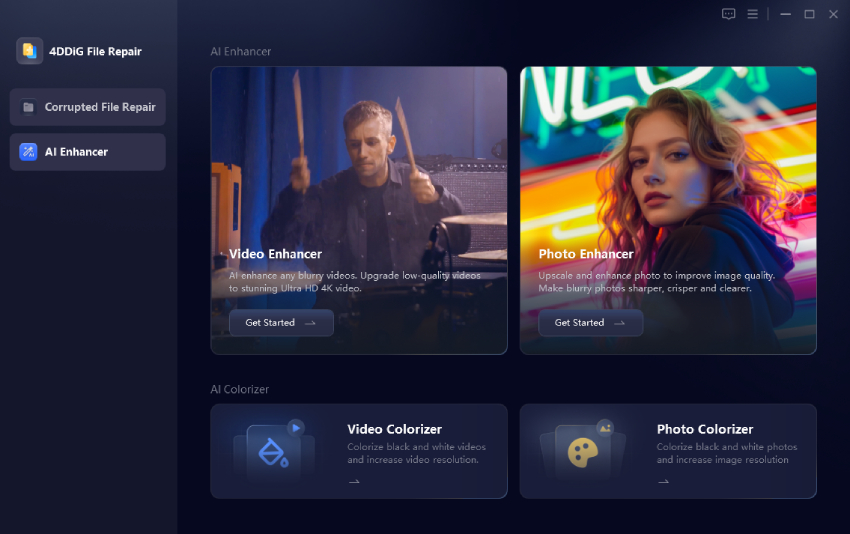
That's exactly where 4DDiG Video Repair helps. It specializes in repairing damaged, corrupted, unplayable, or distorted MKV files (and many other formats) in batch, with a high success rate. You can preview the result before saving, so there's no risk of losing the original.

FREE DOWNLOAD

Secure Download

FREE DOWNLOAD

Secure Download

How to Repair Unplayable MKV Files Using 4DDiG Video Repair:

  • Install the 4DDiG File Repair, following by firing it up. Then navigate to "Photo Repair" > "Add Photos".

    add corrupted mkv files to 4ddig
  • Hit the bottom-right "Repair All" button to commence the batch MKV file repair process.

    repair all mkv files
  • When finished, click "Preview" to check the repaired MKV playback. Finally, choose an output video format (MP4, MKV, MOV, AVI, or the original) and tap on "Save" or "Save All" to download the results locally.

    preview and save repaired mkv files in preferred format

FAQs about MKV Viewer and Player

Q1: Can MKV play on iPhone

Yes, but not with the built-in player. iPhone does not support MKV natively, so you need a third-party mkv player on iphone such as Infuse, VLC, or nPlayer. These apps handle most MKV files smoothly, including multiple audio tracks and subtitles.

Q2: Does Plex play MKV?

Yes. Plex can play MKV files, but the exact playback method depends on the device and the video and audio codecs inside the file. When a client supports the media directly, Plex can use Direct Play; otherwise, it may Direct Stream or transcode the video for compatibility. So, if you are wondering what plays MKV files across TVs, phones, and computers, Plex is a flexible choice when paired with a capable Plex Media Server.

Conclusion

Now, you can figure out which MKV player should you choose on difference devices. From native Mac options like IINA to powerful Windows tools, mobile apps, and even online players, the recommendations above cover every major platform. If a file still won't open, a quick repair often solves it. With the right player and a solid fix tool, your MKV videos should play smoothly wherever you watch.

FREE DOWNLOAD

Secure Download

FREE DOWNLOAD

Secure Download

William Bollson (senior editor)

William Bollson, the editor-in-chief of 4DDiG, devotes to providing the best solutions for Windows and Mac related issues, including data recovery, repair, error fixes.

(Click to rate this post)

You rated 4.5 ( participated)