Top 7 Best DivX Players for Smooth Playback on Windows, Mac & Android

DivX files are still widely used for high quality video compression, especially for movies, DVDs, and legacy media libraries. However, not every modern media player can handle DivX smoothly without codec errors or playback issues.
Choosing the right DivX player ensures stable playback, sharp visuals, and full audio support across devices. This article explores the 7 best DivX players in 202 6, plus solutions if your DivX files refuse to play.
Part 1. What Is DivX & Why DivX Files Still Matter?
What Is DivX and What Is It Used For?
- Definition: A video file that is compressed using the DivX codec. A codec is a digital translator. It helps your device in reading and playing video files properly.
- Purpose: Lower the size of video files without deteriorating the image, and this is why it can be used to store videos on the computer and share them over the internet.
- Pros: DivX files consume less storage space compared to uncompressed videos.
- History: Developed in the late 1990s, it introduced a more efficient method of video compression, offering higher quality in smaller file sizes compared to early MPEG 4 formats. This led to its rapid rise in popularity for online movie sharing and established DivX as a trusted brand for high-quality digital video playback.
Advantages of DivX Over Other Video Formats
The DivX format offers many benefits:
- DivX videos have smaller file sizes, making them easy to download, save, and share.
- They provide good video quality even after compression.
- Playback is fast and does not use much system power.
- DivX works well with many media players, TVs, and DVD/Blu-ray players.
- DivX videos are still easy to find and access online.
Because of these advantages, DivX remains a reliable format for video playback and storage even today.
Part 2. How to Play DivX Videos on Windows/Mac Using Official DivX Player Software (Fastest & Direct Way in 2026)
Method: Use Official DivX Player Software (Free Download & Best for Dedicated DivX Support)
DivX Player, created by the same company that developed the DivX format, is an easy and reliable choice for playing DivX videos on Windows or Mac. With over 1.5 billion downloads and 25 years of use, it's considered one of the safest and most stable DivX players, offering smooth playback, clear video, and good sound.
Best For: Users who primarily need a player designed specifically for DivX files, ensuring smooth playback and optimal performance.
Main Features of DivX Player Software
- Supports a wide range of video files including DivX, AVI, MKV, and MP4
- Plays videos in up to 4K Ultra HD quality
- Supports AC3 surround sound and high quality audio
- Built in media library to organize your videos
- DLNA streaming to smart TVs and compatible devices
- Works on Windows and macOS
How to Download DivX Player Software & Play Videos
Using the official DivX Player is easy, even if you’re a beginner. Just follow these simple steps:
-
Go to the official DivX website and download the DivX Player for Windows or Mac.
-
Open the downloaded file (.dmg on Mac or .exe on Windows). Choose your language and click "Next."
-
Read the license agreement carefully. Click “I Agree”, then click “Next” to continue.
-
Select the components you want to install (default settings are fine).
Click “Next” to continue.
-
Wait for the installation to finish. This usually takes about 3–5 minutes. Click "Finish" once the installation is complete.
-
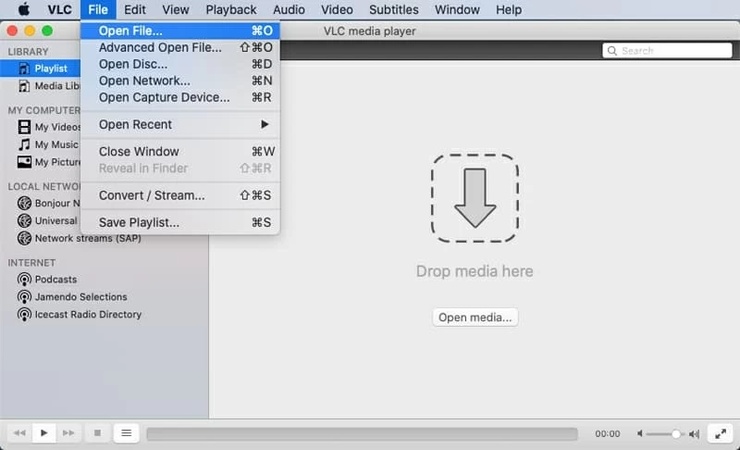
Open DivX Player, then drag and drop your video file into the player or use "File" then "Open" to load a video.
Now DivX Player is installed and ready to play your DivX videos smoothly.
- Pros
- Cons
-
- Best-in-class compatibility for DivX formats
- No need for third party codecs
- Excellent video and audio quality
- Simple, beginner friendly interface
- Supports streaming to TVs via DLNA
- Free version available
-
- Limited format support than all-in-one players
- Some extra features are only available in the Pro version.
- Not ideal if you rarely use DivX files
Part 3. Other 6 Best DivX Players You Can Try in 2026
If you prefer alternatives, here are six excellent DivX players covering Windows, Mac, and Android.
1. VLC Media Player – Best Free All-in-One Divx Player for Any Device
VLC Media Player is the most popular free media player worldwide and a reliable choice for playing DivX files. It supports DivX and other MPEG-4 codecs without needing extra codec packs. Simply install VLC, drag your DivX video or DVD file into the player, and it will start playing instantly. VLC also works as a simple DivX DVD player.
Best For: Users seeking a free, universal media player that works across all devices with broad format support.
Main features:
- Plays all DivX versions (DivX 1–6) without extra codecs
- Works as a basic DivX DVD player
- Supports almost all video and audio formats
- Subtitle loading, syncing, and customization
- Audio tools like equalizer and sound effects
- Drag and drop playback
- Basic video conversion tools
- Pros
- Cons
-
- 100% free with no forced add-ons
- Excellent DivX and Xvid support on VLC and wide compatibility
- Lightweight and stable
- Available on desktop and mobile platforms
-
- Interface looks basic compared to premium players
- Advanced settings may feel overwhelming for beginners
2. PotPlayer – Feature-rich DivX Player for Windows 11/10/7
PotPlayer (64-bit) is a free, powerful multimedia player that supports a wide range of video formats, including DivX, with built-in codecs—no need for additional programs. It’s perfect for users seeking a customizable, high-performance DivX player on Windows 11, 10, or 7, offering excellent hardware acceleration, professional subtitle support, and comprehensive playback controls.
Best For: Windows users looking for advanced features, customization options, and smooth DivX playback.
Main features:
- Smooth DivX playback with built in codecs
- Hardware acceleration for better performance
- Advanced subtitle tools
- Supports 3D and 360° videos
- Custom skins and shortcuts
- Pros
- Cons
-
- Excellent format support, including DivX
- Very smooth playback on modern hardware
- Highly customizable interface
- Strong subtitle and audio tools
-
- Windows-only
- Can feel overwhelming for beginners
- Focused mainly on local files (not streaming)
3. MX Player – Top-Picked Divx Player for Android
MX Player is a popular Android DivX player known for its speed, reliability, and rich features. It smoothly plays large DivX files and HD videos using hardware acceleration. Its simple gesture controls for brightness, volume, and seeking make watching DivX movies easy and comfortable.
Best For: Android users wanting a powerful, feature-rich DivX player with great performance and ease of use.
Main features:
- Supports DivX, MP4, AVI, MOV, and more
- Multi core decoding for smooth playback
- Strong subtitle support
- Gesture controls for easy use
- Extensive subtitle support and customization
- Child lock to prevent accidental touches
- Casting support (device dependent)
- Pros
- Cons
-
- Excellent performance for DivX playback
- Easy gesture based controls
- Strong subtitle features
- Handles large files well
-
- Free version includes ads
- Some advanced settings may feel complex
- Casting reliability varies by device
4. Elmedia Player – Best Divx Player for Mac with Premium Experience
Elmedia Player is a versatile and elegant media player for Mac, supporting over 70 video and audio formats, including DivX without extra codecs. It offers dynamic playback, customizable captions, and streaming to Chromecast, AirPlay, and DLNA systems for a high-quality viewing experience.
Best For: Mac users who want a premium DivX player with additional features like AirPlay, Chromecast support, and high-quality playback.
Main features:
- Native DivX playback with no extra codecs
- Smooth HD and 4K DivX video support
- Advanced subtitle and audio synchronization
- Stream DivX videos to Apple TV, Chromecast, and Smart TVs
- Custom playlists and frame by frame viewing
- Pros
- Cons
-
- Excellent DivX compatibility and stability
- Clean, macOS native interface
- High quality playback with low CPU usage
- Powerful streaming and subtitle tools
-
- Some advanced features require the Pro version
- Not available for Windows
5. KMPlayer – Advanced Features with DivX Codec & VR Support
KMPlayer is a versatile and feature rich media player that goes beyond basic playback. It supports DivX, 4K, UHD, and even 3D content without requiring additional codecs. KMPlayer also includes VR and 360 degree video support, allowing users to enjoy immersive viewing with custom controls. This makes it a strong option for modern multimedia needs.
Best For: Users looking for a feature-rich player with VR and 360° video support, as well as hardware acceleration for smooth playback.
Main features:
- Built in DivX codec for seamless playback
- VR and 360° video support
- Wide video, audio, and subtitle format compatibility
- Hardware acceleration for low CPU usage
- Advanced playback controls and post processing effects
- Pros
- Cons
-
- Free with rich features
- Excellent format compatibility
- High quality video playback
- Works well on low end systems
-
- Ads in the free version
- The interface may feel complex
- Optional bundled software during installation
6. MPC-HC – Lightweight Classic Divx Player for Older Windows PCs
Media Player Classic - Home Cinema (MPC-HC) is a lightweight, traditional media player designed for older Windows PCs. It offers high-quality DivX and Xvid playback, even on low-end hardware, and supports DivX DVDs and AVI files with built-in codecs. Its simple interface, quick startup, and open-source nature make it a popular choice for users seeking a clean, efficient player.
Best For: Users with older Windows PCs who need a lightweight, simple DivX player with minimal resource usage.
Main features:
- Smooth DivX and Xvid playback on older Windows systems
- Built in codecs (no separate DivX codec packs needed)
- Supports MP4, AVI, MKV, MPEG, and more
- Optimized for very low CPU usage
- Subtitle support with sync and basic customization
- Portable version available
- Pros
- Cons
-
- Extremely lightweight and fast
- Excellent DivX playback on old hardware
- No ads, spyware, or tracking
- Simple and distraction free interface
-
- Official development has ended
- Interface feels outdated
- Limited modern streaming features
Part 4. Quick Comparison Table of 7 DivX Players
Choosing the right DivX player depends on your device, the formats you watch most, and the features you need (like subtitles, streaming, or advanced controls).
Here is a comparison of the top 7 DivX players to help you choose the right one easily.
Part 5. What If Your DivX Is Not Playing on Players?
Even the best DivX players like VLC or PotPlayer can't always handle corrupted or damaged files. Issues such as choppy playback, no sound, black screens, jerky motion, or error messages often stem from file corruption during transfer, recording, or storage. In these cases, a dedicated video repair tool is essential.
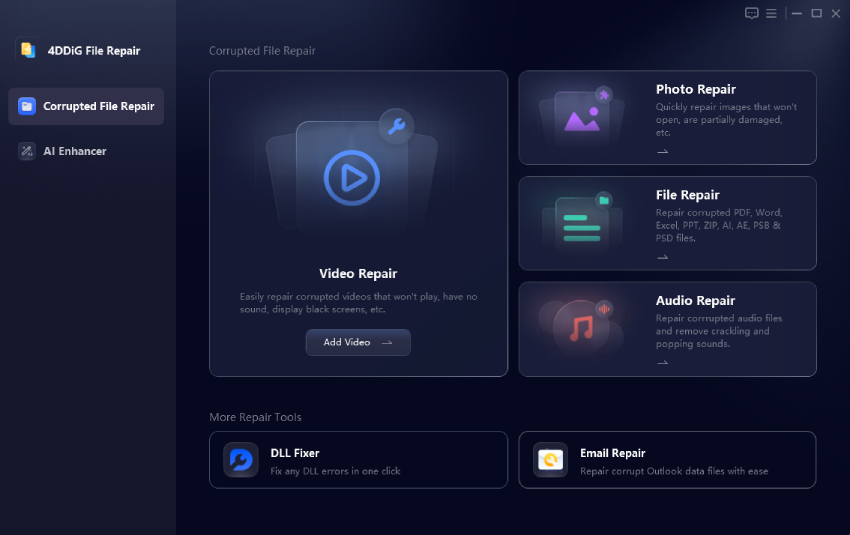
This is where 4DDiG Video Repair helps. This AI-powered tool excels at batch fixing DivX-encoded videos in common containers like AVI and MKV, along with many other formats including MP4, MOV, M4V, 3GP, and more. It handles a wide range of corruption issues, whether from cameras, drones, dash cams, or storage devices, with an impressive success rate of up to 92% in independent tests.
Steps to Fix DivX Videos Not Playing with 4DDiG Video Repair
-
Install 4DDiG Video Repair, choose “Video Repair” and press “Add Videos” to add files of DivX, AVI or MKV that are not working.
FREE DOWNLOADSecure Download
-
Click "Repair All." The software will automatically repair the damaged DivX videos using advanced algorithms.
-
Once the repair is complete, “Preview” the fixed DivX video to ensure it plays smoothly with proper audio and video sync.
-
Click "Save" or "Save All" to export the repaired DivX videos to your computer.
If your DivX videos are not playing on any media player, don’t assume they are lost. With 4DDiG Video Repair, you can quickly restore damaged DivX-encoded videos and enjoy smooth playback again, no technical skills required.
People Also Ask About DivX & DivX Players
Q1: Can VLC play DivX?
Yes, VLC supports playing even DivX without additional codecs on Windows, Mac or Android.
Q2: Is DivX free to use?
Yes, DivX can be free player version but the advanced features are offered in paid version.
Q3: How do I open a DivX file?
A DivX file can be opened in DivX Player, VLC Media Player or any other video player that supports DivX media.
Q4: What video player supports DivX?
DivX is supported by popular media players such as DivX Player, VLC, KMPlayer, PotPlayer, and Elmedia Player.
Q5: Is DivxFree free to use?
Yes, DivX is free, but it offers fewer features than the official DivX player.
Q6: Are there any great DivX DVD players?
Yes, DivX Player supports DivX DVD playback, and certain Blu-ray players support DivX discs.
Conclusion
Choosing the right DivX player helps you enjoy smooth playback on DVDs, old video files, or mobile devices. Each player has its own strengths, whether it’s the official DivX Player, VLC, or MX Player. If your DivX videos fail to play due to corruption, 4DDiG Video Repair is highly recommended for restoring damaged files quickly and reliably. With the right tools, enjoying DivX content in 2025 is easier than ever.
Secure Download
Secure Download
💡 Summarize with AI:
You May Also Like
- Home >>
- Video Tips >>
- Top 7 Best DivX Players for Smooth Playback on Windows, Mac & Android
ChatGPT
Perplexity
Grok