TunesBro HEIC Converter Review: Is It Free, Safe & Worth Using

5 mins read

Updated on 2026-07-10 10:28:30 to Photo Tips

If you've transferred photos from an iPhone to a Windows PC or Mac, you've probably encountered HEIC files that won't open in certain apps or websites. TunesBro HEIC Converter is a desktop tool designed to solve this problem by converting HEIC and HEIF images into JPG, PNG, or PDF while preserving image quality and supporting batch conversion.

In this TunesBro HEIC converter review, we'll examine its features, pricing, safety, real-world performance, and whether it's worth choosing over newer alternatives.

What Is TunesBro HEIC Converter?

Before deciding whether this software is right for you, it's important to understand what it does and who it's designed for. This section explains the background of TunesBro HEIC Converter, the file formats it supports, and the platforms it runs on.

TunesBro HEIC Converter is a desktop application developed by TunesBro that converts Apple's HEIC and HEIF image formats into more widely supported formats such as JPG, PNG, and PDF.

The software is primarily intended for Windows and macOS users who need to view, edit, print, or share iPhone photos on devices or applications that don't fully support HEIC files.

Unlike many online converters, the software processes files locally on your computer. It helps improve privacy while allowing batch conversion of large photo libraries.

Supported Formats

  • Input Formats: HEIC and HEIF
  • Output Formats: JPG, PNG, and PDF

Available Platforms

  • TunesBro HEIC Converter is available for: Windows 11, 10, 8/8.1, 7, and macOS

Key Features of TunesBro HEIC Converter

tunesbro heic converter

TunesBro focuses on making HEIC conversion straightforward rather than overwhelming users with advanced editing tools.

Below are the main features you'll find when using the software.

  • Batch converts multiple HEIC and HEIF images in a single session.
  • Converts HEIC files to JPG, PNG, or PDF.
  • Preserves original image quality during conversion.
  • Retains EXIF metadata, including capture date, camera information, and GPS data when supported.
  • Drag-and-drop interface for quickly importing photos.
  • Processes files locally without uploading images to cloud servers.
  • Supports photos transferred directly from iPhones, iPads, and HEIC folders.
  • Simple interface suitable for beginners.

How to Use TunesBro HEIC Converter (Step-by-Step Guide)

The software is designed for users who want a simple conversion workflow without adjusting complicated settings. Whether you're converting a few vacation photos or an entire folder from your iPhone, the process only takes a few minutes.

The following steps show how to convert HEIC images into PNG, JPG, or PDF using the TunesBro HEIC converter tool.

  • Download and install TunesBro HEIC Converter, then launch the application. Click "Add File" or drag your HEIC images into the program.

  • Select the desired output format (JPG, PNG, or PDF) and choose the destination folder "Output Path" by clicking "Browse" at the bottom right.

    tunesbro heic converter choose output format and path
  • Click "Start," and you will see the conversion process in the pop-up window. Wait for the conversion to finish, then open the converted images from the output folder.

    tunesbro heic converter converting progress

Is TunesBro HEIC Converter Free?

Many users searching for TunesBro HEIC converter free want to know whether they can convert photos without paying. The answer is partially.

TunesBro HEIC Converter offers a free trial that lets you test the software before purchasing a license. However, the trial version comes with limitations, and unrestricted batch conversion requires a paid subscription or license.

Subscription Plans

  • Plan
  • Price
  • Suitable For
  • Features
  • Free Trial
  • Free
  • Evaluation
  • Limited functionality for testing
  • Monthly License
  • $14.95
  • Short-term users
  • Full conversion features during subscription
  • Annual License
  • $22.95
  • Regular users
  • Full features with one-year updates
  • Lifetime License
  • $29.95
  • Long-term users
  • Permanent access with lifetime license terms on 3 PCs
tunesbro heic converter pricing

Pricing may change over time, so it's always worth checking the official pricing for the latest plans.

Is TunesBro HEIC Converter Safe & Legit to Use?

For users downloading software from the internet, safety is often just as important as functionality.

Based on its intended purpose, installation process, and publicly available information, if you are wondering is TunesBro HEIC Converter legit, it is a legitimate desktop application rather than an online conversion service.

Since files are processed locally instead of being uploaded to remote servers, it also offers better privacy than many browser-based converters. As with any software, it's recommended to download it only from the official TunesBro website to reduce security risks.

Pros And Cons Of TunesBro HEIC Converter: Real User & Editor's Experience

Looking beyond the feature list gives a clearer picture of what the software is actually like to use. The following table summarizes its strengths and limitations based on functionality, usability, and overall workflow.

  • Pros
  • Cons
    • Easy-to-use interface suitable for beginners
    • Supports batch conversion of HEIC files to PDF, JPG, and PNG, etc.
    • Preserves image quality during conversion
    • Local processing improves privacy
    • Available for both Windows and macOS
    • Free version has limited functionality and paid license required for unrestricted use
    • Not saving EXIF data
    • Supports fewer output formats than some competitors
    • No cloud synchronization features

Real User Reviews to TunesBro HEIC Converter from Trustpilot

The rate for TunesBro's image converter in Trustpilot is 3.9/5. Some users praised its easy-to-use and speed batch conversion speed while also other users give negative feedback that is lost EXIF data after conversion

tunesbro heic converter review 1 tunesbro heic converter review 2 tunesbro heic converter review 3 tunesbro heic converter review 4

Editor's Experience

During testing, TunesBro converted multiple HEIC images quickly and maintained good visual quality in the exported JPG files. The interface felt clean and easy to navigate, even for first-time users. Batch conversion worked reliably with medium-sized photo collections, and the software preserved most image metadata as expected.

While it performs its core task well, the limited output options and absence of additional image management tools may encourage some users to consider more feature-rich alternatives.

⚡ Best Alternative To TunesBro HEIC Converter For Batch HEIC To JPG Conversion Losslessly

If your primary goal is converting large numbers of HEIC images while preserving quality, it's worth comparing more than one solution before making a decision.

Although TunesBro handles basic conversions well, some users may prefer a tool that offers additional image utilities in the same application. The following alternative is designed for users who want fast batch conversion alongside image repair and enhancement features.

For users who regularly manage photos from iPhones or iPads, 4DDiG Image Format Converter is a practical alternative. Built into 4DDiG File Repair, it not only converts HEIC images to JPG and other popular formats but also works entirely on your computer, helping protect your privacy.

Its workflow makes it suitable for beginners, while the batch processing capability saves considerable time when working with hundreds of images.

Why Users Choose 4DDiG Image Format Converter?

  • Converts HEIC, PNG, CR2, BMP to JPG without noticeable quality loss.
  • Supports batch conversion, allowing hundreds of HEIC images to be processed in one operation.
  • Preserves important image details and metadata whenever possible.
  • Processes files locally, eliminating the need to upload personal photos to online conversion services.
  • Built into 4DDiG File Repair, providing access to additional tools for repairing damaged photos and documents.
  • Simple drag-and-drop interface that requires very little setup.
  • Compatible with both Windows and macOS.
FREE DOWNLOAD

Secure Download

FREE DOWNLOAD

Secure Download

Steps To Batch Convert HEIC To JPG Using 4DDiG Image Format Converter

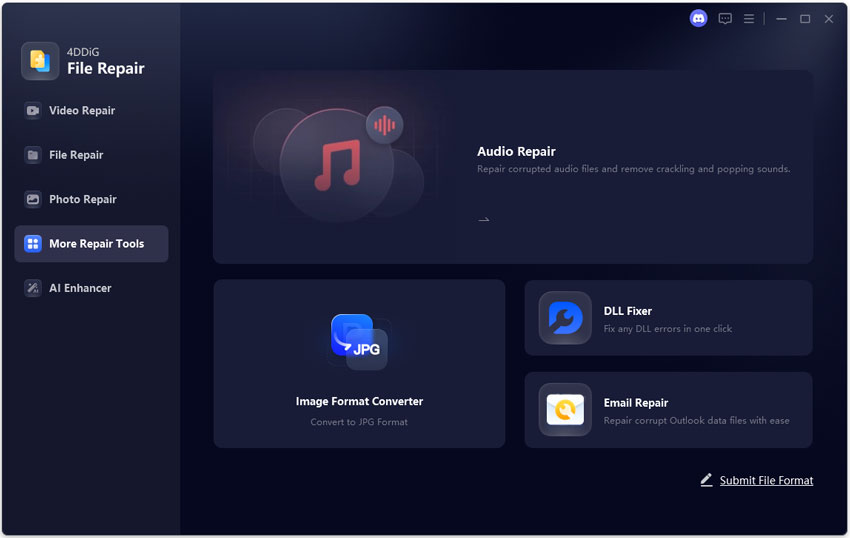
  • Install and launch "4DDiG File Repair" on your computer, then click "More Repair Tools". Then choose the "Image Format Converter" tool.

    open 4ddig image format converter
  • Click "Add Files" to import one or multiple HEIC, BMP, CR2, or PNG files.

    add multiple images to 4ddig
  • Choose JPG as the output format by clicking "Convert All to JPG," then click "Convert".

    4ddig start converting all images to jpg
  • Click "Save," then select the destination folder if prompted, and open the converted JPG files from the output folder.

    4ddig preview and save converted jpg files

TunesBro HEIC Converter vs. 4DDiG Image Format Converter

  • Feature
  • TunesBro HEIC Converter
  • 4DDiG Image Format Converter
  • Batch HEIC Conversion
  • Yes
  • Yes
  • JPG Output
  • Yes
  • Yes
  • PNG Output
  • Yes
  • Yes
  • Additional Image Formats
  • Limited
  • Supports multiple formats including WEBP and BMP
  • Image Repair Tools
  • No
  • Yes
  • Local File Processing
  • Yes
  • Yes
  • Beginner-Friendly Interface
  • Yes
  • Yes
  • Built-in Image Utilities
  • No
  • Yes
  • Windows & macOS Support
  • Yes
  • Yes

Overall, both tools are capable HEIC converters, but they target slightly different users. TunesBro HEIC Converter focuses on straightforward format conversion with a clean interface, making it a good choice for occasional use.

4DDiG Image Format Converter, on the other hand, offers a broader feature set by combining image conversion with file repair capabilities. That makes it a stronger option for users who frequently manage large photo libraries or occasionally deal with damaged image files.

Conclusion

This TunesBro HEIC converter review shows that the software is a legitimate desktop application capable of converting HEIC and HEIF images into JPG, PNG, and PDF while preserving image quality and supporting batch processing. Although the free version has limitations, it remains a convenient choice for basic conversion tasks.

If you need a more versatile solution with additional image format support and built-in repair features, 4DDiG Image Format Converter is a compelling alternative for converting HEIC photos quickly and losslessly.

FREE DOWNLOAD

Secure Download

FREE DOWNLOAD

Secure Download

William Bollson (senior editor)

William Bollson, the editor-in-chief of 4DDiG, devotes to providing the best solutions for Windows and Mac related issues, including data recovery, repair, error fixes.

(Click to rate this post)

You rated 4.5 ( participated)