6 Best Studocu Downloaders Free You Can Try in 2026

5 mins read

Updated on 2026-10-08 21:42:56 to File Tips

Studocu contains useful notes, lecture materials, assignments, and study guides, but downloading them is not always straightforward. This is why students often search for a Studocu downloader that can save documents as PDFs for offline use.

In this guide, we compare six popular options, including online tools, browser extensions, and open-source projects. We also cover legitimate ways to access Studocu documents and fix PDFs that download incorrectly.

Part 1. Why Do Users Search for Studocu Downloaders?

Students usually search for downloaders when they need a document outside the normal Studocu viewing experience. The reasons range from offline study to easier file management. Common reasons include:

  • Save materials for offline studying
  • Access notes without repeated page loading
  • Keep documents available during travel
  • Prepare study materials before exams
  • Create personal reference libraries
  • Convert online documents into PDFs
  • Access files across different devices
  • Avoid browser-only reading workflows

A Studocu PDF downloader can also be useful when students need to organize several study materials together. However, the experience varies between tools. Some require only a document link, while others work as browser extensions or local applications.

Part 2. Top 6 Best Studocu Downloaders Free Online in 2026

The following tools take different approaches to Studocu document downloading. Some focus on simple online conversion, while others provide browser-based or open-source workflows. Availability can change as Studocu updates its website, so the current functionality of each tool may vary.

1. DLSTUDOCU

DLSTUDOCU is a web-based Studocu document downloader designed for users who want to process a Studocu document through a browser. Its main advantage is simplicity because there is no desktop application or browser extension to configure.

The tool is best suited to users who want a straightforward online workflow. It is particularly convenient for occasional downloads because the process centers on entering a document link rather than managing additional software.

dlstudocu studocu downloader
  • Pros
  • Cons
    • Direct URL-based document processing
    • Focused specifically on Studocu documents
    • Minimal steps from link to output
    • Useful for quick individual conversions
    • Dependent on Studocu page compatibility
    • Limited control over generated PDF structure
    • Processing can vary between documents
    • Third-party changes can affect reliability

2. OkDebrid Studocu Downloader (Unlimited PDF Converter)

OkDebrid provides a dedicated Studocu document downloader through its web interface. Users enter a valid Studocu document link, select “Convert PDF File,” and receive a downloadable document link after processing. The service currently advertises unlimited use and no file-size limit.

Its main advantage is the direct link-to-PDF workflow. It is suitable for students who want a Studocu downloader free without installing an extension or desktop application.

okdebrid studocu downloader
  • Pros
  • Cons
    • Supports direct Studocu URL parsing
    • Converts accessible documents into PDF format
    • Advertises unlimited conversion usage
    • No stated file-size restriction
    • Output depends on source document accessibility
    • Limited control over PDF rendering
    • Processing relies on external infrastructure
    • Service behavior may change without notice

3. DownStudocu

DownStudocu is another browser-based service focused specifically on Studocu documents. Its dedicated purpose makes it easier to understand than general-purpose download platforms that support many different websites.

It is mainly suited to users looking for a quick Studocu downloader online free option. The browser-based workflow also makes it accessible from computers without requiring a dedicated application.

downstudocu free studocu downloader
  • Pros
  • Cons
    • Optimized specifically for Studocu URLs
    • Simple document extraction workflow
    • Avoids unnecessary conversion configuration
    • Suitable for individual document retrieval
    • Limited output customization options
    • Dependent on Studocu’s page structure
    • Conversion results may vary by document
    • Third-party service availability can fluctuate

4. StudocuHack Browser Extension

StudocuHack is an open-source Chrome and Firefox Studocu downloader extension hosted on GitHub. Its repository describes features including removing the Premium banner, bypassing document blur, downloading documents, and saving pages as PDFs.

Its biggest difference is that it works directly inside the browser rather than requiring users to copy document links into an external website. The project has also received updates, although website changes can affect whether the extension continues working correctly.

studocuhack
  • Pros
  • Cons
    • Integrates downloading into browser workflow
    • Open-source code enables technical inspection
    • Supports automated document-saving functionality
    • Chrome and Firefox compatibility
    • Website changes can break extraction logic
    • Requires extension permissions
    • May need manual troubleshooting after updates
    • Compatibility depends on current Studocu implementation

5. FreePDFDownloader

FreePDFDownloader is an online PDF conversion service that supports Studocu alongside several other document platforms. Its Studocu tool uses a simple link-based process: paste a document link, convert it, and download the resulting PDF.

Its main difference is that Studocu conversion is part of a broader PDF downloading platform. This can be useful for students who work with documents from multiple online study platforms.

freepdfdownloader
  • Pros
  • Cons
    • Supports Studocu alongside other platforms
    • URL-driven document conversion workflow
    • Designed around PDF output
    • Useful for multiple document sources
    • PDF output depends on source rendering
    • Limited control over conversion parameters
    • External processing affects reliability
    • Complex documents may convert inconsistently

6. StudoCu PDF Downloader by Calamivathan

StudoCu-PDF-Downloader is an open-source project available on GitHub. Unlike simple web converters, it provides a more technical approach and can process Studocu document URLs into viewable or printable PDF content. The current project documentation states that no login or installation is required and lists a 20-download daily limit.

Its open-source structure makes it particularly interesting for technical users who want to inspect the project or understand how it processes documents. However, its functionality can vary between document types and over time.

studocu pdf downloader by calamivathan
  • Pros
  • Cons
    • Open-source implementation for technical users
    • Processes documents from direct URLs
    • No proprietary conversion interface
    • Code allows community-level inspection
    • Requires technical troubleshooting sometimes
    • Document compatibility can vary
    • Project maintenance affects reliability
    • Current usage limits restrict repeated downloads

Part 3. How to Download Studocu PDFs for Free Legally?

Not every Studocu document needs a third-party downloader. Depending on the material and your account, you may have legitimate ways to access and save study content. These options avoid relying entirely on external downloading services.

Method 1. Upload Your Study Materials to Earn Premium Rewards

Studocu has an upload-to-unlock model that can give eligible users Premium access after contributing their own study materials. This is sometimes called upload-to-earn or upload-to-unlock. This option is useful for students who already have their own notes, summaries, or study materials and want to exchange them for access.

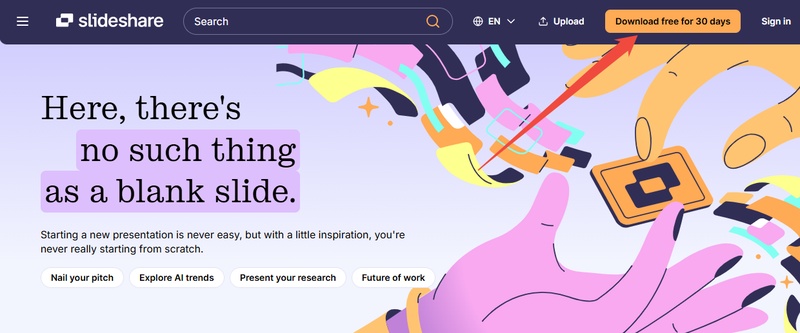
  • Sign in to your Studocu account and look for the option (such as the “Upload your file” button) to upload study materials. Choose the appropriate upload option to begin.

    studocu upload your file button
  • Select a study document from your computer. Only upload materials you created yourself or have permission to share.

  • Complete the required information and submit the document. Studocu will process the upload according to its current requirements.

  • Once the material is accepted, check your account for any Premium access or rewards. The available rewards can depend on Studocu’s current policies.

After receiving access, use Studocu’s normal download functionality for documents available to your account.

Method 2. Use Studocu’s Free Trial

A Studocu trial can provide temporary access to Premium features depending on your account and the current offer. However, trial terms can change, so check the current conditions before starting. This option is better suited to students who need temporary access rather than maintaining a long-term subscription.

  • Open Studocu and sign in to your account. Check whether a trial offer is available for your account and review its terms before activating it.

  • Start the trial if it meets your needs. Use the available Premium features during the trial period.

    studocu free trial option
  • If you do not want a paid subscription afterward, manage or cancel the subscription according to the displayed terms.

Method 3. Use Browser’s “Print to PDF” Feature

The browser’s built-in “Print to PDF” function can save content that is already available for viewing or printing. It is particularly useful when you simply need a local PDF copy of accessible material. This method does not require a dedicated Studocu PDF downloader Chrome extension or third-party website.

  • Open the Studocu document you are authorized to view. Press “Ctrl + P” on Windows or “Command + P” on Mac to open the print dialog.

  • Choose “Save as PDF” (or “Microsoft Print to PDF” / “PDF” depending on your system) as the destination or printer option. Select the pages and layout settings you need. Then click “Save.”

    browser save website document as pdf
  • Choose a destination folder and save the document. Open the resulting PDF to confirm that the pages were captured correctly.

⚡ Downloaded Studocu PDF Shows Blank or Not Opening? Fixed Now!

A Studocu PDF downloader may successfully create a file that still has problems afterward. The PDF might open with blank pages, display broken content, show unreadable text, or fail to open altogether.

This can happen when the document conversion or download process does not create a complete PDF structure. Instead of downloading the same document repeatedly, you can try repairing the problematic file with 4DDiG File Repair.

4DDiG’s document repair feature supports corrupted PDFs, including files that fail to open, display blank content, contain unreadable information, or show distorted elements. It can also repair multiple PDF files in one operation and lets you preview repaired results before saving them.

Key features of 4DDiG File Repair:

  • Fixes PDFs that won’t open, open as blank pages, show unreadable/gibberish content, or have distorted images
  • Restores embedded content including text, images, tables, and hyperlinks
  • Supports PDF versions from 1.0 to 1.7
  • Batch repair so you can fix multiple problematic PDFs at once
  • Preview repaired files before saving
  • Advanced repair mode for more severely corrupted documents
  • Does not overwrite the original file
FREE DOWNLOAD

Secure Download

FREE DOWNLOAD

Secure Download

Steps to Repair a Problematic Studocu PDF

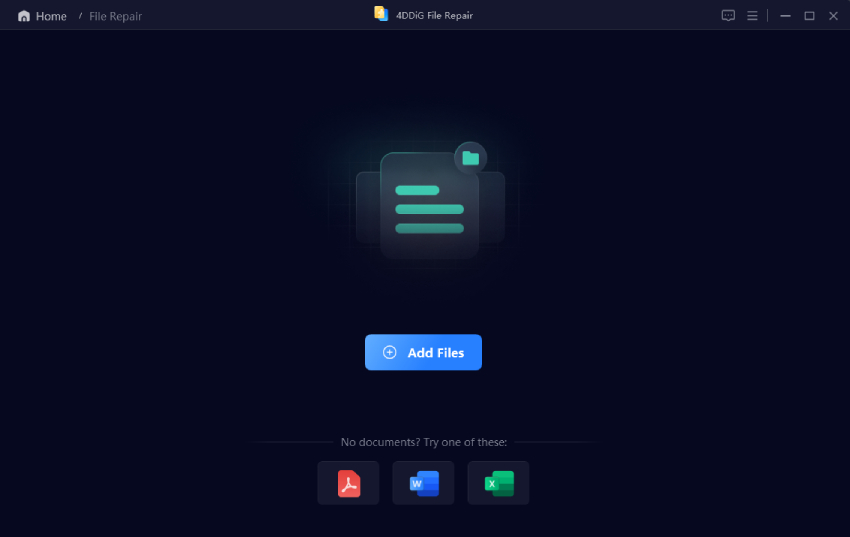
  • Launch 4DDiG File Repair on your computer. From the main interface, select “File Repair” to open the document repair workspace. Click “Add Files” and select the problematic PDF downloaded from Studocu. You can add one file or multiple PDFs if several documents have the same problem.

    add corrupted pdfs to 4ddig
  • After adding the files, click “Repair All.” 4DDiG will analyze the selected PDFs and attempt to repair their damaged structures and recover usable content.

    repair all problematic studocu pdfs
  • Click “Preview” after processing to inspect the repaired PDF. Check whether the previously blank pages, missing text, images, or other elements are restored.

    preview repaired studocu pdfs
  • If the recovered document looks correct, select “Save” and choose a destination folder. Keep the original PDF until you have confirmed that the repaired copy works properly.

This makes 4DDiG useful as a second step after downloading. The downloader handles document access, while 4DDiG addresses the separate problem of a damaged or unusable PDF.

FAQs About Studocu Downloader

Q1: How to Download Studocu Documents for Free Without Uploading?

The available options depend on the document and your Studocu account. Some materials may be available for free, while other downloads may require Premium access. You can also check whether your account has an eligible trial or upload-based reward. Third-party downloaders may offer another route, but their availability and compatibility can change.

Q2: Is There a Studocu Downloader Chrome Extension?

Yes. StudocuHack is an open-source Chrome and Firefox extension associated with Studocu document downloading. Its GitHub repository lists document downloading and PDF-saving features.

Browser extensions can become unreliable when the target website changes its page structure. Check the project’s current release information before installing an older version.

Q3: Can I Use a Studocu Downloader on iPhone or Android?

Browser-based downloaders are generally easier to access on mobile because they do not require extension installation. However, mobile compatibility can vary between services. For larger documents, a desktop browser may provide a smoother workflow because downloading, opening, and managing PDF files is easier.

Q4: Why Is Stuhack Not Working?

The Stuhack Chrome extension (not working now) may happen when Studocu changes its website structure or delivery system. Community reports have described problems such as blank pages, missing text, and inconsistent document loading.

The project’s GitHub repository has released updates, including changes to its document-download workflow, so checking the latest release is more useful than relying on an outdated installation.

Q5: Is It Legal to Download Documents from Studocu?

That depends on the document, your access rights, and how you obtain it. Downloading material that you are authorized to access is different from bypassing access restrictions or redistributing someone else’s copyrighted work. Before downloading or sharing a document, check Studocu’s current terms and the rights attached to the material.

Conclusion

A Studocu downloader can make it easier to save study materials for offline use, and the six options above offer different approaches. Online services focus on convenience, while browser extensions and open-source projects provide alternative workflows.

For accessible materials, Studocu’s own features and browser PDF tools can also help. If a downloaded PDF is blank, corrupted, or unreadable, 4DDiG File Repair provides a practical way to repair it, preview the result, and save a usable copy.

FREE DOWNLOAD

Secure Download

FREE DOWNLOAD

Secure Download

Ehtsham Ahmed (senior editor)

Ehtsham Ahmed, the content writer for 4DDiG, is dedicated to offering workarounds for Windows Data Recovery, Windows Troubleshooting, iDevices System Repair, etc.

(Click to rate this post)

You rated 4.5 ( participated)