Top 5 Best SWF Decompilers to Extract Flash Game Files in 2026

5 mins read

Updated on 2026-10-13 16:37:23 to Video Tips

Need to open an old Flash game, recover its assets, or view the ActionScript inside an SWF file? A SWF decompiler can break the compiled file into reusable resources such as images, sounds, scripts, and animations.

This guide explains how SWF decompilation works and compares five practical tools for extracting or editing Flash content, from browser-based options to full desktop applications. Meanwhile, you can figure out how to extract from extract flash game files step by step.

Part 1. What Is an SWF Decompiler and Why Do You Need One for Flash Games?

Old Flash games may look like single files, but an SWF often contains many separate elements, including graphics, audio, animation data, fonts, and programming logic. All those factors will be bundled into a single compiled file. When the original project file is unavailable, decompilation can help you inspect or recover those resources.

SWF Decompiler Meaning

An SWF decompiler is a tool that analyzes a compiled Flash SWF file and separates its internal content into readable or reusable resources. Depending on the tool, you may be able to view ActionScript, extract media files, or decompile SWF to FLA for further editing. It is especially useful when you only have the final SWF file but no longer have access to the original Flash project.

Key Capabilities of Flash SWF Decompiler and Extractor

A good Flash decompiler software usually offers these core functions:

  • View ActionScript 1, 2, or 3 code.
  • Extract images, audio, video, fonts, and text.
  • Export sprites, shapes, and other game assets.
  • Search and inspect SWF scripts.
  • Replace or edit basic elements without full conversion
  • Convert SWF files to FLA or similar editable formats.
  • Replace selected images, sounds, or text with supported desktop tools.
  • Support both compressed and uncompressed SWF files

These features help you recover assets from old Flash games or fix broken projects when the original source is missing.

What Can You Extract from an SWF File?

The available output depends on the SWF file and the decompiler you use.

SWF Content Possible Output
Images PNG, JPEG, BMP
Audio MP3, WAV
Video FLV or supported video formats
ActionScript AS or readable source code
Vector graphics SVG or image resources
Fonts Embedded font files
Text TXT, HTML, or editable text
Sprites and animations SWF or separate project assets
Project structure FLA, XFL, or FLEX project

If you only want to extract from SWF, a simple online tool may be enough. For deeper script editing or project recovery, desktop software usually offers more control.

Part 2. Top 5 Best SWF Decompilers to Edit and Extract SWF Files

Finding the right tool makes a big difference when you want to recover assets or edit old Flash content. Below are five solid options that range from quick online tools to full desktop software.

An online tool is usually enough for quick extraction, while desktop software is better for deeper editing, ActionScript inspection, or SWF-to-FLA conversion. Each one can help you decompile SWF files and work with the content inside.

1. SWF Decompiler Online

SWF Decompiler Online from Decompiler.com is a free browser-based tool, letting you upload an SWF file and quickly view its ActionScript code along with images, sounds, and shapes. It works directly in your browser, supports both ActionScript 2 and 3, and shows extracted resources online without any installation. It is a practical choice if you only need to decompile SWF online or check the contents of an old Flash file.

swf decompiler online
  • Pros
  • Cons
    • Supports ActionScript 2 and 3
    • Completely free and no installation required
    • Simple drag-and-drop interface
    • Quickly extracts code and common resources (scripts, images, sounds, and shapes)
    • Works on any device with a browser
    • Limited advanced editing options
    • Depends on internet connection
    • Less suitable for complex Flash projects

Best for: Beginners who want a simple SWF decompiler online for quick resource extraction.

2. Heroku SWF Decompiler Online (SWF to FLA Decompiler)

Heroku SWF Decompiler Online focuses on converting SWF files into FLA format so you can open them in Flash-compatible editors. You can upload files from your computer or cloud storage, and it also extracts and export selected elements and individual resources (scripts, images, fonts, sprites, sounds, and frames). It is useful for light recovery tasks, though file size is limited to about 700 KB and free use is restricted.

heroku swf decompiler online
  • Pros
  • Cons
    • Can decompile SWF to FLA
    • Lets you select specific resources to export
    • Supports many SWF asset types
    • Works directly in a browser, and no software installation is needed
    • Supports Google Drive, Dropbox, and Box
    • Strict file size limit (700 KB)
    • Daily free conversion limits
    • Basic features only
    • Not suitable for large Flash games

Best for: People who occasionally need to decompile SWF to FLA online and work with smaller files.

3. Sothink SWF Decompiler

Sothink SWF Decompiler is a professional desktop Flash decompiler that converts SWF files into FLA or FLEX projects with high accuracy. It extracts almost every resource type, supports ActionScript 2 and 3, and even lets you replace images, sounds, or text directly inside the SWF. It also offers HTML5 export for broader compatibility. This tool stands out for users who regularly recover or edit old Flash content.

sothink swf decompiler
  • Pros
  • Cons
    • Converts SWF to FLA, FLEX, and XFL
    • Extracts most common Flash resources
    • Supports ActionScript 2 and 3
    • Includes batch export
    • SWF resource extraction and replacement features
    • HTML5 export option
    • Paid software (free trial available) and more complex than browser-based tools
    • Windows-focused (Mac version sold separately)
    • Interface can feel a bit dated, mainly designed for legacy Flash workflows
    • Flash preview may be affected by Flash Player limitations

Best for: Users (especially designers and developers) who want to recover an old Flash project or edit Shockwave Flash files with a desktop tool.

4. JPEXS Free Flash Decompiler (FFDec)

JPEXS Free Flash Decompiler, or FFDec, is a free, open-source SWF decompiler that runs on Windows, macOS, and Linux through Java. It can extract and edit ActionScript, images, sounds, shapes, fonts, and more. It also converts SWF to FLA or XFL and supports advanced features like debugging and searching inside scripts. Its active development and zero cost make it one of the most popular choices today.

jpexs free flash decompiler
  • Pros
  • Cons
    • Completely free and open source
    • Powerful editing and export options
    • Regular updates and strong community
    • Supports Windows, macOS, and Linux
    • Extracts a wide range of SWF resources
    • Converts SWF to FLA and XFL
    • Supports ActionScript inspection and editing
    • Interface may feel complicated for beginners
    • Advanced features require some Flash knowledge
    • Decompiled scripts may still need manual cleanup

Best for: Users looking for the best SWF decompiler for free, especially for detailed SWF analysis and extraction.

5. Flash Decompiler Trillix by Eltima

Trillix is a feature-rich desktop program that converts SWF to FLA, extracts resources in many formats, and allows direct editing of images, text, sounds, colors, and links without full conversion. It supports a wide range of Flash versions, including Flex projects, and handles batch processing well. Its visual interface and batch conversion features make it useful for working with multiple legacy Flash files.

flash decompiler trillix by eltima
  • Pros
  • Cons
    • Direct editing of many SWF elements
    • Strong multi-format extraction (video, audio, images, and text)
    • Batch conversion support
    • Clear preview and organization tools with a visual desktop interface
    • Converts SWF to FLA or Flex
    • Paid software
    • Updates have slowed in recent years
    • Demo version has export limits
    • Mainly suited to legacy Flash projects

Best for: Users who want a visual desktop tool for SWF extraction, editing, and batch conversion.

Part 3. How to Extract Flash Game Files with SWF Compiler

Once you know which tool fits your needs, the next step is actually pulling out the assets. Many people search for how to extract flash game files because they want the images, sounds, or code from an old browser game without installing heavy software.

The easiest way for most users is an online swf decompiler. We'll walk through the process using SWF Decompiler Online. It's free, browser-based, and works well for quick extraction.

  • Upload the SWF FileGo to the SWF Decompiler Online page. Drag and drop your .swf file into the right upload area, or click Choose File to select it from your computer.
  • Start the decompile processOnce the file is uploaded, the site automatically begins working. It reads the binary data and pulls out ActionScript code along with the embedded resources. This usually takes just a few seconds for typical game files.
  • Browse and extract the contentAfter processing finishes, you can explore everything online. Scripts appear as readable ActionScript, while images, sounds, shapes, and other assets show up in a clear list. Click any item to view or download it. You can save individual resources or the full set of extracted files.
  • Save the Resources You Need

Select the available resource you want to keep and download or save it in the supported format.

swf decompiler online extract and download swf resources
Tips:

If your goal is simply to extract from SWF, this browser-based method is usually enough. For deeper tasks, such as editing ActionScript or rebuilding a complete FLA project, a desktop tool like JPEXS may be more suitable.

⚡ Bonus: How to Repair Corrupted SWF Files Before Decompiling and Extraction

Sometimes the problem is not the decompiler. If an SWF file is damaged, incomplete, or no longer opens correctly, the tool may fail to analyze it or may only extract part of the content. In that case, repairing the SWF file first can give you a better starting point before attempting decompilation.

4DDiG Video Repair is designed to repair corrupted or unplayable video files and officially lists SWF among its supported formats, along with MP4, MOV, AVI, MKV, FLV, MPEG, and others. It also supports batch repair, which is useful if you have several damaged files to process at once.

Why Choose 4DDiG Video Repair

  • High success rate on repairing unplayable or damaged SWF and other video files
  • Batch repair so you can fix several files at once
  • Support preview repaired results before saving them
  • Simple interface that needs no technical knowledge
  • Extra AI tools that can improve quality or even colorize older content if needed
  • Works on both Windows and Mac
FREE DOWNLOAD

Secure Download

FREE DOWNLOAD

Secure Download

Repair Damaged SWF Files with 4DDiG Video Repair

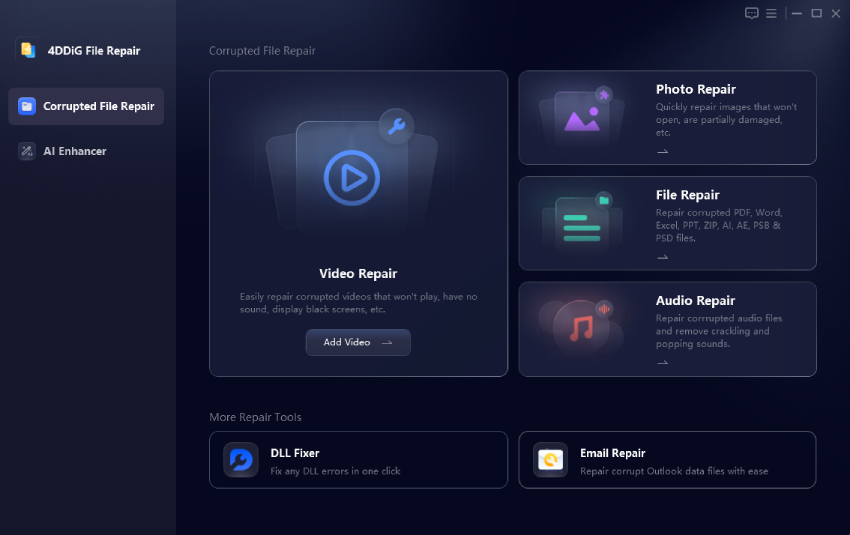
  • Launch 4DDiG Video Repair and go to the Video Repair section. Click Add Videos and import the corrupted SWF file.

    add corrupted swf files to 4ddig
  • Click Repair All to let the software analyze and repair the selected file. If you have multiple damaged files, you can add them together for batch processing.

    start repairing all swf files
  • After the repair is complete, you can preview the repaired SWF video files.

    preview repaired swf files
  • Afterward, select an output format (such as MP4, AVI, MKV, MOV, or othe original SWF) and click "Save All" to export them to your computer.

    save repaired swf files in suitable format

Conclusion

The right SWF decompiler depends on whether you only need to extract a few Flash assets or want to inspect scripts, edit resources, and recover an older project. Online tools are convenient for quick tasks, while desktop options such as JPEXS offer more control for deeper decompilation.

If the SWF file itself is corrupted and cannot be opened or processed correctly, repairing it first may help. In that situation, 4DDiG Video Repair can be used to fix damaged SWF files before you try to decompile or extract their contents again.

FREE DOWNLOAD

Secure Download

FREE DOWNLOAD

Secure Download

William Bollson (senior editor)

William Bollson, the editor-in-chief of 4DDiG, devotes to providing the best solutions for Windows and Mac related issues, including data recovery, repair, error fixes.

(Click to rate this post)

You rated 4.5 ( participated)