Aiarty Video Enhancer Review: Key Features, Price & Best Alternative

5 mins read

Updated on 2026-07-10 10:28:31 to Video Tips

Struggling with blurry old videos, noisy smartphone clips, or low-resolution footage? Aiarty Video Enhancer promises to upscale, denoise, and restore details using AI. In this review, we'll break down its features, test it on different types of content, check the price, and compare it with strong alternatives. Whether you're a content creator or preserving family memories, here's what you need to know.

Quick Verdict: Is Aiarty Video Enhancer Good?

Aiarty Video Enhancer is a solid choice if you want to improve video quality without learning a full editing suite. It focuses on common AI enhancement tasks such as upscaling, denoising, deblurring, frame interpolation, and color improvement. However, it is not the best fit for everyone, especially if you need unlimited free exports or a very simple batch workflow.

Question Quick Answer
Is Aiarty Video Enhancer good? Yes. It is good for users who want a desktop AI tool to clean up blurry, noisy, or low-resolution videos with less manual editing.
Best For Old videos, low-res smartphone clips, social media footage, low-light videos, and creators who prefer local processing on Windows or macOS.
Not Best For Users who need a completely free tool, cloud-based processing, or advanced timeline editing features.
Free Version Yes, there is a free version for testing core features, but full-length exports, batch export, and watermark-free output require a paid license.
Best Alternative 4DDiG AI Video Enhancer is a better option for users who want a more beginner-friendly tool for batch video enhancement and quick quality improvement.

Overall, Aiarty is worth trying if your goal is to restore detail, reduce noise, and make old or compressed videos look cleaner. But if your search intent is mainly about fast batch enhancement with fewer settings to adjust, you may want to compare it with an alternative before buying.

What Is Aiarty Video Enhancer and Who Is It For?

Aiarty Video Enhancer is a desktop AI-powered tool designed to improve video quality by upscaling resolution, reducing noise, sharpening details, and restoring older or damaged footage. It works entirely offline, which helps protect your privacy, and runs efficiently on both Windows and Mac computers.

At its core, the software uses specialized AI models to rebuild missing details in videos --- whether it's adding realistic textures to faces and fabrics, cleaning up grainy low-light scenes, or smoothing out compression artifacts from older files. It also includes audio denoising to reduce background noise.

Core uses include:

  • Turning low-res videos (like old VHS or 720p clips) into clearer 4K versions.
  • Fixing blurry or noisy smartphone recordings.
  • Enhancing portraits with better skin and hair details, or improving landscapes and general footage.
  • Boosting frame rates for smoother playback.
  • Preparing content for social media, YouTube, or personal archiving.

It's particularly well-suited for everyday users and semi-pro creators who want impressive results without complicated settings. If you have a collection of old family videos or need to quickly polish clips for online sharing, this tool feels approachable and effective. Professionals who need highly advanced controls might pair it with other software or look at more specialized options.

Key Features of Aiarty Video Enhancer in 2026

Aiarty Video Enhancer continues to evolve with a focus on practical, high-quality results that feel natural rather than overly artificial. Here are the standout features that matter most this year:

  • AI Upscaling to 4K: Intelligently increases resolution while generating realistic details in textures, hair, fabrics, and backgrounds.
  • Powerful Denoise and Deblur: Effectively removes grain, noise, and blur --- especially useful for low-light or compressed videos.
  • Detail Restoration and Sharpening: Rebuilds fine elements without introducing unwanted artifacts or plastic-looking skin.
  • Frame Interpolation: Boosts frame rates (up to 120fps) for smoother slow-motion or playback.
  • Audio Denoise: Cleans up background noise, wind, or hiss while preserving voices.
  • Batch Processing: Handle multiple videos at once for more efficient workflows.
  • Color Correction and HDR Support: Improve lighting, balance colors, and export in HDR for better dynamic range.

The software offers Turbo Mode for faster processing on supported hardware and runs completely offline.

Notes:

Compatibility- Aiarty Video Enhancer works well on both Windows and Mac (including Apple Silicon). It supports a wide range of input and output formats like MP4, MOV, MKV, and more. It takes advantage of NVIDIA, AMD, and Intel GPUs on Windows, plus CoreML on Mac for good performance without needing the absolute latest hardware.

Aiarty Video Enhancer Review 2026 (Pros & Cons) -- Real-World Testing

To give you a clear picture, I tested Aiarty Video Enhancer on several common video types. The process is simple and beginner-friendly.

Steps to enhance video quality using Aiarty Video Enhancer:

  • Download and install the software (free version available to start).

  • Import your video or folder of clips.

  • Choose an AI model based on your footage (e.g., one optimized for detail, noise, or low-light).

  • Adjust settings like upscale factor (2x, 4x), denoising strength, and output resolution.

  • Preview the results in the comparison window.

  • Click to process --- single files or batch --- and export.

Hands-on performance:

  • Old VHS footage: Good improvement in clarity and color. Noise reduction helped, but some motion artifacts remained on very degraded tapes.
  • Low-res smartphone videos: Solid results with natural upscaling to 1080p or 4K. Details in faces and text looked sharper without over-sharpening.
  • Noisy clips (low-light/grainy): One of its stronger areas. The denoise tool cleaned up grain effectively while keeping the scene natural.
  • Portraits vs landscapes: Portraits benefited from better skin and hair detail, though extreme close-ups sometimes needed minor manual tweaks. Landscapes and general scenes often showed excellent texture recovery in foliage, fabrics, and architecture.

Pros and Cons

  • Pros
  • Cons
    • Fast processing with good GPU optimization.
    • Natural-looking results compared to older AI tools.
    • Affordable one-time purchase option.
    • Easy interface suitable for non-experts.
    • Offline processing and batch support.
    • Regular updates with new AI models.
    • Free version has length limits and watermarks.
    • May not match top-tier tools in the most challenging motion or ultra-low-resolution cases.
    • Some advanced users want even more manual controls.
    • Results can vary depending on the original footage quality.

Aiarty Video Enhancer Pricing: How Much Does Aiarty Cost?

It offers flexible options without forcing a subscription on everyone. You can start with the free version to test core features on short clips (with watermarks). For full use, paid plans provide unlimited processing, batch support, and no watermarks.

Current pricing (as of 2026):

  • Standard/Annual License: Around $79 per year --- covers 1 PC/Mac with ongoing updates during the subscription period.
  • Lifetime License: One-time payment of approximately $165 (often discounted from $235), which supports up to 3 devices with lifetime updates and all future AI model improvements.

Many users find the lifetime option offers excellent long-term value, especially if you enhance videos regularly. A 30-day money-back guarantee adds peace of mind. Prices may vary with promotions, so check the official site for the latest deals.

Best Aiarty Video Enhancer Altrernative for Batch Video Enhancement

If you need stronger batch processing capabilities or want to push resolutions even higher, there's a compelling option worth considering. While Aiarty Video Enhancer performs well for many users, 4DDiG AI Video Enhancer stands out when handling multiple files efficiently or restoring very low-quality footage up to 8K.

4DDiG AI Video Enhancer (from Tenorshare) delivers a user-friendly all-in-one solution focused on practical enhancements. Its standout features include:

  • AI upscaling from SD/HD to 4K or even 8K with clear, sharp results.
  • Specialized models for general videos, portraits (face enhancement), anime, and denoising.
  • Strong old video restoration, colorization for black-and-white clips, and artifact removal.
  • Excellent batch processing for handling dozens of files at once.
  • Additional tools like video repair for corrupted files, sharpening, and color correction.
  • Fast, intuitive workflow suitable for both beginners and regular users.

Steps to batch enhance low-quality videos up to 8K with 4DDiG:

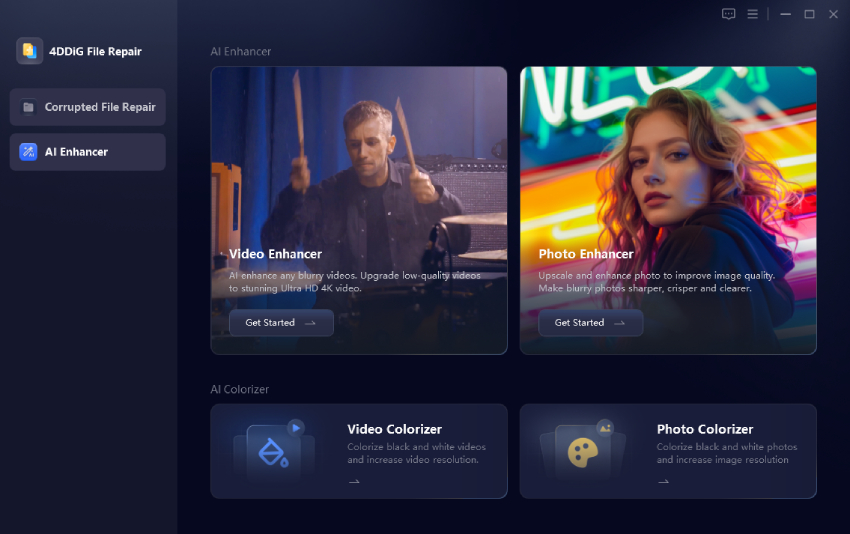
  • Install and launch the program and click "AI Enhancer" > "Video Enhancer".

    select 4ddig video enhancer
  • Tap on "Add Video" or simply drag and drop multiple files or an entire folder into the interface for batch processing.

    add low quality videos to 4ddig
  • Select the AI model that best matches your footage: General Model for most videos, Face Model for portraits, or Denoise Model for noisy/grainy clips. Also, choose your target resolution (up to 8K) and adjust additional settings such as sharpness level, noise reduction intensity, color correction, and frame rate improvement.

    select ai model and resolution for video enhancement
  • Click "Enhance" to begin batch processing. The software will handle all videos automatically while showing real-time progress.

    preview enhanced videos

Aiarty Video Enhancer vs 4DDiG AI Video Enhancer

Aspect Aiarty Video Enhancer 4DDiG AI Video Enhancer
Best For Quick, natural enhancements & everyday use Batch processing & higher resolution (up to 8K)
Main Features Detail generation, denoise, frame interpolation Detail generation, denoise, frame interpolation
Ease of Use Detail generation, denoise, frame interpolation Simple drag-and-drop batch workflow
Old Photo Restoration Video-focused with solid results Video-focused with solid results
AI-generated Video Enhancement Good on general content Effective across models including portraits
Better for Casual Users Excellent balance of speed and quality Great for beginners handling many files
Best User Type Hobbyists, content creators, family archivists Users needing volume processing or max resolution

4DDiG AI Video Enhancer often becomes the better pick for users who work with large collections of old or low-quality videos and want maximum resolution flexibility.

People Also Ask about Aiarty Video Enhancer

Q1: Aiarty Video Enhancer vs Topaz Video AI: Which should I choose?

Choose Aiarty if you want faster processing, simpler controls, and better value with a one-time purchase. Go with Topaz Video AI for more advanced customization and potentially superior results on extremely challenging footage, though at a higher price and steeper learning curve.

Q2: Is Aiarty Video Enhancer free?

There is a free version available for testing, but it limits video length and adds watermarks. Full unlimited use requires a paid Standard or Lifetime license.

⚡ Conclusion

In summary, Aiarty Video Enhancer is a capable and affordable tool that delivers natural-looking results for upscaling, denoising, and restoring videos. Whether you're working with old home footage or modern clips, it offers solid performance at a reasonable price. However, for users who need powerful batch processing and higher resolution support up to 8K, 4DDiG AI Video Enhancer serves as an excellent alternative. Choose the option that best fits your workflow and start enhancing your videos today.

FREE DOWNLOAD

Secure Download

FREE DOWNLOAD

Secure Download

William Bollson (senior editor)

William Bollson, the editor-in-chief of 4DDiG, devotes to providing the best solutions for Windows and Mac related issues, including data recovery, repair, error fixes.

(Click to rate this post)

You rated 4.5 ( participated)