What is Ntdll.dll & How to Fix Ntdll.dll Crash

5 mins read

Updated on 2025-12-12 14:23:43 to Windows Fix

If your game suddenly freezes, crashes to desktop, or fails to launch at all, an ntdll.dll crash may be the hidden culprit behind the problem. Many players encounter this issue while running demanding games on Windows, especially after updates, driver changes, or prolonged gaming sessions.

Because ntdll.dll is a core system file responsible for memory handling and low-level system operations, even a minor fault can trigger repeated game crashes, lag spikes, or unexpected error messages. In this 2025 guide, we’ll break down why ntdll.dll crashes happen during gameplay and show you how to fix them effectively so you can get back to gaming without interruptions.

ntdll crash

Part 1: What is Ntdll.dll?

Before you fix the problem, it’s helpful to understand what is ntdll.dll. Actually, it is a critical system file responsible for handling kernel functions, system calls, and essential operations used by thousands of Windows processes. Whenever applications need low-level services such as memory handling or I/O operations, they communicate through ntdll.dll.

Because it is tied so deeply to the Windows operating system, issues involving the faulting module path C:\Windows\System32\ntdll.dll often indicate conflicts at a system level rather than simple program errors.

🔔Common Causes of Ntdll.dll Crash

Ntdll.dll crash happens for several underlying reasons. Below is a clearer breakdown of the most common causes and what they mean for users:

  • Program compatibility issues: Some older or poorly optimized programs are not fully compatible with your version of Windows. When they attempt to use system functions that ntdll.dll manages, the mismatch can cause immediate crashes.
  • Outdated or missing Windows system files: If Windows hasn’t been updated for a long time, essential system components, including ntdll.dll dependencies, may be outdated or missing. This leads to instability when applications try to access newer instructions that are not supported.
  • Corrupted or damaged DLL files: If ntdll.dll itself or its dependent files become corrupted due to system errors, disk issues, or forced shutdowns, applications may fail the moment they call those functions.
  • Malware or virus interference: Malicious software often targets critical system files, including ntdll.dll. They may inject code, modify memory, or corrupt system processes, leading to repeated crashes.
  • Memory access violations: Programs sometimes attempt to read or write data in restricted areas of memory. When this happens, Windows flags the violation and outputs an error referencing faulting module name ntdll.dll in the Event Viewer.
  • Missing or incomplete Windows updates: If key patches or security updates are missing, certain program operations may fail unexpectedly, again pointing back to ntdll.dll as the crash source.

Part 3: How to Fix Ntdll.dll Crash?

Below are the most reliable solutions. Each fix is discussed with detailed steps, so you can easily resolve the problem on your end by following our guide.

Fix 1: Update Windows

Updating Windows is often the simplest and most effective fix because missing patches or outdated system components can conflict with ntdll.dll.

  • Press “Windows + I” to open Settings and go to the “Windows Update” section.

  • Click “Check for updates” and install all available patches, then restart your PC afterward.

    click check for updates

A fresh update ensures that compatibility bugs, system vulnerabilities, and corrupted Windows components are replaced with clean, stable versions.

Fix 2: Run Compatibility Troubleshooter

Sometimes applications are designed for older Windows versions and fail to run properly, causing ntdll.dll to crash. The built-in compatibility troubleshooter automatically tests the software in different compatibility modes and applies the recommended settings.

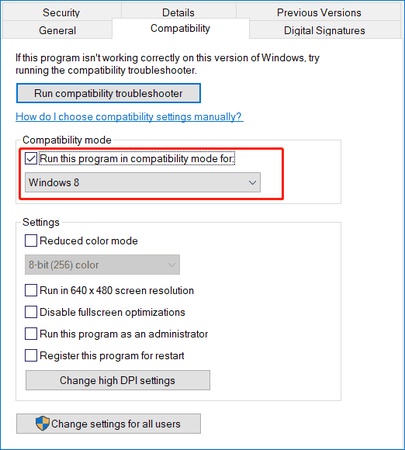
  • Right-click the problematic application and choose “Properties”.

  • Open the “Compatibility” tab and click “Run compatibility troubleshooter” and follow the on-screen instructions.

    run compatibility troubleshooter fixing ntdll.dll crash
  • Apply the recommended settings and restart the app.

If an older or poorly optimized program is causing application crashes, using the compatibility troubleshooter can stabilize the app and eliminate errors linked to ntdll.dll corrupt behavior.

Fix 3: One-Click Repair Ntdll.dll & Hundreds of Other System DLLs Automatically

Corrupted or missing DLL files, including ntdll.dll, are among the leading causes of sudden system crashes. While manual repair is possible, it’s often complex, especially when multiple dependencies are damaged.

A dedicated tool like 4DDiG DLL Fixer simplifies the process by scanning, identifying, and repairing broken DLL files automatically without technical steps.

  • Download and install the 4DDiG DLL Fixer software on your computer and launch it. Now, select the "DLL Repair" feature from the left side and click the "Full Scan" button to begin the process.

    FREE DOWNLOAD

    Secure Download

    click full scan in dll repair
  • Once the scanning is complete, it will show you a list of DLL files that need repairing. You just need to click the "Repair" button in the top right to begin repairing them automatically.

    start repairing system dll errors
  • Wait for the tool to repair all the DLL files, and once it is complete, you can close the software, and all your DLL-related issues will be fixed.

    repairing system dll errors successfully

This is one of the fastest and safest ways to repair ntdll.dll, causing application crash errors, especially when multiple DLLs are corrupted.

Fix 4: Run SFC & DISM

When internal system files are damaged, the System File Checker (SFC) and Deployment Image Servicing and Management (DISM) tools can restore missing or corrupted components. These tools check for integrity violations that commonly trigger ntdll.dll crashes.

  • Open "Windows Search" and search for "CMD," then right-click the "Command Prompt" application and select "Run as Administrator."

  • Run the following commands one by one:

    • sfc /scannow

    • DISM /Online /Cleanup-Image /RestoreHealth

      sfc command
    dism command
  • Once both are successfully executed, close the Command Prompt Window and restart your PC.

SFC and DISM repairs help restore ntdll.dll corrupt or missing components inside Windows’ system image, making them critical tools when system-level damage is the root cause.

Fix 5: Reinstall the Problematic Program

If the crash only happens inside one application, the program’s internal files may be corrupted. Reinstalling clears damaged configuration files and resets dependencies that interact with ntdll.dll. This is typically the fastest fix for application-specific crashes.

  • Press “Windows + R”, type “appwiz.cpl”, and hit Enter.

    type appwiz cpl
  • Uninstall the problematic program by right-clicking on it and selecting "Uninstall."

  • Then, reboot your PC, then download and install the latest version from the official website.

Fix 6: Update or Clean Reinstall Graphics Drivers

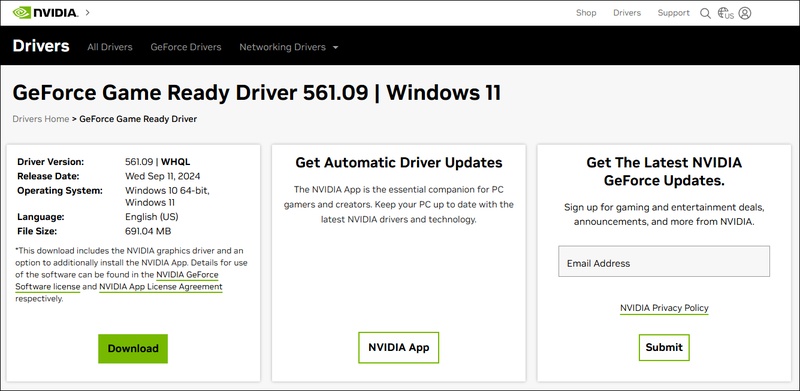
Graphics drivers can also trigger ntdll.dll crashes, especially during gaming or video processing. Outdated or corrupted GPU drivers cause applications to make invalid memory requests, leading to faults inside ntdll.dll. Performing an update or clean reinstall often resolves the issue completely.

  • Press “W in + X” and open “Device Manager”, then expand "Display adapters”. Right-click your GPU and choose “Update driver

    update driver
  • Then select the “Search Automatically” option, then restart the PC after the update is complete.

    select search automatically

Outdated or unstable GPU drivers frequently trigger ntdll.dll crash issues, so refreshing them can restore overall system stability.

More FAQs about Ntdll.dll

1.How to repair the Ntdll.dll file?

You can repair it using SFC/DISM, reinstall Windows updates, or use 4DDiG DLL Fixer for automatic repair.

2.What is the purpose of Ntdll.dll?

Ntdll.dll is the most important system file in Windows. It is the bridge between your programs (and even the Windows kernel itself) and the actual hardware. Every single time an app wants to open a file, allocate memory, create a thread, or even crash gracefully, it must go through ntdll.dll first.

3.Where is Ntdll.dll located?

ntdll.dll location: 64-bit Windows: C:\Windows\System32\ntdll.dll

Conclusion

The ntdll.dll crash can disrupt your workflow, but it’s almost always repairable using the solutions covered in this guide. Whether the issue stems from outdated system files, faulty applications, corrupted drivers, or damaged DLL dependencies, applying the right fix will restore stability.

For users who want a fast, automatic solution without technical steps, 4DDiG DLL Fixer remains one of the most reliable tools to repair ntdll.dll and hundreds of other system DLLs.

FREE DOWNLOAD

Secure Download

William Bollson (senior editor)

William Bollson, the editor-in-chief of 4DDiG, devotes to providing the best solutions for Windows and Mac related issues, including data recovery, repair, error fixes.

(Click to rate this post)

You rated 4.5 ( participated)