How to Resolve Aion 2 Error 40309:500?
5 mins read

Updated on 2026-03-05 16:45:33 to Windows Fix

Many players report seeing Aion 2 error 40309:500 when trying to log in, update the client, or verify their account. This issue can prevent you from accessing the game entirely, but don’t worry. We will break down what this error means, why it appears, and how to fix it safely and effectively so you can return to Aion 2 without unnecessary delays.

1. What Does Aion 2 Error 40309:500 Mean?

The Aion 2 error code 40309:500 typically indicates a verification or server communication problem. When you see the error messages 40309:500, it usually means the game client failed to complete authentication with the update or login server. In some cases, players also report facing the error in the update server, which points to a backend server validation issue rather than a local hardware failure.

aion 2 error 40309:500

Common Causes of Aion 2 Error 40309:500

Several factors can trigger this error, and understanding them helps you choose the correct solution:

  • If the login or update servers are under maintenance or overloaded, players may receive this error. It is common after major updates or patch releases.
  • When adding or verifying a phone number, regional restrictions or unsupported carriers may cause the error code 40309 to appear.
  • Using VPNs, proxies, or unstable connections can interrupt server authentication, resulting in Aion 2 a temporary error in the update server messages.
  • Incomplete patches or damaged update files may prevent proper server validation.

2. How to Solve Aion 2 Error 40309:500?

Below are proven methods to fix Aion 2 error 40309:500. Follow them for the best results and ease:

Fix 1: Restart Purple and Log in Later

If the error message states Aion 2, a temporary error occurred 40309:500, the issue may resolve itself once server traffic stabilizes. Restarting both the Purple and your system refreshes network sessions and clears temporary conflicts.

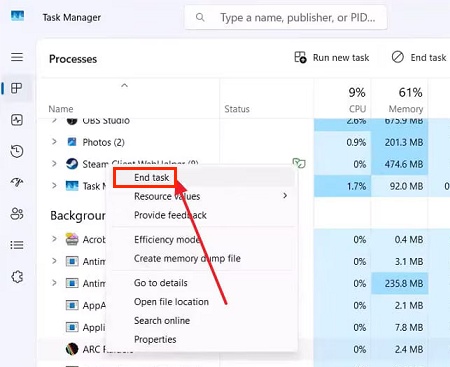
  • Press “Ctrl + Shift + Esc” to open “Task Manager” and end all Aion 2-related processes by right-clicking the process and choosing “End Task”.

  • Restart your computer, then reopen Aion 2 and attempt to log in again after a few minutes.

If the issue was server congestion, this method often resolves it quickly.

Fix 2: Check Server Status

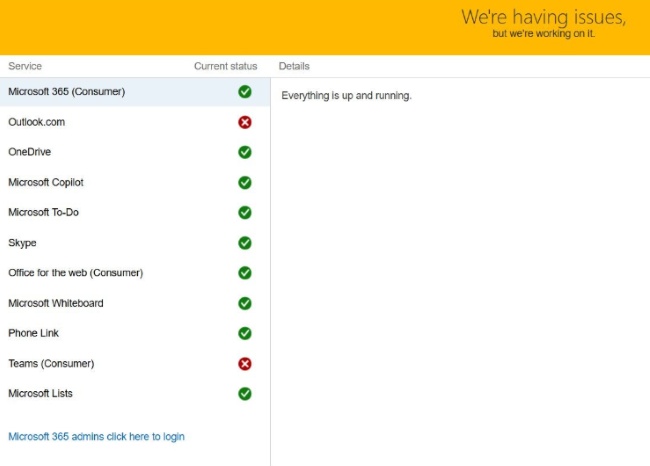
Before troubleshooting your system, confirm whether the problem originates from the server's side. When this error appears, it may indicate maintenance or downtime. Checking official sources prevents unnecessary changes on your PC.

  • Visit Aion 2’s official website or social media channels. Check the launcher for maintenance notifications.

  • Look for player reports in online forums.

  • Visit online third-party server status platforms like TalentBuilds to check server status.

    check aion 2 server status
  • Wait until maintenance is completed if downtime is confirmed.

If servers are offline, no local fix will solve the error until services resume. If the server is online and you are still unable to join, this might indicate a region-lock issue.

Fix 3: Delete Purple Cache

  • Fully close the Purple launcher.

  • Press Windows + R to open the Run dialog. Type the following path and press Enter: C:\Program Files (x86)\NCSOFT\Purple\Cache.

  • Select all files and folders inside the Cache folder, then delete them.

  • Empty the Recycle Bin if you want to fully free up the disk space.

  • Relaunch the Purple launcher and log in again.

Fix 4: Complete In-Game Verification with a Virtual SMS Number

Many players report encountering Aion 2 error 40309:500 during account verification. This usually occurs due to unsupported regional numbers or SMS delivery failures. Using a trusted virtual SMS service compatible with the game’s supported regions can sometimes bypass this issue.

  • Open the Aion 2 account verification page and log in with your account.

  • Click the “Security Service in Use” option and click “Manage OTP”.

    click security service in use
  • Check the "I have read and understood all the notes above, and I agree," then click "Agree and Request."

  • Open the Google Authenticator app on your phone and tap on “+” then scan the “QR Code” on the Aion 2 page.

  • Now you will get a verification code on your app, and enter it in the "verification code" section on the OTP registration page and click "Confirm."

  • After OTP verification, the page will ask you for phone number verification. For this, you can use your Taiwan phone number or get a virtual SMS number for the Taiwan region. Click “Confirm” to begin and provide your number.

  • You will get a verification code that you need to enter on the website and complete the verification process.

Ensure you use legitimate services only, as unauthorized tools may lead to account restrictions.

Fix 5: Use Email Verification Instead

If phone verification repeatedly triggers Aion 2 40309:500 error, switching to email authentication can help. Email verification bypasses SMS gateway issues and regional limitations.

  • Open the preregistration page and log in with your Google account.

  • After logging in, you will be taken to the NCSoft page where you must select “Taiwan” as your region and then complete the registration and click “Get Started”.

  • Now you may use this account with email verification to enjoy the game.

This method works well when SMS systems are unstable.

⚡ Bonus: Don’t Overlook Disk Issues When Game Errors Keep Reappearing

If Aion 2 error 40309:500 keeps returning even after verification and server checks, underlying disk or partition problems may be interfering with update files. Corrupted partitions or file system errors can prevent the launcher from properly validating updates. In such cases, using a professional tool like 4DDiG Partition Manager can help.

This tool provides advanced disk management and partition recovery features. It can detect damaged partitions, and ensure your game installation drive functions correctly. Besides partition recovery, it also supports disk cloning, OS migration, partition resizing, and disk conversion without data loss.

  • Download and install 4DDiG Partition Manager on your computer, then launch it. Click the "Partition Recovery" option and click the “Quick Scan” button to begin.

    FREE DOWNLOAD

    Secure Download

    do a quick scan
    Note:

    If Quick Scan fails to locate your desired partition, you may go for the Deep or Full Scan options.

  • Now, choose the partition you want to restore and note that this process will overwrite your existing partition. Click “Sure” and then click “Start Recovery”.

    click sure and start recovery
  • Just wait as 4DDiG restores your partition, and when it is fully restored, click "Finish."

    restore partition successfully

By repairing disk-level issues, you eliminate hidden causes behind recurring update server errors.

More FAQs about Aion 2

1. What is the temporary error in Aion 2?

The temporary error in Aion 2 usually refers to authentication or update server issues. When you see Aion 2, a temporary error occurred 40309:500, it typically indicates a short-term communication failure between your client and the game server. Waiting and retrying later often resolves it.

2. How to verify Aion 2?

You can verify Aion 2 using either phone SMS or email authentication. If Aion 2 error code 40309 appears during phone verification, switch to email verification or ensure your number is supported in the game region. Always complete verification promptly to avoid session expiration.

Conclusion

The Aion 2 error 40309:500 can stem from server congestion, verification failures, network conflicts, or even disk-related issues. By restarting the game, checking server status, completing verification properly, or switching to email authentication, most players can resolve the problem quickly. Moreover, if the error persists, inspecting your disk health with tools like 4DDiG Partition Manager ensures your installation drive functions correctly.

FREE DOWNLOAD

Secure Download

William Bollson (senior editor)

William Bollson, the editor-in-chief of 4DDiG, devotes to providing the best solutions for Windows and Mac related issues, including data recovery, repair, error fixes.

(Click to rate this post)

You rated 4.5 ( participated)