Silent Hill: Townfall PC Requirements and How to Prepare Your PC

5 mins read

Updated on 2026-09-16 09:31:33 to game

Before you step into the fog of SILENT HILL: Townfall, make sure your PC is ready for the experience. The game's requirements cover more than whether it can simply launch. Windows version, CPU, graphics card, memory, and available storage will all affect the settings and performance you can realistically expect. This guide breaks down the official PC requirements, and shows how to prepare your system before installation.

Silent Hill: Townfall PC Requirements: Minimum Hardware

Minimum requirement
Operating system Windows 11, 64-bit
Processor AMD Ryzen 5 3600 or Intel Core i7-8700K
Memory 16 GB RAM
Graphics NVIDIA GeForce RTX 2060 Super or AMD Radeon RX 6600
DirectX DirectX 12
Storage 75 GB available space
Performance target Low settings at 1080p / 30 FPS
Sound Windows-compatible audio device

When considering "Can I run Silent Hill Townfall?", compare complete hardware models. Freeing disk space cannot overcome an inadequate processor or graphics card.

The storage figure describes required available capacity, not a confirmed download size. Your launcher may need working space during installation or updates, so avoid filling the SSD exactly to its limit.

Silent Hill: Townfall PC Requirements: Recommended Hardware

The Silent Hill Townfall recommended specs increase memory to 32 GB and call for a substantially stronger GPU. The official target is high settings at 4K and 30 FPS with DLSS, FSR, or TSR set to Balanced.

Recommended requirement
Operating system Windows 11, 64-bit
Processor AMD Ryzen 7 5700X or Intel Core i7-9700K
Memory 32 GB RAM
Graphics NVIDIA GeForce RTX 3080 or AMD Radeon RX 7800 XT
DirectX DirectX 12
Storage 75 GB available space
Performance target High settings at 4K / 30 FPS with Balanced upscaling
Sound Windows-compatible audio device

Balanced upscaling is an important condition: the target should not be described as native 4K rendering. Nor does the recommended label guarantee 60 FPS. Choose settings according to your resolution and performance priorities once the game is available.

⚡ How to Prepare Your PC for Silent Hill: Townfall?

Method 1: Extend Game Drive

If storage space is your only obstacle, first check whether another suitable SSD partition already has enough room. Installing there may be simpler. Extending your partition makes sense when spare space exists elsewhere on the same physical SSD.

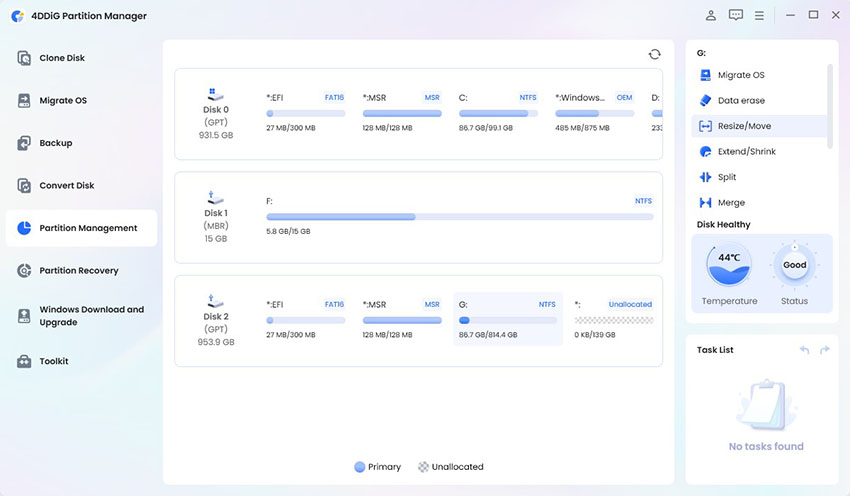
4DDiG Partition Manager provides a Resize/Move function for this situation. Back up important files, save open work, and connect the PC to reliable power before editing the disk layout.

  • Download 4DDiG Partition Management and launch it. Open Partition Management and identify the game partition. Click Resize/Move.

    FREE DOWNLOAD

    Secure Download

    resize partition
  • In the pop-up window, resize the partition. You can also type in the exact size you want in GB. Review the new disk layout, and click OK.

    extend partition
  • Review the pending operation and confirm that the selected partition and new size are correct. Click OK to continue.

    click ok
  • The operation will begin. Once the partition has been resized successfully, click Finish.

    complete extending partition

After completion, verify the free space in File Explorer and choose that drive when installing.

Method 2: Upgrade to Windows 11

The Silent Hill Townfall system requirements list Windows 11. For an eligible Windows 10 computer, Windows Update is the preferred starting point. Back up personal files and ensure the system drive also has room for the Windows upgrade.

  • Open Start > Settings > Update & Security > Windows Update.

  • Select Check for updates and look for the Windows 11 upgrade offer.

    check for updates
  • If offered, choose Download and install, then accept the installation terms.

  • Keep the PC powered on and restart when prompted to complete setup.

  • Sign in, confirm Windows 11 under Settings > System > About, and check for remaining updates.

If the offer is missing, that alone does not identify the cause. Review Microsoft's PC Health Check results and any compatibility message. A disabled firmware feature or a safeguard hold requires different handling from unsupported hardware.

Bonus Tip: How to Upgrade to Windows 11 If Your PC Does Not Meet the Requirements

If the eligibility check blocks installation, 4DDiG Partition Manager offers a Windows 11 upgrade workflow for some unsupported configurations. Before doing this, back up your system and personal files.

  • Launch 4DDiG Partition Manager. Go to Windows Download and Upgrade > Windows 11 Upgrade.

    FREE DOWNLOAD

    Secure Download

    win11 upgrade
  • Review the compatibility results. Follow the indicated route; some layouts need GPT conversion or installation media.

    check compatibility results follow the guide to prepare
  • Select the appropriate language and edition, then follow the Start and confirmation prompts.

    select edition and language
  • Then, you can complete Windows setup and verify drivers and applications before installing the game.

    run win11 setup

Review the selected destination carefully, especially on a computer with multiple disks. A successful Windows installation still leaves CPU, RAM, GPU, and SSD requirements to satisfy.

More FAQs About Silent Hill: Townfall PC Requirements

Does Silent Hill: Townfall require Windows 11, or can it run on Windows 10?

Windows 11 64-bit is the listed operating system for both tiers. Windows 10 is not part of the published supported configuration. That does not establish that launching is technically impossible, but you should not assume compatibility or purchase on that basis.

Will an RTX 2060 Super or Radeon RX 6600 run Silent Hill: Townfall?

Both cards appear in the minimum specification, associated with low settings at 1080p and 30 FPS. Your processor, memory, operating system, and storage must also meet the baseline. Neither listing promises the recommended 4K experience.

What should I do if I do not have enough SSD space for Silent Hill: Townfall?

Remove unused games, choose another suitable SSD location, or expand the installation partition using spare capacity on the same disk. If the entire SSD is full, consider upgrading to a larger drive. Partition resizing cannot create physical storage capacity.

Conclusion

Meeting the Silent Hill: Townfall PC requirements means matching the complete hardware configuration, running the listed operating system, and providing sufficient SSD space. Minimum hardware targets a modest 1080p experience, while recommended settings carry specific 4K upscaling conditions.

If partition sizing is the obstacle, 4DDiG Partition Manager can help redistribute available space. Its Windows upgrade tools offer another installation route for certain PCs, but do not remove hardware limitations. Back up before making changes and confirm the final configuration before downloading the game.

FREE DOWNLOAD

Secure Download

William Bollson (senior editor)

William Bollson, the editor-in-chief of 4DDiG, devotes to providing the best solutions for Windows and Mac related issues, including data recovery, repair, error fixes.

(Click to rate this post)

You rated 4.5 ( participated)