Windows X-Lite for the Windows 11 26H2 Era: Features, Safety, and Alternatives

5 mins read

Updated on 2026-09-04 10:10:41 to Windows Update

Windows X-Lite is a third-party, stripped-down Windows build designed to use less storage and fewer background resources than standard Windows 11. It can make an older or low-spec PC feel more responsive, but the smaller footprint comes from removing Microsoft components, services, and security features.

This guide explains how Windows X-Lite works, where it can help, what can break, which edition suits different use cases, how to download it more safely, and how to upgrade an unsupported PC with a less disruptive alternative.

1. What is Windows X-Lite?

Windows X-Lite is an unofficial family of customized Windows installation images maintained by a third-party developer. The project reduces the operating system footprint through debloating, service changes, interface tweaks, and in some editions, the removal of features that many users never open.

windows x lite

The result is a lightweight Windows environment that may consume less RAM, occupy less disk space, and run fewer processes after startup. This appeals to owners of older laptops, virtual-machine users, gamers chasing lower idle overhead, and testers who want a disposable system.

2. Windows X-Lite vs. Official Windows 11 26H2

Many users are wondering: is X-Lite still worth it, or should you just upgrade to 26H2? In this section, we compare Windows X-Lite against the official Windows 11 26H2 to help you decide which one fits your needs.

Windows X-Lite Official Windows 11 26H2
Developer Third-party project Microsoft
System size Reduced; varies by build Full Windows installation
Preinstalled apps Many apps and services removed Standard supported components retained
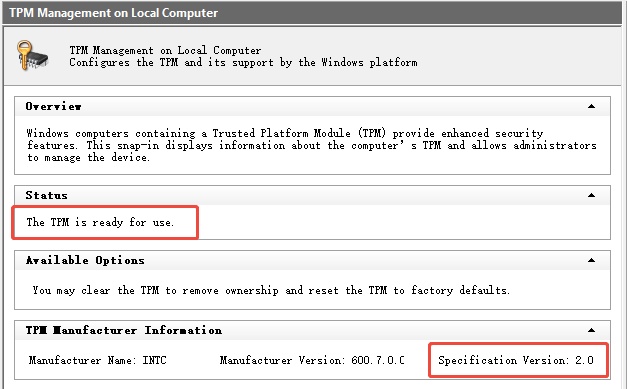
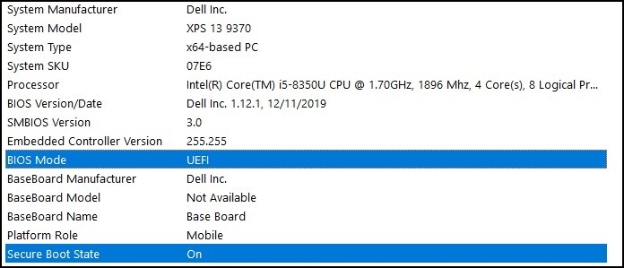
Hardware checks Some builds relax requirements TPM 2.0, UEFI/Secure Boot capability, supported CPU and other requirements
Compatibility May lack dependencies or optional features Broadest app, driver and enterprise compatibility
Security servicing Depends on image design and maintainer choices Microsoft servicing and security lifecycle
Best fit Testing, VMs, or noncritical low-spec PCsAA Daily work, school, business, and primary gaming PCs

Official Windows 11 26H2 retains Microsoft’s supported components, hardware requirements, driver compatibility, and regular security servicing. Windows X-Lite typically trims or disables preinstalled UWP apps, telemetry and advertising tasks, Cortana, Widgets, and certain background services.

Ultimately, neither option is automatically better for every user.The right choice depends on your hardware, the apps you rely on, and how much flexibility or standardization you want from your system.

3. Is Windows X-Lite Safe?

The honest answer is conditional: Windows X-Lite 11 can run normally, but it cannot offer the same trust chain or support guarantees as an untouched Microsoft image. Judge it from both its practical advantages and its structural risks.

✔ Core Advantages of Windows X-Lite

  • Lower resource use: Fewer bundled apps and background services can reduce idle RAM, CPU activity, and storage consumption on constrained hardware.
  • More user control: Privacy-oriented defaults and customization options may appeal to experienced users who would otherwise debloat Windows manually.
  • Useful test environment: A small Windows 11 lightweight image can be convenient in a virtual machine or on secondary hardware where snapshots and reinstalls are easy.

⚠ Potential Risks of Windows X-Lite

  • Unverifiable modifications: A premodified ISO is harder to audit than an image downloaded directly from Microsoft. A checksum confirms a file matches the publisher’s file; it does not prove the modifications are safe.
  • Reduced protection: Certain editions may disable or remove Defender, recovery, BitLocker, diagnostics, or Windows Update. This increases exposure and makes failures harder to reverse.
  • Update uncertainty: A cumulative update may fail, restore removed components, or conflict with servicing changes. Long-term support depends on the specific build rather than Microsoft alone.

For that reason, avoid installing a win 11 lite build on a work PC, a device that stores irreplaceable data. If you test one, use a spare device or virtual machine, back up the system first, and keep official Windows installation media available.

4. Which Windows X-Lite Version Should You Choose?

Build names and availability change, so confirm the project’s current download page before deciding. The broad positioning below is more useful than choosing only by the smallest ISO size.

Positioning Typical characteristics Best for
Optimum 11 Balanced option Performance tuning with more compatibility retained Most testers, everyday apps, and gaming
Ultimate / Special Edition Customized appearance Debloating plus themes, icons, cursors, and interface changes Users who prioritize a distinctive desktop
Micro / Ultralight Extreme reduction Very small footprint; more Microsoft services and features removed Old PCs, temporary VMs, and controlled experiments

Choose Optimum-style builds when compatibility matters. Select a themed edition only if you want its visual changes. Treat Micro or Ultralight as specialized images: the project states that some ultralight builds may omit Windows Update, Defender, OneDrive, BitLocker, troubleshooting, Hyper-V, WSL2, optional features, and other services. That is a major functional limit, not just a cosmetic difference.

⚡ Bonus Tip: A Safer Alternative to Windows X-Lite for Windows 11 26H2

If your goal is to run Windows 11 26H2 on a PC that fails Microsoft’s hardware checks, 4DDiG Partition Manager offers a Windows 11 upgrade workflow that checks compatibility and helps prepare an upgrade for unsupported hardware while retaining the standard Windows environment.

It uses an official Windows ISO, helping you keep the standard Windows environment, built-in features, and Microsoft update support rather than relying on a modified system image.

Other Key Features of 4DDiG Partition Manager

  • Clone an Entire Disk or a Single Partition: Create an exact copy of a hard drive, SSD, or individual partition for disk upgrades, data transfers, backups, or drive replacement.
  • Extend a Drive Without Data Loss: Expand an existing partition even when unallocated space is not directly next to it.
  • Convert MBR to GPT Without Data Loss: Convert a disk between MBR and GPT partition styles without deleting existing files.
  • Install and open the 4DDiG Partition Manager. Select Windows Download and Upgrade, then choose Windows 11 Upgrade.

    FREE DOWNLOAD

    Secure Download

    upgrade to win11
  • Wait while the program checks your processor, TPM status, Secure Boot configuration, boot mode, and disk layout. Review the compatibility report carefully to see which items pass and which ones require attention.

    check compatibility
  • If the PC does not meet requirements, click Next and follow the recommended option. Depending on the detected problem, the program may guide you to prepare for Windows 11 installation.

    bypass win11 requirements
  • Then, select the required Windows version, edition, and system language.

    select language and version
  • After the preparation process finishes, follow the on-screen instructions to complete the Windows upgrade.

    win11 setup

5. How to Get Windows X-Lite?

  • Use only the project’s official site. Start at windowsxlite.com and avoid reposted ISOs, shortened links from strangers.

  • On the homepage, look at the top navigation menu and click DOWNLOADS. Select Windows 11 Builds.

    various windows x-lite builds
  • Choose the desired builds. Confirm the removed features, update support, installation notes, and known limitations.

    windows 11 lite builds
  • For newer builds, your CPU must support the SSE4.2 instruction set. You can Download and run CPU-Z below to check the compatibility.

  • Then choose Home or Pro, and click it. Then, click the version button to download.

More FAQs About Windows X-Lite

1. Does Windows X-Lite work without TPM 2.0 or Secure Boot?

Some builds are designed to relax Windows 11 setup checks, so they may install Windows 11 without TPM 2.0 or enabled Secure Boot. That does not add the missing security capabilities or turn unsupported hardware into a Microsoft-supported configuration. The exact behavior varies by release.

2. Can Windows X-Lite improve gaming performance?

It can reduce background activity and improve responsiveness on a CPU, RAM, or storage-constrained PC. On modern hardware, average frame-rate gains may be small, while missing drivers, Xbox services, runtimes, or anti-cheat dependencies can cause worse results. Test the games you actually play instead of relying on idle-process counts.

3. Does Windows X-Lite receive Windows updates?

It depends on the edition. Some builds retain Windows Update; others remove or restrict it. Even when updates work, later cumulative or feature updates may conflict with customized components.

Conclusion

Windows X-Lite can give an old PC or virtual machine a smaller, cleaner Windows environment, but its speed gains come with real tradeoffs in features, updates, and support. Optimum-style builds are generally the least disruptive. Download only from the project site, verify the file, and back up before installation.

If your real objective is simply to upgrade an unsupported PC to Windows 11 26H2, 4DDiG Partition Manager offers a more conservative route that keeps the standard Windows platform and its broader compatibility intact.

FREE DOWNLOAD

Secure Download

William Bollson (senior editor)

William Bollson, the editor-in-chief of 4DDiG, devotes to providing the best solutions for Windows and Mac related issues, including data recovery, repair, error fixes.

(Click to rate this post)

You rated 4.5 ( participated)