What Is Infostealer Malware? Definition, Risks & How It Works

5 mins read

Updated on 2026-06-26 15:10:39 to Windows Fix

Have you ever been locked out of an account you use daily or received login alerts from unfamiliar locations? These situations are often more than simple errors—they can be early signs of infostealer malware running silently on a device.

In recent years, infostealer attacks have grown rapidly worldwide, targeting both individuals and organizations. These tools operate in the background, collecting sensitive data like passwords, financial details, and browser information without being noticed.

Because they often rely on phishing links, fake downloads, or compromised software, infections can go undetected until damage is already done. This guide explains what infostealer malware is, how it works, and how to protect yourself.

what is infostealer malware

What Is Infostealer Malware?

Infostealer malware is a type of malicious software designed to silently collect sensitive information from an infected device. Unlike destructive malware, its goal is not to damage systems but to steal valuable data without being detected.

Once installed, it can extract credentials, browser data, financial details, and other personal information in the background. The stolen data is then typically sent to attackers or sold on underground markets for further exploitation.

What makes it especially concerning is that there are usually no visible signs once the device is compromised. The malware runs quietly in the background, leaving users unaware that their system has been infected for an extended period.

What Data Can Infostealers Steal?

  • ① Browser login credentials: Usernames and passwords saved in browsers such as Google Chrome and Microsoft Edge, often covering social media, banking, email, and cloud accounts.
  • ② Autofill and personal data: Stored form details such as names, phone numbers, addresses, and payment information saved in browser autofill systems.
  • ③ Session cookies and authentication tokens: Active login sessions that can be stolen to bypass passwords and directly access user accounts without re-authentication.
  • ④ Financial and payment information: Credit card details, banking credentials, and other financial data stored in browsers or applications.
  • ⑤ Cryptocurrency wallet data: Wallet files, private keys, and browser extension data used to access and transfer digital assets.
  • ⑥ Email and messaging account data: Login credentials and active sessions from email and messaging platforms that can be used for account takeover and phishing attacks.
  • ⑦ System and device information: Operating system details, installed applications, IP address, and hardware identifiers used for device profiling and follow-up attacks.
  • ⑧ Stored local files: Documents and files on the device that may contain sensitive or confidential information such as notes, passwords, or business data.

How Infostealer Malware Spreads?

Phishing Emails

Attackers use fake emails that appear to come from trusted companies or institutions. These messages often contain malicious attachments or links that install infostealer malware once opened or clicked.

Malicious Ads (malvertising)

Cybercriminals embed malicious code into online advertisements displayed on legitimate websites. In some cases, fake ads for popular software are even promoted in search results, leading users to harmful downloads.

Pirated Software and Game Cheats

Cracked software, key generators, and game cheat tools are frequently used to distribute infostealers. Users who download these unofficial tools often unknowingly install malware along with them.

Fake Websites and CAPTCHA Scams

Attackers create fake websites that closely resemble legitimate ones or display fraudulent CAPTCHA verification pages. These tricks are designed to make users perform actions that trigger malware installation.

Malicious Browser Extensions

Some browser extensions are disguised as useful tools but are designed to steal sensitive data such as browsing activity, stored credentials, and session cookies once installed.

Trojanized Software Installers

Infostealer malware is often bundled with seemingly legitimate software installers. Once the program is installed, the hidden malicious payload activates in the background without the user’s knowledge.

Infostealer vs Other Malware

Infostealer malware is just one type of cyber threat, but it differs in purpose and behavior compared to other common malware families. While some malware focuses on disruption or extortion, infostealers are designed to quietly collect and extract sensitive data without being detected.

infostealer vs other malware

Aspect Infostealer Ransomware Trojan Spyware Worm
Main Goal Steal sensitive information such as credentials, cookies, and financial data. Encrypt files or lock systems and demand payment. Disguise as legitimate software to gain access to a system. Secretly monitor user activity and collect information. Self-replicate and spread across networks.
Visibility Highly stealthy, runs silently in the background. Very visible, often shows ransom messages or locked screens. Often hidden but depends on payload behavior. Very stealthy, designed to avoid detection. May cause noticeable network or system slowdown.
Impact on System Minimal direct system disruption. Severe disruption by locking or encrypting data. Can install additional malicious payloads or backdoors. May slow system due to continuous monitoring. Consumes network resources and spreads rapidly.
Data Handling Steals and sends data to attackers without the user noticing. Encrypts data and holds it hostage. May download or execute other malware. Records user activity and sends it to attackers. Focuses on spreading rather than data theft.
Detection Often detected only after data has been stolen. Detected quickly due to system lock or ransom note. Can be detected during unusual system behavior. Difficult to detect due to stealth operation. Often detected through abnormal network traffic.

How to Check If Your Device Is Infected by Infostealer Malware?

Infostealer malware is designed to run silently, which makes it difficult to detect in real time. However, there are still several warning signs that may indicate your device has been compromised.

Signs Your Device May Be Infected:

  • Unusual login alerts or account activity from unknown locations.
  • Sudden inability to access frequently used accounts.
  • Browser sessions logging out unexpectedly or requiring frequent re-login.
  • Slow system performance or unfamiliar background processes running.
  • Security software detecting suspicious activity or unknown files.
  • Unexpected spikes in network or background data usage.

Ways to Check If Your Device Is Affected:

Review Account Activity Logs

Check your email, social media, and financial accounts for logins from unfamiliar locations or devices.

Check Browser Saved Passwords

Look for unexpected changes or unauthorized access to saved credentials in browsers like Chrome or Edge.

Run a Security Scan

Perform a full system scan using trusted antivirus or anti-malware software to detect suspicious files or processes.

Monitor Running Processes

Check Task Manager or system activity tools for unknown background processes consuming unusual resources.

Inspect Browser Extensions

Remove any unfamiliar or recently installed extensions that may be collecting browsing data or credentials.

Check Network Activity

Look for unusual spikes in internet or background data usage that may indicate data being exfiltrated.

What to Do When Infected by Infostealer Malware?

If you suspect your device has been infected by infostealer malware, immediate action is critical. Since this type of malware works silently in the background, delaying response may lead to stolen accounts, financial loss, or exposed personal data.

what to do when infected by infostealer malware

Disconnect from the Internet

If you suspect an infostealer infection, the first priority is to stop any ongoing data theft before it can continue. Since this type of malware often communicates silently with external servers, cutting off its access immediately can help limit potential damage.

  • Turn off Wi-Fi or power down the router to disconnect wireless internet access.
  • Unplug the Ethernet (LAN) cable if the device is connected via a wired network.
  • Disable mobile data on smartphones or cellular-connected devices.
  • Turn off Bluetooth to block any remaining wireless communication channels.

Run a Full System Scan

Once your device is isolated from the internet, the next step is to identify and remove any malicious files that may already be present. A full system scan helps detect hidden infostealer components that are often missed during normal usage.

Run a full system scan by using a trusted antivirus or anti-malware tool and performing a deep scan of your entire system. Make sure the software is fully updated before scanning, so it can recognize the latest threats and remove any detected malware effectively.

Change Important Passwords

After dealing with the infection, the next priority is to secure every account that may have been exposed. This includes services where your passwords were saved or automatically filled, such as email, social platforms, online shopping sites, and any work-related systems.

Always reset these credentials from a trusted, uncompromised device to ensure the new passwords are not intercepted or reused.

To further strengthen protection, enable multi-factor authentication (MFA) wherever it is available, so that even if login details are stolen, unauthorized access is still blocked.

Warning:

⚠️ If the infection cannot be fully removed, a clean system reinstall may be necessary to eliminate hidden malware components. This ensures that any deeply embedded infostealer files are completely erased from the system. Be sure to back up important data first using a secure and trusted device before proceeding.

How to Protect Yourself from Infostealer Malware?

To reduce the risk of infostealer malware infections, it is important to adopt strong cybersecurity habits and stay alert to common attack methods. Below are a few key preventive practices:

  • Use strong passwords and a password manager: Create unique, complex passwords for each account and store them securely using a trusted password manager to reduce the risk of credential theft and reuse attacks.
  • Avoid unknown email links and attachments: Do not open suspicious emails, especially those from unknown senders or asking for urgent actions.
  • Download software only from official sources: Avoid cracked software and unofficial download websites that often bundle malware.
  • Keep your system and software updated: Regular updates help patch security vulnerabilities that attackers may exploit.
  • Use reputable security software: Install trusted security software such as Microsoft Defender, Malwarebytes, or Bitdefender to detect and block infostealer malware in real time.
  • Enable multi-factor authentication (MFA): Add an extra layer of protection to your accounts even if passwords are compromised.
  • Be cautious with browser extensions: Only install extensions from trusted developers and remove any that are unnecessary or unfamiliar.

How to Recover Lost Data After Infostealer Malware Infection?

In some cases, infostealer infections can result in data loss due to system cleanup, antivirus quarantine, or even a full system reinstallation. As a result, important files may become inaccessible or accidentally removed during the recovery process.

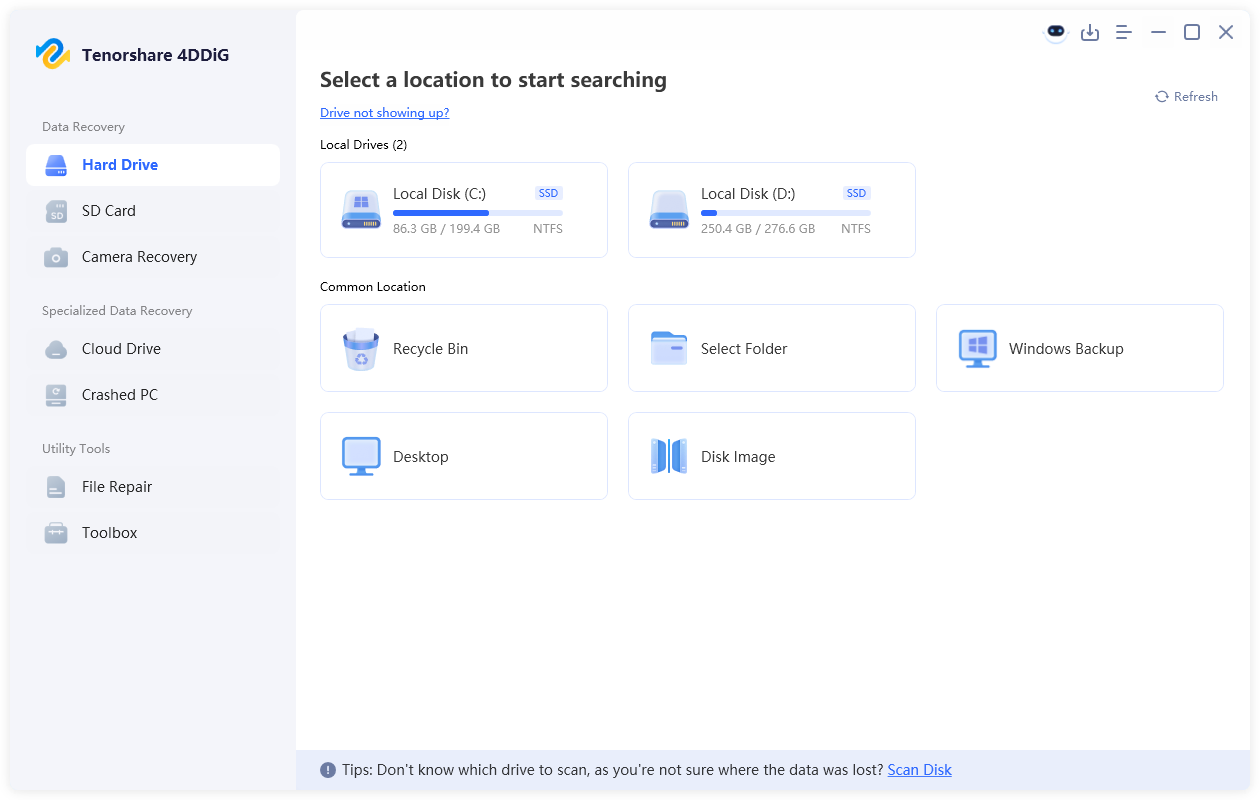
In such situations, a professional data recovery tool can help restore lost or hidden files safely. Tools like 4DDiG data recovery are designed to perform deep scans on storage devices and recover deleted, missing, or lost data from scenarios such as system crashes, formatting, or malware-related damage.

FREE DOWNLOAD

Secure Download

FREE DOWNLOAD

Secure Download

  • Download and install 4DDiG on your Win/Mac. Launch the software and select the drive where your lost or inaccessible files were stored after the infostealer malware infection or system cleanup.

    launch 4ddig and enter interface
  • The software will automatically perform a deep scan of the selected drive. You can quickly locate specific files using the "File Type" filter to narrow down the results.

    click type to see all files 4ddig
  • Once the scan is complete, preview the recoverable files to confirm their integrity before recovery. Select the files you need and click "Recover" to proceed.

    preview and recover the files
  • Finally, choose a secure and separate location to save the recovered files, and click "Save Now" to complete the recovery process.

    save the recoverable files
Tip:

Avoid recovering files to the same partition where the data was originally lost.

Conclusion

This article explains how infostealer malware works, how it spreads, how to identify a potential infection, and what actions to take once a device is compromised.

Infostealer is a stealthy malware that runs in the background and steals sensitive data like login credentials and personal information. Because it shows few signs, users often notice it only after accounts are compromised. To reduce risk, avoid suspicious links, pirated software, and keep your system protected with trusted security tools.

If files are lost during malware cleanup or system recovery, try Tenorshare 4DDiG, which helps scan storage devices and restore deleted or missing files safely, minimizing data loss and helping users get back to normal quickly.

William Bollson (senior editor)

William Bollson, the editor-in-chief of 4DDiG, devotes to providing the best solutions for Windows and Mac related issues, including data recovery, repair, error fixes.

(Click to rate this post)

You rated 4.5 ( participated)