Windows 11 24H2 End of Support: Date, Risks, and Upgrade Guide

5 mins read

Updated on 2026-07-22 15:56:11 to Windows Fix

Windows 11 24H2 will reach end of support on October 13, 2026, for Home and Pro editions. After that date, affected devices will no longer receive regular security updates, bug fixes, or technical support from Microsoft, increasing the risk of security and compatibility issues. This guide explains the support deadlines for each edition, what happens when support ends, and how to prepare for a safe upgrade.

1. When Does Windows 11 24H2 Support End?

If your computer is running Windows 11 Enterprise or Education 24H2, you have a little more breathing room. Those editions will be supported by businesses and school systems until October 12, 2027, as they do not have the same support cycle.

Windows 11 24H2 was initially released in October 2024, and thus this end date coincides with the typical schedule of Microsoft: approximately 24 months of consumer releases. It is not a sudden ending, it is simply the logical conclusion of the line with this release.

end date of win11 24h2

2. What Happens after Windows 11 24H2 Support Ends?

Using a computer that reaches the end of support for its software version, that doesn't mean it will stop booting up the next day. You can still access your applications, Internet and games. However, behind the scenes, your computer becomes a sitting duck. This is precisely what will occur when the support tap runs dry:

  • Security Patches Are a Thing of the Past: Hackers are always seeking new methods to infiltrate Windows. Microsoft patches these vulnerabilities each month through Windows Update. On version 24H2, those holes remain open forever after October 2026.
  • Zero Bug Fixes: Glitches occur. When a new bug begins to cause your favorite software to crash or your Wi-Fi to freeze, Microsoft will not provide a patch to fix it for your version.
  • Software Compatibility Drops: Popular software companies such as Google, Adobe, and game studios have to create their latest software versions for supported operating systems. As time goes on, apps will fail to update or function at all.
  • Compliance Issues: If you're using your computer for work or for a small business, using an unsupported operating system is against basic data protection laws.

The best way to ensure your digital life remains secure is to follow the official Microsoft Lifecycle Policy to see how long your software remains safe.

3. What to Do before Windows 11 24H2 Support Ends?

Step 1: Back Up Important Files

Before touching anything system related, secure your photos, documents and work files. Make a copy of them on an external drive or upload them to cloud storage or both.

Step 2: Install All Current Windows Updates

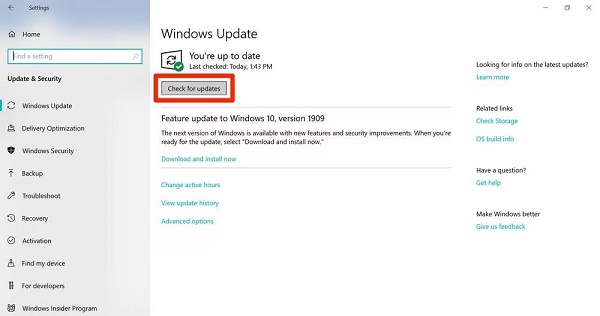
Open Settings, Windows Update, and then "Check for updates”. Install everything pending. A full system update works much better when working with a system that has been fully updated rather than a system that left updates unattended for months. It also removes minor bugs that can cause upgrade problems down the road.

Step 3: Check Hardware and Upgrade Compatibility

Not every older PC will meet Windows 11 requirements like TPM 2.0, Secure Boot and supported processor. If it does not, then you will need a workaround, which we will discuss further below.

⚡ 4. How to Update to Windows 11 26H2 from Windows 11 24H2?

Method 1: Use Windows Update

The easiest method to update your system is to use the Windows Update built in tool. Microsoft does not issue updates simultaneously, so when your device is deemed ready, it will appear in your settings menu.

  • Open your Start Menu and locate Settings (gear icon).

  • Select Windows Update in bottom of left sidebar. Click on the blue Check for updates button.

    check for windows updates
  • You will see the Windows 11 26H2 upgrade available if it is offered for your hardware. Select Download and install.

  • Let the process finish and restart your PC when prompted.

Method 2: Upgrade to Windows 11 26H2 via 4DDiG Partition Manager

At times, Windows Update freezes, displays mysterious error numbers, or just says "Your computer is not ready for Windows Update" when it really is. A dedicated system migration tool is a clever alternative to skip waiting times and guarantee a seamless migration. 4DDiG Partition Manager boasts a highly optimized system deployment feature which streamlines the entire process of transferring the OS without any data loss.

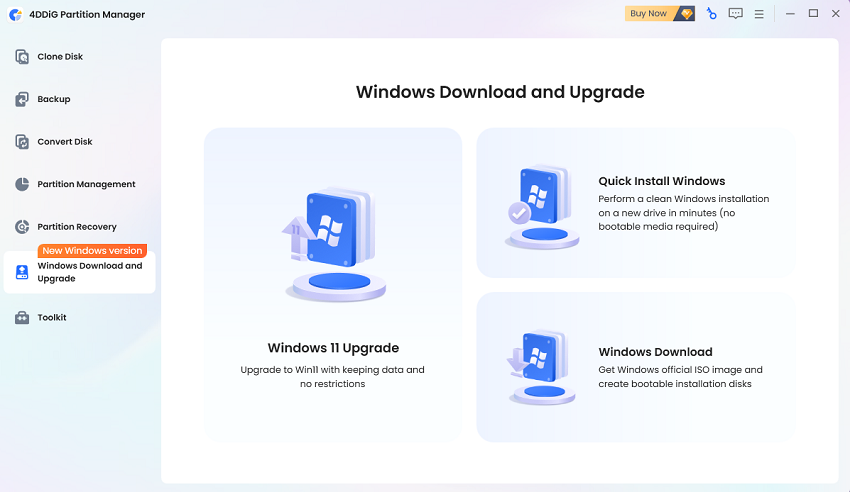
  • Download and install 4DDiG Partition Manager on your PC. Launch it, and choose Windows 11 Upgrade in Windows Download and Upgrade section.

    FREE DOWNLOAD

    Secure Download

    win11 upgrade
  • The software will check whether your PC meets the upgrade requirements. After the scan, click Next to continue bypassing unsupported items.

    check pc compatibility
  • Choose the Windows version and language you need. Click Start and confirm the operation.

    click start to proceed process
  • Once it completes, you can upgrade to Windows 11 26H2.

    upgrade to win11 26h2

If you want to know more details about Windows 11 26h2, this preview can help you.

Method 3: Use Windows 11 Installation Assistant

In the event that Windows Update fails to show the package, but you do not want to use a third party utility, Microsoft provides a manual utility known as the Installation Assistant.

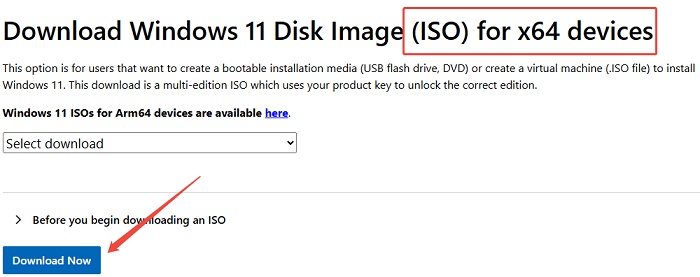
  • Navigate to the official Microsoft Windows 11 download page.

  • In the Windows 11 Installation Assistant section, click on Download Now.

    download win11 installation assistant
  • Open the downloaded tool. Allow the tool to check for hardware compatibility and accept the licensing terms.

  • Press Start Now to automatically download the files and keep the system updated behind the scenes without interfering with your tasks.

FAQs about Windows 11 24H2 End of Support

1. Has Windows 11 24H2 been discontinued?

No, it is still fully available and operational right now. But it's about to hit retirement mode. New computers purchased from stores will probably have the newer versions, but if you are using 24H2, you can continue using it until the official end of support date in late 2026.

2. Is there an end of life for Windows 11 24H2 Enterprise?

No, not concurrently with the Home and Pro versions. In corporate settings, Microsoft provides a longer time period for companies to upgrade their extensive computer networks. The Enterprise and Education versions of Windows 11 24H2 will continue to get official security updates for another year.

Conclusion

The end of support for windows 11 24h2 doesn't need to be a tech tragedy. It is merely a reminder that software has to be improved to fight more modern and sophisticated digital security threats. To ensure that your computer is fast, reliable, and completely safeguarded against malware, you should ensure that your OS is up-to-date.

The built-in Windows update utility is an efficient tool when it works, but it tends to hit roadblocks in some cases, or even crash due to lack of drive space. 4DDiG Partition Manager is a great option for seamlessly upgrading to Windows 11 26H2 without compromising your drive setup or data. Don't wait until the last minute; do your PC a quick health check today and enjoy computing with complete peace of mind!

FREE DOWNLOAD

Secure Download

William Bollson (senior editor)

William Bollson, the editor-in-chief of 4DDiG, devotes to providing the best solutions for Windows and Mac related issues, including data recovery, repair, error fixes.

(Click to rate this post)

You rated 4.5 ( participated)