What Is a Configuration File and How Does It Work?

5 mins read

Updated on 2026-10-19 19:09:12 to Wiki

Config files store settings that help applications and systems work properly. They control options such as preferences, file paths, and program behavior. Knowing what is a config file can help you understand how software uses these files and why they are important.

what is a config file

What Is a Config File?

A config file, short for configuration file, stores settings used by software, applications, or operating systems. These files tell a program how to run by storing settings such as preferences, options, and file locations.

Unlike regular text files that mainly store information for users to read, config files store instructions that programs can use.

What Information Does a Config File Store?

The content of a config file depends on the program that creates it. Common settings stored in config files include:

  • User preferences: Such as language, theme, or display options.
  • File paths: Locations where applications save or load files.
  • Program settings: Options that control how software behaves.
  • System options: Settings related to how a system or service works.

How Do Config Files Work?

When a program starts, it may read its config file to load saved settings. The application then applies these settings to determine how it should run.

how do config files work

For example, a program may check its config file during startup and load the options it needs before opening. This allows applications to keep settings without requiring users to configure everything again each time they open the program.

What Are Config Files Used For?

Config files are commonly used for the following purposes:

  • Customizing applications: Config files can store user preferences such as language, appearance, and other personal settings.
  • Controlling program behavior: They define options that affect how software starts and works.
  • Managing system settings: They can store paths, connection details, and other options required by programs or services.

What Are the Common Types of Config Files?

Config files can use different formats depending on the application or system. Common types include:

INI Files

INI files use a simple structure with sections and key-value pairs. They are commonly used by Windows applications to store basic settings.

Example:

[User]
name=Tux
theme=dark
enabled=1

JSON Config Files

JSON config files store structured data and are commonly used by modern applications and development tools.

Example:

{
  "name": "Tux",
  "theme": "dark",
  "enabled": true
}

YAML Config Files

YAML config files use a simple, human-readable format and are often used for application and system configuration.

Example:

name: Tux
theme: dark
enabled: true

Where Are Config Files Stored?

The location of a config file depends on the operating system and the application that creates it. Common locations include:

  • Windows: Many applications store config files in folders such as AppData, ProgramData, or the application's installation folder.
  • Linux: Linux systems often store configuration files in locations such as /etc or user configuration folders.
  • Applications: Some applications store config files in their own folders instead of system-wide locations.

How to Open or Edit a Config File?

Most config files are plain-text files, so you can open and edit them with text editors such as Notepad, Notepad++, or Visual Studio Code.

Before editing a config file, it is recommended to create a backup. Incorrect changes may cause an application to lose settings or stop working properly.

To open or edit a config file with Visual Studio Code:

  • Open "Visual Studio Code".

  • Select "File > Open File".

    open a json file with vs code
  • Choose your config file.

  • Edit the settings in the file and save the changes.

How to Recover Deleted or Lost Config Files?

Config files may be lost due to accidental deletion, formatted drives, and lost files after system changes. Losing important config files can cause programs to lose saved settings or return to default configurations.

If you do not have a backup, 4DDiG File Recovery can help recover deleted config files from SSDs, HDDs, USB drives, and other storage devices.

Besides config files, 4DDiG also supports recovery of many other file types, including TXT, JSON, XML, CSV, DOCX, and XLSX files, helping you recover important data from different data loss situations.

FREE DOWNLOAD

Secure Download

FREE DOWNLOAD

Secure Download

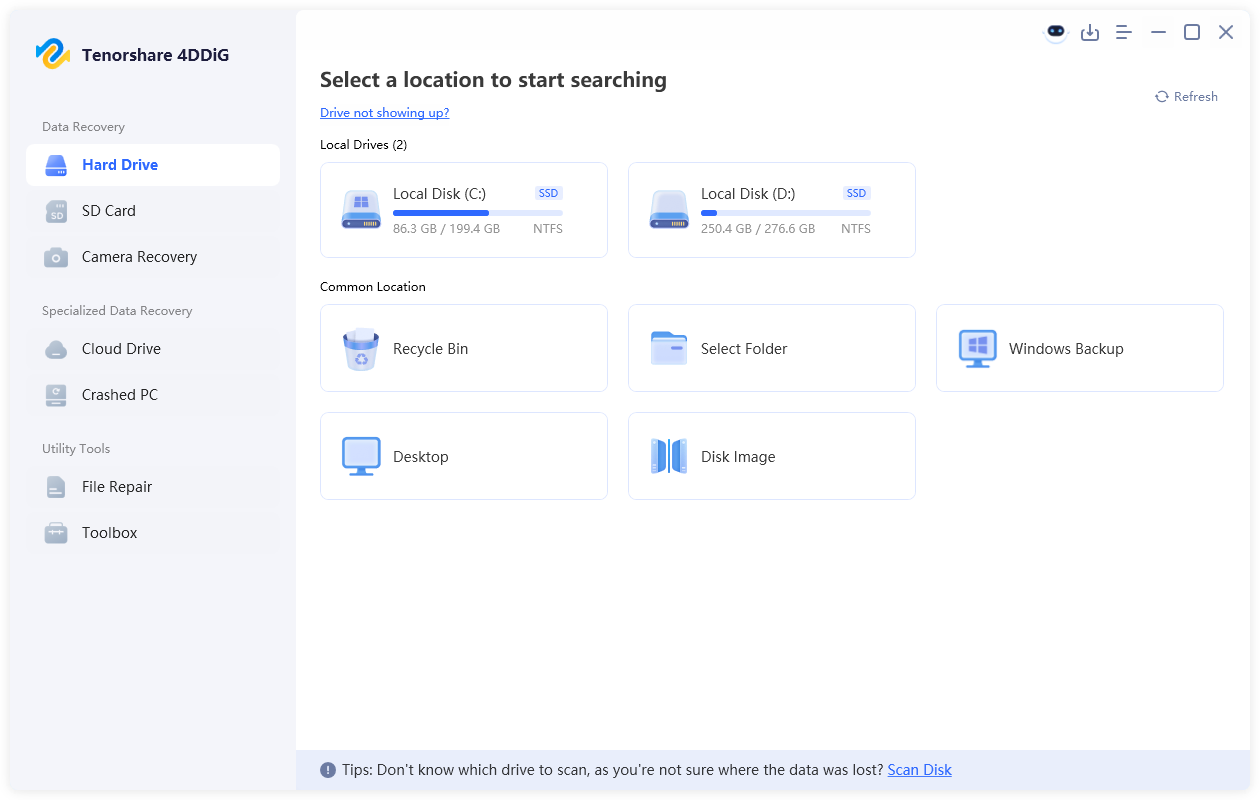
  • Install and launch 4DDiG. Select the drive or location where your deleted or lost config files were originally stored.

    launch 4ddig and select the location where config files were stored
  • The scan will start automatically. Use the search function or filter options to quickly find your missing config files.

    search scan results to find deleted config files
  • Check the found config files and select the files you need. Click "Recover" to restore the selected files.

    recover config files with 4ddig
  • Save the recovered config files to a different storage location instead of the original drive to avoid overwriting other lost data.

    save the recovered config files

Conclusion

Config files play an important role in helping applications and systems keep their settings. Understanding what is a config file can help you manage these files and avoid issues caused by missing configurations. If important configuration files are accidentally deleted, 4DDiG can help recover your deleted or lost files.

William Bollson (senior editor)

William Bollson, the editor-in-chief of 4DDiG, devotes to providing the best solutions for Windows and Mac related issues, including data recovery, repair, error fixes.

(Click to rate this post)

You rated 4.5 ( participated)