Carbon Copy Cloner Windows Alternative [Guide 2026]

5 mins read

Updated on 2026-04-30 18:25:55 to Windows Fix

Looking for a reliable Carbon Copy Cloner Windows alternative? Whether you’re upgrading to an SSD, migrating your system, or creating a full backup, finding the right disk cloning tool on Windows is essential. Since Carbon Copy Cloner is macOS-only, this guide will quickly cover what it does and highlight the best Windows alternatives.

1. What is Carbon Copy Cloner?

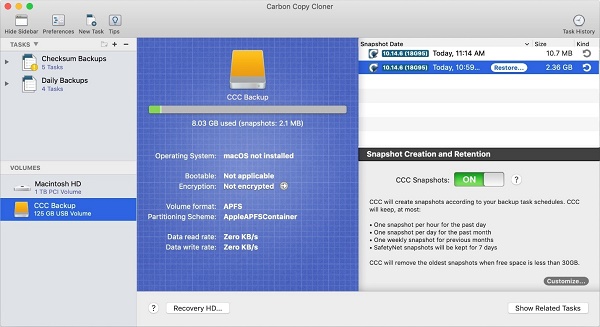
Carbon Copy Cloner is a professional-grade backup and disk cloning application, built exclusively for macOS. First released in the early 2000s, it has become one of the most trusted tools in the Mac ecosystem for creating exact, bootable replicas of entire disks.

Carbon Copy Cloner allows Mac users to clone their startup disk to an external drive, schedule automated incremental backups, and restore their entire system from a cloned copy in the event of a failure. Unlike Apple's built-in Time Machine, CCC creates a fully bootable backup, meaning you can plug in the cloned drive and start your Mac directly from it if your internal drive dies.

2. What Makes 4DDiG Partition Manager the Best Alternative to CCC?

Among all the disk clone software options available for Windows in 2026, 4DDiG Partition Manager stands out as one of the most well-rounded alternative to Carbon Copy Cloner for Windows users. It combines powerful disk cloning capabilities with an intuitive interface, making it equally accessible to beginners. Here's a detailed feature comparison:

Feature Carbon Copy Cloner 4DDiG Partition Manager
Full Disk Cloning ✅ Supports full disk cloning ✅ Supports full disk & partition cloning
Move Installed Programs ❌ Not supported ✅ Yes
Incremental / Smart Clone ✅ Smart update (incremental cloning) ❌ Focuses on full cloning
Partition-Level Cloning Limited flexibility ✅ Dedicated partition cloning feature
Disk Layout Adjustment During Clone ❌ Minimal control ✅ Resize partitions during cloning
Ease of Use (Cloning Workflow) More configuration required ✅ Simple step-by-step guided process
Use Case Focus Backup + data protection Disk cloning + Partition management + Convert Disk...

As the table shows, 4DDiG Partition Manager isn't just a match for CCC on Windows. In several important areas like partition-level control, disk layout adjustment during cloning, and the ability to move installed programs, it actually goes further. For users making the switch from Mac to Windows, or for Windows users who always wished they had a CCC-equivalent, 4DDiG delivers exactly that.

What makes it especially compelling as a carbon copy cloner windows alternative is its guided, step-by-step workflow. Where CCC can require configuration knowledge to use effectively, 4DDiG leads you through every action with clear prompts.

⚡ 3. How to Clone Data Disk with 4DDiG Partition Manager?

Want to clone partition or clone disk to SSD? Here's a clear, step-by-step walkthrough using 4DDiG Partition Manager's Clone Disk function.

  • Download and install 4DDiG Partition Manager, then connect an external drive to your computer. Launch the program and select “Clone OS Disk.”

    3 day free trial
    FREE DOWNLOAD

    Secure Download

    select clone os disk
  • Choose a target disk to store the cloned data, then click Next. The source disk is your system disk by default, while the target disk is the external drive you connected.

    select target disk
  • A preview window will display the cloned layout. By default, the source disk’s partitions will fill the entire target disk. You can adjust the partition sizes by dragging the edges. Once everything looks correct, click Start to begin cloning.

    adjust partition size
  • Keep in mind that all data on the target disk will be overwritten. After confirming, click Sure to proceed.

    click sure to proceed
  • Wait for the cloning process to complete. Avoid interrupting the process or using the computer during this time. Once finished, your system disk will be successfully cloned to the target drive.

    clone successfully

More FAQs about Carbon Copy Cloner Windows Alternative

1. Does Carbon Copy Cloner work on Windows?

No. Carbon Copy Cloner is exclusively a macOS application. There is no official Windows version and none has been announced.

2. Does Windows have built-in drive cloning?

Windows does not have a built-in disk clone tool. The operating system includes Backup and Restore (a legacy feature from Windows 7) and System Image Backup, but neither of these produces a live, directly bootable clone the way CCC or 4DDiG does.

Conclusion

While Carbon Copy Cloner is a powerful tool for Mac users, Windows users have been without a direct equivalent for too long. That’s where 4DDiG Partition Manager comes in. Beyond cloning, 4DDiG also offers seamless MBR to GPT conversion without data loss, flexible partition management to resize, create, delete, or format disks, and a built-in Windows Clean feature to remove junk files and free up valuable space.

FREE DOWNLOAD

Secure Download

William Bollson (senior editor)

William Bollson, the editor-in-chief of 4DDiG, devotes to providing the best solutions for Windows and Mac related issues, including data recovery, repair, error fixes.

(Click to rate this post)

You rated 4.5 ( participated)