Troubleshooting Skate Error Code 3967269002 Easily

5 mins read

Updated on 2026-02-02 18:55:12 to Windows Fix

Many players have recently reported being kicked out with Skate error code 3967269002, often accompanied by a frustrating "lost connection to server" message. Whether you’re playing on Xbox, PlayStation, or another supported platform, this error can appear suddenly.

We will correctly understand what Skate error code 3967269002 means, why it happens, and how to fix it step by step. We’ll walk through proven community-tested solutions and provide additional system-level tips to help you regain stable access and prevent repeat disconnects.

1. What is Skate Error Code 3967269002?

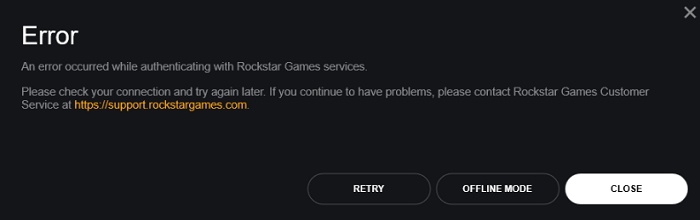
Skate is a popular skateboarding game series developed by EA, known for its realistic mechanics. Skate error code 3967269002 is a connection-related error that usually appears when the game unexpectedly loses communication with its servers. When this happens, players are often kicked back to the main menu or completely disconnected from online features.

skate error code 3967269002

🛠 Common Causes of Skate Error Code 3967269002

Understanding the cause makes troubleshooting far easier. The most reported reasons behind this error include:

  • Conflicts with virtual drive software such as DAEMON Tools
  • Temporary server instability or handshake failures
  • Network interruptions between the console/PC and the EA servers
  • Corrupted local game files or licenses
  • Platform-specific authentication issues on Xbox or PlayStation

2. How to Fix Skate Error Code 3967269002?

1Uninstall DAEMON Tools (If you have it)

Some players discovered that DAEMON Tools and similar virtual drive software can interfere with Skate’s connection and authentication process. Even if you’re not actively using the software, background services may still cause conflicts.

  • Open Settings on your computer and go to Apps and Features.

  • Locate “DAEMON Tools” on the list and click it. Then, choose “Uninstall” to completely uninstall the software.

    uninstall daemon tools
  • Restart your system, launch Skate, and test the connection

This fix has resolved the Skate error code 3967269002 for many PC players who couldn’t stay connected for more than a few seconds.

2Keep Reconnecting by Pressing the Start Button

While it sounds overly simple, repeatedly reconnecting has surprisingly worked for some users during temporary server hiccups.

  • Launch Skate and attempt to connect.

  • When disconnected, press the “Start” button to reconnect.

  • Repeat several times without closing the game

This method works best when the issue is caused by temporary server-side instability rather than a local system problem.

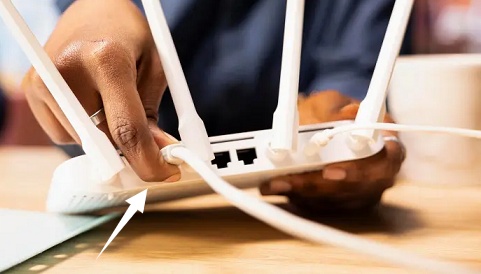
3Restart Your Device and Router

Network desynchronization is a common trigger for this Skate error. Restarting both your gaming device and router can refresh IP assignments and clear stalled connections.

  • Power off your console or PC and unplug your router and modem for 10+ seconds.

    unplug router
  • Reconnect the router and wait until the network stabilizes

  • Turn your device back on and launch Skate.

This step often resolves unexplained “lost connection to server” errors across many online games.

4Switch Xbox Offline then Back Online (Xbox)

Xbox players, in particular, have reported success with resetting their network state manually.

  • Press the Xbox button and open Settings, and select General then go to Network Settings.

  • Select Go Offline and wait for a few minutes.

    switch xbox to offline
  • Switch back to Go Online and Restart Skate.

This forces the Xbox network services to re-authenticate, which can eliminate lingering connection glitches.

5Restore Licenses on PS5

If you’re playing Skate on PlayStation, corrupted or unsynced licenses can block online access and trigger disconnect errors.

  • Open Settings on PS5 and navigate to Users and Accounts, then choose Other to select Restore Licenses.

    restore license ps5
  • Select Skate and click Restore and wait for the process to complete. Then, relaunch Skate to verify whether the error is fixed.

    This ensures the game properly verifies ownership and online permissions.

6Uninstall and Reinstall Skate

If none of the above methods work, reinstalling the game is often the most reliable solution.

  • Uninstall Skate completely from your device and restart your console or PC

  • Re-download and reinstall Skate from official sources.

    download skate game
  • Launch Skate and reconnect to the servers.

This clears corrupted game files that may repeatedly trigger the Skate error code 3967269002.

⚡ Extra Tip: Repair Disk Partition to Fix Game Launch Issues

Sometimes, launching issues is linked to disk partition errors, corrupted file structures, or damaged game storage sectors. These issues can prevent the game from properly loading or maintaining a stable connection.

4DDiG Partition Manager provides a practical solution by helping users repair and recover problematic disk partitions without reinstalling the entire operating system. Beyond recovery, it also helps manage disk space, migrate OS and clone disks. This is especially useful for gamers who frequently install large titles and want to keep their storage organized and stable.

  • Install and launch 4DDiG Partition Manager on your computer and select the “Partition Recovery” feature from the left menu pane. Select the affected disk or partition that you want to recover and click the “Quick Scan” button.

    FREE DOWNLOAD

    Secure Download

    click quick scan
    Note:

    Once the partition you want to recover is found, you may click the "Stop” button and proceed with the next steps.

  • Next, click “Start Recovery” then click “Sure” in the pop-up screen.

    start recovery
  • Wait as 4DDiG recovers your partition, and when it is done, click "Finish," and you can close the program now.

    complete partition recovery

Ensuring a healthy disk structure reduces unexpected crashes, launch failures, and connectivity-related errors in games.

More FAQs about Skate Error Code 3967269002

1.Why have I been kicked from the server on Skate?

This usually happens due to unstable server connections, corrupted local files, or software conflicts such as virtual drive tools.

2.Why is my skate not working on Xbox?

Xbox-specific issues often relate to network authentication, offline/online state conflicts, or license synchronization problems.

3.Is Skate 3 shutting down?

No official shutdown has been announced. Most connection issues are temporary or related to local system configuration rather than permanent server closure.

Conclusion

Skate error code 3967269002 is frustrating but rarely permanent. In most cases, it’s caused by temporary server instability, network synchronization issues, or local system conflicts such as virtual drive software or corrupted files. By following the fixes outlined above, starting with simple reconnections and progressing to reinstalls, you can restore stable access to the game.

For deeper system-related issues, tools like 4DDiG Partition Manager offer an extra layer of protection by repairing disk partitions that may affect game performance and connectivity. With the right steps, you’ll be back skating online smoothly in no time.

FREE DOWNLOAD

Secure Download

William Bollson (senior editor)

William Bollson, the editor-in-chief of 4DDiG, devotes to providing the best solutions for Windows and Mac related issues, including data recovery, repair, error fixes.

(Click to rate this post)

You rated 4.5 ( participated)