Windows Error Code 0x803F700F: Causes & Fix Guide H1: How to Fix Windows Error Code 0x803F700F?

5 mins read

Updated on 2026-07-02 12:06:26 to Windows Fix

Windows activation should be simple, but windows error code 0x803f700f can appear when Windows cannot confirm that your license is valid. You may see messages such as we can't activate windows on this device, windows not activated, or windows isn't activated after reinstalling Windows, replacing hardware, upgrading to Windows 11, or signing in with a different Microsoft account. The error does not always mean your license is fake or lost. In many cases, Windows is blocked from contacting activation servers, reading the digital license, or matching the license to your current device.

1. What Does Windows Error Code 0x803F700F Mean?

Windows error code 0x803f700f is an activation-related error. It usually means Windows cannot validate the digital license or product key connected to your device. A digital license is normally linked to your hardware and, in many cases, your Microsoft account. When Windows detects a mismatch, cannot reach Microsoft servers, or cannot verify the activation record, the system may stay unactivated and show this error.

Before applying fixes, check your activation status. Go to Settings > System > Activation. This is also the simplest answer to how to check if windows 11 is activated.

Common Causes of Error Code 0x803F700F

1. Windows cannot connect to activation servers

Activation requires Windows to communicate with Microsoft servers. If the internet connection is unstable, a proxy is misconfigured, or DNS resolution is failing, Windows may not be able to confirm the license. This is one of the easiest causes to overlook because other websites may still load while activation traffic fails silently.

2. The system date, time, or region is incorrect

Incorrect time and date settings can break secure communication with activation services. If the clock is too far from the actual time or the region is inconsistent, Windows may reject the validation request. This cause is especially common after CMOS battery issues, dual-boot setups, or fresh installations.

3. The digital license no longer matches the device

After replacing major hardware, Windows may treat your PC as a new device. A motherboard change is the most common trigger because it affects the hardware identity used for activation. In this case, your license may still be valid, but Windows needs help reconnecting it through your Microsoft account or the Activation Troubleshooter.

4. Firewall, VPN, or antivirus software blocks activation

Security tools can sometimes block activation-related services. A strict firewall rule, corporate network policy, VPN, or third-party antivirus may prevent Windows from reaching the required endpoints. When this happens, the system may report windows isn't activated even though the license itself is not the real problem.

5. The wrong Windows edition is installed

A Windows Home license cannot activate Windows Pro, and a Pro license cannot activate Enterprise unless it matches the correct channel. If the installed edition does not match the key or digital entitlement, activation will fail. Always confirm the edition before entering another key or reinstalling the system.

2. How to Resolve Windows Error Code 0x803F700F?

Fix 1: Check Network Connection

Start with the network because activation depends on server communication.

  • Restart your router, disconnect from VPN, and switch to a stable network if possible.

    restart router
  • Then open Command Prompt as administrator and run ipconfig /flushdns to clear DNS cache.

  • Restart the PC and check activation again.

Fix 2: Confirm Time and Date Settings

Activation uses secure certificates and server validation. A wrong clock can make legitimate requests look invalid. Correcting the time costs nothing and avoids unnecessary troubleshooting.

  • Go to Settings > Time & language > Date & time.

  • Turn on “Set time automatically” and “Set time zone automatically” if available. Then click Sync now.

    set time automatically
  • After the time is corrected, return to Settings > System > Activation and try again.

Fix 3: Try the Activation Troubleshooter

The troubleshooter is designed specifically for digital license mismatches. It can reconnect the license to your PC without forcing a reinstall or manual product key replacement.

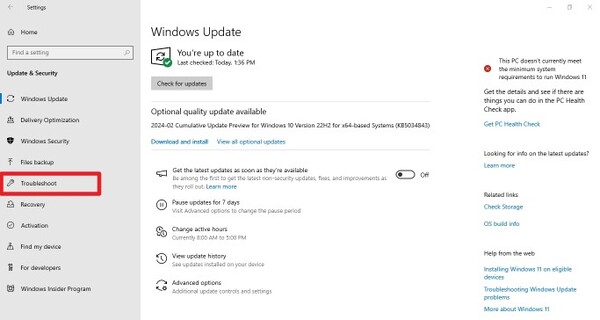
  • Open Settings > Update & Security > Activation and choose Troubleshoot. If you recently changed hardware, select the option that says you changed hardware on this device recently.

    run activation troubleshooter
  • Sign in with the Microsoft account linked to your license, choose the current device, and confirm activation.

Fix 4: Use Phone Activation

  • If online activation on PC keeps failing, press Windows + R, type slui 4, and press Enter.

  • Choose your country or region, call the displayed number, and follow the automated instructions. You may need to provide the installation ID and enter a confirmation ID.

Phone activation is useful when server communication fails repeatedly or when the system needs manual confirmation. It is also helpful for users on restricted networks where standard online activation cannot complete.

Fix 5: Temporarily Turn Off Firewall and Antivirus Programs

  • Click the Start menu, type Windows Security, and press Enter.

  • Click on Virus & threat protection in the left sidebar or the main dashboard.

  • Under the Virus & threat protection settings section, click on Manage settings. Toggle the Real-time protection switch to OFF.

    disable real time protection
  • Click Yes when the User Account Control (UAC) prompt pops up to confirm the change.

Do not leave your system unprotected for long. If Windows activates successfully, re-enable protection immediately and adjust the security tool so it does not block Windows activation services.

⚡ Optional Tip: Preparing System Storage for Windows Upgrade

Activation errors can also appear around upgrade or reinstall scenarios, especially when the system partition is nearly full. A cramped C drive may interrupt updates, prevent Windows from completing system tasks, or leave behind incomplete upgrade files. Before moving to a new Windows version, it is worth checking whether your system partition has enough free space.

4DDiG Partition Manager can help here with its Windows cleanup function. It quickly scans your system to eliminate junk files, temporary system caches, and redundant App data that clog up your drive. With just a few clicks, this tool helps eliminate system stuttering and restores your PC’s peak performance.

  • Download and install 4DDiG Partition Manager. Open it and locate the Windows Clean module. Select the types of junk files and click Start Scan button to begin scanning.

    FREE DOWNLOAD

    Secure Download

    windows clean
  • After scanning, 4DDiG will display temporary files, system caches, log files, and other junk that can be safely removed. Select the file categories you want to delete and click Clean to proceed.

    select items to clean
  • Once complete, your PC will be completely freed from deeply buried junk files and system clutter. And you can enjoy a more responsive system for your daily tasks and gaming.

    clean successfully

Conclusion

Windows error code 0x803f700f usually points to an activation validation problem, not necessarily an invalid license. Start with network, date and time, edition, firewall, and Activation Troubleshooter checks before considering a reinstall. If the issue appears during an upgrade, make sure the system partition has enough room to complete Windows tasks properly. 4DDiG Partition Manager is a useful companion for preparing storage, extending drives, and reducing upgrade-related interruptions that may lead to activation problems.

FREE DOWNLOAD

Secure Download

William Bollson (senior editor)

William Bollson, the editor-in-chief of 4DDiG, devotes to providing the best solutions for Windows and Mac related issues, including data recovery, repair, error fixes.

(Click to rate this post)

You rated 4.5 ( participated)